
- Your Google Business Profile is not just a listing. For many plumbing searches, it is the call button customers see before your website.
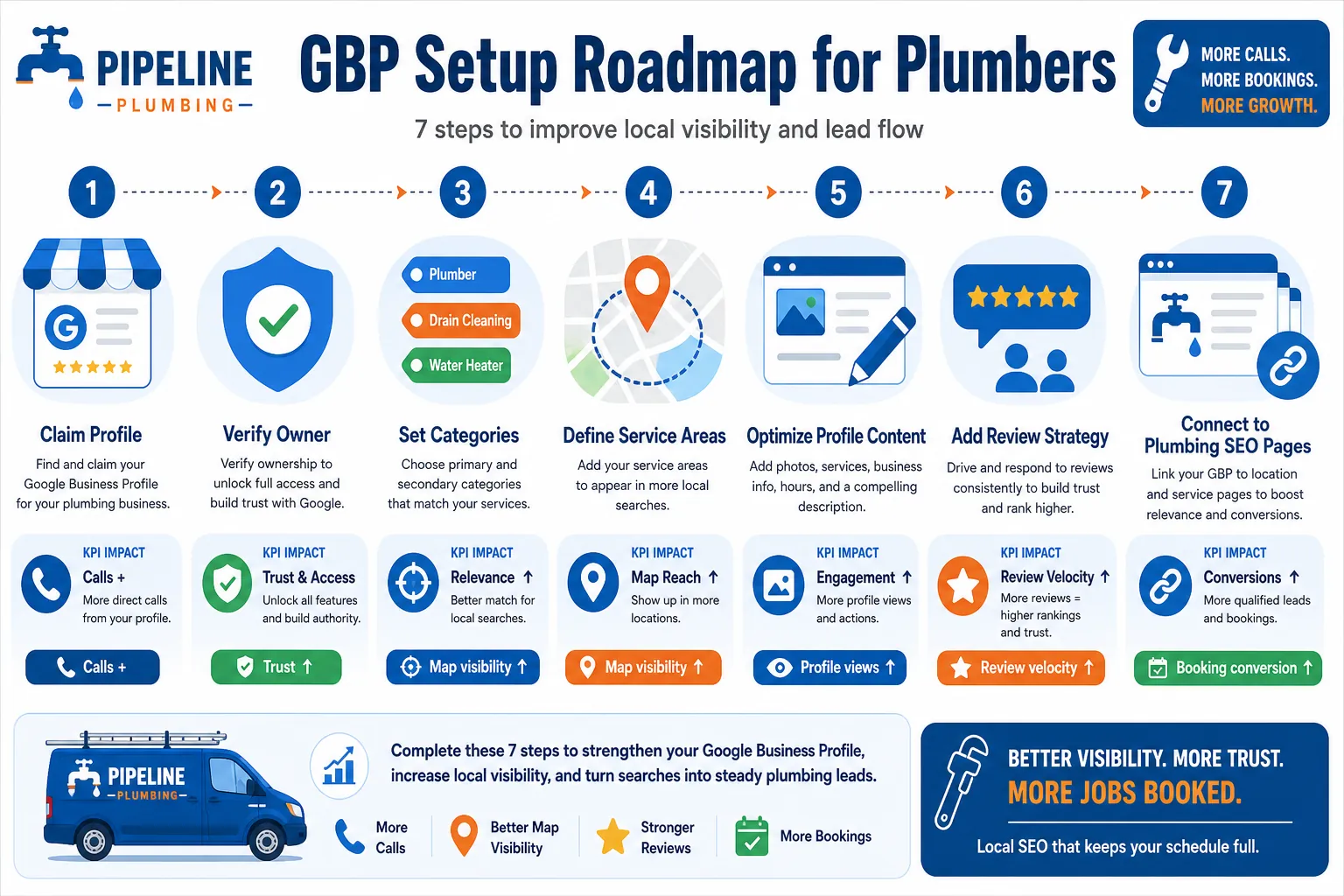
- Start with clean basics: real business name, Plumber as the core category, accurate service areas, local phone, hours, and verification.
- Optimize monthly with photos, services, posts, reviews, Q&A, and call tracking so rankings turn into booked jobs, not vanity reports.
If a homeowner has water backing up into the tub, they are not calmly reading ten websites with a cup of coffee. They search, glance at the map results, compare reviews, and hit call. That is why a plumber's Google Business Profile has to be set up like a working dispatch tool, not a dusty business directory.
This guide walks through how to set up and optimize your Google Business Profile for plumbers step by step. It is written for the owner who needs the phone to ring with the right jobs in the right service area. No magic. No keyword stuffing. Just the work that helps Google understand who you are, where you work, and why a customer should trust you.
Use this page for the plumbing GBP setup workflow. If you are comparing advice written for HVAC companies, use the HVAC-to-plumbing GBP comparison. If you need the broader site-wide order of SEO work, use the complete plumbing and HVAC SEO checklist.
Google's own help documentation says a Business Profile lets eligible storefront and service-area businesses manage how they show up on Search and Maps at no charge, including hours, phone number, website, service area, photos, videos, and reviews. Google also says local results are mainly based on relevance, distance, and prominence. That is the frame for everything below.
Before you touch the profile, decide what kind of plumbing business Google should see
The first mistake I see plumbers make is setting up the profile before they make one simple decision: are customers coming to you, or are you going to them?
Most plumbing companies are service-area businesses. Google gives plumbers as an example of businesses that visit customers directly in its service-area business guidance. If customers do not visit your shop, Google says you should remove the address from the profile and use service areas instead. That matters because a home address listing can create verification trouble, customer confusion, and sometimes a profile suspension. Nobody needs a suspension when the trucks are already busy.
| Decision | Use this setup | Owner note |
|---|---|---|
| Customers never visit your location | Service-area business, hidden address | Most residential plumbers fit here. |
| You have a staffed office or showroom | Hybrid business, visible address plus service areas | Only use this if signage and customer access are real. |
| You have multiple staffed locations | One verified profile per real location | Do not create fake city profiles. That is how profiles get burned. |
Step 1: Create or claim the profile with the real business name
Go to Google Business Profile and sign in with a Google account the business controls. Do not use an employee's personal Gmail as the only owner. If that person leaves, your profile access can leave with them.
Search for your business name first. If a listing already exists, claim it. If someone else verified it, request ownership through Google instead of making a duplicate. Duplicate listings split trust signals and confuse customers. If no profile exists, create one.
Use your real-world business name. Not "Austin Emergency Drain Cleaning Water Heater Plumber Near Me LLC" unless that is what is actually on your paperwork, trucks, website, signage, and invoices. Google's business representation guidelines say your name should reflect the real-world name used consistently by the business. Keyword stuffing the name may work for a minute, then bite you later.
Step 2: Choose the right category, then keep it tight
Your primary category should usually be Plumber. That is the plain answer. Google says categories should complete the sentence "This business IS a" rather than "this business HAS a." A plumbing company is a plumber. It may have drain cleaning, water heater repair, slab leak work, and sewer work, but those are services or secondary categories, not a reason to make the profile fuzzy.
Add secondary categories only when they are real services you actively sell. Good examples may include Drainage Service, Water Heater Installation Service, Sewer Service, or Bathroom Remodeler if those match your actual work. Do not add every possible category because it feels like more is more. In local SEO, more random categories can water down relevance. Like using a pipe wrench as a hammer, it might move something, but it is not the right tool.
Step 3: Set service areas like a dispatcher, not like a wish list
Google says service areas can be set by city, postal code, or another area type. It also says you can have up to 20 service areas and that the overall area should generally not stretch more than about two hours of driving time from where the business is based. That is a practical limit for plumbers too. If a call costs half the day in windshield time, it is not a good lead.
Use cities and ZIP codes you can actually serve with a reasonable response time. Then back those areas up on your website with helpful local content. If you want a deeper structure for service area pages, read our guide to advanced local SEO for plumbers. The profile and the website should tell the same story.
| Profile field | Plumber example | What to avoid |
|---|---|---|
| Primary service area | Dallas, Plano, Richardson, Garland | Listing the whole state just because you can drive there once. |
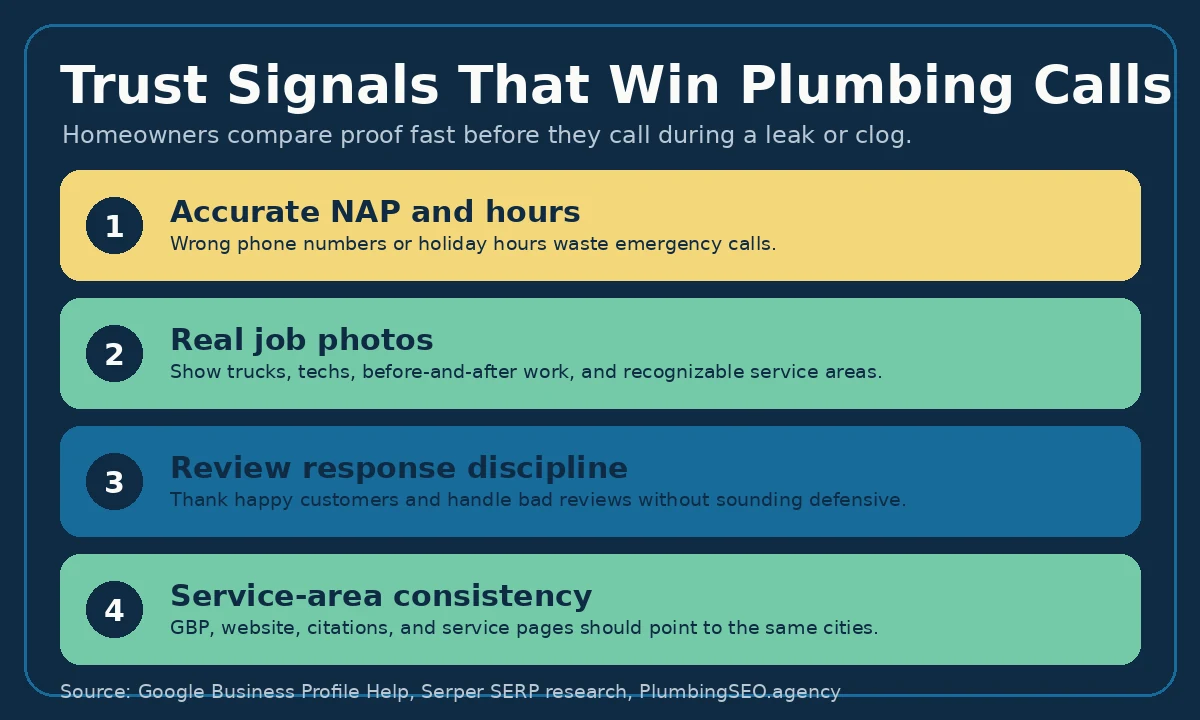
| Emergency hours | Open 24 hours if you truly answer and dispatch 24/7 | Claiming 24/7 when calls roll to voicemail all night. |
| Phone number | Local number controlled by the business | Shared call-center numbers or numbers you cannot keep. |
Step 4: Add the contact details that make calls easy
Your phone number, website, hours, and booking links should be boringly accurate. That is a compliment. A customer with a leaking heater does not want clever. They want a plumber who looks legitimate and answers.
Use a local phone number where possible. If you use call tracking, do it carefully. Use tracking in a way that preserves NAP consistency and does not replace every citation number with a random pool. If you need the safe setup, our local SEO call attribution guide explains how plumbers can track calls without making Google distrust the business data.
For the website link, send visitors to the page that best helps them take action. Many single-location plumbers can use the homepage. Multi-location companies may use a location page. If your homepage does not clearly show service areas, emergency services, proof, and click-to-call buttons, fix that before blaming the profile. The profile can bring the customer to the door. The site still has to not trip them on the way in.
Step 5: Build out services in customer language
The services section is where you translate the work your crew does into the words homeowners search. Add services like leak detection, drain cleaning, water heater repair, sewer line replacement, toilet repair, garbage disposal repair, sump pump service, gas line repair, and emergency plumbing if you actually offer them.
Keep descriptions plain. Mention the job, the situation, and the area. For example: "Water heater repair for leaking, noisy, or no-hot-water units in Dallas and nearby suburbs." That is better than stuffing the same city and keyword seven times. Google is confusing enough without us helping it get more confused.
Step 6: Add real photos that prove you are a real plumbing company
Google recommends adding photos and videos to the profile. For plumbers, this is not decoration. It is trust proof. Homeowners want to know whether the company looks real, local, and professional before they invite someone into the house.
Start with these:
- Logo and cover image.
- Truck photos with branding visible.
- Technicians in uniform, taken safely and professionally.
- Before-and-after photos of permitted work where appropriate.
- Water heater installs, drain equipment, sewer equipment, and clean jobsite photos.
- Office, shop, or yard photos if customers can verify the business is local.
Skip stock photos. A fake smiling plumber holding a wrench in a kitchen nobody recognizes does not build trust. It makes the business look like every other template site on the map.
Step 7: Turn reviews into a system
Google says responding to reviews shows that you value customer feedback, and positive reviews and helpful replies can help your business stand out. That is the polite Google version. The owner version is simpler: reviews help customers decide who gets the call.
Ask after the job is complete, when the customer is relieved and the work area is clean. Send a short text with your review link. Do not offer incentives, do not pressure the customer, and do not ask only happy customers in a way that violates platform rules. Build the habit into dispatch or invoicing so it happens every week.
| Review situation | Good owner response | Why it helps |
|---|---|---|
| 5-star drain cleaning review | Thank them and mention the service naturally. | Shows future customers you handled the exact job they need. |
| Complaint about timing | Apologize, explain briefly, and offer a direct follow-up. | Shows you take service seriously without arguing in public. |
| Vague positive review | Thank them by area or job type if you can do it honestly. | Adds context for readers and keeps the reply human. |
Step 8: Use posts and Q&A for the questions customers ask before calling
GBP posts are not a magic ranking lever, but they are useful. Use them to show activity, answer seasonal questions, and push timely services. A plumber can post about frozen pipe checks, water heater warning signs, hydro jetting, sewer smell troubleshooting, sump pump testing, or holiday hours.
Use Q&A to answer the questions your office hears all the time. Do you offer emergency service? Do you work on tankless water heaters? Which areas do you serve? Do you provide estimates? Keep answers short and accurate. If the answer changes by job, say so.
Step 9: Connect GBP work to your website and plumber SEO
A strong profile needs a site that backs it up. If your profile says you serve Plano, drain cleaning, and tankless water heaters, your website should have useful pages that support those services and areas. That is how you connect the profile to broader SEO for plumbers work.
At minimum, make sure your site has:
- A clear homepage with click-to-call buttons.
- Service pages for the work you want more of.
- Service-area pages for important cities.
- Consistent name, address if used, and phone number.
- Schema markup, fast mobile loading, and real photos.
- Tracking that separates calls, forms, chats, and booked jobs.
If you are unsure whether the problem is GBP, the website, reviews, or technical SEO, use this diagnostic: why your plumbing business is not ranking on Google.
Step 10: Measure what brings booked plumbing jobs, not just views
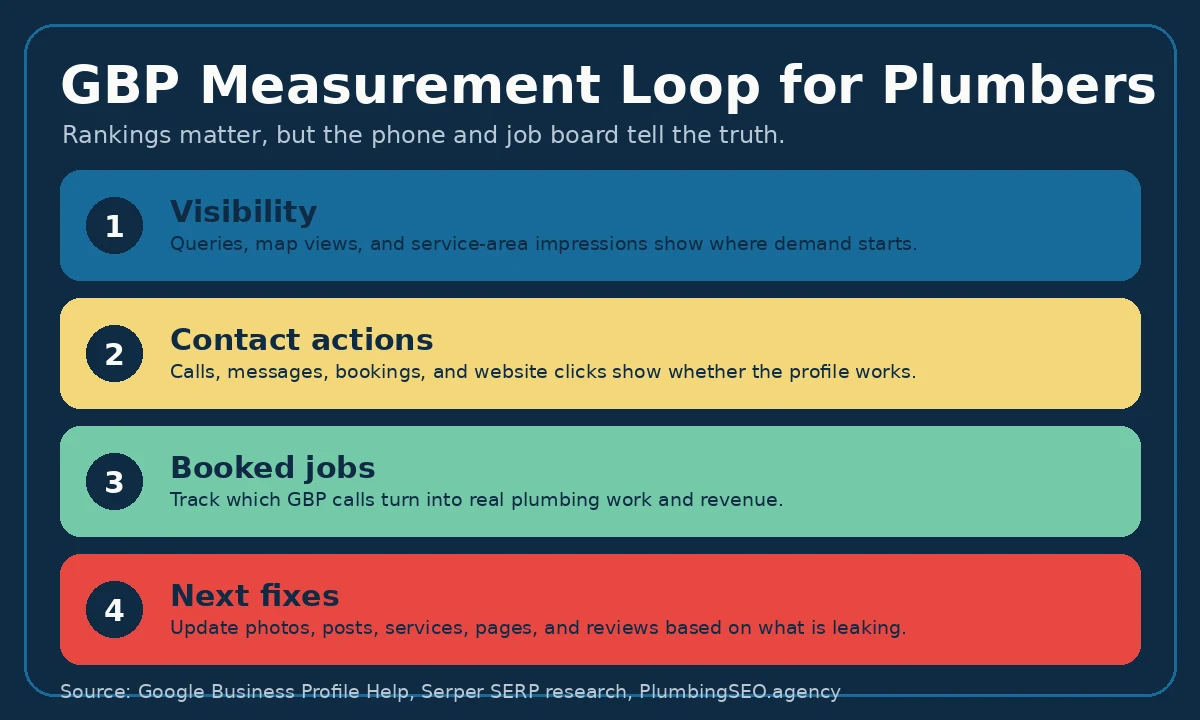
Profile views are nice. Calls and booked jobs pay payroll. Review your Business Profile performance and compare it to call logs, form fills, chat leads, and the job board. The goal is not to say, "traffic is up." The goal is to know which services and cities are producing profitable work.
Track these monthly:
- Searches and Maps visibility.
- Calls from the profile.
- Website clicks from the profile.
- Messages or booking actions if enabled.
- Top services mentioned in calls.
- Booked jobs and revenue from GBP leads.
- Review count, rating, and review response time.
Common GBP mistakes plumbers should avoid
Most GBP problems are not mysterious. They are small leaks that never got fixed. Here are the big ones:
| Mistake | Why it hurts | Fix |
|---|---|---|
| Keyword stuffing the business name | Can trigger trust issues or suspension risk. | Use the real-world business name. |
| Wrong primary category | Google may not match you to plumbing searches. | Use Plumber unless your actual business model says otherwise. |
| Too-wide service area | Creates bad leads and weak local relevance. | List cities and ZIPs you can realistically serve. |
| Old photos and ignored reviews | Makes the company look inactive. | Add real job photos and reply weekly. |
| No lead tracking | You cannot tell what work GBP produced. | Track calls through to booked jobs. |
What I would fix first
In my opinion, most plumbing companies should fix the boring trust pieces before chasing clever tricks. Verify the profile. Clean up the name, category, phone, hours, and service areas. Add services and real photos. Build a steady review process. Then connect the website and tracking.
That order works because it follows how customers actually choose a plumber. They need to find you, trust you, call you, and get on the schedule. If any step leaks, the report may look good, but the phone tells the truth.
Google Business Profile for Plumbers FAQ
It helps your plumbing company appear on Google Search and Maps with phone, hours, service area, reviews, photos, and directions or website actions. For urgent plumbing searches, that profile is often what customers see before they visit your site.
Yes. A careful owner or office manager can claim the profile, verify it, choose categories, add services, upload photos, and request reviews. Hire help if you have suspensions, multiple locations, messy tracking, or no time to manage it consistently.
Most plumbing companies should use Plumber as the primary category. Add secondary categories only for real services you perform, such as drainage service, water heater installation, or sewer service.
If customers do not visit your location, Google says to remove the address and use service areas. If you have a real staffed location with signage where customers visit, a hybrid setup may be appropriate.
Basic cleanup can improve profile quality quickly, but meaningful ranking and call growth usually takes weeks to months. Results depend on competition, location, review strength, website support, and how consistently you improve the profile.
Check it weekly for reviews, questions, photos, hours, and messages. Review performance monthly to see which searches, services, and locations are producing calls and booked jobs.
Want to know what is leaking calls from your Google profile?
We will review your Google Business Profile, service-area signals, website basics, and tracking setup so you know what to fix first.
Run My Free SEO Leak Check