
- Call tracking is essential to know which marketing efforts make your phone ring, but doing it wrong can mess up your Name, Address, and Phone (NAP) consistency.
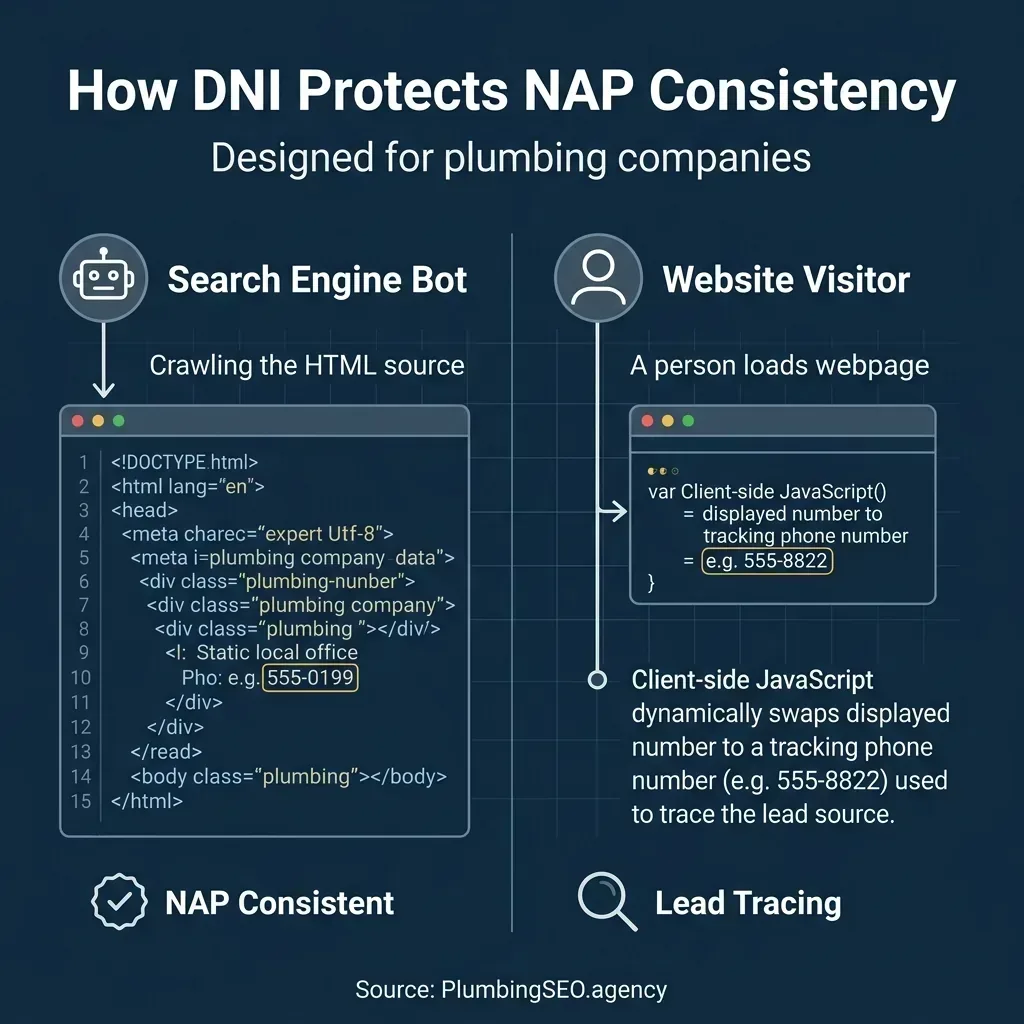
- Dynamic Number Insertion (DNI) protects your SEO by swapping numbers client-side for website visitors while leaving your static, canonical office number in the HTML for search engines.
- To safely track Google Business Profile (GBP) calls, place your tracking number in the primary field and your main canonical office number in the secondary field.
Why Local SEO Attribution is Tricky
Every plumbing owner knows the stress of checking the dispatch board on a quiet Tuesday. You spend thousands of dollars on website optimization, local listings, and Google Ads to keep your trucks moving. Yet, when the phone finally rings, you probably have no idea which marketing channel generated that call. Did they find you on Google Maps, click an organic listing, or react to a wrapped truck driving by? Without attribution, you are flying blind.
Tracking organic calls is notoriously difficult. Unlike paid search, where Google tracking scripts follow a user's every click, local organic search relies on a mix of Google Business Profile (GBP) views and website visits. If a homeowner searches for a local plumber, clicks your site, and dials the number on their screen, standard analytics registers them as a direct visitor. The credit for that lead is lost in an attribution black hole. You might think your SEO is failing when it is actually driving your best jobs.
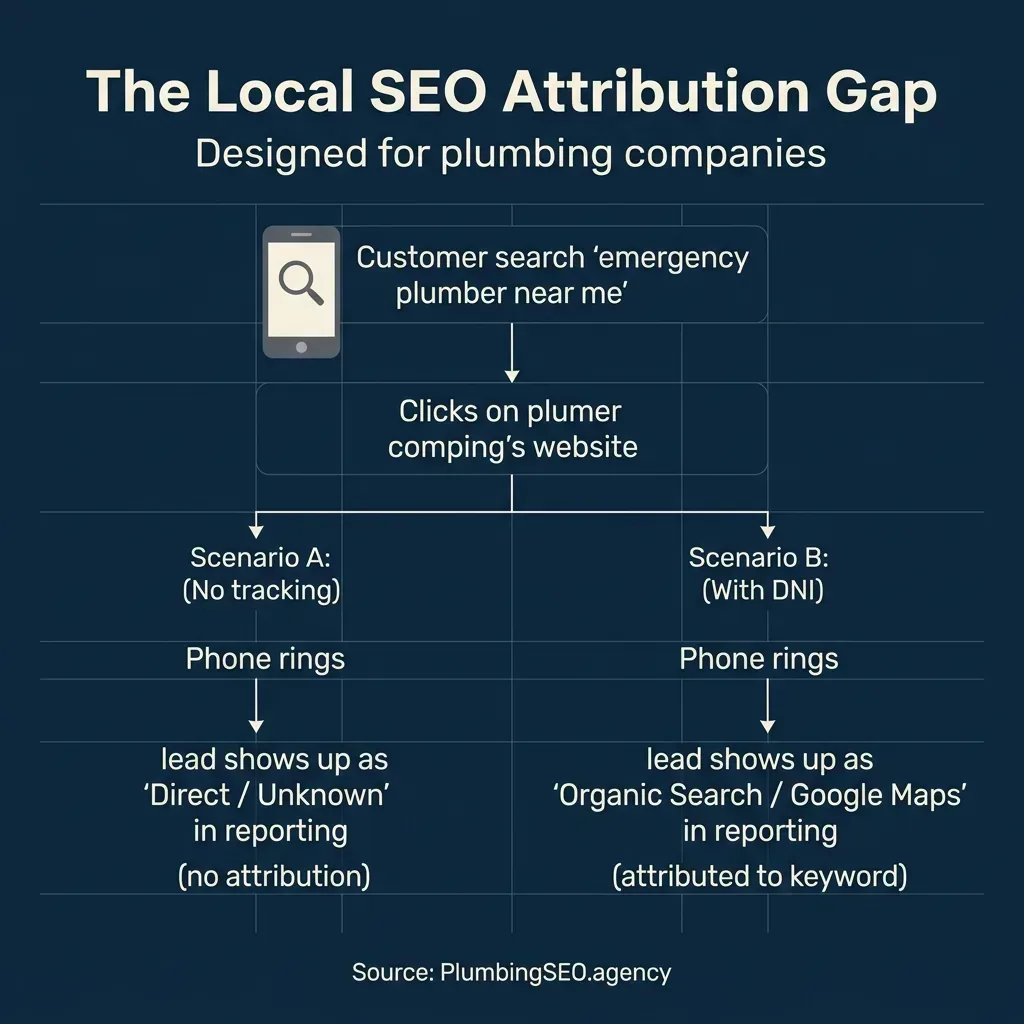
In the real world, this attribution gap leads to bad business decisions. If you cannot trace where your calls are coming from, you might cut your SEO budget to save cash, only to watch your phone dry up three months later. You cannot reward the marketing channels that feed your crew if you do not know which ones are actually pulling their weight. Call tracking bridges this gap by connecting every phone call directly to the search query, map view, or ad click that triggered it.
NAP Consistency Explained: The Old Rule vs. Modern Reality
If you have spent any time reading about local SEO, you have run into the concept of NAP consistency. NAP stands for Name, Address, and Phone number. For over a decade, SEO agencies preached NAP consistency like it was holy law. The rule was simple: your business details had to match exactly across every directory on the web, from Yelp and the YellowPages to your local Chamber of Commerce. If one site listed your office as "Main Street" and another wrote "Main St," or if you used a tracking number on one page, agencies warned that Google would penalize your Maps rankings.
This rule existed because early search algorithms were fragile. They needed identical data across directories to verify that your plumbing shop was a legitimate, local business. If Google saw five different phone numbers associated with your business name, it got confused and lowered your search visibility. Today, things are different. Google's algorithm is smart enough to tie multiple numbers to a single entity, provided you set up your infrastructure correctly.
Modern local search marketing does not require you to avoid call tracking. Instead, it requires you to deploy it using methods that keep your core business identity intact. The old concern about phone number mismatch is resolved by client-side scripting and proper field settings. This means you can get clean marketing reports without risking your placement in the local 3-pack.
Website DNI vs. GBP Tracking Numbers
To track calls safely, you must understand that your website and your Google Business Profile are two separate animals. They require different tracking strategies because users interact with them differently. Your website is under your complete control, which allows for dynamic adjustments, while your GBP listing is a public portal managed through Google's dashboard.
On your website, you use Dynamic Number Insertion (DNI). This is a simple Javascript snippet that lives on your site. When a customer visits, the script checks how they found you, such as via a Google Ads campaign, a Facebook post, or an organic search result. It then swaps the phone number on their screen to a matching tracking number. Because this swap happens in the browser, your raw HTML source code remains untouched. When Google crawls your website, it only reads your permanent, canonical office number. This maintains 100 percent NAP consistency on your site.
Your Google Business Profile is different. Most homeowners looking for emergency plumbing do not click through to your website. They search on their phone, see your listing in the Map Pack, and click the "Call" button directly. To track these leads, you cannot rely on website DNI. You must place a tracking number directly on your GBP listing. Doing this without hurting your local search presence requires configuring Google's phone fields correctly, which we will cover next.
When to Use a Tracking Number on Google Business Profile
If you ask ten different SEO agencies whether you should put a call tracking number on your Google Business Profile, half will say yes and the other half will warn you that it will ruin your Maps rankings. Here is the straight truth: you should track GBP calls, and you can do it safely. GBP is the single largest source of calls for local service companies, often driving over 70 percent of all organic leads. If you are not tracking GBP calls, you are ignoring the core engine of your business.
To track GBP calls without damaging your NAP consistency, you must take advantage of how Google structures its business information. Google provides two separate fields for phone numbers inside your GBP dashboard: Primary Phone and Additional Phones. When configuring call tracking, you should structure them like this:
- Primary Phone: Enter your dedicated GBP call tracking number. This is the number Google will show to searchers and use for the click-to-call button. Every call from your Map listing will route through this line, giving you clean attribution.
- Additional Phone: Enter your main, canonical local office number. This is the permanent number associated with your business registrations and local citations.
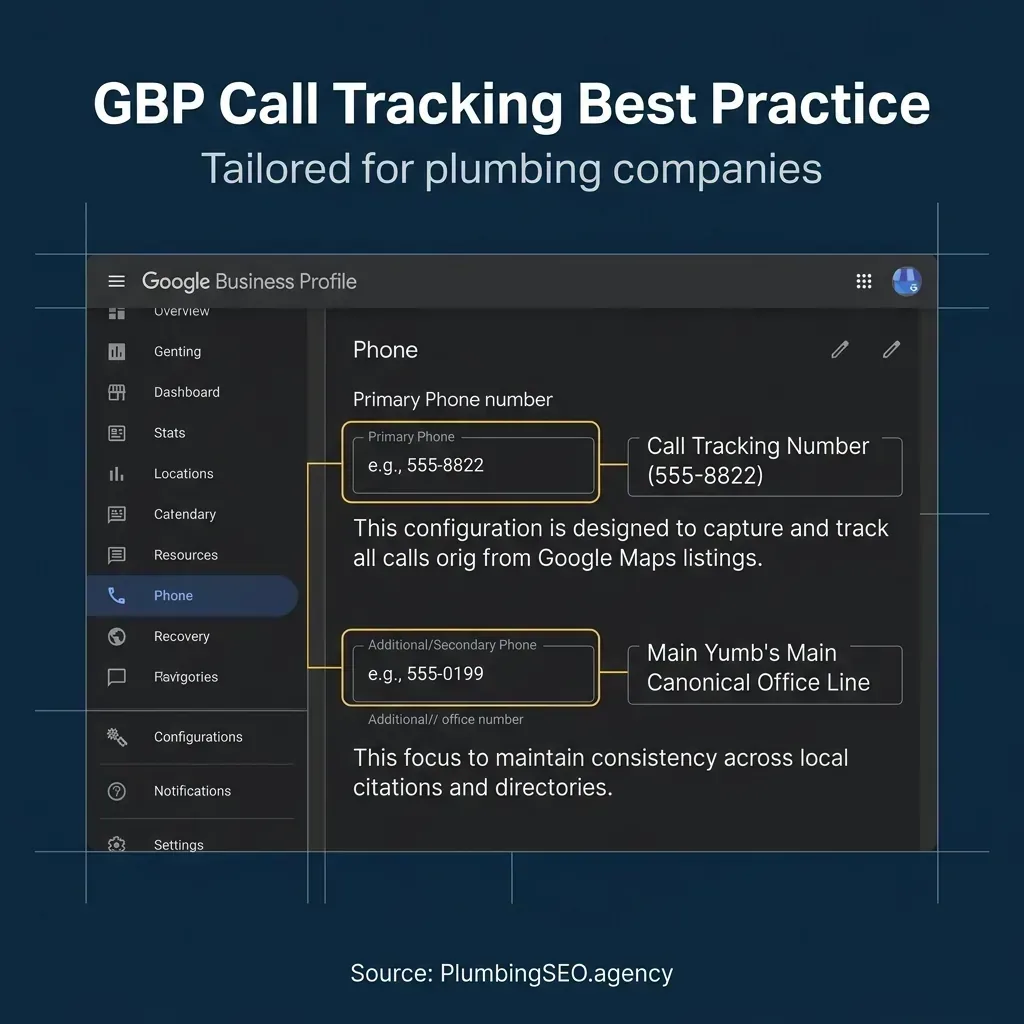
By placing your canonical office number in the additional phone field, you give Google's crawler the exact data link it needs to connect your GBP listing to all your citation listings on sites like Yelp, Angi, and local business directories. Google uses the secondary field as an alternate identifier, ensuring that your local search authority remains intact. Your rankings will not drop, and your reports will show exactly how many high-value service calls are coming from Maps.
How to Track Organic Calls Safely on Your Website
Once you have sorted out your GBP tracking, you need to address the traffic landing on your website. When a visitor arrives via organic search and dials the number on your header, you want to know which page they landed on and what keyword brought them there. This is accomplished using a Dynamic Number Insertion (DNI) pool.
A DNI pool is a group of local phone numbers that you buy through your call tracking provider. The size of your pool depends on your website traffic. For most local plumbers, a pool of 4 to 8 numbers is plenty. When a visitor arrives on your site, the call tracking script assigns them a temporary number from the pool. As they browse your pages, that number stays locked to their session. If they call, the tracking software matches the number dialed to that specific visitor's session history, capturing their landing page, referral source, and keyword search.
The beauty of DNI is that it has zero impact on your website's SEO. Because the phone number swap occurs client-side using JavaScript, the raw HTML code on your server remains unchanged. When search engine bots crawl your pages, they do not execute JavaScript the way a human browser does. They simply read the static HTML, which displays your canonical local number. This setup gives you deep session-level call data while keeping your website's NAP consistency perfectly secure.
How to Track Google Ads and LSAs Separately
With paid clicks costing anywhere from $30 to over $100 in the plumbing industry, tracking your paid spend is critical. If you mix your paid ad traffic with your organic search traffic, your attribution data will become a mess. You must separate Google Ads and Local Services Ads (LSAs) into their own tracking streams.
For Google Search Ads, you should set up a separate DNI pool dedicated exclusively to Google PPC traffic. When a searcher clicks your text ad and lands on your site, the script draws a number from your Google Ads pool instead of your organic pool. This allows you to track conversions down to the specific campaign, ad group, and paid keyword. You can also integrate this data directly back into Google Ads to train your bidding algorithms on actual phone conversions, rather than just form fills.
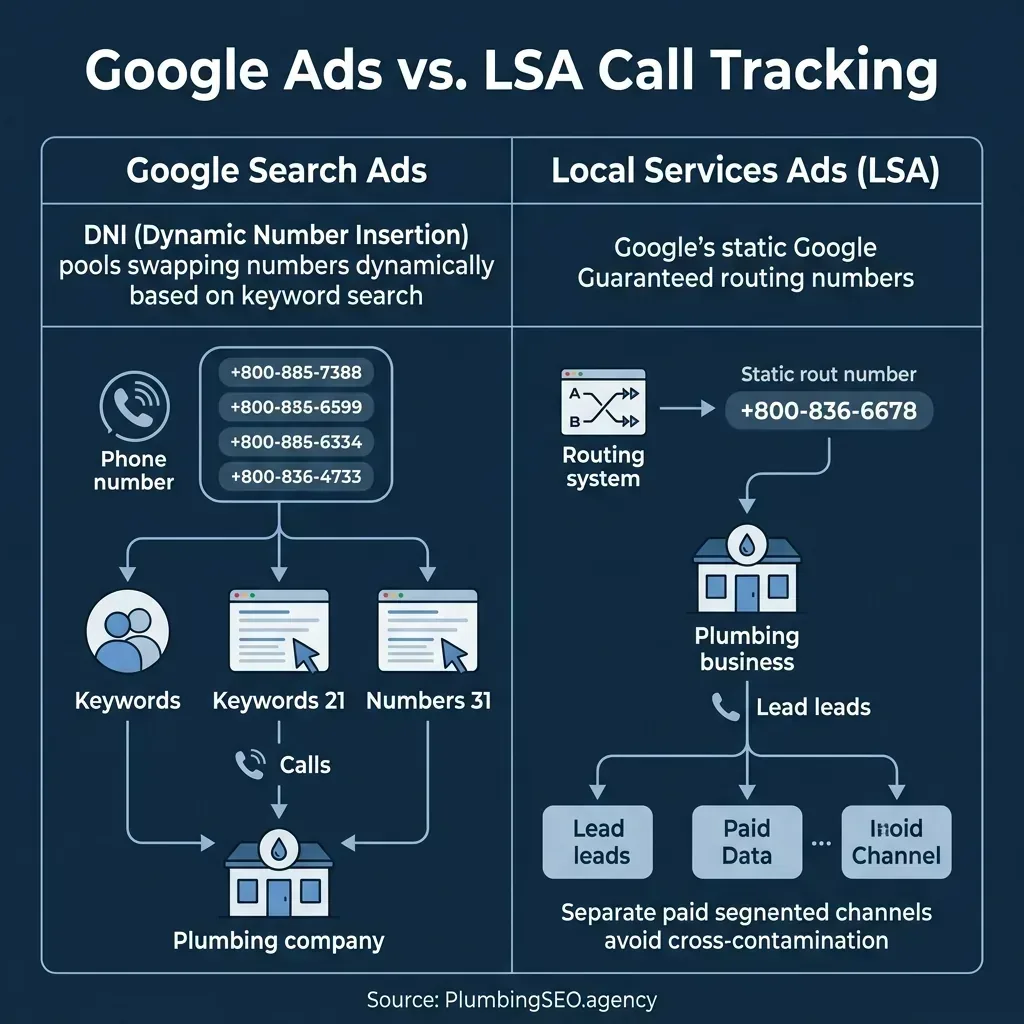
Google Local Services Ads, or LSAs, require a different approach. Because LSAs display your company card directly in the search results with a Google Guaranteed badge, users do not click through to your website to call. Google automatically generates a unique tracking number for your LSA listing and routes those calls to your office. You do not need to configure DNI for LSAs. Instead, you manage and review these calls within your LSA console. Keeping these paid calls separate from your website DNI ensures that your organic ROI calculations are accurate and untainted by ad spend.
Call Tracking Platforms: Setup Notes for Plumbing Owners
Choosing the right call tracking software is the difference between clean marketing data and a monthly bill that eats your entire profit margin. If you want to know which platform is right for your shop, here is how the top three tools compare for plumbing companies.
CallRail
Best for: Shops running ServiceTitan or Housecall Pro who want native booking-to-call matching.
Cost: Expensive. Around $3.00 per number per month plus $0.05 per minute markup.
Pros: Excellent out-of-the-box integrations with major plumbing CRMs.
CallTrackingMetrics
Best for: Large plumbing operations with an in-house dispatch team and softphones.
Cost: High platform fees, but wholesale usage rates are reasonable.
Pros: Advanced routing, IVRs, and phone system replacements.
Switch.monster
Best for: Independent plumbers looking for wholesale pricing without long-term lock-in.
Cost: Extremely low. Uses your Twilio account at $1.15 per number and $0.0085 per minute.
Pros: 100 percent number ownership, missed-call text-back, and Zapier support.
If you are a smaller shop or just starting with attribution, we highly recommend using a Bring Your Own Carrier (BYOC) model like Switch.monster. Traditional platforms rent you the phone numbers. If you ever decide to cancel your subscription, they make porting those numbers away incredibly difficult. Since your GBP number is a core asset of your business, renting it from a third-party is a massive risk. With Switch.monster, you connect directly to your own Twilio developer account. You buy the numbers, you own the lines, and you pay raw wholesale rates with no markup. If you want a deep dive on how these tools compare, check out our comparative guide to plumber call tracking.
Setting up your call tracking requires a clear, step-by-step approach. Start by purchasing your numbers. You will need one local number for your Google Business Profile, one for your Google Local Services Ads if you route them manually, and a pool of four to eight numbers for website DNI. Next, configure your routing. Ensure all calls route to your main office dispatch line. Finally, install the tracking script on your website. Most platforms generate a single snippet of JavaScript that you paste into your site header. You can read more about this in our guide to call tracking for plumbing companies.
Once your software is in place, you must link it with your local SEO efforts. When setting up directories, keep your canonical office line on your citation profiles to maintain NAP health, as explained in our plumber NAP citation directory list. For a full breakdown of how we deploy tracking and SEO to drive real jobs, see how our plumbing SEO process works on our impact tracking page.
For official setup guidance and technical specifications, you can review the Google Business Profile help docs on phone numbers, read the CallRail local SEO / NAP guide, or consult the Google Ads call conversion docs to configure paid conversion actions.
Frequently Asked Questions
No, not if you configure it correctly. By using Dynamic Number Insertion (DNI) on your website, search crawlers only see your hardcoded canonical phone number, which keeps your NAP consistency fully intact. On your Google Business Profile, as long as you place your main local number in the "Additional Phone" field, Google matches your citations without any drop in rankings.
DNI stands for Dynamic Number Insertion. It is a client-side JavaScript technology that dynamically replaces the phone numbers displayed on your website based on the marketing channel the visitor came from (like Google Ads, organic search, or social media). This allows you to track exactly which source drove the call while keeping your base HTML code unchanged for search engine crawlers.
For local SEO and Google Maps, always use local tracking numbers with the same area code as your physical office location. Homeowners prefer calling local service businesses rather than generic toll-free lines, and using local numbers reinforces your regional relevance to Google.
To track calls from Google Maps/GBP, purchase a dedicated local tracking number. Enter this tracking number into the "Primary Phone" field in your GBP dashboard so that it is used for the "Call" button. Then, place your permanent canonical local office number into the "Additional Phone" field so Google can verify your business identity across directories.
Stop Flying Blind on Your Marketing
As a specialized plumbing SEO agency, we help you set up call tracking that keeps your citations consistent and proves your marketing ROI. Let's find your SEO leaks and get your phones ringing.
Run My Free SEO Leak Check