
- City pages work when each page has unique local content, real job photos, city-specific reviews, and localized FAQs. They fail when you copy-paste the same text and swap city names.
- Google's 2026 algorithm updates are actively deindexing mass-produced location pages. Five rich city pages can outperform fifty thin ones every time.
- The right URL structure matters less than you think. Content quality, internal linking, and local proof signals determine whether your city pages rank or get ignored.
What City Pages Are and Why Plumbing Companies Build Them
You run a plumbing company that serves multiple cities. Your trucks cross city lines daily. But when a homeowner in a neighboring town searches "plumber near me," your business is nowhere to be found. That gap between where you work and where you show up online is exactly what city pages are designed to close.
A city page is a dedicated page on your website targeting a specific geographic area where you provide services. Instead of hoping your homepage ranks for "plumber in Fort Worth" when your office is in Dallas, you create a page specifically optimized for Fort Worth with content relevant to homeowners in that area.
The concept is straightforward. The execution is where most plumbing companies go wrong. And going wrong does not just mean wasted effort. In 2026, poorly executed city pages can actively damage your site's authority.
Those numbers from BrightEdge and Revved Digital explain why city pages are worth the investment when done right. Nearly half of all searches are local, and most of those searchers act fast. If your plumbing company does not show up in the results for a city you actively serve, those calls are going to a competitor who does.
But the operative phrase is "when done right." The SEO community is deeply divided on city pages, and for good reason. They have been one of the most abused tactics in local SEO history. As one practitioner on r/localseo put it: "City pages work until they all start sounding like the same page with the town name swapped. Once that happens, you're basically asking Google to pick between duplicates, and it gets messy."
When City Pages Work: The Conditions for Success
The SEO community has debated city pages for years, and the consensus from practitioners who actually build them is clear: city pages are one of the highest-leverage plays in local SEO when executed properly. The key word is "properly."
Here is what separates city pages that generate calls from ones that collect dust on page seven of Google's results:
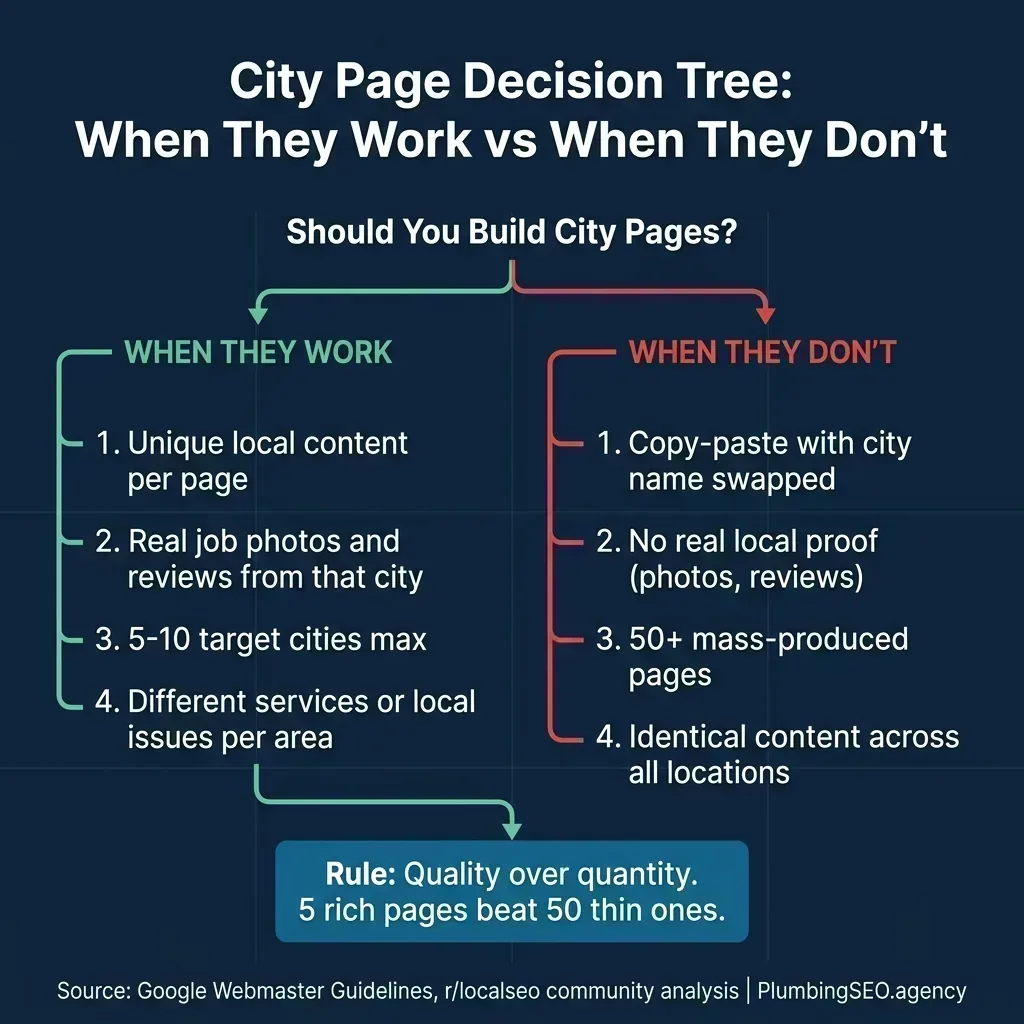
A seasoned local SEO practitioner on r/localseo summarized it well: "Multiple city pages don't hurt rankings by default. They only hurt if they are thin doorway duplicates with only the city name swapped. If each city page is actually unique, solves different local problems, uses real local data, local reviews and local E-E-A-T, they absolutely help rankings."
The conditions that make city pages work for plumbing companies specifically:
- You genuinely serve 3-10 distinct cities with regular job volume in each one. If you complete 2+ jobs per month in a city, you have enough material for a rich page.
- Each city has different local characteristics you can write about: water quality issues, common pipe materials in older neighborhoods, permit requirements, or seasonal plumbing problems.
- You can source city-specific proof: project photos tagged to that location, customer reviews mentioning the city, or job completion data from your dispatch software.
- You are willing to maintain them. A city page published and forgotten will decay in rankings. Pages that get updated quarterly with new projects and fresh reviews continue to climb.
If you meet those conditions, city pages can become a compound growth engine. If you do not, they can become thin-content baggage. As one practitioner noted: "Volume compounds. 20-30 pages at 10-15 visits each adds up fast. Plus those users are pre-qualified by location and intent, so conversion rates usually beat broad traffic."
For a deeper look at how keyword targeting works for location-specific pages, our plumbing keyword strategy guide walks through the exact page structure that works for local rankings.
When City Pages Backfire: The Traps That Kill Rankings
For every plumbing company that has built successful city pages, there are dozens that have wasted thousands of dollars on pages Google will never rank. Understanding why city pages fail is just as important as knowing how to build them right.
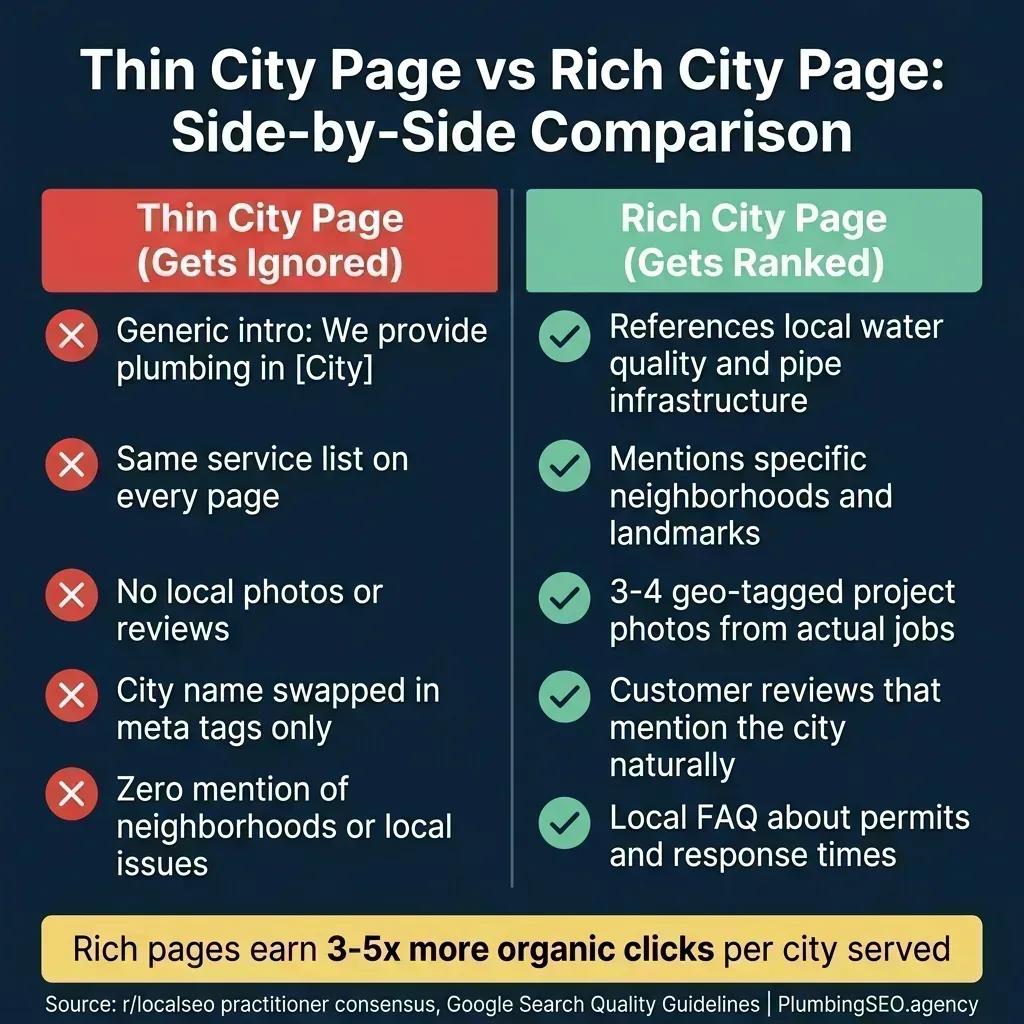
The Copy-Paste Trap
The most common failure mode is the "find-and-replace" approach: take your homepage content, swap "Dallas" for "Fort Worth," and publish it as a new page. Google's algorithm in 2026 detects this instantly. As Precision Marketing Partners explains: "Google doesn't 'penalize' most duplicate content in the dramatic way people fear. The bigger issue is indexing and ranking selection: Google may choose one page as the 'best' and ignore the rest."
The result? Instead of ranking in five cities, you rank in zero because Google cannot determine which of your nearly identical pages to show.
The Mass Production Trap
A Reddit thread on r/DigitalMarketing flagged that Google's 2026 algorithm updates are "officially nuking mass-produced location pages." Companies that created 50, 100, or even 200 city pages targeting every suburb in their metro area are seeing those pages deindexed entirely.
The case study from r/localseo puts it bluntly: "A common issue in local SEO is 'bloat.' Brands often create too many city pages and blog posts that fail to crack the top 10. This creates more problems than it solves."
The "About the City" Fluff Trap
Another common mistake: padding city pages with generic tourism information. "Fort Worth, Texas, is a vibrant city known for its rich Western heritage and thriving arts scene..." Nobody searching for a plumber cares about the Stockyards. This kind of filler content signals to Google that the page exists for SEO manipulation, not to help users.
The fix? Every sentence on a city page should connect your plumbing services to that specific location. Write about the hard water problems in that neighborhood, the galvanized pipes in homes built before 1970, or the fact that Fort Worth requires specific permits for water heater replacements.
The Neighborhood Stuffing Trap
Listing every neighborhood, zip code, and subdivision in a city at the bottom of the page was an effective tactic in 2015. In 2026, it reads as spam to both users and Google. Mention neighborhoods naturally within your content where they add value. Do not create a wall of text listing 40 zip codes.
If you are unsure whether your current pages qualify as "thin content," our technical SEO checklist covers the content quality signals Google evaluates.
The Anatomy of a City Page That Actually Ranks
Knowing what not to do is only half the equation. Here is the framework for building city pages that earn their rankings through genuine local value.
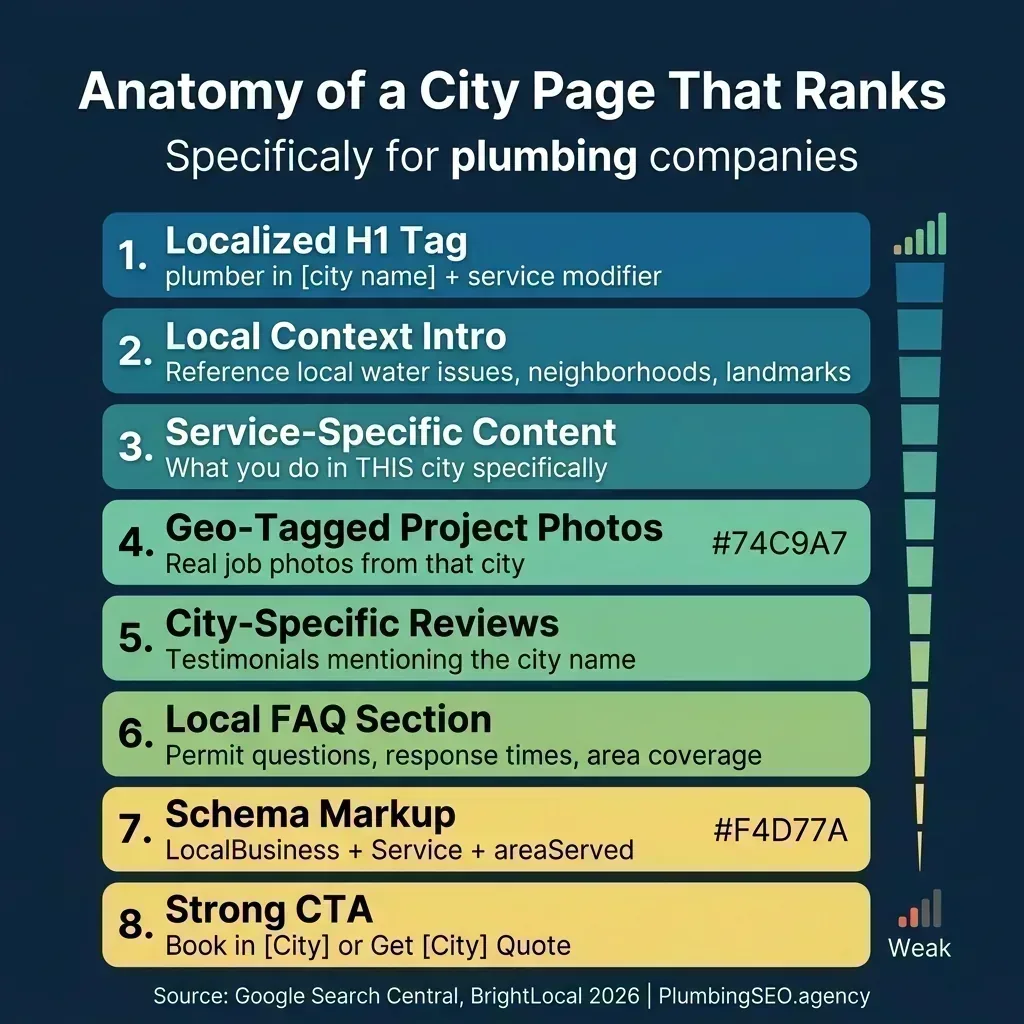
What makes this framework different from a generic template is the "local layer" concept described by Precision Marketing Partners. Think of each city page as having two layers: your stable core (what services you offer, your process, your credentials) and your local layer (why it matters in this specific city). Most plumbing companies do the first layer and skip the second entirely.
What Your Local Layer Should Include
Pull from 3-5 of these elements to make each city page genuinely distinct:
- City-specific plumbing issues: Hard water problems, aging pipe infrastructure, common well water concerns, or freeze risk in winter months
- Neighborhood references: "We frequently service homes in the Fairmount Historic District" reads as authentic. A list of 40 neighborhoods reads as keyword stuffing.
- Real project photos: Geo-tagged images from completed jobs in that city. A before/after of a water heater replacement in a real Fort Worth home is worth more than any stock photo.
- City-specific testimonials: Reviews where customers naturally mention the city name carry enormous weight with Google's algorithm.
- Local FAQ: "Does Fort Worth require a permit for tankless water heater installation?" is a real question with a city-specific answer.
- Response time data: "Most appointments in [City] are scheduled within 24 hours" ties your service to a specific geography.
- Local pricing factors: Water conditions, building codes, or property types that affect service costs in that area.
An experienced SEO on r/localseo shared a detailed framework: "My go-to: a location blueprint that forces unique, verifiable data per city. Jobs completed, geo-tagged photos, permit notes, supplier names, price ranges, FAQs from support tickets, and three city-only CTAs." That level of specificity is what separates pages that rank from ones that get filtered out.
For a deeper look at what elements every plumbing page needs to convert visitors into calls, our guide on website anatomy that converts covers the conversion side of the equation.
The URL Structure Debate: Which Pattern Works Best
One of the most heated discussions in local SEO forums is URL structure for city pages. Should you use /dallas/drain-cleaning/ or /drain-cleaning/dallas/? The SEO community is genuinely divided.
After reviewing dozens of Reddit threads and case studies, here is the honest answer: for a plumbing company serving 5-10 cities with 6-8 core services, any of these patterns will work if you execute the fundamentals. As one experienced SEO put it on r/localseo: "If you've got multiple services per city, then /city-name/service-name is better. If you've got one service only and a handful of cities, then /service-name/city-name can work."
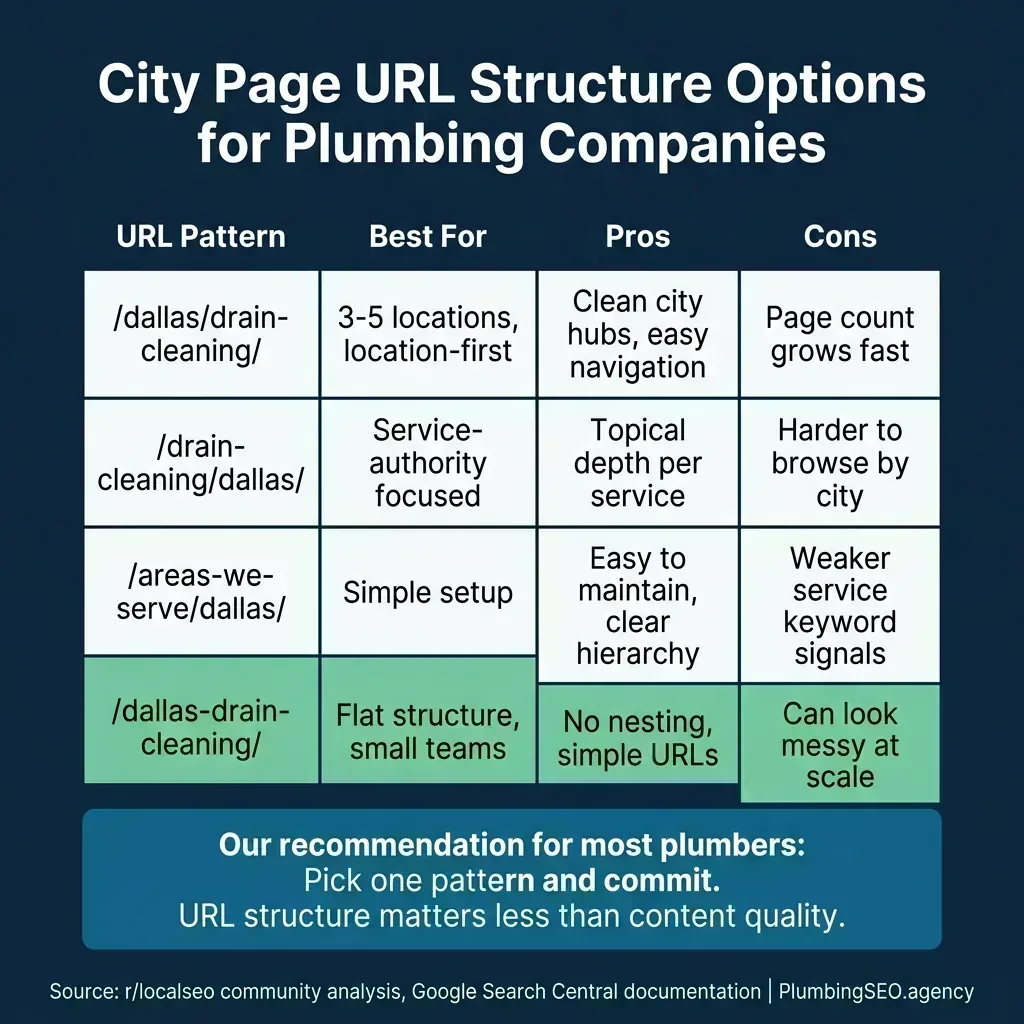
Our recommendation for many growing plumbing companies: use /areas-we-serve/[city]/ for city hub pages when you have real service history and local proof, with services integrated into each city page rather than creating separate pages for every city-service combination. A plumber with 7 services in 5 cities usually does not need 35 pages on day one. Five strong city pages with all services listed on each one will usually outperform 35 thin pages. A solo plumber in one small town may not need dedicated city pages at all until the search data and job history justify them.
The Page Count Question
A practical rule from the Reddit community: "Start with 4-5 locations and see what ranks before scaling." This advice from r/localseo is smart because it lets you validate your approach before committing resources to dozens of pages. Better to optimize 5 well than half-build 50.
Another practitioner offered a strategic clustering approach: "Use research to figure out which cities have the most demand, the best ROI, and the least competition. Then cluster nearby cities that you will not build separate pages for into the content of your primary city pages." This way, a Fort Worth page naturally mentions that you also serve Arlington Heights, Fairmount, and the TCU area without creating separate pages for each neighborhood.
For guidance on structuring multiple location pages within a larger site architecture, our multi-location SEO guide covers the hub-and-spoke model in depth.
The Technical Foundation: Schema, Internal Linking, and Ongoing Maintenance
A city page with great content but poor technical SEO is like a fully stocked plumbing van with no gas. The content earns the ranking, but the technical foundation is what Google needs to understand and trust the page.
Schema Markup for City Pages
Most city pages benefit from LocalBusiness schema with an areaServed property specifying the city, but only when the page reflects a real service area and visible on-page claims. If you offer different services per location, use Service schema with hasOfferCatalog. This structured data helps Google connect your business entity to specific geographic areas. Our schema markup guide has copy-paste JSON-LD code for all five important types.
Internal Linking Strategy
Your city pages should not exist as isolated islands. They need to connect to your main site structure through intentional internal links:
- City page links to core service pages: "Learn more about our drain cleaning process" passes topical authority from the service page back to the city page.
- Core service pages link to top city pages: "We provide emergency plumbing in Dallas, Fort Worth, and Arlington" with each city name linked to its page.
- Blog posts link to relevant city pages: A blog about winter pipe freeze prevention naturally links to city pages where freezing is a common issue.
This creates a web of relevance signals that reinforces both your topical authority (plumbing services) and your geographic authority (specific cities you serve).
Quarterly Maintenance Checklist
City pages are not "set and forget" assets. Schedule a quarterly review to keep them competitive:
- Add 2-3 new project photos from recent jobs in that city
- Update or add new customer testimonials mentioning the city
- Refresh the local FAQ based on questions your dispatch team hears
- Check that all contact information and response time claims are current
- Review ranking positions and adjust content based on what competitors are doing
The plumbing companies that treat city pages as living documents rather than static SEO assets consistently outperform those that publish and forget. If you want to understand how call tracking can measure which city pages are actually generating leads, that data should inform which pages get the most attention.
Not Sure If Your City Pages Are Helping or Hurting?
We will audit your current city page setup, identify thin content risks, and map out exactly which locations deserve dedicated pages based on your actual job data and competitive landscape.
Get My Free City Page AuditFrequently Asked Questions
Start with 4-5 cities where you have the most job volume and can source unique local content (photos, reviews, local FAQs). Scale from there only after those initial pages are ranking and generating calls. Most plumbing companies serving a metro area perform best with 5-10 well-built city pages rather than 30-50 thin ones.
Not when done correctly. Each city page should target a distinct "[service] in [city]" keyword. A "plumber in Dallas" page and a "plumber in Fort Worth" page target different search queries and serve different audiences. Cannibalization only occurs when multiple pages compete for the same keyword with similar content.
Yes, in organic search results. Strong city pages with localized content, local backlinks, and geo-tagged project photos can rank organically for cities where you do not have an office. However, ranking in the Google Map Pack is significantly harder without a physical address in that city due to Google's proximity factor.
For most plumbing companies, /areas-we-serve/[city]/ provides the cleanest hierarchy. However, /[city]/[service]/, /[service]/[city]/, and flat structures like /[city]-[service]/ all work. What matters far more than the URL pattern is your content quality, internal linking strategy, and NAP consistency. Pick one pattern and commit to it.
Review and update city pages quarterly at minimum. Add new project photos, fresh customer testimonials, updated local FAQs, and current response time data. Pages that show recent activity signal to Google that the business is actively serving that area. A page last updated two years ago sends the opposite signal.
Google does not penalize city pages that provide genuine value to users. It does, however, filter out or deindex mass-produced doorway pages where the only difference is the city name. The key distinction: if each page has unique local content, real photos, specific reviews, and answers questions a local searcher would actually ask, Google rewards it. If it is a template with swapped city names, Google ignores or suppresses it.
Ready to Build City Pages That Actually Generate Calls?
Our free SEO audit maps your current visibility across all your service areas, identifies which cities deserve dedicated pages, and gives you a clear action plan to start generating leads from every market you serve. It is exactly how a growth-focused plumber SEO agency expands your footprint city by city.
Get My Free SEO Audit