
- Not all keywords are equal: emergency keywords convert at 12-18%, while informational keywords convert at just 1-3% — match your keyword type to the right page.
- A plumbing website needs two page types to dominate local search: service pages (what you fix) and city pages (where you work) — most sites have one but not both.
- Every service page should answer three things in the first 50 words: what you fix, where you serve, and how fast you respond — anything else is killing your conversion rate.
Why Plumbing Keyword Strategy Is Different From Every Other Industry
Most SEO guides treat keyword research like a volume game — find the terms with the highest monthly search count and target them. For plumbers, that approach is actively harmful. A plumbing company ranking for "how to fix a leaky faucet" is driving DIY searchers to a page designed to sell a service. The traffic is real; the phone stays silent.
Plumbing is an emergency-driven, local, and high-trust purchase. A homeowner searching for a plumber at 11pm with water coming through the ceiling is not reading an informational guide — they're dialing the first result that looks trustworthy and available. Your keyword strategy has to be built around that reality, not the generic SEO playbook.
The practical result: plumbers need fewer keywords than most businesses, targeted more precisely, on the right pages. A plumbing website with 12 tightly optimized service and city pages will consistently outrank a competitor with 80 thin, keyword-stuffed pages because Google's algorithm in 2026 weighs topical authority and intent alignment over raw keyword density.
The 50-150 keyword range cited by Auxilium Technology's 2026 research isn't arbitrary — it's the window where a focused plumbing site can achieve true topical authority without creating content that cannibalizes its own rankings. Hitting that range across service pages, city pages, and a targeted blog gives Google a coherent picture of who you serve and where.
The 4 Types of Plumbing Keywords (And Which Pages They Belong On)
Before you put a single keyword on a page, you need to understand what the searcher is trying to do. Every plumbing keyword falls into one of four intent categories — and each belongs on a different type of page. Mixing these up is the #1 reason plumbing websites get traffic but no calls.
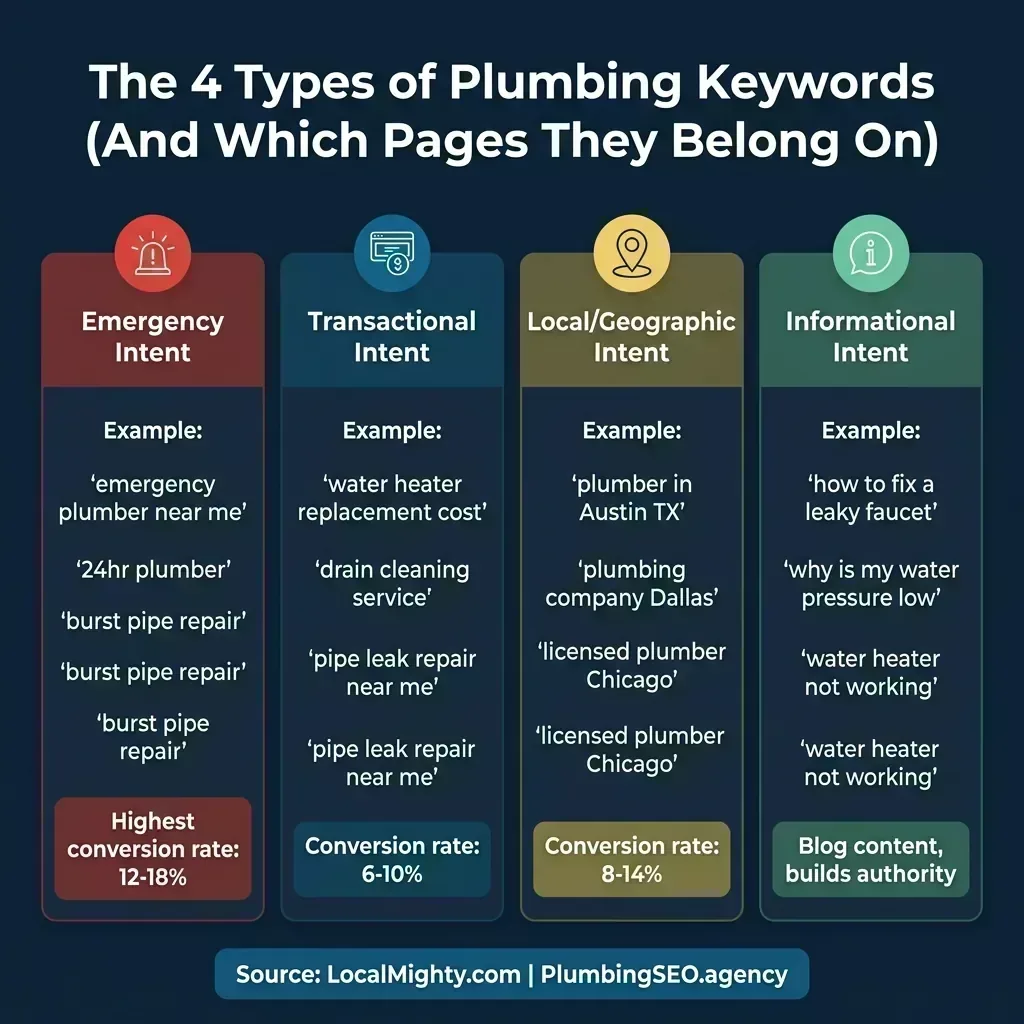
The gap between emergency keywords and informational keywords isn't just a ranking difference — it's a business model difference. A plumber who has invested in ranking for "emergency plumber [city]" is getting callers in crisis with a credit card ready. A plumber ranking for "why is my water pressure low" is getting homeowners who may resolve the issue themselves. Both have value, but they require completely different page strategies and conversion approaches.
Emergency Intent Keywords — Your Highest-Value Pages
These are your top priority. Emergency searches happen under urgency, on mobile, with immediate intent to book. The searcher isn't comparing prices or reading reviews deeply — they're looking for availability and trust signals.
- Examples: "emergency plumber near me," "burst pipe repair [city]," "24 hour plumber," "water leak emergency," "plumber open now"
- Page type: Dedicated emergency service page, prominently linked from homepage
- Conversion trigger: Phone number visible above the fold, hours clearly stated, average response time mentioned
Transactional Intent Keywords — Your Core Service Pages
These searchers know what service they need and are ready to book — they just need to find the right company. This is your bread and butter: one dedicated page per major service.
- Examples: "water heater replacement [city]," "drain cleaning service," "sewer line repair," "water softener installation near me"
- Page type: Individual service page (not a combined "all services" page)
- Conversion trigger: Clear pricing expectation, trust signals, direct CTA above the fold
Local/Geographic Intent Keywords — Your City Pages
These are searches that include a location modifier. The searcher wants a plumber specifically in their area. These keywords power your city/location pages — a separate page type from service pages, and one that most plumbing websites are completely missing.
- Examples: "plumber in Austin TX," "Dallas plumbing company," "licensed plumber Chicago," "Scottsdale emergency plumber"
- Page type: City landing pages (one per city or service area you cover)
- Conversion trigger: Local proof (neighborhood mentions, city-specific reviews), NAP consistency
Informational Intent Keywords — Your Blog Content
These are research-phase queries. Searchers aren't ready to book — they're trying to understand a problem or evaluate options. These belong exclusively on blog posts and guides, not on service pages.
- Examples: "why is my water pressure low," "how to fix a leaky faucet," "water heater not producing hot water," "how long do pipes last"
- Page type: Blog posts and educational guides
- Conversion trigger: Mid-post CTA capturing lead interest before they bounce, internal links to relevant service pages
The strategic insight here — one that repeatedly surfaces in r/localseo discussions — is that plumbers get into trouble when they try to rank service pages for informational keywords. Google's algorithm has become very accurate at detecting intent mismatch. A service page targeting "how to fix a burst pipe" will almost never outrank a detailed guide because the formats are fundamentally incompatible. Save the informational keywords for blog content, and let your service pages do what they're built for: converting searchers who are ready to call.
Keyword Conversion Rates: Where Your SEO Budget Should Focus
Not all organic traffic is equally valuable. Before we get into page architecture, it's worth grounding the strategy in the actual conversion rate data — because this is what should drive your prioritization, not search volume alone.
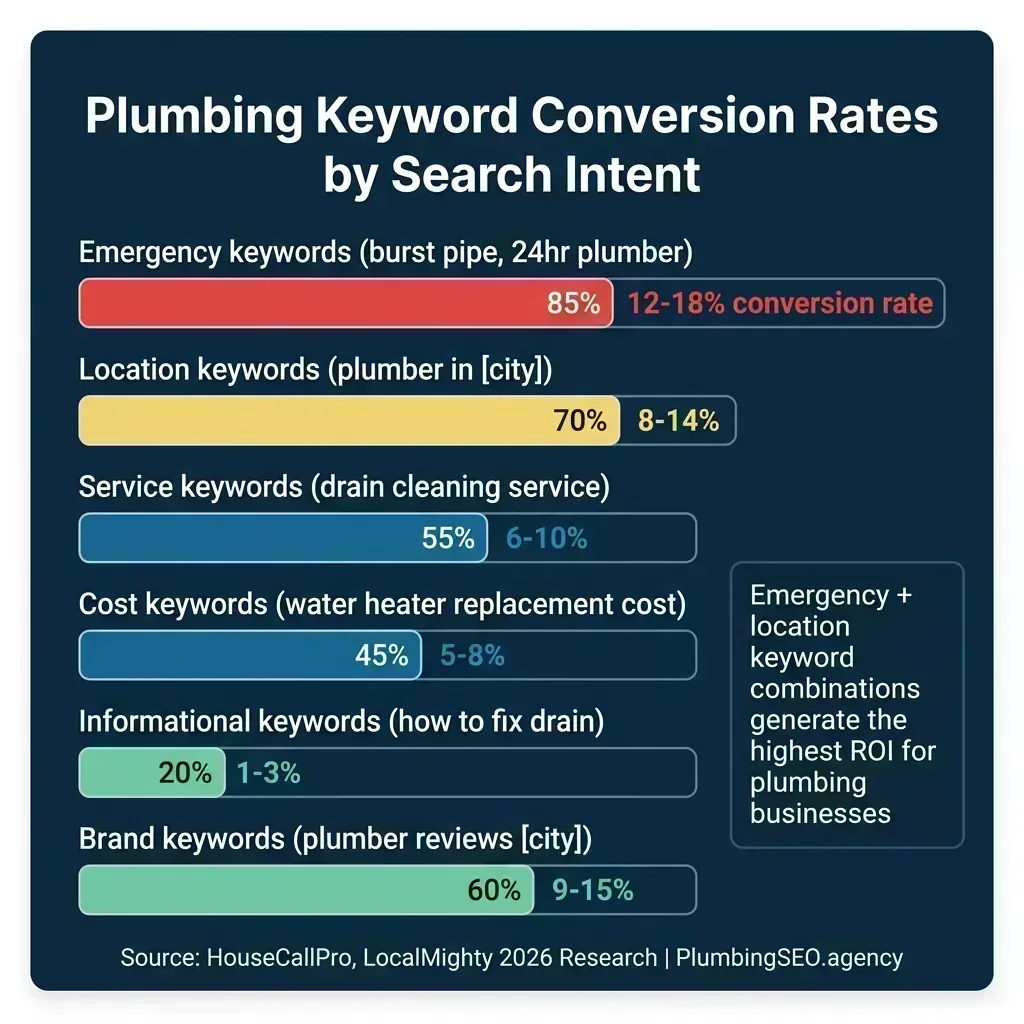
The data reinforces a simple prioritization framework for where to spend time building and optimizing pages. Emergency and location keyword combinations sit at the top because they capture searchers at the moment of maximum intent and minimum price sensitivity. A homeowner with sewage backing up into their basement is not comparison shopping — they need a plumber, and they need one now.
Informational keywords at 1-3% conversion don't mean they're worthless. They're just a different asset class. A blog post ranking for "signs you need a new water heater" that gets 500 monthly visitors and converts at 2% generates 10 warm leads per month who already understand the problem. That's valuable. But it's a completely different ROI calculation than a service page for "water heater replacement [city]" that converts at 7-8%.
| Keyword Type | Avg. Conversion Rate | Best Page Type | Priority |
|---|---|---|---|
| Emergency keywords | 12-18% | Emergency service page | Critical |
| Brand + location keywords | 9-15% | Homepage / GBP | High |
| Local/geographic keywords | 8-14% | City landing pages | High |
| Transactional service keywords | 6-10% | Service pages | Core |
| Cost/pricing keywords | 5-8% | Service pages (with pricing) | Medium |
| Informational keywords | 1-3% | Blog posts / guides | Long-term |
For a plumbing business building its online presence from scratch, the right order is: emergency page first, core service pages second, city pages third, blog content last. That sequencing mirrors the conversion data — you build the highest-converting assets before the lower-converting ones. This is also why our plumbing SEO budget guide recommends front-loading the foundational page work rather than starting with a content calendar.
The 7-Element Service Page Formula That Actually Converts Plumbing Leads
Most plumbing service pages fail for the same reason: they're written to explain what the plumber does, not to convert someone who's already decided they need the service. A homeowner searching "water heater replacement [city]" doesn't need to be educated about what a water heater is — they need to be convinced this plumber is the right choice and find a phone number fast.
Here's the anatomy of a service page that works — validated against what Google's algorithm rewards in 2026 and what actually drives inbound calls in plumbing markets:
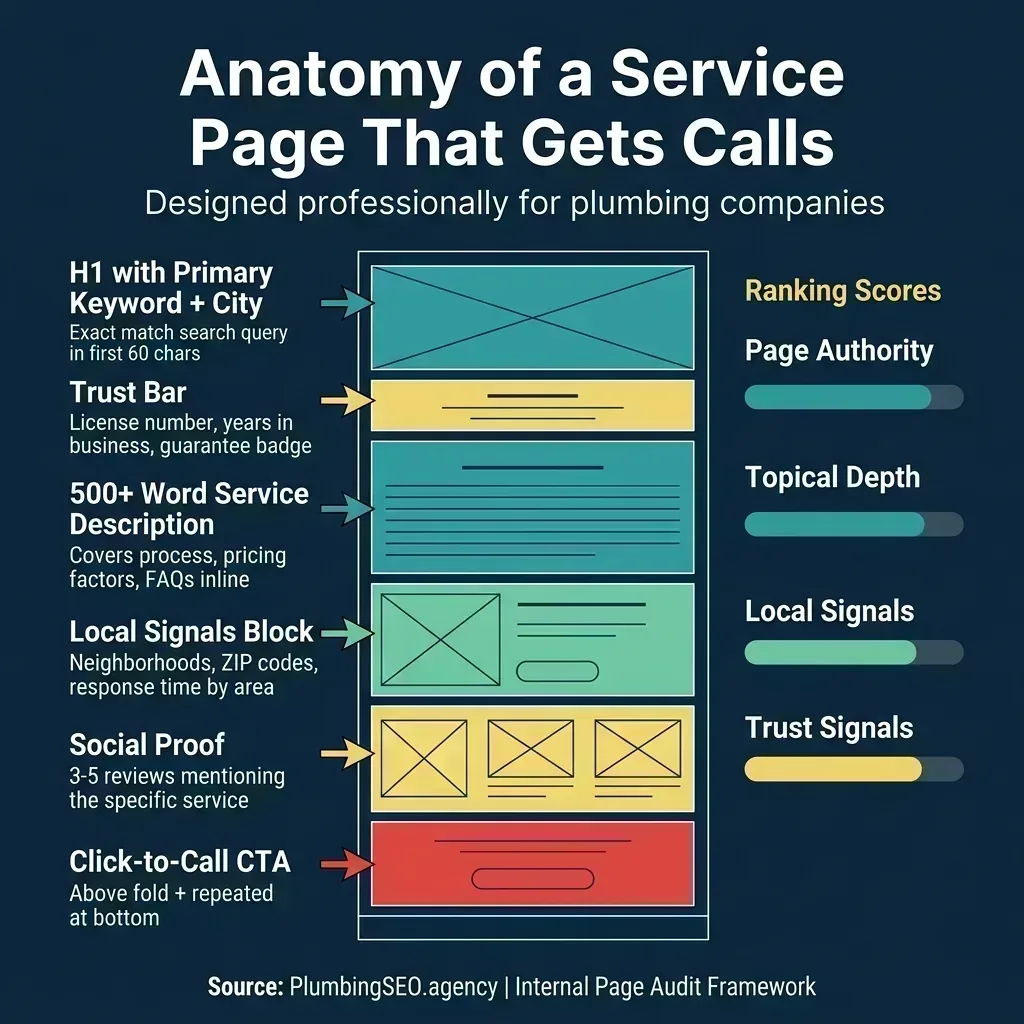
What separates this structure from the generic "about us + services + contact us" pattern is the intentional placement of trust signals and local proof. Reddit practitioners in r/localseo and r/WebsiteSEO consistently point to the same failure mode: plumbing websites bury their credibility markers (reviews, license numbers, response time) at the bottom of the page, after the customer has already bounced.
Element 1: The Problem-Focused H1 Title
Your H1 should name the problem the customer is trying to solve AND your service area. Not "Water Heater Services" — but "Water Heater Repair & Replacement in [City] — Same-Day Service." The formula: [Service keyword] + [Location] + [Urgency or differentiator]. This single change is often enough to move a page several positions in local organic results.
Element 2: The Trust Signal Strip
Immediately below the H1, before any body text, display your four most important trust signals in a horizontal bar or badge row: Licensed & Insured, your star rating, number of reviews, and service hours. Plumbing is a high-trust purchase that happens in someone's home — every second of uncertainty costs you a call. Address it in the first 2 seconds of page load.
Element 3: The Short Answer Paragraph
Write a 2-3 sentence paragraph that directly answers the searcher's core question. State what problem you fix, where you serve, and how fast you respond. If your page is about drain cleaning: "We clear blocked drains across [City] and [Surrounding Areas] — same-day appointments available 7 days a week, including evenings. Our licensed technicians use hydro-jetting and drain snake technology to clear any blockage on the first visit." That's it. Google's Helpful Content guidelines reward pages that answer the intent immediately.
Elements 4-7: Depth, Proof, and Conversion
Once the intent is satisfied, you earn the reader's attention for the remaining elements: a pricing or process section (eliminates fear of the unknown), local proof with neighborhood references and city-specific reviews, a 4-6 question FAQ block with keyword-rich answers (critical for schema markup and featured snippet capture), and a sticky CTA visible at all times on mobile. The last element — the sticky call button — is non-negotiable for mobile. More than 78% of plumbing searches happen on mobile devices, and a customer who's ready to call but has to scroll back to the top to find the number will call whoever's below you instead.
- Generic H1: "Plumbing Services"
- 3 paragraphs about company history
- List of every service they offer
- Stock photo of a pipe wrench
- Contact form at the bottom of the page
- No pricing, no response time, no local proof
- Problem-focused H1 with city + urgency signal
- Trust badge strip: licensed, insured, rating, hours
- Short answer paragraph answering searcher's intent
- Pricing range or process explainer
- Local proof: neighborhood names, city-specific reviews
- Sticky phone number visible on every scroll position
City Pages vs. Service Pages: The Architecture Most Plumbing Sites Get Wrong
Here's the conversation that repeats in local SEO forums constantly: a plumber has a solid homepage and a few service pages, but they can't break into the top 5 organically for searches in neighboring cities or suburbs. The answer is often the same — they don't have city pages.
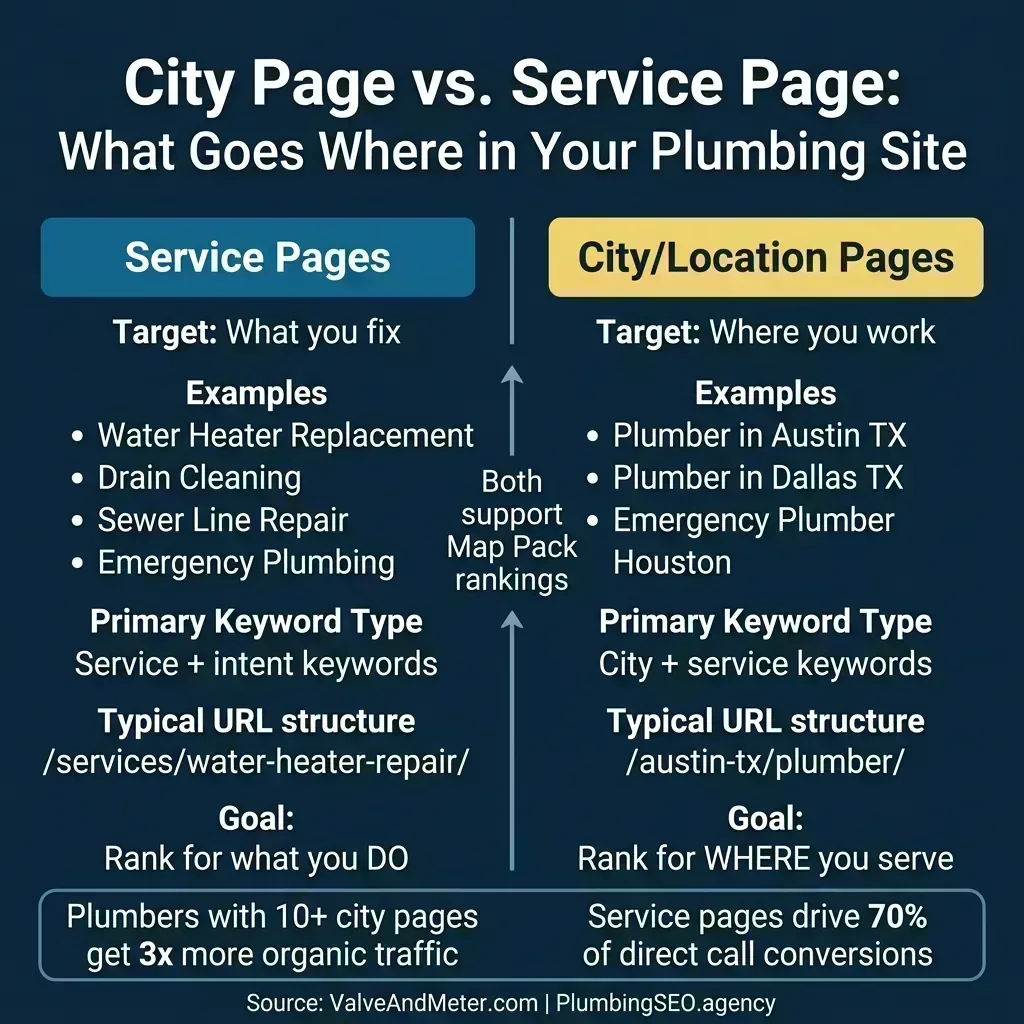
The strategic architecture for a plumbing website that wants to grow local search usually looks like this: a homepage targeting your primary market + "plumber," dedicated service pages for major revenue-driving services (drain cleaning, water heater repair, sewer line, emergency, etc.), and then city/location pages only where you have real service-area demand and enough local proof to make each page useful. Plumbers with 10 or more city pages, according to Valve+Meter's 2026 research, see 3x more organic traffic than those relying on their homepage alone for geographic coverage, but that does not mean Many companies should consider rush into 10 pages before the business case exists.
What Goes on a City Page (vs. a Service Page)
The common mistake is building city pages that are thin clones of each other — just swapping the city name and calling it done. Google penalizes thin location pages aggressively now. A city page needs to be genuinely differentiated and locally useful:
- Detailed explanation of the service (What We Offer)
- Signs you need this service
- What to expect during the service call
- Pricing expectations or ranges
- Service-specific FAQ (5-6 questions)
- Service-specific before/after or case study
- All services you offer in that specific city
- Local neighborhood and area names you serve
- City-specific reviews or testimonials
- Local landmarks or community references
- Embedded Google Map of your coverage area
- Local FAQ (permits, codes, common issues in that area)
URL Structure That Scales
The URL structure you choose at the start determines how easy it is to scale your city pages later. Research from multiple plumbing SEO practitioners in 2026 points to two proven structures:
- Service-first: /services/drain-cleaning/ then /services/drain-cleaning/austin-tx/ — works well when you lead with service identity
- Location-first: /austin-tx/plumber/ then /austin-tx/drain-cleaning/ — works well when geographic expansion is the primary growth strategy
Either pattern works, but pick one and be consistent. Mixed URL structures create crawl inefficiency and dilute the geographic signals you're trying to build. For a single-location plumber serving one metro area, the service-first structure is simpler. For multi-location or franchise operations, location-first scales more cleanly. This connects directly to the agency vs. in-house debate — managing a multi-city URL architecture typically requires an experienced SEO partner who's done it before.
How Many City Pages Do You Need?
A rule of thumb from Valve+Meter's plumbing city page research: consider one city page for each city or town where you have real job volume, search demand, and a credible reason to appear in local organic results. If you serve 8 cities in a metro area, that might mean 8 city pages. If most jobs come from one town plus a few small nearby communities, a smaller architecture may be enough. In highly competitive markets (Dallas, Phoenix, Los Angeles), you may also need service-specific city pages — a dedicated "Drain Cleaning Austin TX" page alongside your general "Austin TX Plumber" page — but only where the search volume, competition, and operational coverage justify the extra page.
A practical audit: open Google's Incognito mode and search "[your service] [each city you serve]." In cities where you don't appear in the top 10 organic results, you almost certainly don't have a dedicated city page. That's your immediate action list.
The On-Page Keyword Checklist: 10 Things to Verify on Every Page
Research and page architecture are the strategy. On-page optimization is the execution — the specific technical and content elements that tell Google what each page is about and who it serves. Here's the checklist that every plumbing service page and city page should pass before it's published:
| Element | What to Check | Why It Matters |
|---|---|---|
| Title Tag | Primary keyword + city + differentiator, under 60 chars | First ranking signal Google reads; also the headline in search results |
| Meta Description | Compelling summary with keyword + CTA, under 160 chars | Directly influences click-through rate from search results |
| H1 Tag | One H1 only, includes primary keyword and location | Primary content signal; must match search intent of target keyword |
| First Paragraph | Primary keyword appears naturally within first 100 words | Google weighs keyword prominence in early content heavily |
| H2/H3 Structure | Subheadings include secondary and long-tail keywords naturally | Supports topical coverage and featured snippet eligibility |
| Image Alt Text | Every image has descriptive alt text including keyword where natural | Image search ranking signal + accessibility compliance |
| Internal Links | Links to related service pages and city pages with descriptive anchor text | Distributes page authority and helps Google understand site structure |
| NAP Consistency | Name, address, phone number matches exactly what's on Google Business Profile | Critical for local ranking — inconsistencies confuse Google's entity matching |
| Schema Markup | LocalBusiness or Service schema with service area, category, and contact | Helps Google understand context; can generate rich result features |
| Mobile Speed | Page loads in under 3 seconds on 4G mobile (test with Google PageSpeed) | Google uses mobile page speed as a ranking factor; 78% of plumbing searches are mobile |
The two elements most commonly skipped are schema markup and NAP consistency — and they're both related to local ranking specifically. Schema markup helps Google understand that your water heater repair page is a service offered in a specific city by a licensed plumbing contractor, not just a generic how-to guide. NAP consistency might seem trivial, but a mismatch between "John's Plumbing LLC" on your website and "Johns Plumbing" on your Google Business Profile creates an entity disambiguation problem that suppresses local rankings. These issues are part of what we diagnose in our technical SEO audit for plumbers.
For keyword density specifically: the 2026 guidance from every credible SEO source is to target 1-2% keyword density naturally, not force it. If you're writing about water heater repair in Austin, the keyword will appear naturally in your H1, first paragraph, service descriptions, FAQ answers, and schema markup. If you're counting keyword occurrences and trying to hit a specific number, you're optimizing for an outdated version of the algorithm. Write for the customer first; the density will take care of itself.
How to Actually Do Keyword Research for Your Plumbing Business
Most keyword research guides point you at enterprise tools (Ahrefs, SEMrush) that cost $100-$200 per month and produce lists of thousands of keywords that a solo plumber has no capacity to target. Here's a practical, low-cost approach that plumbing business owners can execute themselves — or hand to an SEO partner with clear direction.
Step 1: Start With Google's Own Data
Open Google and type your primary service + your city (e.g., "water heater repair Austin"). Look at three free data sources before you open any paid tool:
- Autocomplete suggestions: Google's dropdown shows the most common search completions — these are real queries with real volume. Screenshot them all.
- People Also Ask box: These questions are the exact long-tail queries your FAQ section should answer. They often have zero competition and can win featured snippets.
- Related Searches (bottom of page): These are secondary keywords that should appear in your content naturally — Google itself is telling you what related terms matter.
Step 2: Map Keywords to Pages Before You Build
Keyword mapping — assigning each keyword to a specific page before you create it — prevents the single most common SEO mistake in plumbing websites: keyword cannibalization. When two of your pages target the same keyword, Google gets confused about which one to rank, and often ranks neither well.
Create a simple spreadsheet with three columns:
- Page URL: What URL will this page live at?
- Primary Keyword: The one term this page is the definitive answer for
- Secondary Keywords: 3-5 related terms that should appear naturally in the content
Do this for every page you plan to build — your homepage, every service page, every city page. It takes 2-3 hours upfront and prevents months of ranking confusion later. This is the kind of foundational planning covered in our plumbing SEO budget guide — it's the work that makes every subsequent content investment more efficient.
Step 3: Analyze What's Already Ranking — Then Target the Gap
For every target keyword, search it yourself (in Incognito mode to eliminate personalization) and look at what's currently ranking. You need to answer three questions:
- What page type is ranking? If a service page ranks, build a better service page. If a blog post ranks, a service page won't beat it no matter how well optimized.
- What do the top 3 results have that yours doesn't? More specific local proof? Better structured content? More FAQ entries?
- What are they missing? This is your content gap — the unique angle or depth that your page can provide and theirs can't.
A pattern identified in multiple r/SEO discussions about plumbing: competitors in most mid-size markets are ranking with very thin, dated service pages. A plumber who publishes a well-structured service page in 2026 — with the 7-element formula, proper schema, and genuine local proof — can often outrank pages that have been sitting in position 3-5 for years without being updated. The algorithm rewards freshness and structure, not just age and authority.
Step 4: Track Performance and Expand
Google Search Console is free and shows you exactly which queries are driving impressions to each page. After 60-90 days, you'll see patterns: keywords you're appearing for but not ranking highly enough on, questions that are generating impressions but not clicks. These are your optimization signals. Update those pages' content, improve their FAQ sections, and add missing secondary keywords. This iterative process — build, measure, improve — is the sustainable version of SEO for a plumbing business. It's also what separates the plumbers who see steady organic growth from those who publish pages and never revisit them.
For a deeper look at how Google Maps rankings interact with your keyword strategy, our Google Maps SEO guide for plumbers covers the Map Pack side of this picture — because keyword rankings and map rankings are related but governed by different signals. When that keyword map is ready to turn into ongoing service-area publishing, the Service Area Growth Plan is the commercial path built for that work.
Find Out Which Keywords You're Missing
We'll audit your current page structure, identify keyword gaps vs. your competitors, and map out exactly which service and city pages would move your rankings fastest.
Get My Free AuditFrequently Asked Questions
Prioritize in this order: (1) Emergency keywords like "emergency plumber near me" and "24 hour plumber [city]" — highest conversion rate at 12-18%. (2) Transactional service keywords like "water heater replacement [city]" and "drain cleaning service" — your core service pages. (3) Geographic/city keywords for each service area you cover. (4) Informational keywords for blog content that builds authority over time. Don't start with informational keywords — they'll drive traffic but not calls.
Industry research recommends 50-150 keywords across a structured plumbing website. This typically breaks down to: 1 primary keyword per service page (8-12 service pages), 1 primary keyword per city page (one per service area, minimum 5-10), and supporting long-tail keywords on blog posts. More keywords than this dilutes your focus; fewer means you're leaving geographic and service coverage on the table. Quality and coverage beats raw volume.
Yes, absolutely. A single combined "Plumbing Services" page cannot rank for multiple distinct service keywords without cannibalizing itself. Each major service — water heater repair, drain cleaning, sewer line repair, pipe replacement, emergency plumbing, etc. — needs its own dedicated URL, H1, title tag, and content. This is the most common structural mistake in plumbing websites and often the single biggest ranking opportunity when fixed.
Service pages answer "what do you fix?" (drain cleaning, water heater repair, sewer line, etc.) and target transactional intent keywords. City pages answer "where do you work?" (plumber in Austin TX, plumber in Dallas, etc.) and target geographic intent keywords. Both are needed — service pages drive direct service searches, city pages capture "near me" and city-specific searches that often come from neighboring areas you serve but don't have a physical presence in.
You need both. Writing naturally produces content that reads well but often misses the specific terms customers are searching. Keyword research without natural writing produces keyword-stuffed pages that Google penalizes and customers bounce from immediately. The practical approach: use keyword research to identify what terms to target on which pages, then write naturally around those terms. Google's algorithm in 2026 is sophisticated enough to understand topical context — you don't need to force exact match keywords, but you do need to be writing about the right topics in the right structure.
Typically 60-90 days for new pages to be fully indexed and stabilize in rankings, and 3-6 months to see significant traffic increases. Emergency and location keyword pages often rank faster (2-4 weeks) in less competitive markets because the intent signal is so clear. Blog content targeting informational keywords can take 6-12 months to reach meaningful organic traffic. The fastest wins come from optimizing existing pages that are already indexed but ranking on page 2-3 — small improvements to these pages can produce quick ranking jumps.
See Exactly Which Keywords Your Competitors Are Ranking For
Our free SEO audit analyzes your current page structure, identifies keyword gaps, and maps the exact service and city pages you need to outrank your competition in local organic search.
Get My Free SEO Audit