
- Schema markup is invisible code that tells Google exactly what your plumbing business does, where you operate, and why you deserve to rank. Sites with proper schema can see 20-30% higher click-through rates from rich results alone.
- Roughly 80% of plumber websites have zero schema markup, meaning adding the right structured data immediately puts you ahead of most local competitors.
- Five specific schema types matter most for plumbers: LocalBusiness, Service, AggregateRating, FAQPage, and Article. This guide includes ready-to-paste JSON-LD code for each one.
Why Schema Markup Is a Competitive Advantage for Plumbers
When a homeowner searches "emergency plumber near me" at 11pm, Google has to decide which businesses to show first and how to display them. Schema markup is what helps Google understand your business at a glance: your name, your phone number, your service area, your hours, and your reputation.
Without it, Google is guessing. And a guessing search engine does not rank you as confidently as one that has been handed a perfectly organized cheat sheet about your business.
The practical payoff is rich results. You have seen those search listings that show star ratings, business hours, phone numbers, and price ranges right in the Google listing. That is schema markup at work. According to Google's own documentation, Rotten Tomatoes saw a 25% higher click-through rate on pages enhanced with structured data. For local service businesses like plumbers, the advantage is even more pronounced because so few competitors have implemented it.
Here is what that difference looks like in real search results:
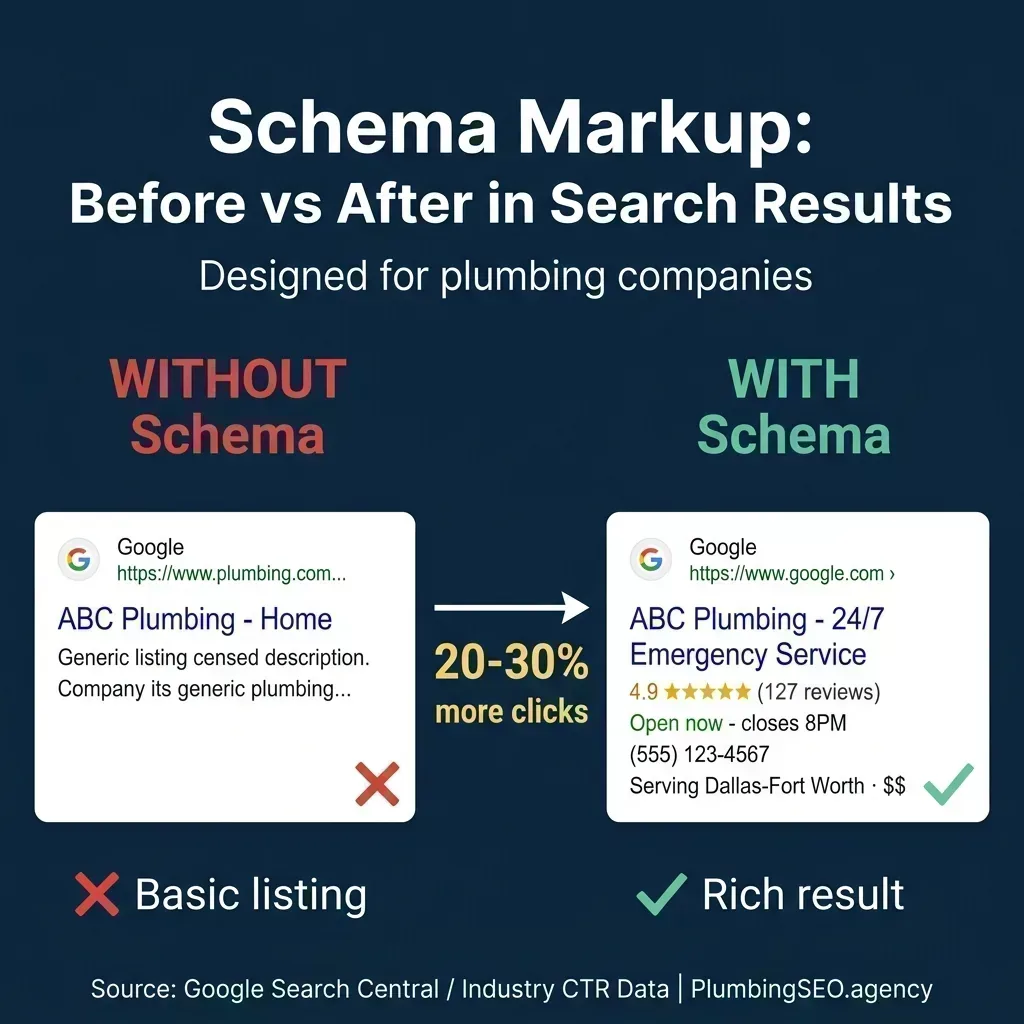
Schema markup transforms a bare-bones listing into one packed with trust signals that drive clicks.
Think about which result you would tap when your basement is flooding. The plain blue link with two lines of vague text, or the listing showing 4.9 stars, 127 reviews, and a phone number you can tap immediately? That is the gap schema closes.
According to a controlled experiment published by Search Engine Land, the page with well-implemented schema was the only one to appear in Google's AI Overview answers. The page with no schema was not even indexed. In 2026, schema is not just about rich snippets; it is the infrastructure that determines whether AI-powered search even knows you exist.
The 5 Schema Types That Actually Move the Needle
There are hundreds of schema types in the Schema.org vocabulary. Most of them are irrelevant to a plumbing company. The five types below are the ones that directly impact how plumbers show up in search results, how AI systems understand your business, and how many calls your website generates.
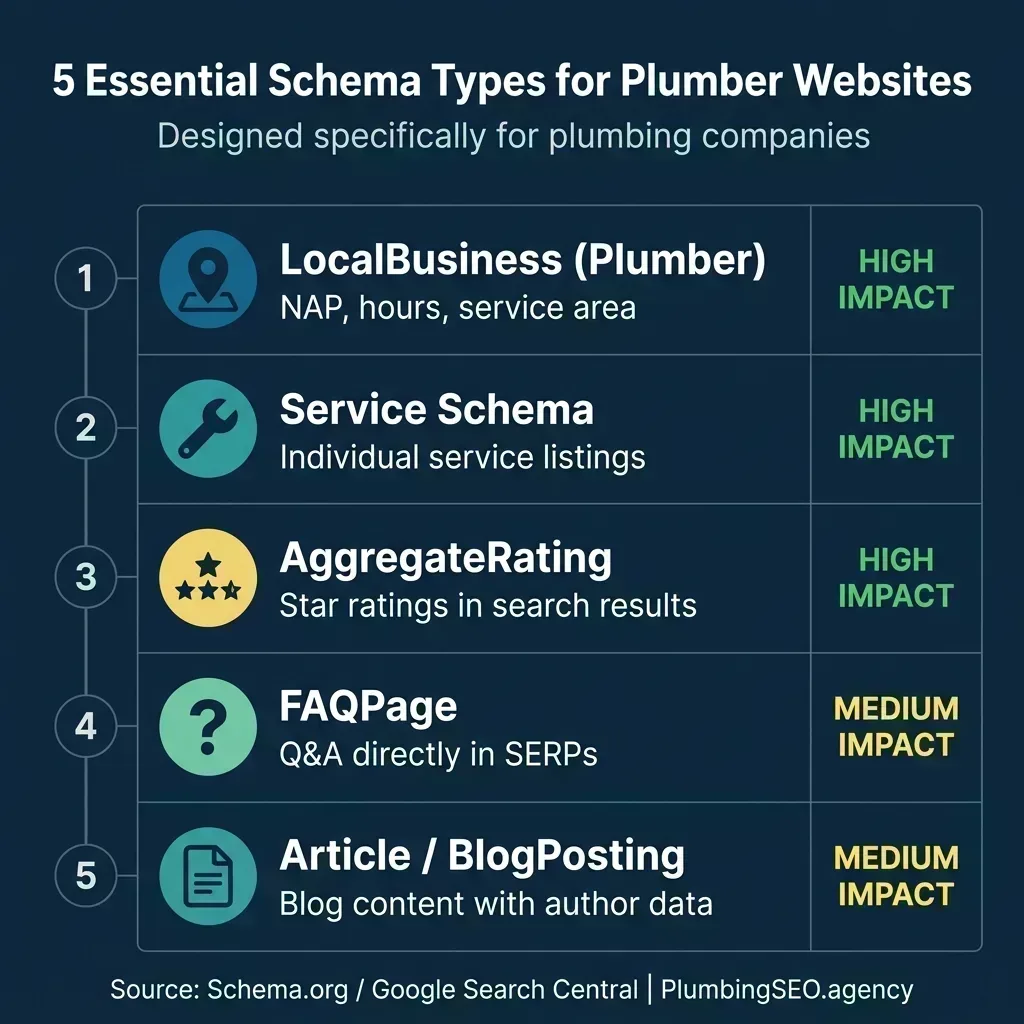
Not all schema types carry equal weight. These five are ranked by their direct impact on plumber search visibility.
What separates a plumber who gets the call from one who gets scrolled past often comes down to whether Google can confidently display your business details in the search result itself. Each of these five types feeds Google a specific piece of that puzzle. Let us break them down one at a time, starting with the most important.
Type 1: LocalBusiness (Plumber) Schema
This is the foundation of everything. LocalBusiness schema tells Google your business name, address, phone number, service area, hours, and what type of company you are. For plumbers, you should use the specific Plumber subtype rather than the generic LocalBusiness type. Being specific matters because Google has a dedicated category for plumbers, and using it strengthens the connection between your website and your Google Business Profile.
One thing most guides get wrong: they tell you to slap LocalBusiness schema on every page. That is not how it works in 2026. After the March 2026 core update, Google now prioritizes schema that describes the primary content of a page. Your LocalBusiness schema belongs on your homepage and contact page. On service pages, nest it within your Service schema. Do not duplicate the same full block on every single page.
Here is the JSON-LD code you can customize and paste into your homepage's <head> section:
<script type="application/ld+json">
{
  "@context": "https://schema.org",
  "@type": "Plumber",
  "name": "YOUR BUSINESS NAME",
  "image": "https://yoursite.com/logo.png",
  "url": "https://yoursite.com",
  "telephone": "+1-555-123-4567",
  "email": "info@yoursite.com",
  "address": {
    "@type": "PostalAddress",
    "streetAddress": "123 Main Street",
    "addressLocality": "Dallas",
    "addressRegion": "TX",
    "postalCode": "75201",
    "addressCountry": "US"
  },
  "geo": {
    "@type": "GeoCoordinates",
    "latitude": 32.7767,
    "longitude": -96.7970
  },
  "areaServed": [
    {
      "@type": "City",
      "name": "Dallas"
    },
    {
      "@type": "City",
      "name": "Fort Worth"
    }
  ],
  "openingHoursSpecification": [
    {
      "@type": "OpeningHoursSpecification",
      "dayOfWeek": ["Monday","Tuesday","Wednesday",
                     "Thursday","Friday"],
      "opens": "07:00",
      "closes": "18:00"
    },
    {
      "@type": "OpeningHoursSpecification",
      "dayOfWeek": ["Saturday"],
      "opens": "08:00",
      "closes": "14:00"
    }
  ],
  "priceRange": "$$",
  "sameAs": [
    "https://www.facebook.com/yourbusiness",
    "https://www.google.com/maps?cid=YOUR_CID"
  ]
}
</script>
Critical details most plumbers miss: The sameAs property is not optional. It is the connective tissue between your website and every other place your business exists online: your Google Business Profile, Facebook page, Yelp listing, and any industry directories. According to SEO practitioners on r/bigseo, including your Google Maps CID link in the sameAs array is one of the strongest entity verification signals you can send. If you serve multiple cities, list every city in the areaServed array rather than leaving it blank. For plumbing companies that cover a wide territory, this is especially important for ranking across multiple service areas.
Type 2: Service Schema
Every plumbing company offers multiple services: drain cleaning, water heater installation, sewer repair, emergency leak detection, repiping. Service schema tells Google about each one individually, connecting each service to your business entity and, when relevant, to specific pricing information.
Why this matters practically: when someone searches "water heater installation cost Dallas," Google needs to know that your website is not just a plumbing company but one that specifically offers water heater installation in Dallas. Service schema makes that connection explicit instead of forcing Google to infer it from your page text.
Add this to each service page, customized for that specific service:
<script type="application/ld+json">
{
  "@context": "https://schema.org",
  "@type": "Service",
  "serviceType": "Water Heater Installation",
  "provider": {
    "@type": "Plumber",
    "name": "YOUR BUSINESS NAME",
    "url": "https://yoursite.com"
  },
  "areaServed": {
    "@type": "City",
    "name": "Dallas"
  },
  "description": "Professional water heater installation
    including tankless, gas, and electric models.
    Licensed and insured.",
  "offers": {
    "@type": "Offer",
    "priceCurrency": "USD",
    "price": "850",
    "priceSpecification": {
      "@type": "UnitPriceSpecification",
      "price": "850",
      "priceCurrency": "USD",
      "unitText": "starting price"
    }
  }
}
</script>
A common mistake is listing every service in a single giant block on your homepage. That is the 2019 approach. In 2026, Google rewards service schema that lives on the page it describes. Your drain cleaning page should have drain cleaning schema. Your repiping page should have repiping schema. This matches Google's post-March 2026 requirement that schema describes the primary content of the page it appears on.
If you have a proper keyword strategy with dedicated service pages, adding Service schema to each one takes about 10 minutes per page. Do not include pricing if your prices vary significantly by job. Google checks for consistency between your schema and your visible page content, and mismatched pricing is a red flag.
Type 3: AggregateRating Schema
This is the schema type that puts gold stars next to your listing in search results. And when it comes to plumbing, those stars are disproportionately powerful. A homeowner with a burst pipe at midnight is not comparison shopping. They are looking for the highest-rated option they can call immediately.
Here is where the opportunity gets interesting for plumbers specifically:
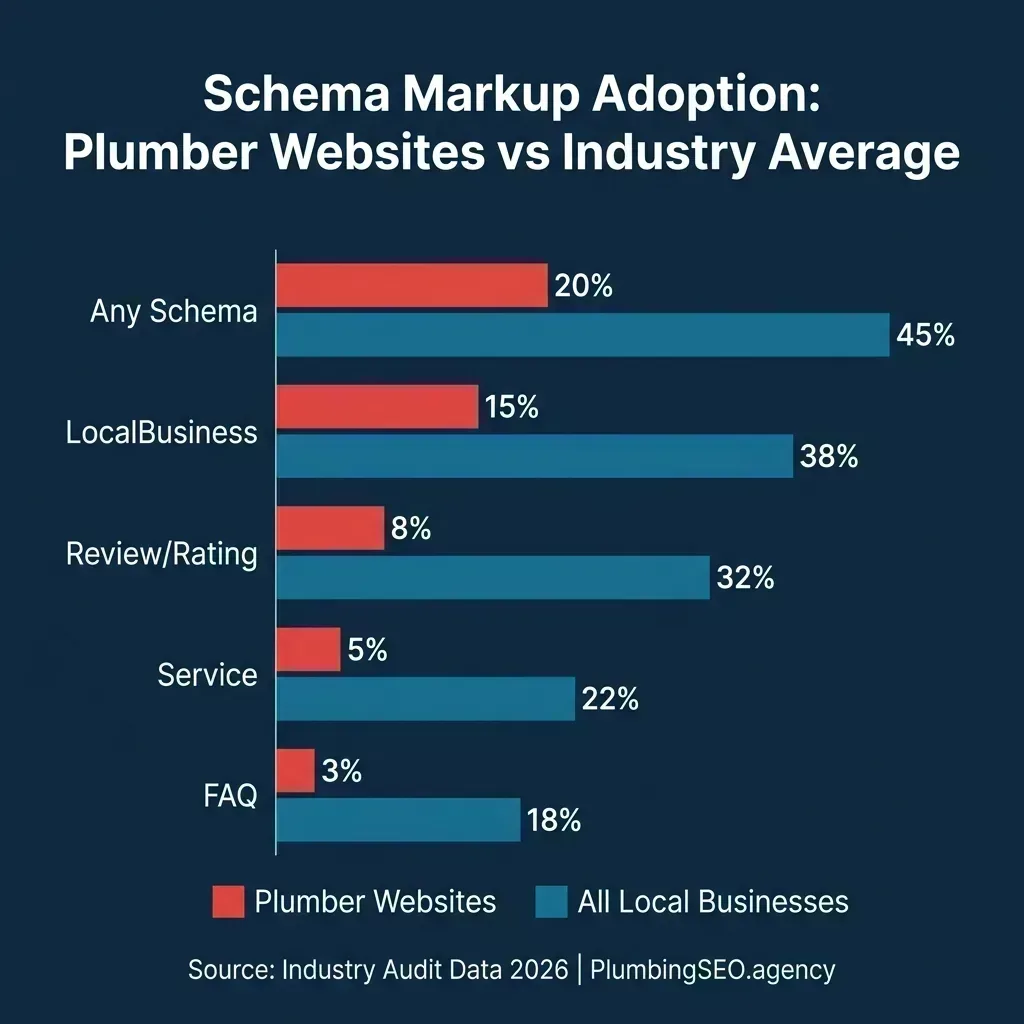
The adoption gap means your reviews can show up as stars in search while your competitors remain invisible.
Only around 8% of plumber websites currently display review stars in search results. Compare that to 32% across all local businesses. This is a gap you can exploit right now. If you have already built a review collection system and have strong Google reviews, AggregateRating schema makes sure those stars follow you into every search result.
"aggregateRating": {
  "@type": "AggregateRating",
  "ratingValue": "4.9",
  "reviewCount": "127",
  "bestRating": "5",
  "worstRating": "1"
}
Important 2026 rule change: Do not use AggregateRating on editorial or comparison pages. After March 2026, Google now classifies non-user-submitted review schema as "misleading markup" and it can trigger manual action penalties. Your AggregateRating must reflect real reviews from actual customers and should nest inside your LocalBusiness or Organization schema block, not on a standalone Product type. Keep the reviewCount updated. If your schema says 127 reviews but your Google Business Profile shows 203, that mismatch reduces trust instead of building it.
Type 4: FAQPage Schema
If you have FAQ sections on your service pages (and you should), FAQPage schema can make those questions and answers show up directly in Google's search results. When it works, your listing expands to take up more vertical space on the results page, physically pushing your competitors further down.
Here is the important nuance for 2026: Google pulled the FAQ rich result feature for most sites back in 2023, and the March 2026 update further restricted it to pages where FAQs are the primary content. However, that does not mean FAQPage schema is useless. FAQPage schema is still one of the cleanest signals you can give AI search systems. Google's AI Mode and tools like ChatGPT and Perplexity use the structured Q&A format to extract direct answers from your content. In a world where more and more searches are answered by AI, having machine-readable FAQs is like leaving the front door open for AI to cite your business.
<script type="application/ld+json">
{
  "@context": "https://schema.org",
  "@type": "FAQPage",
  "mainEntity": [
    {
      "@type": "Question",
      "name": "How much does emergency plumbing
        cost in Dallas?",
      "acceptedAnswer": {
        "@type": "Answer",
        "text": "Emergency plumbing in Dallas
          typically costs $150-$350 for the service
          call, plus parts and labor. After-hours
          and weekend calls may include a $75-$150
          premium."
      }
    },
    {
      "@type": "Question",
      "name": "Do you offer same-day plumbing
        service?",
      "acceptedAnswer": {
        "@type": "Answer",
        "text": "Yes. We offer same-day service
          for most plumbing issues. Emergency calls
          like burst pipes and sewage backups are
          prioritized and typically receive a
          response within 60 minutes."
      }
    }
  ]
}
</script>
Where to place it wisely: Do not add FAQPage schema to every page on your site. That is exactly the pattern Google cracked down on. Instead, use it on your dedicated FAQ page and on service pages where the FAQ section directly answers questions about that specific service. A drain cleaning page with three FAQs about drain cleaning costs is a natural fit. A generic homepage with FAQ schema about every topic is not.
Type 5: Article / BlogPosting Schema
If you are publishing blog content to build authority and attract organic traffic (which you should be doing), every blog post needs Article or BlogPosting schema. This tells Google what the content is, when it was published, when it was last updated, and who wrote it.
The "who wrote it" part has become significantly more important. Google's E-E-A-T framework (Experience, Expertise, Authoritativeness, Trustworthiness) now weighs author expertise heavily when deciding which content to cite in AI-generated answers. Blog posts published by a named, verified entity with a strong online presence are far more likely to get cited than anonymous content, regardless of quality.
<script type="application/ld+json">
{
  "@context": "https://schema.org",
  "@type": "Article",
  "headline": "Your Blog Post Title Here",
  "author": {
    "@type": "Organization",
    "name": "YOUR BUSINESS NAME",
    "url": "https://yoursite.com"
  },
  "publisher": {
    "@type": "Organization",
    "name": "YOUR BUSINESS NAME",
    "logo": {
      "@type": "ImageObject",
      "url": "https://yoursite.com/logo.png"
    }
  },
  "datePublished": "2026-05-12",
  "dateModified": "2026-05-12",
  "mainEntityOfPage":
    "https://yoursite.com/blog/post-slug.html",
  "image":
    "https://yoursite.com/images/blog/post-image.png"
}
</script>
Keep the dateModified field current. If you update a blog post with new information, update the date in your schema too. Google cross-references the schema date against the visible content date on the page, and mismatches hurt trust. This is a small detail that most plumbing websites completely overlook, but it signals freshness to both traditional search and AI systems.
Where Each Schema Type Goes on Your Website
One of the most common questions from plumbing company owners who learn about schema is: "Do I need all of this on every page?" The answer is no. Each schema type has a natural home, and spreading the same markup across every page actually dilutes its effectiveness.
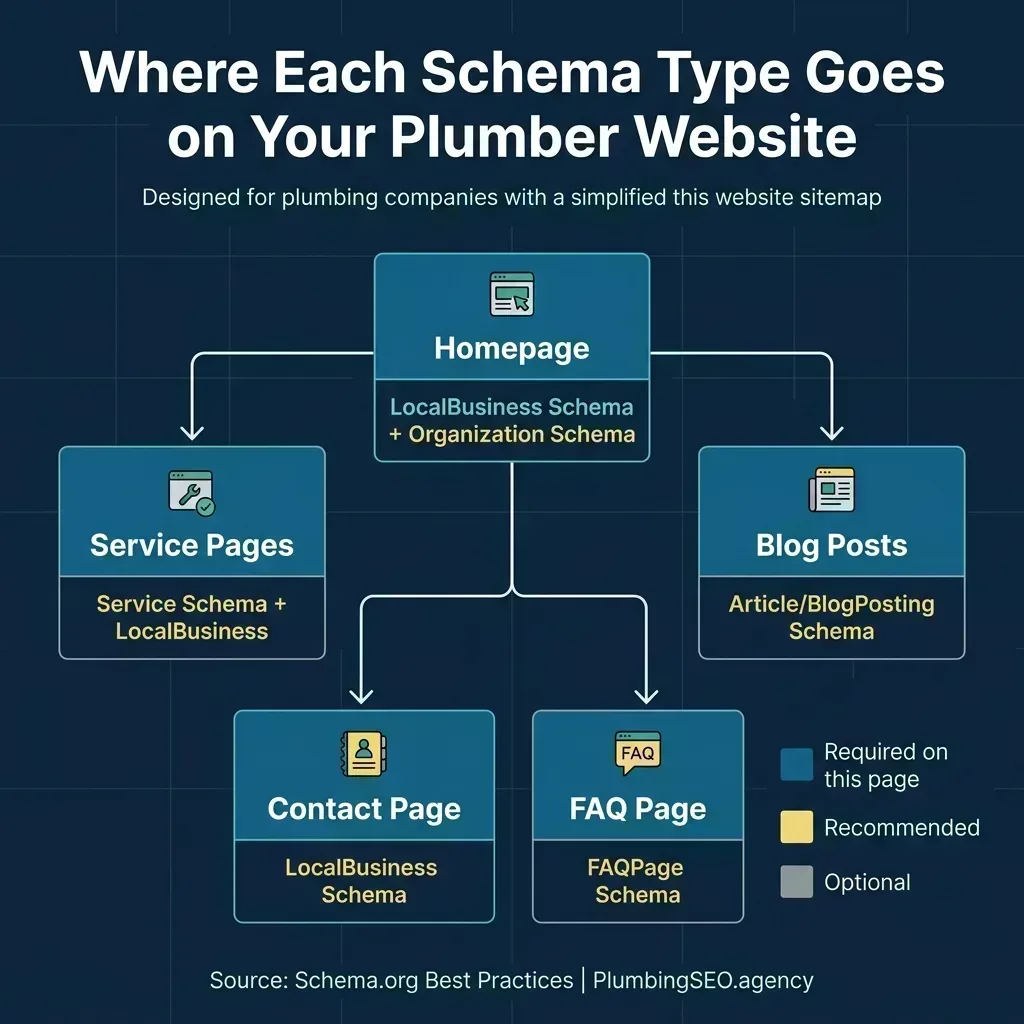
Match your schema to the primary purpose of each page. Do not duplicate the same block everywhere.
The core principle is simple: schema should describe the primary content of the page it appears on. Your homepage is about your business as a whole, so LocalBusiness schema lives there. Your service pages are about specific services, so Service schema belongs there. Your blog posts are articles, so Article schema goes there. Think of it as labeling each room in your house with what that room is for. You would not put a "kitchen" sign on every door.
How to Add Schema Markup (Even If You Are Not Technical)
Option 1: Copy, Customize, and Paste (Recommended)
The JSON-LD code blocks above are ready to use. Copy the relevant block, replace the placeholder values with your real business information, and paste it inside the <head> section of the appropriate page. If you are comfortable editing HTML, this takes about 30 minutes for your entire site.
Option 2: WordPress Plugins
If you are on WordPress, plugins like Yoast SEO or Rank Math can generate schema automatically. However, plugin-generated schema is often incomplete or uses incorrect types. Always verify the output using Google's testing tools. As one SEO practitioner pointed out on r/localseo, "super easy to do with a schema generator, but always validate what it actually outputs."
Option 3: Ask Your Web Developer
If you have a developer or an agency managing your site, send them this article. A competent developer can implement all five schema types in under two hours. If your current SEO agency has never mentioned structured data to you, that tells you something about how much they actually know about technical SEO in 2026.
How to Test Your Schema
After adding schema to your site, validate it using these free tools:
- Google Rich Results Test - Paste your URL and see which rich results you are eligible for. This catches syntax errors and missing required fields.
- Schema.org Validator - A deeper check that flags recommended properties you might be missing, not just required ones.
- Google Search Console - Under the "Enhancements" section, you will see any schema errors Google has found during crawling. Check this regularly.
If you test your plumbing website right now and find zero structured data, you are in the majority. But that majority is leaving clicks on the table. The plumbers who implement schema this week are the ones who will see star ratings, business details, and expanded listings in search results within 2-4 weeks.
5 Schema Mistakes That Hurt Instead of Help
- Using "LocalBusiness" instead of "Plumber" - Google has a specific Plumber type. Using the generic parent type is like telling someone you work in "services" instead of saying you are a plumber.
- Inconsistent NAP data - Your schema says one phone number, your website header shows another, and your Google Business Profile has a third. Pick one and make everything match.
- Stale schema - Changed your hours for summer? Added a new service? Moved to a new office? Your schema needs to be updated too. Outdated structured data feeds Google wrong information, which is worse than having no schema at all.
- FAQ schema on every page - This was a common tactic in 2022-2023. In 2026, it triggers reduced visibility or no rich result display. Only use FAQPage schema where FAQs are genuinely relevant to the page content.
- Fake or inflated review counts - If your AggregateRating claims 200 reviews but Google can only find 45, that is a trust-destroying mismatch. Only mark up reviews you can actually substantiate.
Frequently Asked Questions
Google has stated that structured data is not a direct ranking factor. However, the indirect impact is significant. Schema enables rich results that increase click-through rates by 20-30%, and it helps AI systems like Google's AI Mode understand and cite your content. Sites with clean, accurate schema consistently outperform competitors without it.
If you can edit HTML files, you can add schema yourself. The JSON-LD format goes inside a script tag in your page's head section. Copy the code examples in this guide, replace the placeholder values with your business information, and paste. WordPress users can also use plugins like Yoast or Rank Math, though you should always verify the output with Google's Rich Results Test.
After adding schema, Google typically processes it within 2-4 weeks during its next crawl cycle. Rich results like star ratings may appear sooner for well-crawled sites. You can speed up the process by submitting updated URLs for indexing through Google Search Console.
Yes. If you are a service-area business without a storefront, use the LocalBusiness schema but omit the streetAddress and instead emphasize the areaServed property. List every city and region you service. Google supports service-area businesses in structured data and in Google Business Profile.
For plumbing websites, hand-coded JSON-LD gives you the most control and avoids the common issues with plugin-generated schema (wrong business types, missing properties, conflicting markup). However, if you prefer plugins, Rank Math and Yoast are solid options. The key is to always validate the output using Google's Rich Results Test regardless of which method you use.
Not Sure If Your Site Has Schema?
Our free SEO audit checks your structured data, tests it for errors, and tells you exactly what is missing. Most plumbing websites are leaving clicks and calls on the table because they are not speaking Google's language. Let a technical plumber SEO agency handle the markup so you can focus on running your business.
Run My Free Schema Check