
- Most plumbing websites have 5-10 technical SEO problems that are actively preventing Google from crawling, indexing, and ranking your pages. These are not content issues. They are code-level mistakes your developer should have caught.
- Fixing technical SEO is often the fastest path to ranking improvements because you are removing barriers rather than building something new. One plumbing company saw a 467% traffic increase in 90 days after addressing these foundational issues.
- This checklist covers 15 specific items across three categories: crawlability, performance, and content structure. Each one includes what to check, why it matters, and how to fix it.
Why Your Developer Built a Website That Google Cannot Read
Your plumbing website looks great. The colors match your truck. The photos are professional. The contact form works. Your developer delivered exactly what you asked for: a good-looking website.
But here is the problem. You did not ask for a website that Google can read, crawl, and rank. You asked for a website that looks nice. And those are two very different things.
Web developers build for humans. They care about fonts, layouts, and button colors. SEO requires building for both humans and search engine crawlers, which means there is an entire invisible layer of technical requirements that most developers either do not know about or do not prioritize. According to the 2025 Web Almanac, only 48% of mobile pages pass all three Core Web Vitals thresholds. For plumbing websites built by general-purpose developers, the failure rate is even higher.
We audit plumbing websites every week. The pattern is remarkably consistent: the website was built by a talented designer or developer who simply did not have SEO on their checklist. The result is a site that looks professional to humans but looks broken to Google.
Here is how the failures break down across the plumbing industry:
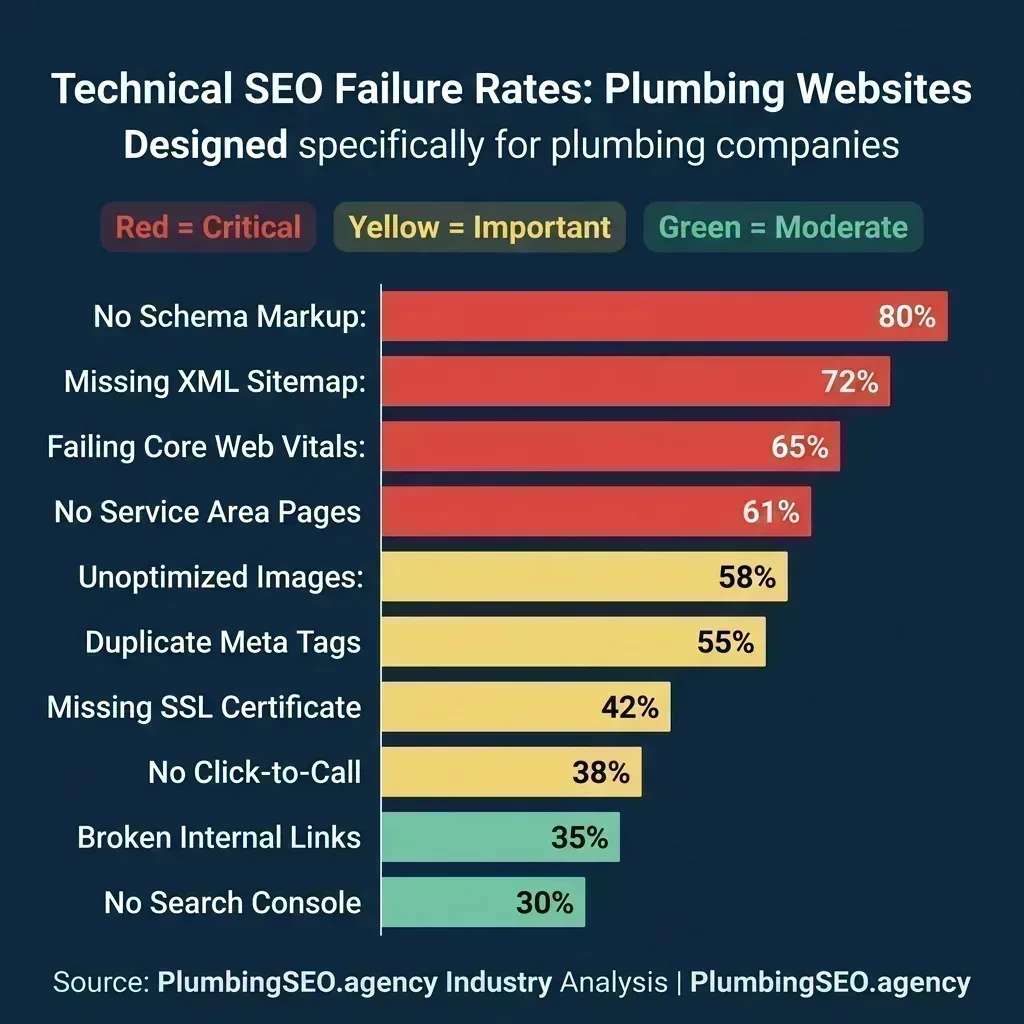
The most common technical SEO failures we find during plumbing website audits, ranked by frequency.
If your site has even three of these issues, you are likely losing rankings to competitors who may have weaker content but stronger technical foundations. The good news is that most of these are one-time fixes. Address them once, and they stay fixed.
The 15-Point Checklist at a Glance
Before we dig into each item, here is the full checklist organized by category. We have broken it into three groups: crawlability (can Google find your pages), performance (can Google load your pages quickly), and content structure (can Google understand what your pages are about).
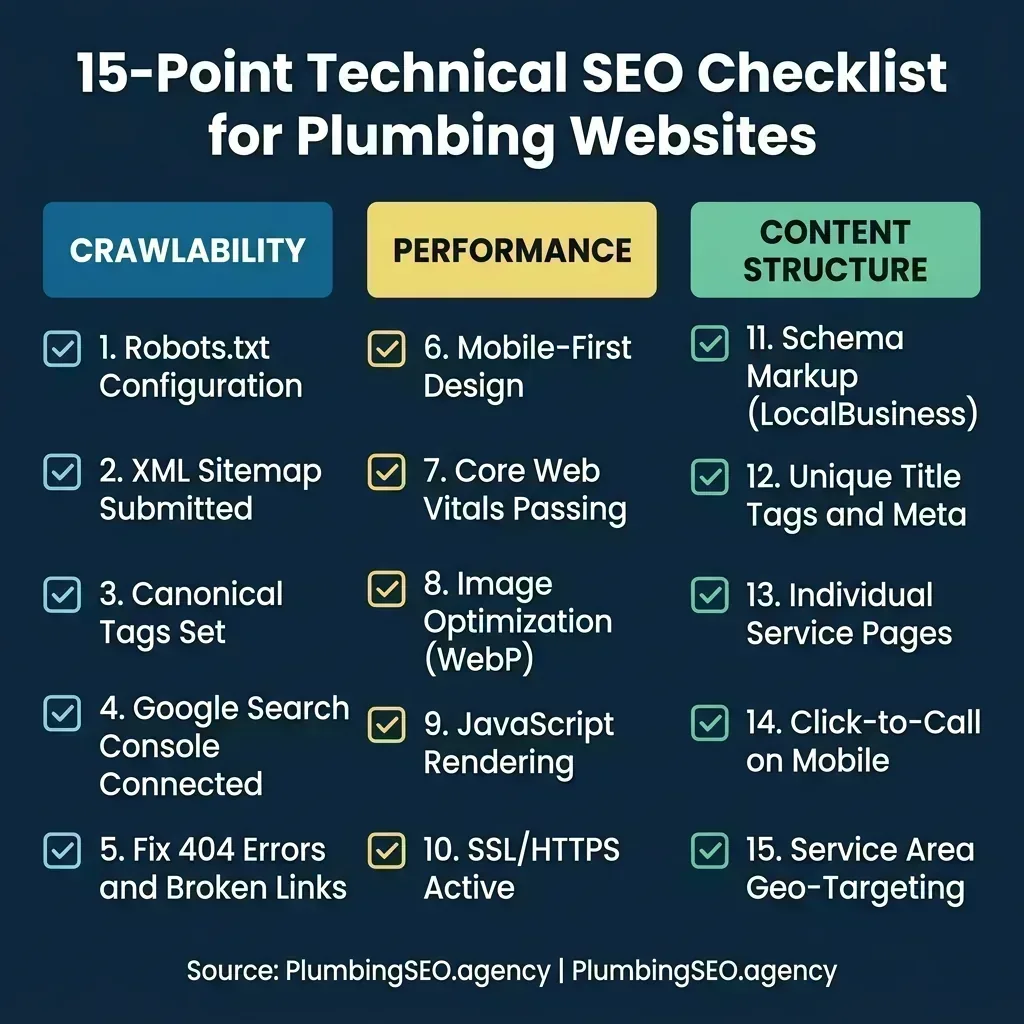
The complete 15-point checklist. Print this, hand it to your developer, and ask them to check every box.
Each item below includes a quick test you can run yourself, why it matters specifically for plumbing companies, and what fixing it actually involves. Some take five minutes. Others require a developer. But all of them are non-negotiable if you want Google to treat your website seriously.
Part 1: Crawlability - Can Google Even Find Your Pages?
This is the most fundamental category. If Google's crawler cannot access, read, and index your pages, nothing else matters. You could have the best content in your market and it would never show up in search results. One commenter on r/localseo summed it up perfectly: "It was skipping technical checks. I kept pushing content and keywords but ignored site speed and schema. That slip cost me rankings and traffic."
1. Robots.txt Is Blocking Critical Pages
Quick test: Go to yourwebsite.com/robots.txt in your browser. If the file says Disallow: / anywhere, Google is being told not to crawl parts of your site. If you see Disallow: /wp-admin/ that is normal. But if you see your service pages, blog, or entire site being blocked, your developer left a development-stage rule in place.
This happens more often than you would think. Developers routinely add Disallow: / during site construction so Google does not index an unfinished site. Then they forget to remove it when the site goes live. We have seen plumbing companies run paid ads to a website that Google literally could not crawl because of a single line in a text file.
How to fix it: Your robots.txt should look something like this:
User-agent: *
Allow: /
Disallow: /wp-admin/
Disallow: /cgi-bin/

Sitemap: https://yoursite.com/sitemap.xml
The key rule: everything should be allowed by default, with only administrative directories blocked. And always include a link to your sitemap so Google can find every page.
2. No XML Sitemap Submitted to Google
Quick test: Try visiting yourwebsite.com/sitemap.xml. If you get a 404 error, you do not have one. Even if it exists, check Google Search Console to confirm it has actually been submitted.
An XML sitemap is a roadmap that tells Google every page on your website. Without it, Google has to discover your pages by following links, which means orphaned pages (pages with no internal links pointing to them) may never get indexed at all. For a plumbing company with 15-20 service pages across multiple cities, this is a significant problem. If your "emergency plumber in [city]" page is not in your sitemap and not linked from anywhere, Google may never know it exists.
How to fix it: If you are on WordPress, install Yoast SEO or Rank Math and enable the sitemap feature. For custom-built sites, generate a sitemap using a tool like XML-Sitemaps.com and submit it through Google Search Console. Then make sure every new page you publish gets added to the sitemap automatically.
3. Missing or Broken Canonical Tags
Quick test: View the source code of any page on your site (right-click, View Page Source). Search for rel="canonical". If it is missing entirely, or if the URL it points to is wrong (like pointing to a staging domain or a different page), you have a problem.
Canonical tags tell Google which version of a page is the "official" one. This matters because your website might serve the same page at multiple URLs: yoursite.com/drain-cleaning, yoursite.com/drain-cleaning/, and www.yoursite.com/drain-cleaning could all show the same content. Without a canonical tag, Google treats these as duplicate pages and dilutes your ranking power across all of them instead of concentrating it on one.
How to fix it: Every page on your site needs a <link rel="canonical" href="[exact URL]"> tag in the <head> section. Make sure the URL in the canonical tag matches the exact format you want Google to index (with or without www, with or without trailing slash, but consistent across your entire site).
4. Google Search Console Is Not Connected
Quick test: Log in to Google Search Console. If you do not have an account, or if your website is not verified, you are flying blind. Search Console is the only tool that tells you exactly which pages Google has indexed, which pages have errors, and what search queries are bringing people to your site.
This is not just a "nice to have." Search Console is where Google tells you about problems. If your site has indexing errors, manual penalties, or mobile usability issues, Search Console is the only place you will find out. We have audited plumbing companies that had critical indexing errors for months without knowing because nobody was checking Search Console.
How to fix it: Go to Google Search Console, add your website as a property, and verify ownership. Verification takes five minutes using the HTML tag method. Once verified, submit your sitemap and check the Coverage report for any errors. Make this a monthly habit.
5. Broken Internal Links and 404 Errors
Quick test: Open Google Search Console, go to the Pages report, and look for "Not found (404)" errors. Alternatively, use a free tool like Screaming Frog to crawl your site and find broken links.
Broken links are like dead-end corridors in your website. Every time a visitor or Google's crawler hits a 404 page, they lose trust and may leave entirely. For plumbing websites, this commonly happens when service pages are renamed, old blog posts are deleted, or city pages are restructured without setting up redirects. One study found that 66.5% of links to websites are dead, which means inbound links from directories and review sites may also be pointing to pages that no longer exist.
How to fix it: For each broken URL, either restore the page, redirect it to the most relevant existing page using a 301 redirect, or update the internal links pointing to it. Prioritize fixing links on high-traffic pages first. If you recently redesigned your site, make sure every old URL redirects to its new equivalent.
Part 2: Performance - Can Google Load Your Pages Fast Enough?
Google has been clear about this for years: page speed is a ranking factor. But speed is not just about rankings. A one-second delay in page load can reduce conversions by 7%, according to Cloudflare's research. For a plumbing company, that means slower pages literally cost you phone calls. When someone has a burst pipe at 11pm, they are not waiting 8 seconds for your page to load. They are hitting the back button and calling the next plumber on the list.
6. No Mobile-First Responsive Design
Quick test: Open your website on your phone. Not in a desktop browser resized to look small. On your actual phone. Can you read the text without zooming? Can you tap the phone number without accidentally hitting the wrong link? Does the navigation work smoothly?
Google uses mobile-first indexing, which means Google evaluates and ranks your website based on its mobile version, not the desktop version. If your mobile experience is poor, your rankings suffer across all devices. Over 60% of plumbing-related searches happen on mobile, often from people standing in front of a leaking pipe. If your site is not built mobile-first, you are losing those emergency calls to competitors whose sites load and function properly on a phone.
As one plumber on Reddit discovered after hiring an SEO audit: "The website itself was part of the problem... slow, not mobile friendly, none of my service pages were optimized for the areas I actually serve." After fixing those issues, they went from struggling to getting 15-20 calls per week from organic search.
How to fix it: If your site is not responsive, it likely needs a rebuild with a mobile-first framework. At minimum, ensure all text is readable without zooming, all buttons are at least 48x48 pixels for tap targets, and the viewport meta tag is set correctly: <meta name="viewport" content="width=device-width, initial-scale=1.0">.
7. Core Web Vitals Are Failing
Quick test: Go to PageSpeed Insights and enter your website URL. Look at the Core Web Vitals section: LCP (Largest Contentful Paint), INP (Interaction to Next Paint), and CLS (Cumulative Layout Shift). If any of them show red or orange, you have work to do.
Core Web Vitals measure three things: how fast your main content loads (LCP, target under 2.5 seconds), how quickly the page responds to user input (INP, target under 200 milliseconds), and how much the layout shifts while loading (CLS, target under 0.1). According to 2025 Web Almanac data, only 48% of mobile pages pass all three metrics. Pages ranking at position 1 are 10% more likely to pass Core Web Vitals thresholds compared to pages at lower positions.
For plumbing websites specifically, the most common CWV failures come from unoptimized hero images (kills LCP), heavy WordPress plugins (kills INP), and ads or chat widgets that load late and push content around (kills CLS).
How to fix it: Start with the biggest offenders. Compress your hero image and set explicit width and height attributes on all images (fixes CLS). Remove unused WordPress plugins. Defer non-critical JavaScript. If your LCP is above 4 seconds, your hosting provider may also be part of the problem. Shared hosting plans often cannot deliver the server response times needed for good Core Web Vitals.
8. Images Are Not Optimized
Quick test: Right-click any image on your site and check the file size. If a single image is over 500KB, it is too large. If images are in PNG format when they could be WebP, they are wasting bandwidth. If any image is missing an alt attribute, you are losing both accessibility and SEO value.
This is one of the most common developer oversights we see. A developer uploads the raw photo from your phone or camera at full resolution (often 3-5MB per image), and the site loads all of them on every page visit. Your homepage might be downloading 15MB of images before any text appears. Multiply that by a visitor on a 4G connection and you have a site that takes 12+ seconds to load.
Image optimization has three components: format (use WebP instead of PNG/JPG for 25-35% smaller files), compression (reduce quality to 80-85% which is invisible to the human eye but cuts file size in half), and lazy loading (only load images when the user scrolls to them). Your developer should also add descriptive alt text to every image. "Plumber repairing copper pipe under kitchen sink" tells Google what the image shows. "IMG_3847.jpg" tells Google nothing.
How to fix it: Run all images through a compression tool like Squoosh or ShortPixel. Convert to WebP format. Add loading="lazy" to all images below the fold. Add descriptive alt text that includes your service and location when natural. Target under 100KB per image for most use cases.
9. JavaScript Is Blocking Content Rendering
Quick test: Disable JavaScript in your browser (Chrome DevTools > Settings > Debugger > Disable JavaScript), then reload your website. If the page is blank or missing critical content, Google may be seeing the same thing. While Google can render JavaScript, it is a two-phase process that introduces delays and sometimes fails entirely.
This issue is especially common on websites built with React, Angular, or other JavaScript frameworks. The developer builds a beautiful interactive site, but the actual content is generated by JavaScript after the page loads. Google's crawler needs to run that JavaScript to see your content, and sometimes it does not. The result: a page that looks perfect to visitors but appears empty to Google's indexer.
Even if Google does eventually render your JavaScript content, it takes longer than crawling static HTML. According to Google's own documentation, JavaScript-rendered pages enter a separate rendering queue that can delay indexing by days or weeks compared to pages with server-rendered HTML.
How to fix it: For plumbing websites, the simplest solution is to use server-side rendering (SSR) or static site generation. Your service pages, contact information, and phone numbers should all be in the raw HTML that Google receives on the first request. If your site uses a JavaScript framework, implement server-side rendering or pre-rendering so critical content is available without waiting for JavaScript execution.
10. No SSL Certificate (HTTP Instead of HTTPS)
Quick test: Look at your browser's address bar. If you see a padlock icon and "https://", you are fine. If you see "Not Secure" or "http://", your SSL certificate is either missing or expired. Also check for mixed content: your site might load over HTTPS but include images or scripts loaded over HTTP, which triggers a security warning.
HTTPS has been a confirmed Google ranking signal since 2014. In 2026, not having SSL is not just an SEO problem. It is a trust problem. Chrome and other browsers actively warn visitors that your site is "Not Secure," which is the last thing a homeowner wants to see when they are about to call a stranger into their home to fix their plumbing. According to a GlobalSign survey, 84% of users would abandon a purchase on a website without a secure connection.
How to fix it: Most hosting providers offer free SSL certificates through Let's Encrypt. Install it, force all traffic to redirect from HTTP to HTTPS, and check for mixed content warnings using your browser's developer tools. This is a 15-minute fix that should have been done on day one.
Part 3: Content Structure - Can Google Understand What Your Pages Are About?
Crawlability gets Google to your pages. Performance keeps Google (and visitors) from bouncing. But content structure is what tells Google what each page is actually about and whether it deserves to rank for a given search query. These five items determine whether Google connects your drain cleaning page to someone searching "drain cleaning near me" or ignores it entirely.
11. No Schema Markup (LocalBusiness, Service, FAQ)
Quick test: Go to Google's Rich Results Test and enter your homepage URL. If the result shows "No rich results detected," you have no schema markup. If you want a deeper explanation, read our complete guide to the 5 essential schema types for plumber websites.
Schema markup is invisible code that tells Google exactly what your business is, where you operate, what services you offer, and what your customers think of you. Without it, Google has to guess all of that from your page text. With it, Google can display your star ratings, business hours, phone number, and service area directly in search results. Sites with proper schema can see 20-30% higher click-through rates from rich results alone, and roughly 80% of plumber websites have zero schema markup.
How to fix it: At minimum, add LocalBusiness (Plumber subtype) schema to your homepage and Service schema to each service page. If you have FAQ sections, add FAQPage schema. If you publish blog content, add Article schema. All of these use JSON-LD format and go in a <script type="application/ld+json"> tag in your page's <head> section.
12. Duplicate Title Tags and Meta Descriptions
Quick test: Open Google Search Console, go to the Pages report, and look for "Duplicate without user-selected canonical" warnings. Also check your title tags: if multiple pages share the same <title> tag (like just "Home" or your business name on every page), you have a problem.
Every page on your website should have a unique title tag and meta description that tells both Google and searchers what that specific page is about. When your drain cleaning page, sewer repair page, and water heater page all have the title "ABC Plumbing - Your Local Plumber," Google does not know which one to show for which search query. The result is that none of them rank well for anything specific.
Your title tags should follow a pattern like: "[Service] in [City] - [Business Name]". For example: "Emergency Drain Cleaning in Dallas - ABC Plumbing". Your meta descriptions should be unique, compelling summaries under 160 characters that include a call to action. Think of them as the ad copy for your organic search listing.
How to fix it: Audit every page on your site and create a unique title tag (50-60 characters) and meta description (120-155 characters) for each one. Include the primary keyword naturally. For your keyword strategy, map one primary keyword per page and make sure your title tag reflects it.
13. No Individual Service Pages
Quick test: Count the pages on your website. If all your services are listed on a single "Services" page rather than having individual pages for drain cleaning, water heater installation, sewer repair, etc., you are limiting how Google can rank your site.
This is one of the most impactful changes a plumbing company can make. Google ranks pages, not websites. If you have one "Services" page listing 12 services, Google has to decide what that page is about. Is it about drain cleaning? Sewer repair? Water heaters? The answer is "all of them, kind of," which means it does not rank strongly for any of them. But if you have 12 dedicated pages, each one optimized for a specific service, Google can match each page to the exact search query it deserves.
On r/SEO, the most common advice for plumbing businesses is to create dedicated service pages with at least 800 words of genuinely helpful content about each service. This is not filler content. It should cover what the service involves, warning signs homeowners should watch for, typical pricing factors, and FAQs. Each page becomes a landing page for a different set of search queries.
How to fix it: Create individual pages for each major service you offer. A typical plumbing company should have pages for: drain cleaning, sewer repair, water heater installation, leak detection, pipe repair/repiping, toilet/faucet repair, and gas line services. If you serve multiple cities, consider creating location-specific versions following the multi-location SEO approach.
14. No Click-to-Call on Mobile
Quick test: Open your website on your phone and try to call you. If you have to manually copy your phone number and paste it into the dialer, you are losing calls. The phone number should be a tappable link that opens the phone app instantly.
This seems obvious, but 38% of plumber websites we audit do not have properly implemented click-to-call functionality. The HTML is simple, but developers often display phone numbers as plain text instead of tel: links. For plumbing companies where most leads come from phone calls, this single issue can be the difference between 10 calls a month and 30.
Your phone number should appear in the header (visible without scrolling on every page), in the footer, and at least twice within the body content of each service page. All instances should be clickable tel: links. If you are tracking calls, use a service like CallRail or CallTrackingMetrics that can swap displayed numbers while preserving the click-to-call functionality.
How to fix it: Wrap every phone number on your site in a <a href="tel:+15551234567"> tag. The format matters: use the full international format with no spaces inside the href. For more on why your plumber website is not generating calls, check our conversion optimization guide.
15. No Service Area Geo-Targeting
Quick test: Search your website for mentions of specific cities, neighborhoods, and regions you serve. If your entire site just says "we serve the greater metro area" without naming specific locations, Google cannot connect you to location-specific searches.
When someone searches "emergency plumber in Frisco TX," Google is looking for pages that specifically mention Frisco. If your website only mentions "Dallas" or "DFW area," you are invisible for that hyper-local search. According to "near me" search data from Google, local searches with specific city or neighborhood names have grown consistently year over year and carry very high purchase intent.
This is not just about creating city pages (though those help). It means Most service pages should mention the specific areas you serve. Your sewer repair page should say where you do sewer repair. Your water heater installation page should list the cities you cover. Include neighborhoods, ZIP codes, and landmarks when they make sense naturally.
How to fix it: Add service area details to existing pages and consider building dedicated location pages for your highest-priority cities. Each location page needs unique content, not just a find-and-replace of the city name. Include local landmarks, neighborhood names, and area-specific details that prove you actually work there. If you serve 5+ cities, follow a hub-and-spoke architecture to keep everything organized.
Where to Start: The Priority Matrix
Fifteen items is a lot to tackle at once. If you try to fix everything simultaneously, you will get overwhelmed and nothing will get done. The priority matrix below organizes every item by effort (how hard it is to fix) and impact (how much it will affect your rankings and calls). Start with the Quick Wins quadrant and work your way through.
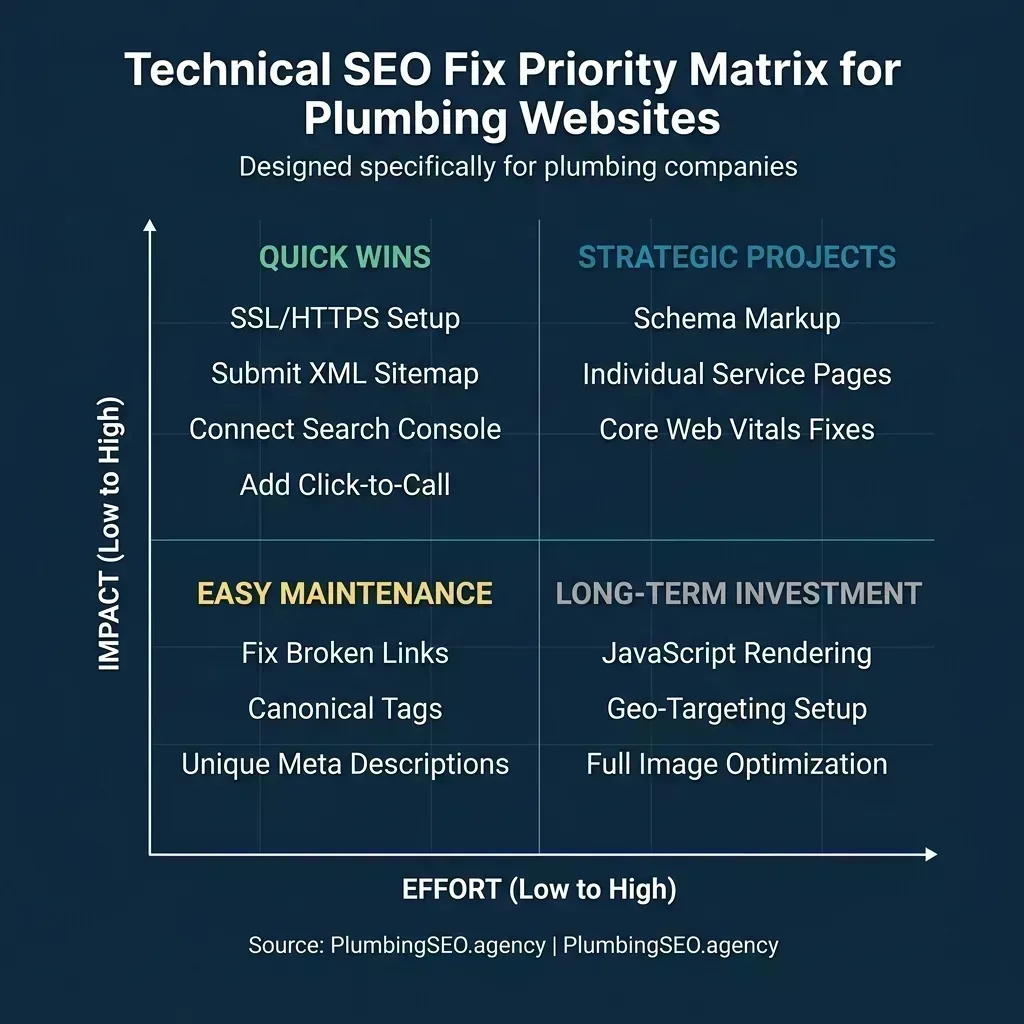
Start with the top-left quadrant. These four fixes take under an hour each and deliver outsized ranking improvements.
The Quick Wins in the top-left are your first week's agenda. Enabling SSL, submitting your sitemap, connecting Search Console, and adding click-to-call buttons can each be done in under an hour and will produce measurable results within 2-4 weeks. The Strategic Projects in the top-right take more time but deliver the biggest long-term gains. Schema markup and individual service pages, in particular, are what separate plumbing websites that generate calls from those that just exist online.
For a suggested weekly schedule, prioritize like this: Week 1 covers the Quick Wins (items 2, 4, 10, 14). Week 2 handles crawlability cleanup (items 1, 3, 5). Week 3 tackles the content structure projects (items 11, 12, 13, 15). Week 4 is performance optimization (items 6, 7, 8, 9). Track your rankings before you start so you can measure the improvement.
What Happens When You Actually Fix These Issues
Theory is nice. Results are better. Here is what a typical technical SEO cleanup looks like for a plumbing company that fixes the majority of items on this checklist:
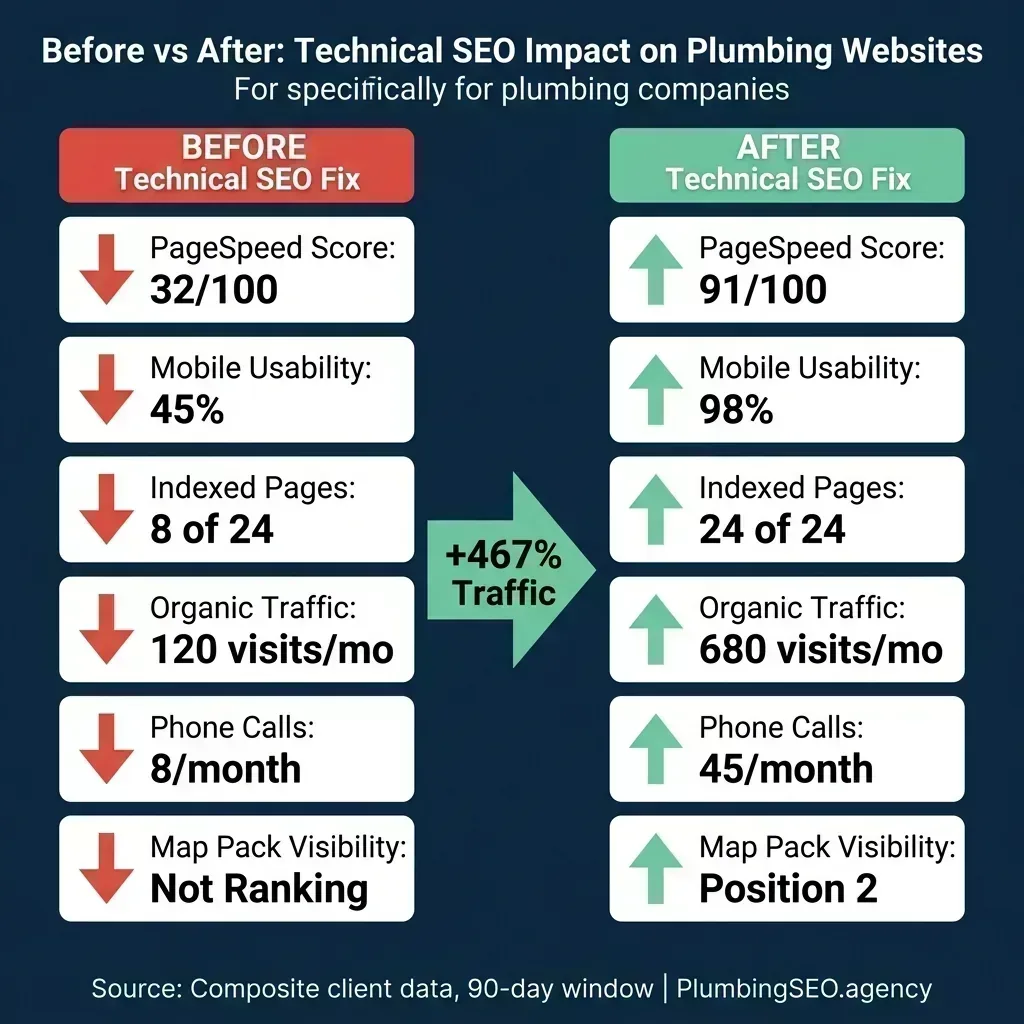
Composite data from a 90-day technical SEO cleanup. The biggest gains came from getting previously un-indexed service pages into Google's index.
The most dramatic improvement in this case was the indexed pages metric. Before the cleanup, only 8 of 24 pages were being indexed by Google. That means 16 pages of service and location content were completely invisible to search. The remaining improvements (PageSpeed, mobile usability, Map Pack visibility) compounded on top of that foundation. More pages indexed means more keywords you can rank for, which means more traffic, which means more calls.
This is not unusual. We routinely see plumbing companies sitting on 30-50% un-indexed pages because of crawlability issues that nobody was monitoring. If you set up Google Search Console (item 4 on this checklist), you will know your exact number within 24 hours.
Frequently Asked Questions
Most technical SEO fixes are one-time costs. A comprehensive technical audit and fix from an experienced agency typically runs $500-$1,500. Many items on this checklist (submitting a sitemap, connecting Search Console, adding click-to-call) are free and can be done yourself. The larger projects like creating individual service pages or implementing schema markup may cost $1,000-$3,000 if outsourced to a developer, but they only need to be done once.
Quick wins like SSL installation and sitemap submission typically show results within 2-4 weeks as Google re-crawls your site. Core Web Vitals improvements can take 28 days to reflect in Google's field data. Larger structural changes like creating new service pages usually take 4-8 weeks to fully impact rankings. The fastest visible change is usually indexing improvements, which you can see in Search Console within days of submitting your sitemap.
About half the items on this checklist can be done without a developer. Connecting Search Console, submitting a sitemap, checking robots.txt, and adding click-to-call links are all manageable if you are comfortable editing basic HTML. Items like schema markup implementation, Core Web Vitals optimization, and JavaScript rendering fixes typically require someone with technical skills. If you are on WordPress, plugins like Yoast SEO and WP Rocket can handle some of the technical work automatically.
Before. Always before. If your site has crawlability issues, Google may not even index the content you create. If your pages load slowly, visitors will leave before reading anything. Technical SEO is the foundation that makes all other SEO work actually count. Fix the technical issues first, then invest in content, then build backlinks. The order matters because each step depends on the one before it.
Run the quick tests listed next to each item in this checklist. Check your robots.txt, look for your sitemap, test your PageSpeed score, verify SSL, and run the Rich Results Test for schema. These are all free tools that take less than five minutes each. If your developer says the site is fine but PageSpeed Insights shows a score of 35 and Google Search Console shows indexing errors, the data speaks for itself. You can also request a free technical SEO audit from agencies like ours that will give you an objective assessment.
Not Sure What Your Developer Missed?
Our free SEO audit checks every item on this 15-point checklist, identifies the specific technical issues holding your plumbing website back, and gives you a prioritized fix list. We are the kind of plumber SEO agency that digs into your code, not just your keywords. Most plumbing websites have at least 5 fixable issues right now.
Run My Free Technical SEO Audit