
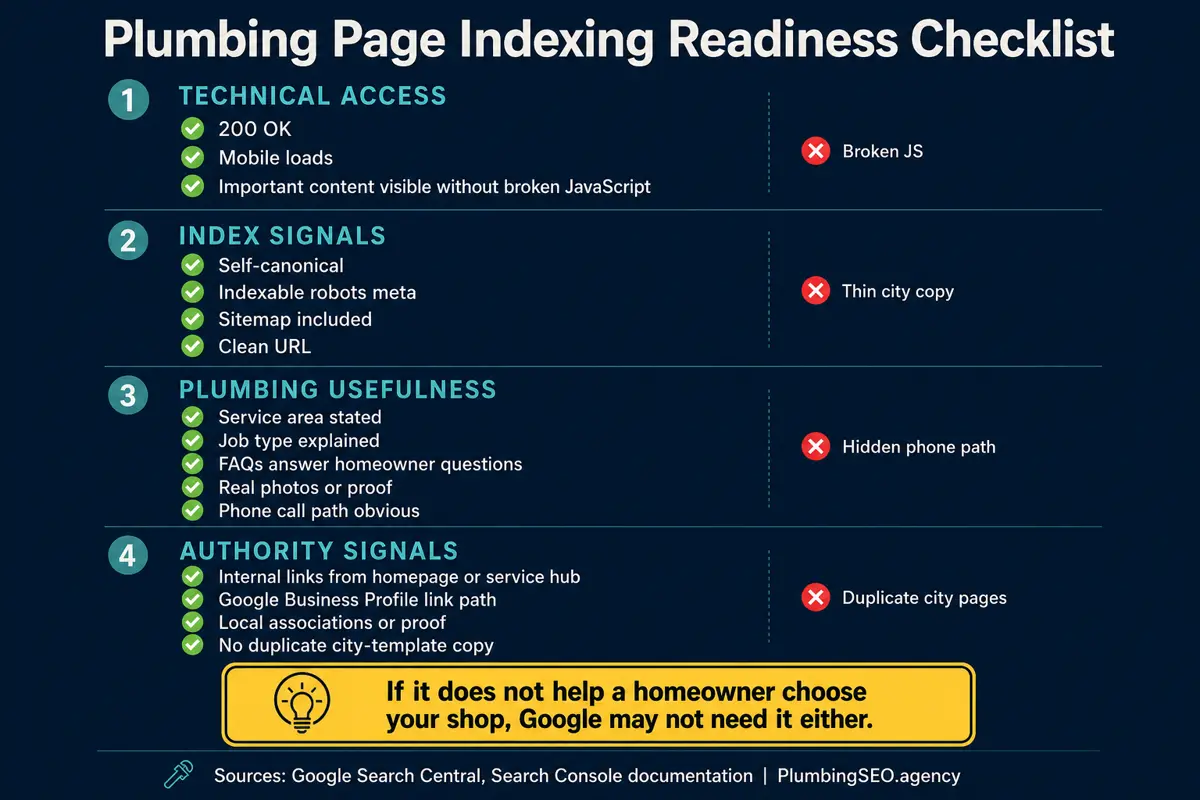
- If Google ignores a plumbing page, check indexability first: 200 status, no noindex tag, crawlable robots.txt, and a clean canonical.
- After the technical basics pass, look at usefulness: real service details, local proof, internal links, and a clear call path.
- Do not request indexing over and over. Fix the leak, confirm it in Search Console, then ask Google to recrawl the finished page.
A plumbing page can look finished to you and still be invisible to Google. The headline is there, the service area is there, the phone number is there, and the page is sitting on your site waiting to pull its weight. Then you search for it a week later and nothing shows up. Not page two. Not page ten. Nothing.
That is not just an SEO annoyance. If your emergency plumbing page, sewer repair page, water heater page, or city service page does not get indexed, it cannot rank. If it cannot rank, it cannot put jobs on the board. The truck may be ready, but the customer never finds the shop.
This checklist is for the owner, office manager, or marketing lead who needs to figure out why Google is ignoring a plumbing website page. We will start with the fast technical checks, then move into the plumber-specific problems that generic SEO checklists miss.
If you want a full outside review, our plumbing website SEO audit checks indexing, titles, links, crawlability, schema, content quality, and the call path together. But if you are checking one page today, start here.
First, confirm the page is really not indexed
Before you start fixing things, make sure you are looking at the right problem. A page can be indexed and still rank poorly. That is different from not being indexed at all.
Run these checks:
- Search Google for
site:yourdomain.com/your-page-slug. This is not perfect, but it is a quick starting point. - Open Google Search Console and use the URL Inspection tool on the exact live URL.
- Check the Page indexing report in Search Console for the reason Google gives, not just the headline status.
- Make sure you are inspecting the clean canonical URL, not a redirecting URL, tracking URL, or old page version.
For a plumbing company, this matters most on pages tied to revenue. If a blog post takes longer to get picked up, that is annoying. If your drain cleaning city page, emergency plumbing page, or slab leak page is excluded, that can cost real calls.
Owner shortcut
If Search Console says "URL is not on Google," do not jump straight to "request indexing." Treat that button like the last turn of the wrench, not the whole repair.
The 6-step diagnostic flow when Google ignores a page
Google has to discover, crawl, understand, and choose to index a page. A failure at any one of those steps can keep the page out. The fastest way to work is in order. Do not rewrite the whole page if the server is returning a 500 error. Do not blame the sitemap if the page has a noindex tag. Find the leak before replacing the pipe.
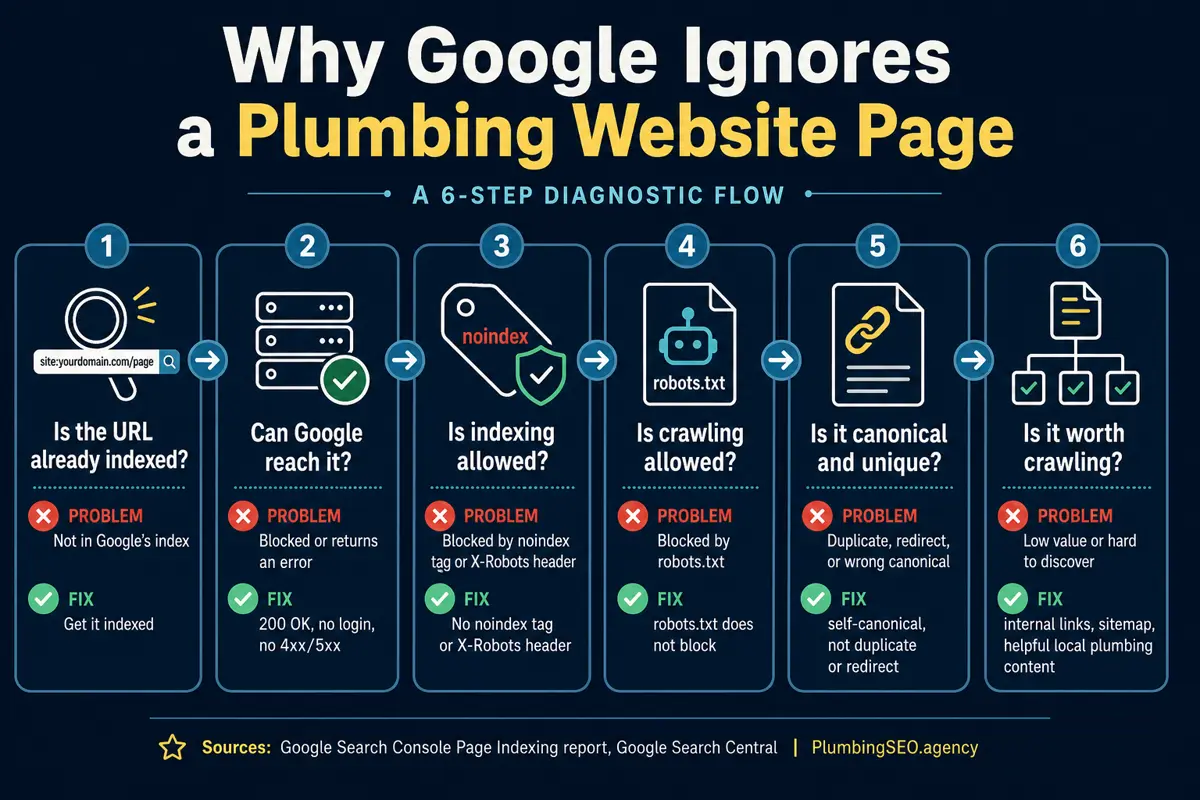
1. Can Google reach the URL?
Open the page in a normal browser first. Then test the exact URL with Search Console. You are looking for the simple stuff that gets missed during site launches and redesigns:
- The page returns a 200 OK status, not a 404, soft 404, 500, or redirect loop.
- The page does not require a login.
- The important copy is visible on mobile.
- The page still works when JavaScript is slow or delayed.
This is where a lot of plumbing sites get hurt after a redesign. The page exists in the CMS, but the live URL redirects, breaks on mobile, or loads the service content late. Google is patient, but it is not a dispatcher waiting on hold all day.
2. Is indexing allowed?
Check the page source or your SEO plugin for a robots meta tag. You do not want:
<meta name="robots" content="noindex">Also check for an X-Robots-Tag header from the server. Google documents both methods in its robots meta tag and X-Robots-Tag guidance. A staging-site setting, plugin checkbox, or template mistake can quietly tell Google not to index the page.
For plumbing sites, this often happens when a developer builds new service pages behind the scenes, then forgets to remove the noindex rule when the pages go live.
3. Is crawling blocked by robots.txt?
A page can be indexable in its meta tag and still be hard for Google to crawl if robots.txt blocks the path. Check yourdomain.com/robots.txt and look for rules that block service directories, city directories, blog folders, or important assets.
Google's robots.txt documentation is clear that robots.txt controls crawling, not whether a URL is allowed to appear in search. In plain English: a blocked page creates confusion. Google may know the URL exists, but it may not be able to fetch enough to judge it properly.
Do not block CSS, JavaScript, or image folders that Google needs to render the page. If your plumbing service page hides the main copy behind scripts that Google cannot load, you made the crawl harder than it needed to be.
4. Is the canonical pointing at itself?
Every important plumbing page should have a clean canonical tag. For a service page, the canonical usually points to itself. For a duplicate or filtered page, it may point somewhere else on purpose. The problem is when it points somewhere else by accident.
Check the page source for:
<link rel="canonical" href="https://example.com/the-right-page">Google treats canonical tags as signals, not absolute commands, but a wrong canonical still tells Google the wrong story. If your new "water heater repair in Plano" page canonicals to a generic water heater page, Google may decide the city page does not need its own index entry.
Review Google's canonical URL documentation if you are sorting through duplicate URLs, trailing slashes, parameters, or redirected versions.
5. Is the page in the sitemap and linked from the site?
A sitemap helps Google discover URLs, but it is not a magic indexing ticket. Internal links matter because they show that the page belongs in the site structure. A page with no internal links is like a cleanout hidden behind a finished wall. It might exist, but nobody can get to it easily.
For a plumbing website, make sure the page has at least one natural path from:
- The homepage or main service hub.
- The relevant service page, such as drain cleaning, sewer repair, emergency plumbing, or water heater repair.
- A city or service-area hub if the page is local.
- A related blog post when the topic supports the page.
If you are building a clearer service structure, compare this with our plumbing SEO process. If the page loads slowly or breaks on mobile, fix that too. Our plumber website speed guide explains where mobile load time leaks calls before the owner ever sees a lead.
6. Is the page worth indexing?
This is the uncomfortable part. Sometimes Google can reach the page, crawl it, and still choose not to index it because the page does not add enough value.
For plumbing websites, thin pages usually look like this:
- The same 400 words copied across twenty city pages.
- No real service explanation beyond "we offer fast, affordable service." Everybody says that.
- No local proof, photos, reviews, license language, or service-area detail.
- No clear job types, symptoms, emergency notes, or homeowner questions.
- No obvious call path, phone number, or trust signals.
Google's indexing systems are not looking for "a page exists." They are looking for pages that deserve to be part of the search results. A plumbing page has a better case when it answers the homeowner's real question, explains the service clearly, proves the company is real, and makes the next step obvious.
If the page is supposed to win calls, strengthen the visible page before asking Google to look again. Add real job photos where possible, explain what counts as an emergency, show service-area relevance, answer the questions the dispatcher hears every week, and make the phone path obvious. Our guide to plumbing website trust signals covers the proof elements that help customers choose you before calling.
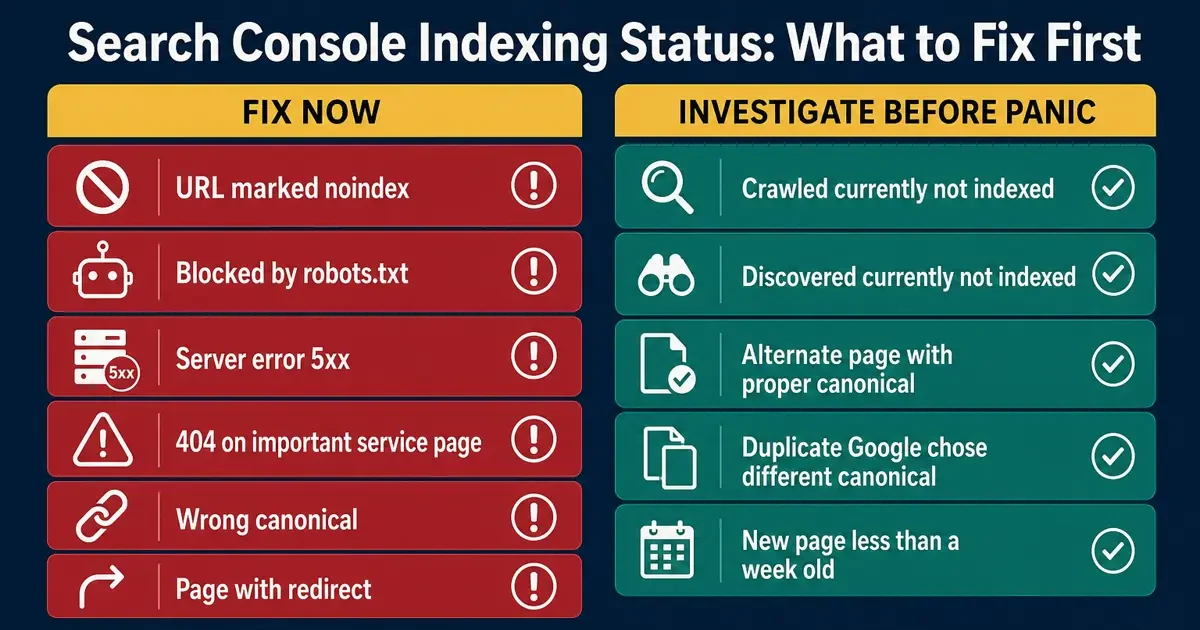
| Search Console status | What it usually means | What to check first |
|---|---|---|
| URL marked noindex | The page or server is telling Google not to index it. | Robots meta tag, SEO plugin settings, X-Robots-Tag header. |
| Blocked by robots.txt | Googlebot is blocked from crawling the URL or important assets. | Robots.txt rules for service folders, blog folders, CSS, and JS. |
| Server error 5xx | Google hit a server problem while trying to crawl. | Hosting logs, redirects, firewall rules, uptime, and plugin conflicts. |
| Alternate page with proper canonical | Google sees another URL as the main version. | Canonical tag, redirects, duplicate service pages, URL variations. |
| Crawled, currently not indexed | Google crawled it but has not chosen to index it yet. | Content depth, duplicate city copy, internal links, sitemap, usefulness. |
Plumber-specific indexing problems generic checklists miss
Most indexing guides stop at robots, canonical tags, and sitemaps. Those matter. But plumbing websites have a few patterns that can make Google treat pages as low-value even when the technical setup looks fine.
Duplicate city pages with swapped place names
City pages are common in plumbing SEO, and they can work when they are useful. The problem is the old template trick: same page, same copy, same headings, same photos, with only the city name changed. If you use local pages, read our guide to local landing pages and doorway risk before you publish a pile of near-duplicates.
That may look efficient on paper. In the real world, it creates a pile of pages that do not say anything new. If Google already has the main service page indexed, it may decide the city version does not deserve a separate slot.
A stronger city page should include real local coverage notes, nearby neighborhoods, service constraints, response considerations, relevant photos if available, and questions customers in that area actually ask.
Service pages that read like ads instead of help
A homeowner searching for sewer line repair is not looking for vague promises. They want to know what the signs are, whether it is urgent, what the plumber will check, and how to book help. If the page never answers those questions, it is weak for both Google and the customer.
Here is a simple test: if your best tech read the page, would they say, "yes, that explains the job," or would they say, "that sounds like every other website"? The second answer is a problem.
Internal links that skip the money page
Sometimes the page is good, but the site does not support it. The homepage links to a services dropdown. The blog links to random older posts. The service hub does not link to the new page. Search engines and customers both need paths.
If this article helped you diagnose a page, the same thinking applies across your service content. Schema can help clarify the page too, but only after the visible page is solid. For examples, see our plumbing schema markup examples.
When to request indexing
Use the request indexing button only after you have fixed the obvious issue. If the page had noindex, remove it first. If robots.txt blocked the page, fix the rule first. If the page was thin, improve it first. If the canonical was wrong, correct it first.
Then inspect the live URL in Search Console and request indexing once. Give Google time to recrawl. Pressing the button five times does not turn a weak page into a strong one. That is not SEO, that is button mashing with better branding.
A practical indexing checklist for plumbing pages
Use this order when a plumbing page is not showing in Google:
- Inspect the exact canonical URL in Search Console.
- Confirm the live page returns 200 OK.
- Check for meta noindex and X-Robots-Tag noindex.
- Check robots.txt for blocked folders or assets.
- Confirm the canonical points to the correct final URL.
- Add the page to the XML sitemap if it belongs there. Google's sitemap documentation explains how sitemaps help discovery.
- Add natural internal links from the homepage, service hub, city hub, or related blog content.
- Improve thin copy with real plumbing service detail, local proof, and homeowner questions.
- Make the call path obvious on mobile.
- Request indexing only after the page is fixed.
The bigger point is this: indexing is not just a technical checkbox. For a plumbing company, it is the first gate between a finished page and actual calls. If Google ignores the page, the homeowner never gets to judge your service, your reviews, your financing, your emergency response, or your phone number.
Fix the crawl signals. Then make the page useful enough that Google has a reason to keep it. That is how you protect the pages that keep the trucks moving.
Plumbing Website Indexing FAQs
It can take days or weeks. Strong internal links, a clean sitemap, a crawlable page, and useful service content help. Search Console can show whether Google has discovered or crawled the URL.
No. Request indexing after you fix the issue. Repeating the request without fixing noindex, robots.txt, canonical, server, or content problems usually wastes time.
Common reasons include thin copy, duplicate city templates, weak internal links, wrong canonical signals, low usefulness, or Google needing more time to evaluate the page.
Yes, if robots.txt blocks Google from crawling the page or important assets, Google may not be able to understand it properly. Check robots.txt along with meta robots and server headers.
They can. If city pages only swap place names and repeat the same generic service copy, Google may ignore many of them. Add useful local detail, service proof, and natural internal links.
Start with hard blockers: 200 OK status, no noindex tag, crawlable robots.txt, correct canonical, and no server errors. Then improve sitemap discovery, internal links, and page usefulness.
Want the indexing leaks found before they cost more calls?
We will inspect your plumbing page for crawl blockers, noindex mistakes, canonical problems, weak internal links, thin service copy, schema issues, and mobile call-path leaks.
Book a Plumbing Website SEO Audit