
- Schema helps Google read the facts already on your plumbing website. It does not replace strong service pages, reviews, photos, or fast call paths.
- Use Plumber or LocalBusiness for the company, Service for each money page, FAQPage only for visible Q&A, Review carefully, and VideoObject for real job videos.
- The safest rollout is page by page: write JSON-LD from visible facts, validate it, inspect the live URL, then monitor Search Console and calls.
If your plumbing website already says you handle water heaters, sewer lines, slab leaks, and emergency calls, schema markup is the clean label you put on those facts for search engines. It is not a ranking button. It is more like labeling every fitting in the truck so the next guy can find what he needs without digging through three bins.
For a plumbing owner, the point is simple. When Google can understand your business type, services, service area, FAQs, reviews, and videos, your pages are easier to interpret and test. That can help rich result eligibility, local understanding, and the way your content gets reused in search features. Google explains structured data as a standardized way to give explicit clues about page meaning.
This guide is different from a broad schema overview. It is a plumber-specific example set. Use it when you want to see what goes on the homepage, what belongs on a drain cleaning or water heater page, when FAQ schema is worth adding, why review stars can get risky, and how video schema should work when you show real job footage.
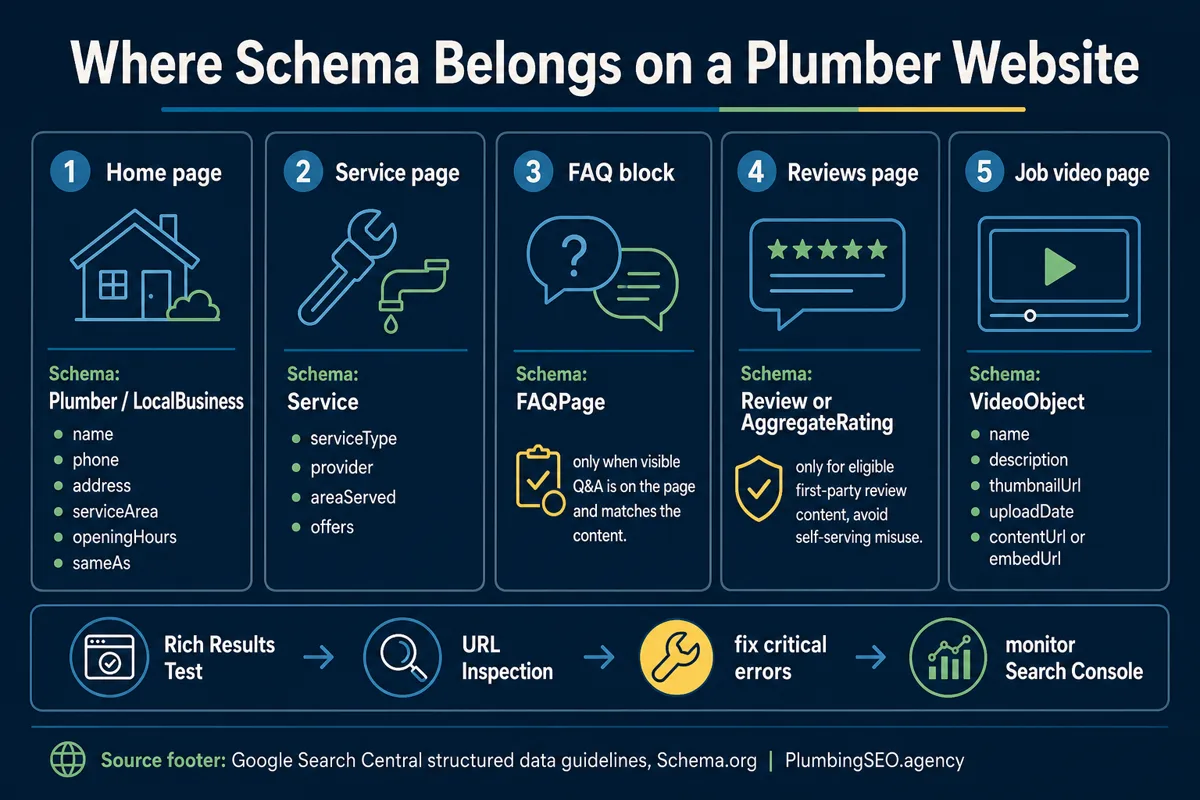
Start with the page purpose, not the schema type
The mistake I see most often is starting with a schema generator and asking, "What can I add everywhere?" That is backward. Start with the page. A homepage, a water heater service page, a reviews page, and a video-heavy case study are doing different jobs. They should not all carry the same pile of markup.
| Page | Best primary schema | Owner-side reason |
|---|---|---|
| Homepage or contact page | Plumber or LocalBusiness | Confirms the company, phone, address or service area, hours, and sameAs profiles. |
| Water heater, drain cleaning, sewer, leak repair pages | Service | Connects the service page to the plumbing business that provides it. |
| Visible Q&A section | FAQPage | Labels real answers customers can read before they call. |
| Testimonials or review page | Review with caution | Review markup has strict rules. Fake or self-serving stars can cost trust fast. |
| Video page or page with an embedded job video | VideoObject | Gives Google a clean title, thumbnail, date, and embed URL for a real video. |
Example 1: Plumber or LocalBusiness schema for the company
Use this on the homepage, about page, contact page, or a strong local landing page where the business facts are visible. For a plumbing company, Schema.org includes Plumber as a local business subtype. That is usually cleaner than a generic LocalBusiness when the company is truly a plumbing contractor.
{
  "@context": "https://schema.org",
  "@type": "Plumber",
  "name": "Example Plumbing Company",
  "url": "https://www.exampleplumbing.com/",
  "telephone": "+1-555-010-1234",
  "image": "https://www.exampleplumbing.com/logo.webp",
  "priceRange": "$$",
  "address": {
    "@type": "PostalAddress",
    "streetAddress": "123 Main Street",
    "addressLocality": "Austin",
    "addressRegion": "TX",
    "postalCode": "78701",
    "addressCountry": "US"
  },
  "areaServed": ["Austin", "Round Rock", "Cedar Park"],
  "openingHoursSpecification": [{
    "@type": "OpeningHoursSpecification",
    "dayOfWeek": ["Monday", "Tuesday", "Wednesday", "Thursday", "Friday"],
    "opens": "07:00",
    "closes": "18:00"
  }],
  "sameAs": [
    "https://www.facebook.com/exampleplumbing",
    "https://www.youtube.com/@exampleplumbing"
  ]
}
Do not stuff every suburb in the state into areaServed because you want the phones ringing everywhere. If your trucks do not actually go there, do not mark it up. Google structured data guidelines say markup should describe visible page content and follow quality policies. That is common sense. If a customer would be mad after reading it, Google probably will not love it either.
Example 2: Service schema for plumbing service pages
A service page is where schema starts helping the right customer understand the right job. Your drain cleaning page should say drain cleaning. Your water heater page should say water heater installation or repair. Your slab leak page should not be labeled as a generic home service page and then hope Google figures it out.
If the page supports commercial intent, connect it to a real audit or service path. For example, our plumbing website SEO audit service checks whether service pages have clear titles, schema, FAQs, internal links, and crawlable content. Schema is one part of that inspection, not the whole truck.
{
  "@context": "https://schema.org",
  "@type": "Service",
  "name": "Water Heater Repair and Installation",
  "serviceType": "Water heater repair, replacement, and installation",
  "provider": {
    "@type": "Plumber",
    "name": "Example Plumbing Company",
    "url": "https://www.exampleplumbing.com/"
  },
  "areaServed": {
    "@type": "City",
    "name": "Austin"
  },
  "offers": {
    "@type": "Offer",
    "availability": "https://schema.org/InStock",
    "url": "https://www.exampleplumbing.com/water-heater-repair/"
  }
}
The main rule is alignment. The visible H1, service copy, internal links, and schema should all point in the same direction. If the page says "tankless water heater installation" but the schema says "emergency plumbing," you are giving mixed directions. Mixed directions waste drives and clicks.
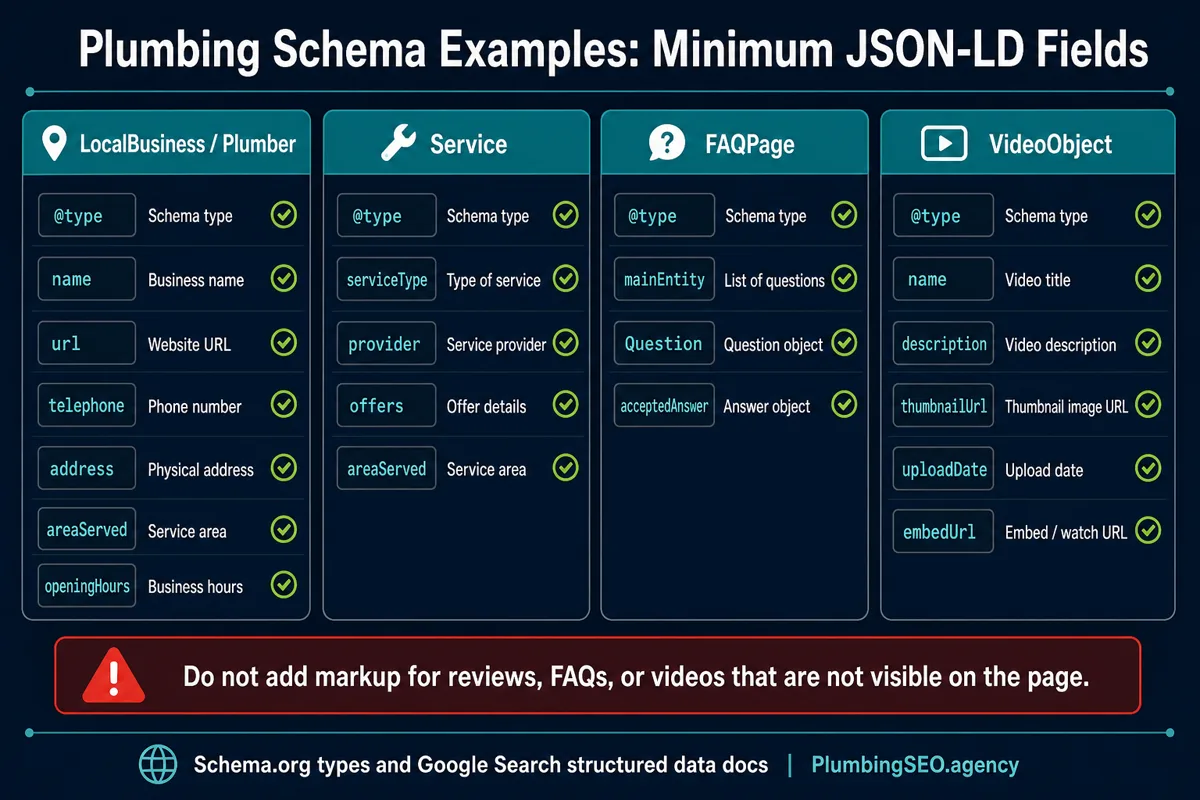
Example 3: FAQ schema for visible customer questions
FAQ schema is not the rich-result free-for-all it used to be. Google says FAQ rich results are limited to well-known authoritative government and health sites. That does not mean plumbing FAQs are useless. It means you should use FAQ markup for clarity and page understanding, not because someone promised starbursts and confetti in search results.
Use FAQPage only when the questions and answers are visible on the page. Do not hide a list of keyword questions in JSON-LD while the customer sees nothing. That is not SEO. That is sweeping mud under a rug and calling the floor clean.
{
  "@context": "https://schema.org",
  "@type": "FAQPage",
  "mainEntity": [{
    "@type": "Question",
    "name": "Should every plumbing service page have schema markup?",
    "acceptedAnswer": {
      "@type": "Answer",
      "text": "No. Start with important pages that have clear service copy, visible business facts, and a real chance to earn search visibility. Weak pages need better content before more markup."
    }
  }, {
    "@type": "Question",
    "name": "Can I use FAQ schema for emergency plumbing questions?",
    "acceptedAnswer": {
      "@type": "Answer",
      "text": "Yes, if the questions and answers are visible on the page and help the customer decide what to do next. Keep the answers specific and honest."
    }
  }]
}
Example 4: Review schema without getting cute
Review markup is where a lot of sites get themselves in trouble. Google's review snippet documentation explains eligibility and calls out self-serving review rules for local businesses. In plain English, do not add star markup to your own local plumbing business page just because you copied five Google reviews into a testimonial block.
For a plumbing company website, I would treat review schema as a caution lane. It can make sense on pages that genuinely collect and display eligible reviews in a compliant way. It is a bad idea when the goal is only to force stars under your own listing. Trust is too expensive to play games with. If a page needs stronger proof, improve the visible testimonials, licenses, photos, guarantees, and review links first. Our guide to plumbing website trust signals shows where that proof belongs.
Review schema rule for plumbers
Do not mark up reviews that are not visible, not yours to reuse, copied without context, or added only to win stars. Show honest customer proof on the page first. Then decide whether review markup is eligible.
Example 5: VideoObject schema for job videos and explainers
Plumbing videos can help when they show real work, real equipment, and real explanations. A 45-second clip explaining a sewer camera inspection can answer questions before the customer calls. A homepage video that says "we care about quality" for two minutes usually does less.
Use VideoObject structured data when the page has a visible embedded video or watchable video content. Google lists required and recommended video properties such as name, description, thumbnailUrl, uploadDate, contentUrl, and embedUrl. Again, the markup should describe the video the customer can actually watch.
{
  "@context": "https://schema.org",
  "@type": "VideoObject",
  "name": "How a Sewer Camera Inspection Works",
  "description": "A plumbing technician explains what homeowners see during a sewer camera inspection and when repair is needed.",
  "thumbnailUrl": "https://www.exampleplumbing.com/images/sewer-camera-video-thumb.webp",
  "uploadDate": "2026-06-11T08:00:00-05:00",
  "duration": "PT1M24S",
  "embedUrl": "https://www.youtube.com/embed/VIDEO_ID",
  "publisher": {
    "@type": "Organization",
    "name": "Example Plumbing Company"
  }
}
The safe rollout order
Do not schema-bomb 80 pages in one afternoon. That sounds efficient until one bad template mistake gets copied everywhere. Start with the pages that already earn impressions or calls: homepage, top service pages, contact page, one strong FAQ section, and one real video page.
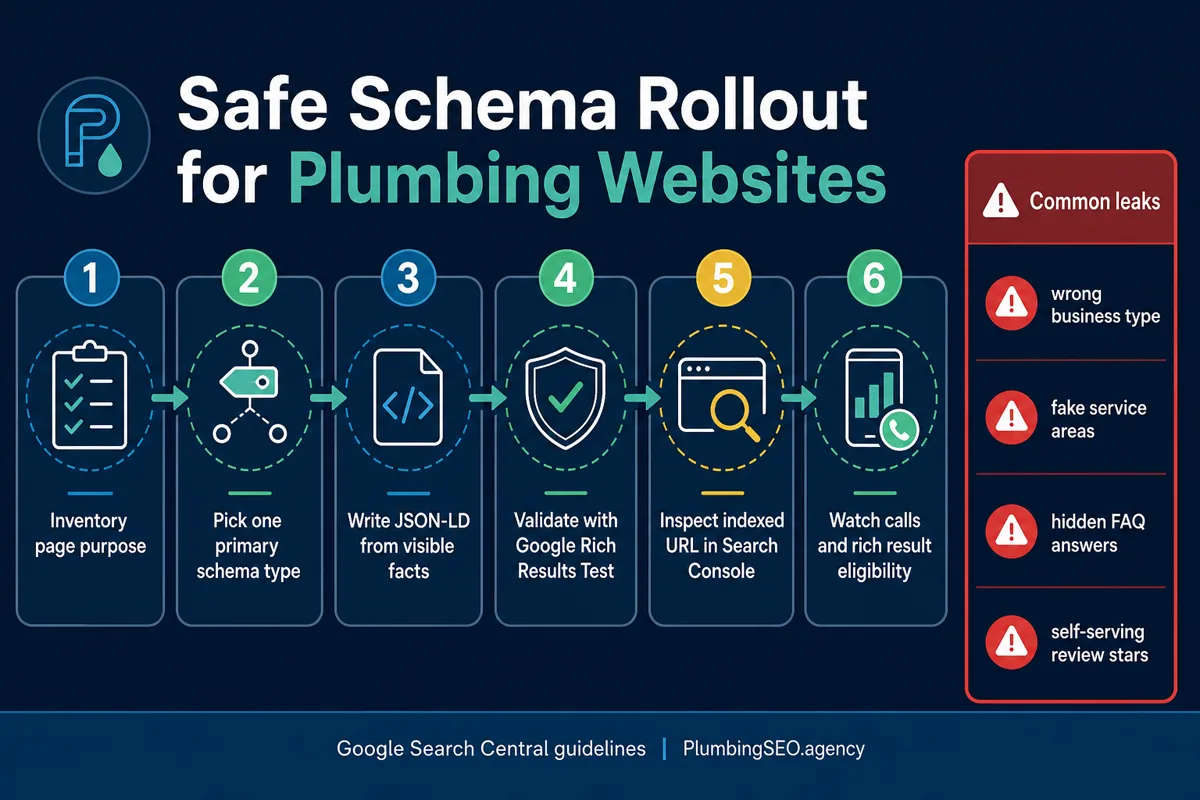
- Inventory the page. Decide whether it is a company, service, FAQ, review, or video page.
- Choose one primary schema type. Add supporting schema only when it fits the visible content.
- Write JSON-LD from real facts. Use exact names, URLs, phone numbers, service areas, and answers.
- Validate before publishing. Use Google's Rich Results Test and fix critical errors before the page goes live.
- Inspect the live URL. Use Search Console URL Inspection after deployment so you know what Google can fetch.
- Watch outcomes. Look for crawl errors, structured data warnings, rankings, calls, and whether the page is actually helping customers.
If that sounds like more than a copy-paste job, good. Schema is technical plumbing for your website. The fittings need to match the pipe. If you want the full page checked, including title tags, schema, internal links, indexability, and service page structure, start with a plumbing website SEO audit.
Internal links that should support this page
Schema works better when the page itself is strong. If the service page is thin, schema cannot save it. Build the visible page first, then mark it up. For service architecture, review our plumbing SEO process. For call-first layout, read the plumbing website homepage checklist. If you need the older broad overview, compare this article with our schema markup for plumbers guide.
Plumbing Schema Markup FAQs
Most plumbing companies should use Plumber or LocalBusiness schema on the homepage or contact page, with accurate name, URL, phone, address or service area, hours, and sameAs profile links.
Use Service schema on important service pages that already have clear visible content. The schema should match the page's actual service, provider, service area, and offer details.
Yes, but use it for visible questions and answers only. FAQ rich results are limited by Google, so treat FAQ schema as clarity markup, not a guaranteed search feature.
Review schema needs caution. Do not add self-serving star markup to force ratings under your own local business pages. First make sure reviews are visible, eligible, accurate, and compliant with Google's guidelines.
Use VideoObject schema when the page includes a real visible video, such as a sewer camera explainer or job walkthrough. Add the video name, description, thumbnail, upload date, and embed or content URL.
Validate the JSON-LD with Google's Rich Results Test before publishing, then use Search Console URL Inspection on the live page. Fix critical errors before adding the same pattern to more pages.
Want your plumbing schema checked?
We will inspect the page, schema, title, internal links, crawlability, and call path so you know what is helping and what is leaking calls.
Book a Plumbing Website SEO Audit