
- Your phone number, emergency language, service area, and trust proof need to be visible before a homeowner scrolls.
- A strong plumbing homepage answers four fast questions: do you serve me, can you fix this, can I trust you, and how do I call?
- Use the homepage to send homeowners into the right service page, not to show every badge, coupon, and paragraph you own.
If a homeowner lands on your homepage with water under the sink, they are not there to admire the design. They want to know if you answer the phone, serve their area, handle the problem, and look safe enough to let into the house.
That is the whole job of a plumbing homepage. It is not a brochure. It is a dispatch filter. It should help the right homeowner call you before they back out, bounce to a directory, or call the next company in the map pack.
Here is my practical plumbing website homepage checklist. Use it before you approve a new site, refresh an old one, or wonder why your traffic looks fine but the phone still acts like it is on lunch break.
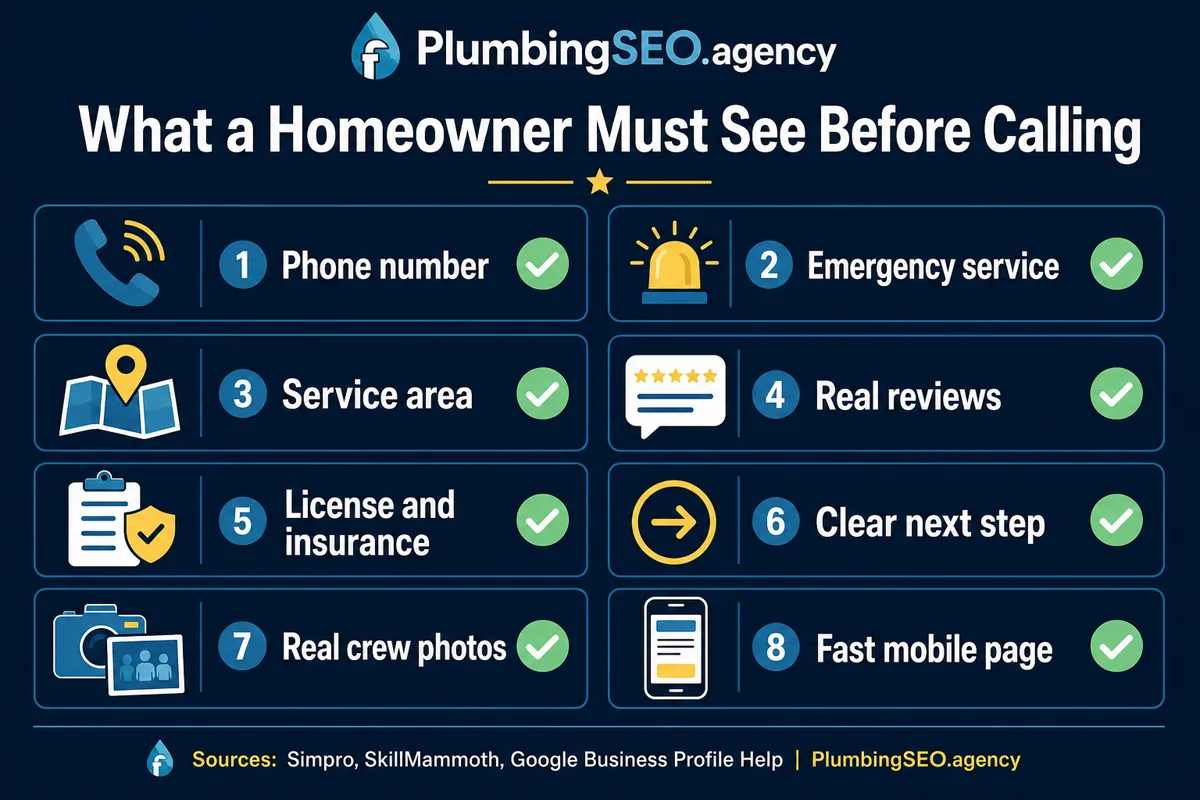
The homepage has one job: make the next call easier
A good plumbing homepage does not try to answer every question a customer could ever have. That is what service pages, city pages, review pages, and FAQs are for. The homepage should do the first job cleanly: help the customer decide whether calling you is worth their next 30 seconds.
In my opinion, the best homepage copy for a plumbing company is built around the caller's decision path, not around the owner's company history. The homeowner is asking:
- Do you answer urgent calls?
- Do you serve my city or neighborhood?
- Do you do the type of plumbing work I need?
- Are you licensed, reviewed, and real?
- Can I call, text, or request service without digging?
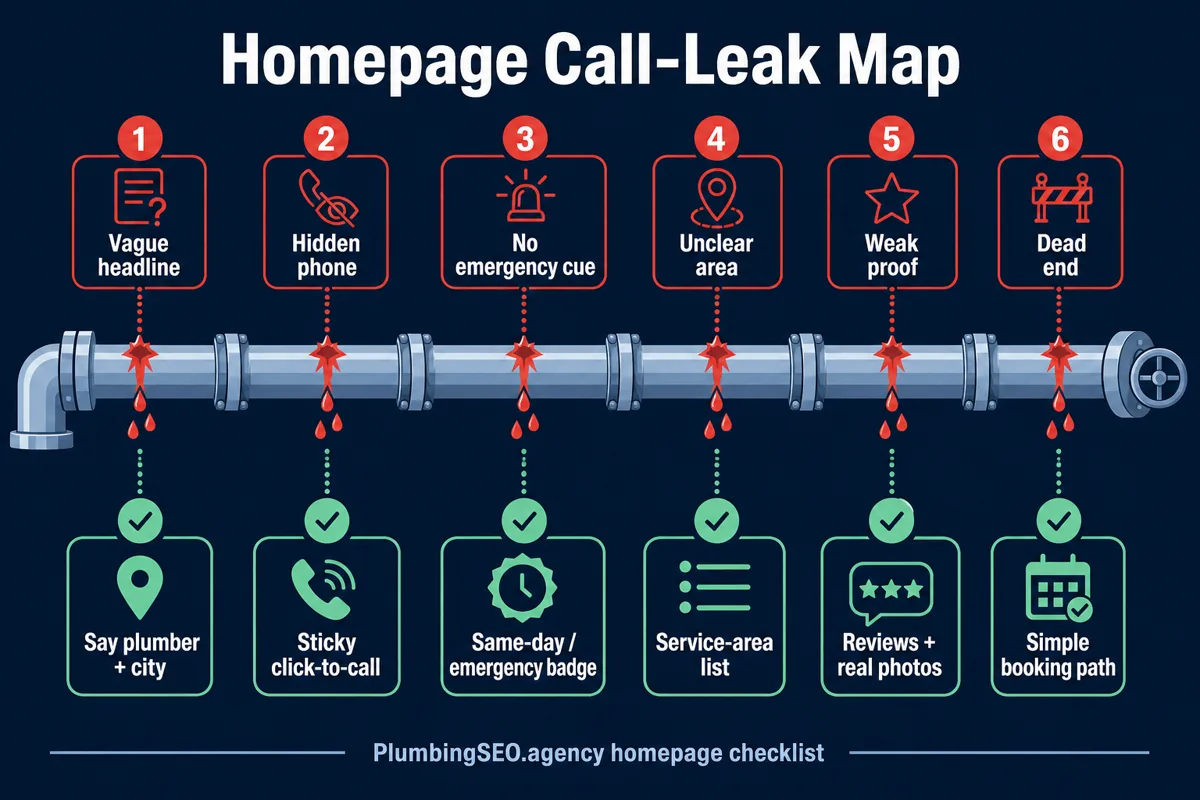
If those answers are hidden below a slider, a giant stock photo, or a paragraph that starts with "we are passionate about excellence," calls leak away. It is like leaving a cleanout cap loose. You may not notice it at first, but the mess shows up when pressure hits.
1. Put the phone number where thumbs and eyes already go
The phone number belongs in the header, in the first screen, and near major decision points. On mobile, it should be tap-to-call. If you offer text or online booking, show that too, but do not bury the phone behind a generic "contact us" button.
For a plumbing company, a vague button costs time. "Call Now" or "Request Service" is clearer than "Learn More." Homeowners with active leaks are not learning. They are deciding who gets the job.
Good first-screen call path
- Tap-to-call phone in header
- Emergency service cue near the headline
- Short request form or booking button
- Same CTA repeated after service proof
Call-leaking first screen
- Phone number only in footer
- Hero button says "Submit" or "More Info"
- No city or service-area clue
- Homepage starts with owner biography
If your office can handle calls 24/7, say it plainly. If you only run emergency service during certain hours, say that plainly too. Honest availability beats a promise the dispatcher cannot keep.
2. Make your service area impossible to miss
One of the fastest ways to waste a call is to make the homeowner guess whether you serve their area. Your homepage should name the primary city, nearby service areas, and the kind of routes your trucks actually run.
This also lines up with how Google expects local business information to work. Google Business Profile Help says businesses can update address, hours, contact info, photos, and service area details so customers can find and understand the business. Your website should not tell a different story than your profile.
For plumbers, I like a short service-area block near the top, then a more complete list lower on the page. The top block tells the rushed homeowner they are in the right place. The lower block gives search engines and careful customers more context.
| Homepage element | What it should answer | Plumbing example |
|---|---|---|
| Headline or subhead | Who you help and where | Emergency plumber serving Plano, Frisco, and North Dallas |
| Service-area strip | Whether the truck can get there | Same-day service in 12 nearby suburbs |
| Footer NAP | Business identity and location consistency | Company name, address if public, phone, hours |
| Internal city links | Where deeper local proof lives | Drain cleaning in McKinney, water heater repair in Allen |
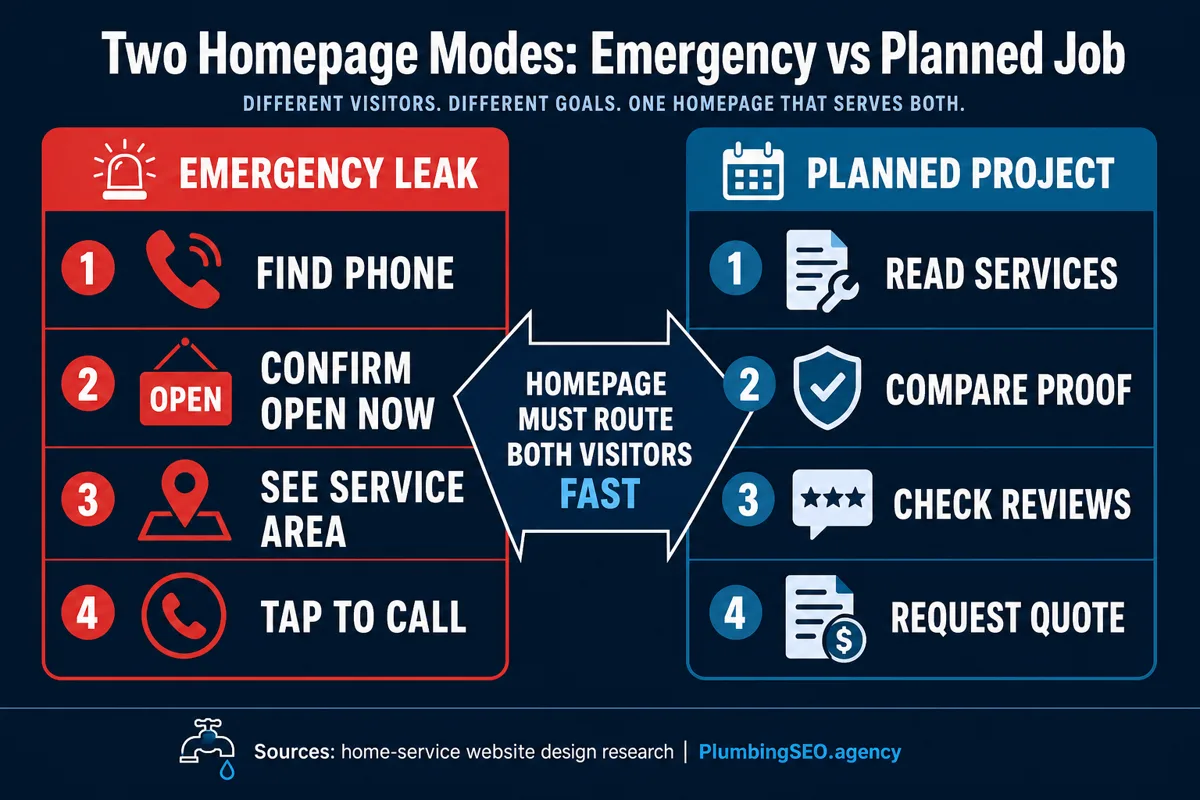
3. Show emergency and planned-service paths separately
A burst pipe caller and a water heater replacement shopper do not behave the same way. The emergency caller wants speed, phone access, and confidence you can arrive. The planned-service shopper may compare options, read reviews, look at financing, and check whether you explain the work clearly.
Your homepage should serve both without making either one work too hard. Put emergency messaging and call buttons high. Then use service cards and internal links to send planned projects to deeper pages.
This is where your homepage should link into the rest of the site. If you offer drain cleaning, sewer repair, leak detection, repiping, water heaters, and sump pumps, the homepage should not explain every service in full. Give each service a short card, then send the customer to the page that answers the deeper question.
If your service pages are thin or missing, fix that as part of the same site project. Our plumbing website design work is built around this exact issue: the homepage routes calls, while the service pages explain the job, proof, and next step.
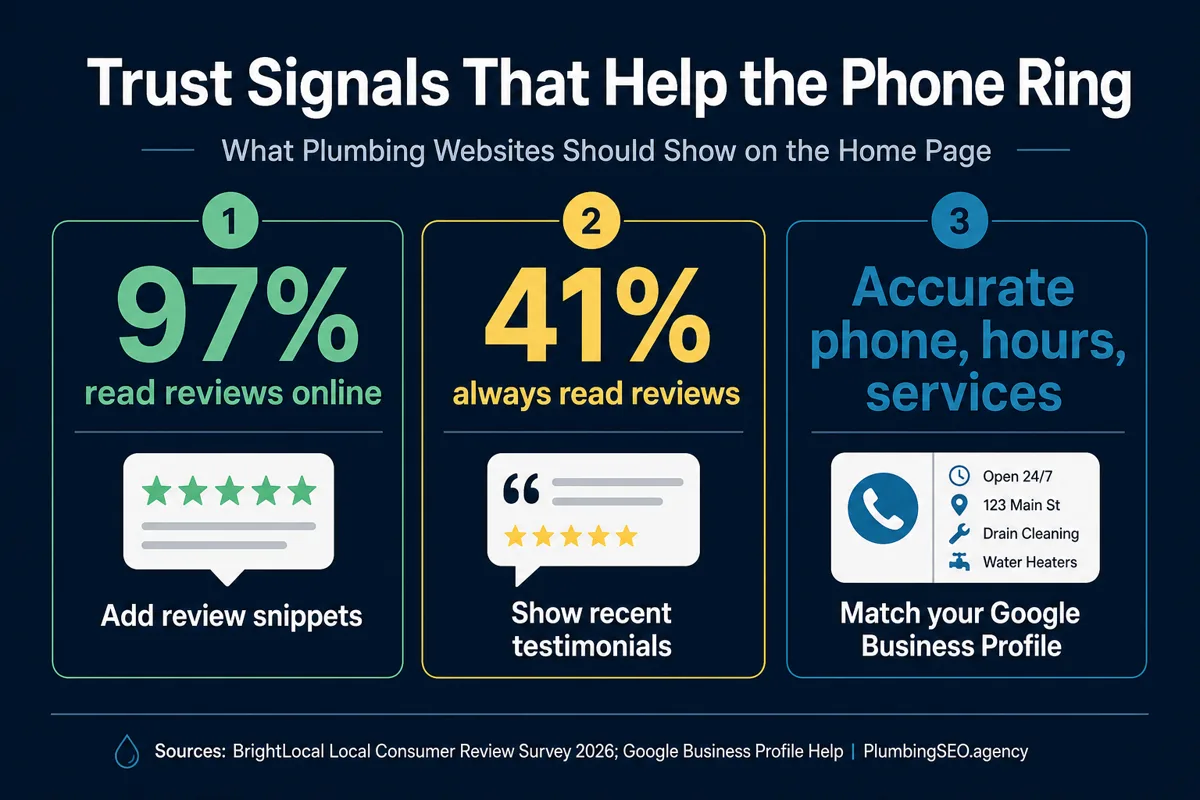
4. Put trust proof near the call button, not only on a reviews page
Homeowners do not just need a plumber. They need a stranger they can allow near their house, water line, kitchen, bathroom, or basement. That is why trust proof belongs close to the call path.
Reviews matter here. BrightLocal's 2026 Local Consumer Review Survey reports that 97% of consumers still lean on reviews to guide purchase decisions. For a plumbing homepage, that means reviews are not decoration. They are part of the call decision.
Show rating, review count, and one short review that sounds like a real service call.
Use exact wording that matches what you can prove. Do not make the customer guess.
Use your people, your trucks, and your service area when possible. Stock photos feel like stock photos.
Mention the work people actually call for: leaks, drains, water heaters, sewer lines, gas lines, and fixture installs.
The key is placement. A five-star badge below everything is weaker than a short review beside the call button. The customer should see proof at the moment they are deciding whether to tap.
5. Make the top services scannable in one pass
A homeowner should not need to read a wall of text to know whether you handle the problem. Use six to ten service cards, grouped by how customers think, not by how your accounting software labels jobs.
For example, homeowners understand "drain cleaning," "water heater repair," "leak detection," and "sewer line repair." They may not understand internal trade phrasing or broad categories like "residential solutions." Keep it plain. The truck does not roll because the copy sounded fancy.
Each service card should include a short benefit and a link to the deeper page. If you already have supporting blog content, use internal links naturally. A homeowner thinking through your wider site can read about how plumbing websites turn visitors into calls, but the homepage itself should stay fast.
6. Match your website information to Google and structured data
Your homepage should not fight your Google Business Profile. Company name, phone number, service area, hours, and categories should line up. If your profile says one thing and your homepage says another, customers get confused and search engines get a messier signal.
Structured data helps too when it is accurate. Google Search Central says Local Business structured data can tell Google about business hours, departments, reviews, and related business details. For plumbers, that means schema should support the real business facts already visible on the page.
If schema says you are open 24 hours but the homepage says phones are answered 7:30 to 5:00, fix the mismatch. The report may look good, but the phone tells the truth.
7. Use homepage sections in the order a caller needs them
Order matters. A homepage can have the right ingredients and still fail because the useful parts show up too late. Put decision-critical items first, then supporting proof, then details for careful shoppers.
Here is a clean order that works for most local plumbing companies:
- Hero section: service, city, emergency cue, phone, primary CTA, one trust proof.
- Problem/service cards: the main jobs people call about.
- Why trust us: reviews, license, insured language, real photos, response expectations.
- Service area: primary city and nearby locations.
- How booking works: call, schedule, dispatch, repair, follow-up.
- Deeper proof: FAQs, financing, guarantees, case examples, and links to helpful pages.
You can adjust the order based on your business model. A heavy emergency shop should lead harder with phone and dispatch speed. A remodel or water heater replacement shop can give more room to options, photos, and financing.
8. Give mobile visitors the short version first
Most urgent plumbing decisions happen on a phone. That means your mobile homepage has to be more disciplined than the desktop version. The first screen should not make a homeowner pinch, zoom, close a pop-up, dismiss a cookie banner, and solve a tiny menu just to call you.
Check the mobile version like a customer, not like a designer. Hold the phone in one hand and ask whether you can answer these in five seconds:
- What city or area do they serve?
- Can I call with one tap?
- Do they handle emergencies?
- Do they look reviewed and legitimate?
- Can I reach the service I need without opening the full menu?
If not, the homepage needs tightening. Pretty does not pay payroll unless it helps the right customer call.
9. The homepage scorecard: pass, fix, or rebuild
Use this scorecard before you spend money on ads, a redesign, or another round of random homepage copy changes. If your homepage fails several of these, fix the basics before chasing something louder.
| Checkpoint | Pass | Fix soon | Rebuild signal |
|---|---|---|---|
| Phone path | Visible tap-to-call above the fold | Visible but not sticky or repeated | Hidden in footer or contact page only |
| Service area | City and nearby areas clear | Only one vague region listed | No location fit visible |
| Trust proof | Reviews, license cues, real photos | Only badges with no context | No proof near CTA |
| Service routing | Top services link to deeper pages | Services listed without links | Homepage tries to explain everything |
| Mobile usability | One-thumb call and clean navigation | Menu works but key CTAs are low | Popups, tiny text, slow first screen |
What I would fix first
If the homepage is weak, do not start by rewriting every paragraph. Start with the items closest to the call.
- First: phone number, tap-to-call, headline, city, emergency cue, and one proof point.
- Second: service cards and service-area clarity.
- Third: reviews, license proof, real photos, FAQs, and internal links.
- Then: schema, page speed, tracking, analytics, and ongoing SEO improvements.
That order keeps the work tied to calls. It also makes future SEO work more useful, because traffic has somewhere better to land. If you are not sure where the leaks are, start with a free plumbing SEO audit and look at the homepage like a dispatcher looks at a busy board: what is blocking the next job from getting booked?
Plumbing Website Homepage Checklist FAQs
Get a plumbing homepage that helps homeowners call faster
We will check your homepage, service-area clarity, trust proof, calls to action, and SEO basics so the right visitors have a clear path to become booked jobs.
See Plumbing Website DesignNo fancy jargon. Just a cleaner path from search to phone call.