
- WordPress can work well for a plumbing company, but only if somebody owns updates, backups, speed, forms, calls, and tracking every month.
- The website should be built around emergency calls, service-area pages, reviews, pricing cues, and tested contact paths, not just a nice theme.
- If you cannot maintain plugins and security, a simpler custom or static site may beat WordPress for keeping trucks booked.
If your phone gets quiet, the first thing most owners blame is Google. Sometimes Google is the problem. A lot of times, the leak is closer to home. The WordPress site loads slow, the call button is buried, a form stopped sending, or a plugin update broke the page right when a homeowner needed an emergency plumber.
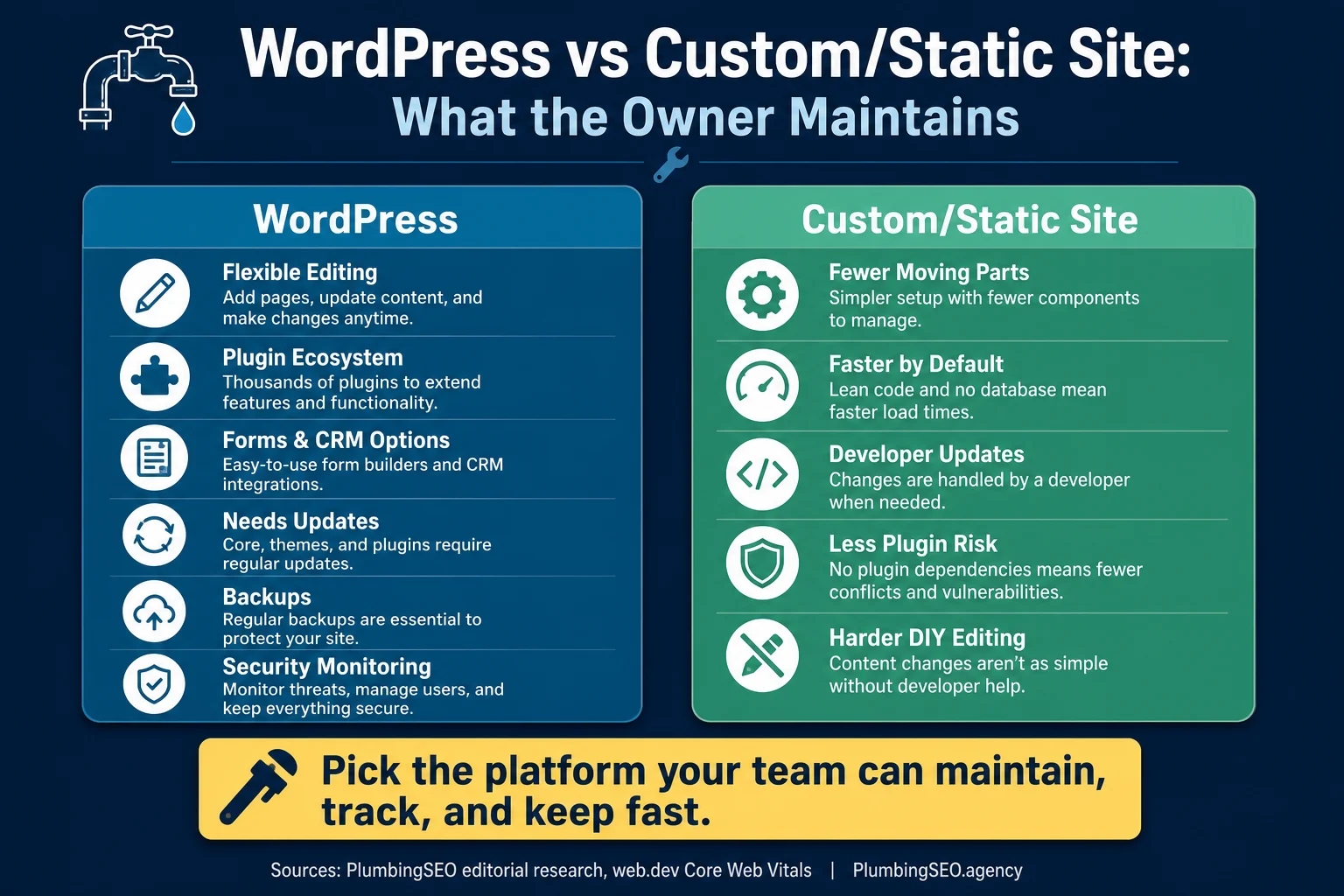
WordPress websites for plumbers can be a good choice. WordPress is flexible, familiar to many designers, and easy to edit when you need to add a new service page or update a coupon. The catch is simple: WordPress is not a set-it-and-forget-it tool. It is more like a service truck. Useful, powerful, and expensive when nobody checks the oil.
This checklist is written for a plumbing owner, not a web developer. The goal is not to turn you into the WordPress person. The goal is to help you know what must be maintained so the site keeps getting found, keeps building trust, and keeps turning local traffic into real calls.
What WordPress can do for a plumbing company
WordPress is strong when you need regular content updates. That matters for plumbers because the site is not one page and done. You may need drain cleaning pages, water heater pages, slab leak pages, emergency plumbing pages, city pages, coupons, reviews, before-and-after photos, and seasonal notices.
It also gives you options for forms, call tracking, chat, review widgets, SEO plugins, schema plugins, and landing pages. That flexibility is the reason a lot of local service companies use it. A good WordPress setup can support strong on-page SEO for plumber service pages and make future updates easier.
But WordPress cannot make bad business signals disappear. If the site has thin service pages, no reviews, confusing service areas, slow mobile performance, or no clear way to call, WordPress is just the toolbox. It will not do the repair by itself.
The owner-side WordPress decision
In my opinion, the platform is less important than the maintenance plan. A clean WordPress site with responsible upkeep can beat a fancy custom build that nobody updates. A fast custom or static site can beat WordPress if your team does not need frequent edits and wants fewer moving parts.
The real question is this: who is accountable when the call form fails, the site slows down, or a plugin conflict breaks your emergency service page on a Friday afternoon? If the answer is nobody, the platform choice is already wrong.
The maintenance checklist that protects calls
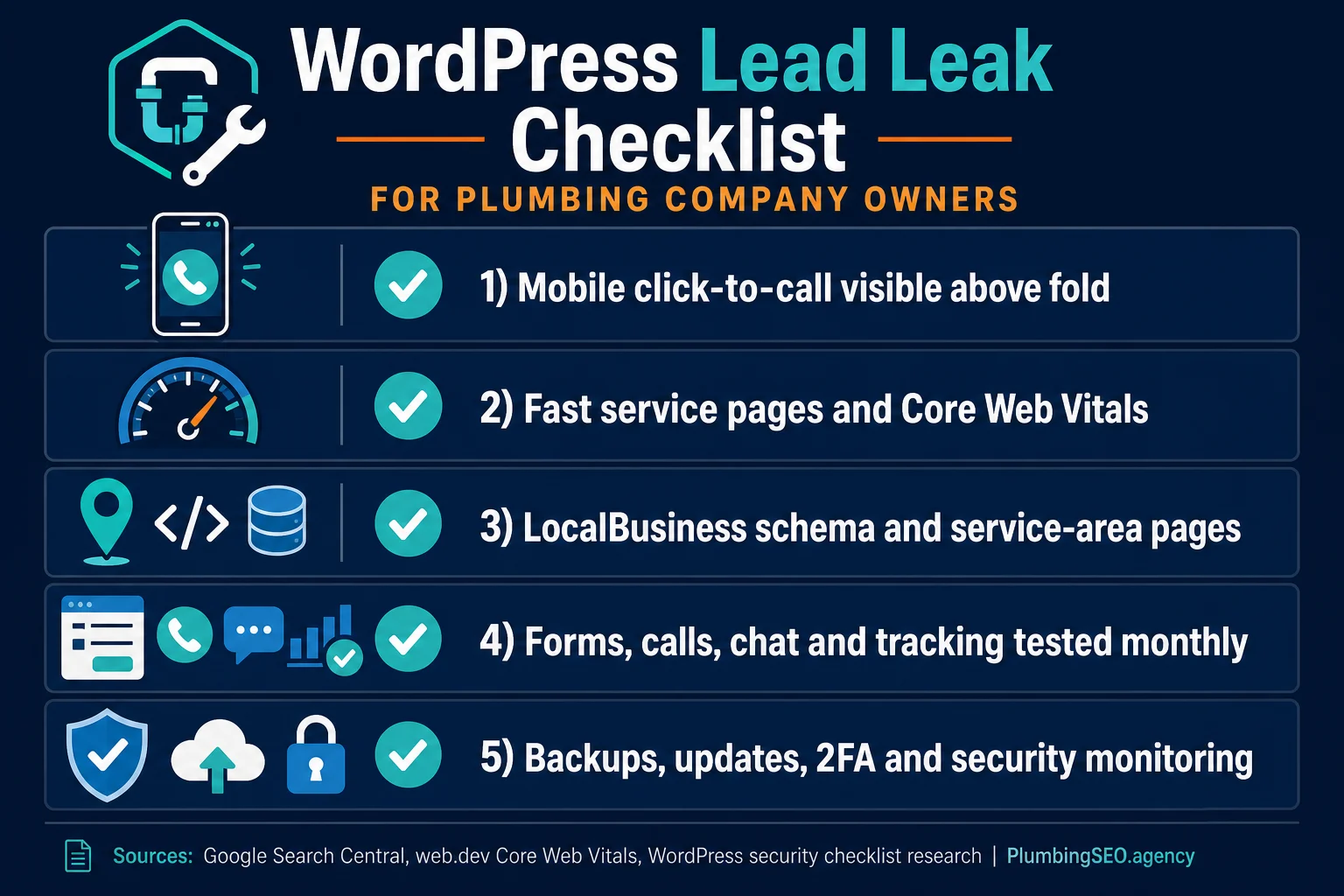
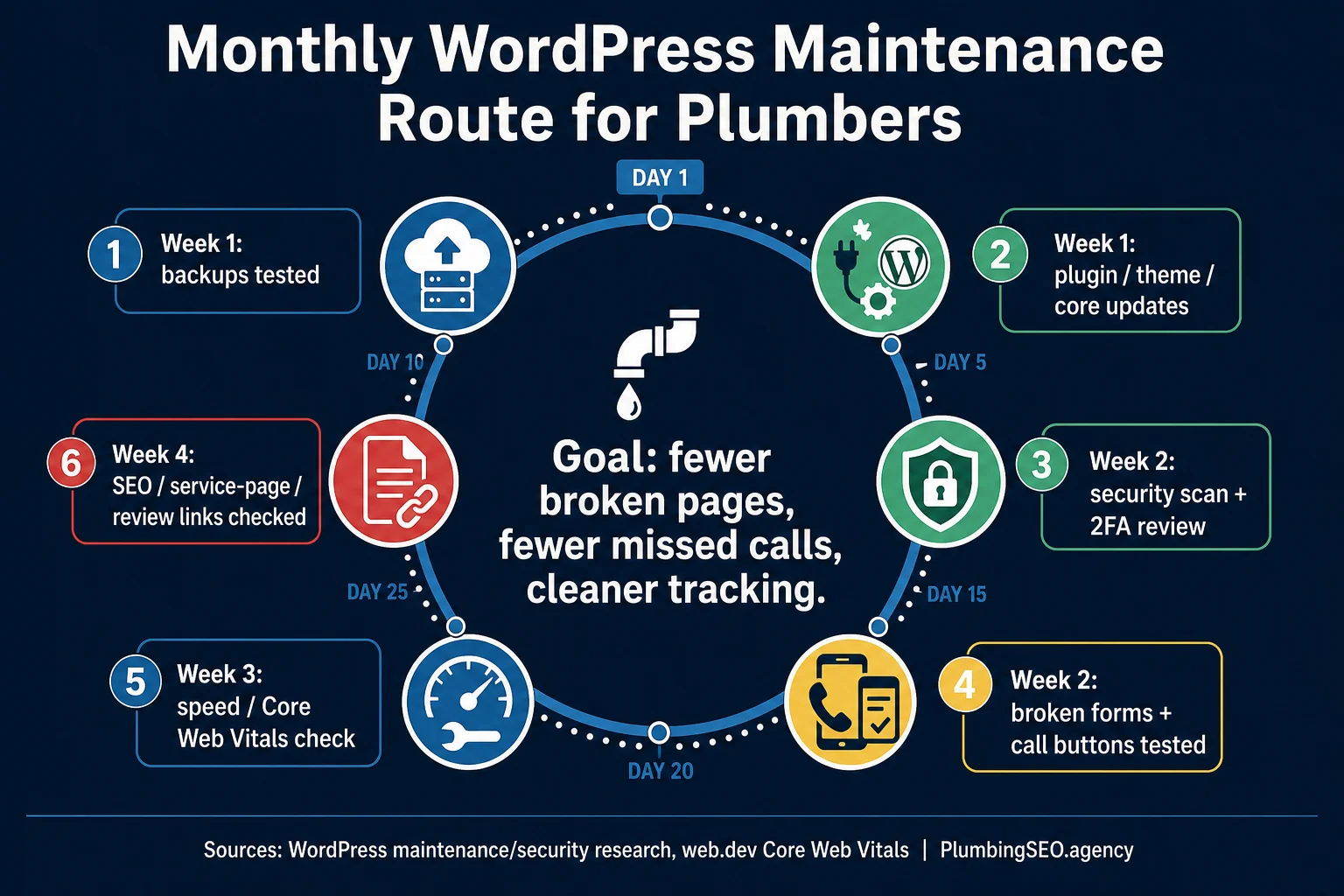
A plumbing website maintenance plan should not be a vague line item on an invoice. It should protect the things that make the phone ring. That means updates, backups, speed, security, forms, tracking, and SEO checks.
Start with backups. A backup is only useful if it can be restored. Before major plugin, theme, or WordPress core updates, confirm there is a recent backup and that someone knows how to roll back. If an update breaks the booking form, you do not want the fix to start with panic and coffee.
Then check contact paths. Test the mobile call button. Submit the contact form. Confirm the email arrives. Confirm spam filters did not eat the lead. If you use call tracking, make sure the number swaps correctly and still routes to the shop, answering service, or dispatcher.
| Area to check | Owner question | Why it matters for calls |
|---|---|---|
| Backups | Can we restore the site fast if an update breaks it? | Downtime during emergency searches means missed calls. |
| Updates | Are core, theme, and plugin updates tested instead of ignored? | Old software creates security and compatibility risk. |
| Speed | Do service pages pass the mobile experience test? | Slow pages make homeowners bounce before they call. |
| Forms and phones | Did we test every quote form and click-to-call button? | A broken form can look like an SEO problem for weeks. |
| Tracking | Can we see which pages created calls or booked jobs? | Without tracking, the report may look good while the phone tells the truth. |
Security is part of lead conversion
Security sounds like a technical problem until the site shows malware warnings, redirects visitors, or stops taking form submissions. Then it becomes a revenue problem. WordPress security basics are not fancy. Use strong logins, two-factor authentication, limited admin users, trusted plugins, updates, malware monitoring, and off-site backups.
The small-business security research we reviewed makes the same practical point: outdated WordPress core, themes, and plugins are common risk areas, and even inactive plugins should be removed if they are not used. If your site has five plugins doing the job of one, simplify it.
WordPress is popular because it is flexible. That also makes it a common target. WhatArmy's small-business WordPress security checklist notes that WordPress powers over 40% of websites and recommends updates, backups before major changes, strong passwords, and login protection. Read their WordPress security checklist if you want a plain-English security baseline.
Speed and Core Web Vitals are not vanity metrics
For plumbers, speed is simple. A homeowner with water on the floor will not wait while a heavy theme, slider, chat widget, and eight tracking scripts argue with each other. They will hit the next result.
Google's web.dev explains that Core Web Vitals focus on loading, interactivity, and visual stability, and that site owners should measure the 75th percentile experience. In owner language, that means you should care about what real mobile visitors experience, not just a perfect lab score on a good day.
If the WordPress site uses a bloated theme, too many plugins, uncompressed photos, and third-party widgets on every page, speed will suffer. Start with your top service pages. Test emergency plumbing, drain cleaning, water heater repair, and your biggest city page. If those pages are slow, fix them before writing another blog post.
SEO structure: service pages first, blog second
A WordPress blog is useful, but plumber SEO usually starts with service pages. You need clear pages for the jobs you want, written for the cities and service areas you actually serve. The blog should support those pages with practical guides, not replace them.
Google's LocalBusiness structured data documentation says structured data can tell Google about business details such as hours, departments, reviews, and actions. For a plumbing company, that means your site should clearly support location, service, phone, hours, and trust signals. See Google's LocalBusiness structured data documentation for the source.
For WordPress, this usually means a clean service-page template, unique copy for each major service, internal links between related pages, review proof near calls to action, and schema that matches the visible business information. If you want a deeper technical pass, use our Core Web Vitals guide for plumbers and the plumbing website conversion rate guide.
Plugins plumbers actually need
- SEO plugin used for titles, meta descriptions, redirects, and sitemap control.
- Form or booking plugin that is tested and protected from spam.
- Security plugin with login protection and alerts.
- Backup plugin or host-level backup with restore testing.
- Image compression and caching tools that do not break forms.
Bloat to avoid
- Multiple page builders fighting over the same layout.
- Unused sliders, popups, coupon widgets, and old theme demos.
- Duplicate analytics tags that make tracking messy.
- Review widgets that slow every service page.
- Inactive plugins left installed because nobody wants to check them.
Launch checklist for a WordPress plumbing website
Before launch, test the site like a customer with a problem, not like a designer admiring the homepage. Open the site on a phone. Pretend you need emergency drain cleaning. Can you find the service? Can you tell whether the company serves your city? Can you tap to call without hunting?
- Homepage explains who you help, where you work, and how to call.
- Top service pages include proof, reviews, license or trust cues, FAQs, and clear calls to action.
- Every form sends to the right inbox and has spam protection.
- Click-to-call works on mobile and routes to the right number.
- Google Analytics, Search Console, call tracking, and form tracking are installed once, not twice.
- Backups are configured, stored off-site, and tested.
- Admin users are limited, passwords are strong, and two-factor authentication is on.
- Images are compressed and all new job photos have useful alt text.
- XML sitemap and robots settings are clean.
- LocalBusiness or plumber-relevant schema matches the visible business details.
The way I see it, a WordPress plumbing website succeeds when it has boring discipline behind it. Updates done. Backups tested. Pages fast. Calls visible. Tracking clean. That is not flashy, but neither is tightening a fitting correctly. Everybody only notices when it leaks.
If you already have a WordPress site, do not start by rebuilding everything. Start with the call path. Test the top pages, the phone number, the form, the tracking, and the mobile speed. Then fix service-page structure and maintenance. That order protects revenue while the bigger SEO work catches up.
Frequently Asked Questions
Want the WordPress leaks checked before they cost calls?
We will review your plumbing website's speed, service-page structure, mobile calls, forms, tracking, and maintenance risk so you know what to fix first.
Run My Free SEO Leak Check