
- Core Web Vitals are not a magic ranking switch. They measure whether your site loads fast, responds quickly, and stays steady on mobile. For plumbers, that matters because impatient emergency searchers will not wait around.
- Fix the leaks that block calls first. Compress the hero image, speed up hosting, remove old plugins and scripts, reserve space for images and call buttons, then monitor real-user data for 28 days.
- Do not chase a perfect score while your service pages are thin. A fast, useful plumber site with clear service-area content beats a perfect PageSpeed report attached to pages that do not answer the customer.
Your Website Speed Problem Is a Call Problem
A homeowner with water coming through the ceiling is not comparing your brand colors. They are trying to tap a phone number before the next plumber shows up in Google.
That is where Core Web Vitals come in. Google defines Core Web Vitals as real-world user experience metrics for loading, responsiveness, and visual stability. In plain English, they answer three questions: did the main page load, did the button respond, and did the page stop jumping around while the customer tried to use it?
For a plumbing company, those are not abstract developer scores. They affect whether a mobile visitor sees your emergency service page fast enough, taps the call button without delay, and trusts the site enough to book the job. If your site feels clunky, the customer does not file a report. They hit back and call somebody else.
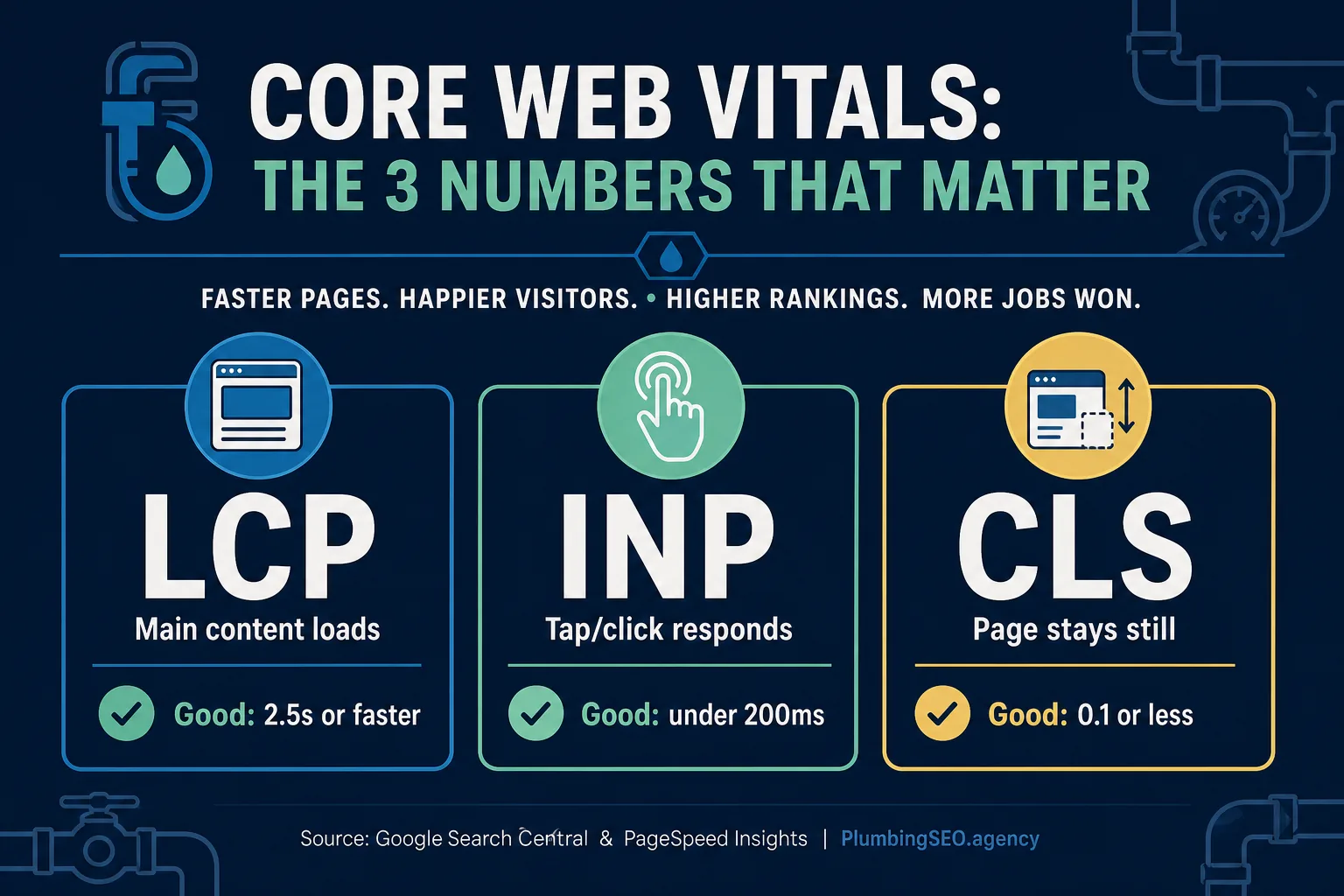
The three Core Web Vitals targets plumbing owners should know before paying for speed work.
The official targets are simple enough to write on the shop whiteboard. Google Search Central recommends LCP within 2.5 seconds, INP under 200 milliseconds, and CLS under 0.1. PageSpeed Insights uses those same thresholds when it labels real-user experiences as Good, Needs Improvement, or Poor.
Here is the owner-side translation:
| Metric | What it means on a plumbing site | Common leak |
|---|---|---|
| LCP | The hero area, service headline, or main image appears fast enough for the visitor to know they are in the right place. | Oversized truck photos, cheap hosting, video headers, and heavy sliders. |
| INP | The call button, menu, form, or chat button reacts quickly after a tap. | Too many plugins, tracking tags, chat widgets, map embeds, and old scripts. |
| CLS | The page stays steady while the visitor reads, taps, or tries to call. | Images without sizes, late-loading banners, sticky bars, and forms that move after loading. |
What Generic Core Web Vitals Advice Misses for Plumbers
Most Core Web Vitals articles are written for publishers, SaaS companies, or online stores. Plumbing is different. The best visitor is often on a phone, under stress, searching in a specific town, and ready to call right now.
That means the first screen matters more than a perfect score on every hidden page. Your homepage, drain cleaning page, water heater page, emergency page, contact page, and top city pages carry the most call pressure. Those are the pages I would test first.
This also means you should not fix speed in isolation. A fast page with no phone number, no service area, no trust proof, and no useful service copy is still a bad sales counter. If the deeper issue is local visibility, pair this work with the broader fundamentals in our SEO for plumbers guide and our advanced local SEO checklist.
The practical position is this: Core Web Vitals can protect the calls you already earned, but they do not replace service pages, reviews, local relevance, tracking, or a clean Google Business Profile.
Do Core Web Vitals Directly Move Map Rankings?
Not in a clean, simple way. A Whitespark study of 4,500 Google Business Profiles found that better Core Web Vitals did not clearly produce higher local finder or map-pack rankings. That is important because it stops owners from spending money on the wrong promise.
But do not take that as permission to ignore speed. The same study found that only 3% of local businesses had good mobile performance scores, 83% had poor content load speed, and average LCP was 9.5 seconds. Google has also reported that 53% of mobile visits are abandoned when pages take longer than 3 seconds to load.
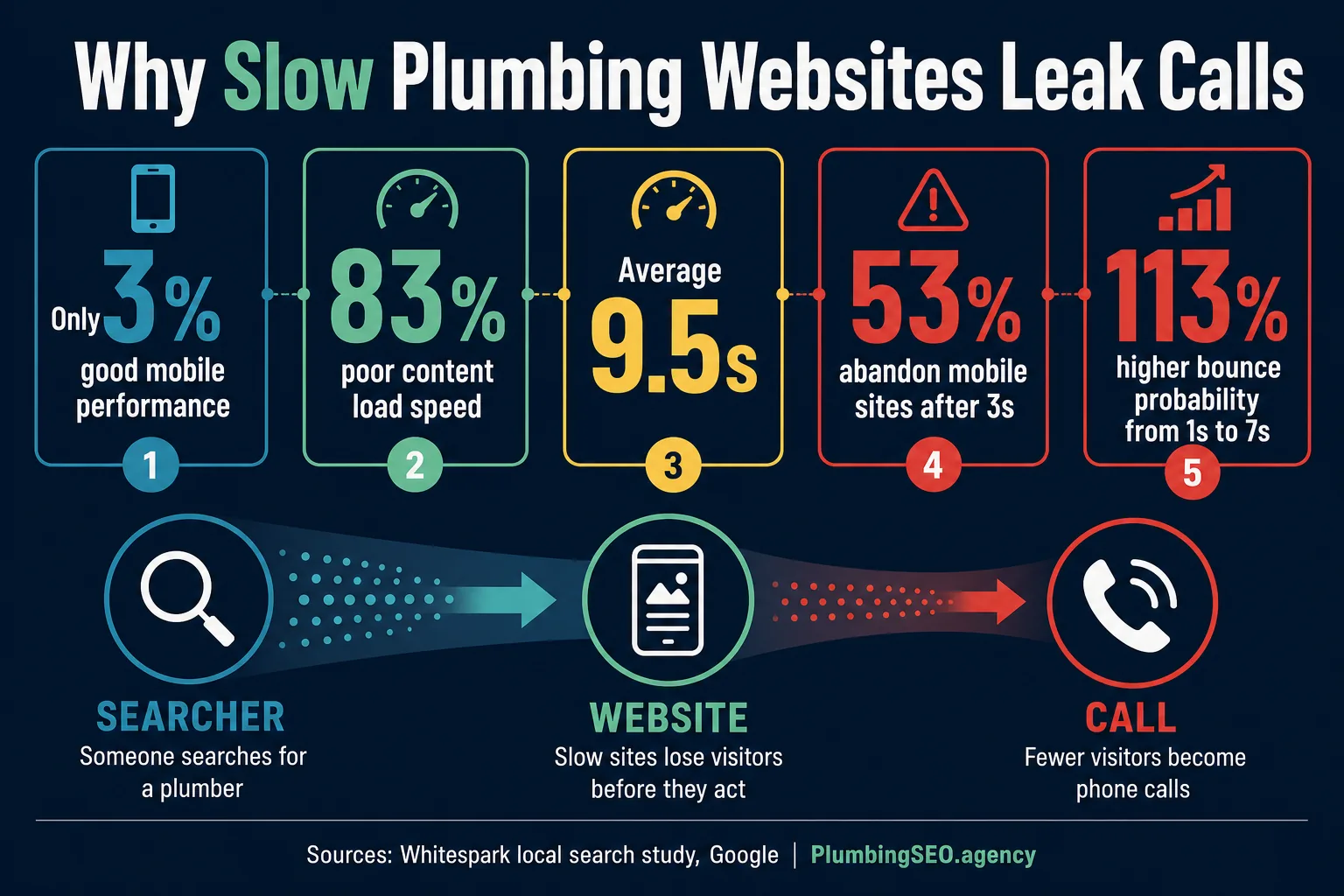
Local-business performance data shows why speed is a conversion issue, not just a technical score.
That is the real plumber math. You can rank well enough to get the click and still lose the call because the page drags its feet. The report may look fine, but the phone tells the truth.
So the goal is not “win SEO by passing Core Web Vitals.” The goal is “do not let a slow site waste the visibility you paid for.” That applies to organic SEO, Local Services Ads, PPC landing pages, and referral traffic from your Google Business Profile.
The Fix Order I Would Use on a Plumbing Website
Do not start by buying every speed plugin you can find. That is like dumping three bottles of drain cleaner into a line you have not inspected. You might get movement. You might also make a mess.
Start with measurement, then fix the visible page experience. PageSpeed Insights gives both lab diagnostics and real-user field data when enough Chrome User Experience Report data exists. Search Console groups Core Web Vitals problems by URL pattern, which helps you see whether the issue is one page, one template, or the whole site.
| Priority | What to inspect | Owner-friendly next action |
|---|---|---|
| 1 | Homepage, emergency page, top services, top city pages, contact page. | Run PageSpeed Insights on mobile and save the before numbers. |
| 2 | Largest image or content block above the fold. | Compress the hero image to WebP, remove video headers, and preload the important image or font only when needed. |
| 3 | Plugins, tag manager scripts, chat, maps, reviews widgets, tracking tools. | Remove dead tools. Load non-critical scripts later. Keep only what helps calls, tracking, or trust. |
| 4 | Layout shifts around call buttons, forms, images, banners, and sticky bars. | Reserve image space, set dimensions, and do not inject banners above content after page load. |
| 5 | Field data after changes. | Wait for enough real-user data, then compare calls, form fills, and rankings. Do not judge only one lab score. |
A Practical 30-Day Core Web Vitals Plan
If your site is slow today, you do not need a six-month rebuild before anything improves. A plumbing site can usually make meaningful progress in the first month if the team fixes the right things in the right order.
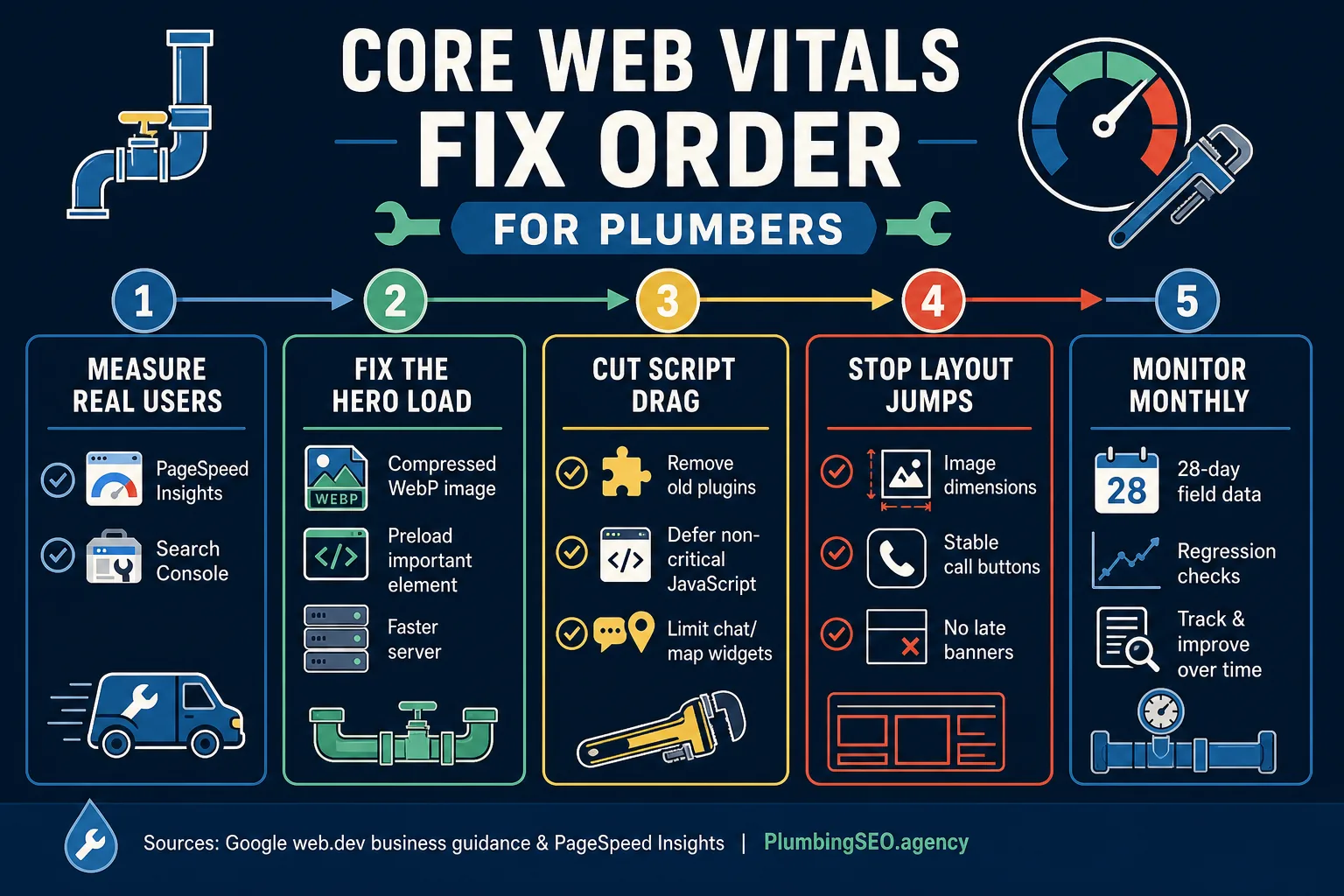
A practical fix order for plumber sites: measure, fix hero load, cut scripts, stop jumps, monitor monthly.
Week 1: Measure the money pages
Test mobile performance on the pages that actually create calls. Pull Search Console Core Web Vitals data if you have it. Check whether field data is page-level or origin-level. If PageSpeed says there is not enough real-user data, do not panic. Smaller local sites often need more traffic before page-level CrUX data appears.
Week 2: Fix the biggest LCP offender
For many plumber sites, LCP is a giant hero photo, a background video, a slow server response, or a slider. Fixing that one thing can make the page feel different right away. Use compressed WebP images, avoid print-quality uploads, and keep the first screen focused on service, area, trust, and call action.
Week 3: Cut JavaScript drag
Google's business guidance on Core Web Vitals specifically warns owners about unused plugins, old campaigns in tag managers, expensive widgets, ads, and excessive page size. On plumbing sites, the usual suspects are chat tools, map embeds, review widgets, call tracking scripts loaded everywhere, and old WordPress plugins nobody remembers installing.
Week 4: Stabilize the call path
Make sure images have width and height, sticky call bars do not jump, forms do not push content down after loading, and the mobile menu responds fast. Then watch calls and form fills, not just the report card. A faster site should make it easier for real customers to reach you.
When to DIY and When to Bring in Help
A plumbing owner or office manager can handle the first layer: run PageSpeed Insights, list slow pages, compress obvious image monsters, remove unused widgets, and ask the website vendor why the homepage is slow on mobile.
Bring in a developer or plumbing SEO team when the fixes involve server response time, render-blocking CSS, JavaScript long tasks, theme bloat, tracking setup, template changes, or a full rebuild. That work can break things if done casually. Nobody wants to find out the contact form stopped working during a busy weekend.
If you want a second set of eyes, start with a plumbing-only SEO leak check through our contact page. We can look at Core Web Vitals alongside service-page quality, local SEO, tracking, and the actual call path.
Frequently Asked Questions
They help protect the calls your SEO and ads already earned. A faster, steadier mobile site makes it easier for homeowners to read your service page, trust the company, tap the phone number, and book the job.
They are not usually the main reason a plumber wins the map pack. Reviews, proximity, Google Business Profile strength, local relevance, and service-area content usually matter more. Core Web Vitals still matter because slow pages can waste clicks and calls.
Some fixes are owner-friendly, like compressing oversized images, removing unused widgets, and asking the web vendor to test the top service pages. Technical fixes involving server response, JavaScript, CSS, templates, and tracking scripts usually need a developer.
Lab scores can change immediately after fixes, but field data uses real-user history. PageSpeed Insights and Search Console often need enough traffic and a trailing data window before the improvement is visible in Core Web Vitals reports.
Not automatically. First test the pages that create calls and fix the biggest performance leaks. Rebuild only when the theme, builder, hosting, or template structure is so bloated that patching it costs more than replacing it.
Start with the homepage, emergency plumbing page, highest-value service pages, top city or service-area pages, and contact page. Those pages are closest to the call, so speed and stability problems there hurt the business fastest.
Want to Know If Your Site Is Leaking Calls?
Run a plumbing SEO leak check. We will look at your Core Web Vitals, service pages, Google Business Profile, local SEO basics, and call path so you know what to fix first.
Book a Plumbing SEO Leak Check