
- A plumbing website fails when it leaks trust, speed, service clarity, or the call path. More traffic will not fix a page that homeowners do not trust.
- Fix the emergency call path first: fast mobile load, visible phone button, real local proof, clear service areas, and short booking options.
- Track calls, forms, and booked jobs by source. If you only measure traffic, you can mistake a busy website for a working website.
If your plumbing website gets visitors but the phone stays quiet, the problem is usually not one big mystery. It is a stack of small leaks. The page loads a little slow. The phone number is a little hard to hit with a thumb. The reviews are buried. The service page says "plumbing" but not which jobs, towns, hours, or proof matter to the homeowner.
That is how good shops lose calls. Not because they forgot how to plumb. Because the website does not make the next step obvious when somebody is standing in a laundry room with water where water should not be.
The way I see it, a plumbing website has one main job: help the right local customer trust you fast enough to call, text, or book. Rankings matter. Design matters. Copy matters. But the phone tells the truth.
What counts as a real plumbing website lead?
A lead is not just a form fill, a click, or a spike in website sessions. For a plumbing company, a useful website lead is a local person with a real problem, in a service area you cover, asking for work you want to book. That definition matters because many websites are optimized for activity instead of revenue.
The wrong goal creates the wrong page. A page built to impress other marketers may hide the phone number under a polished hero image. A page built to win the call puts the emergency action, service area, reviews, proof, and next step where a stressed homeowner can find them quickly.
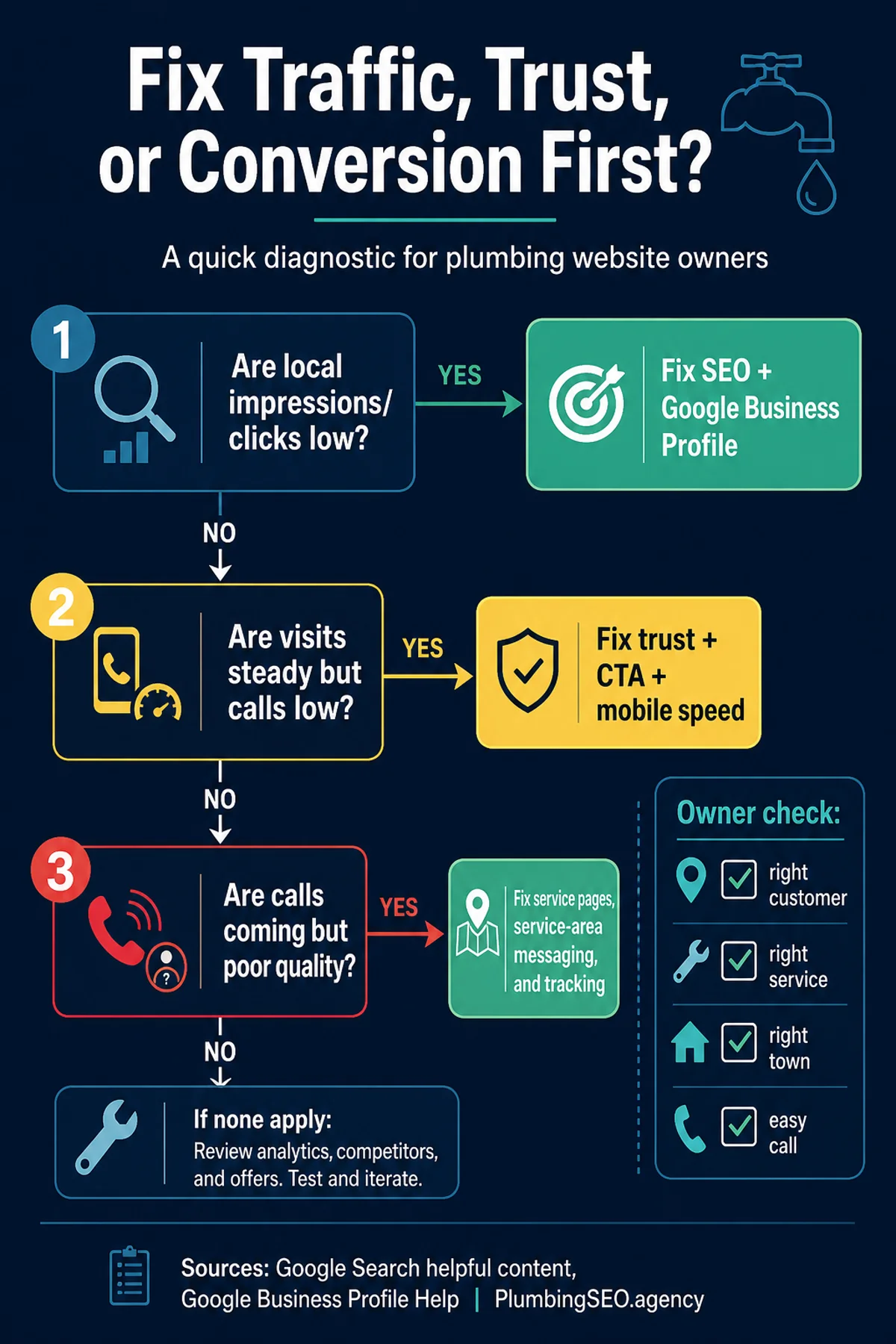
Use this call-first leak map before you buy another click. If the page cannot turn existing visitors into qualified calls, more SEO or ad traffic simply sends more people into the same broken path.
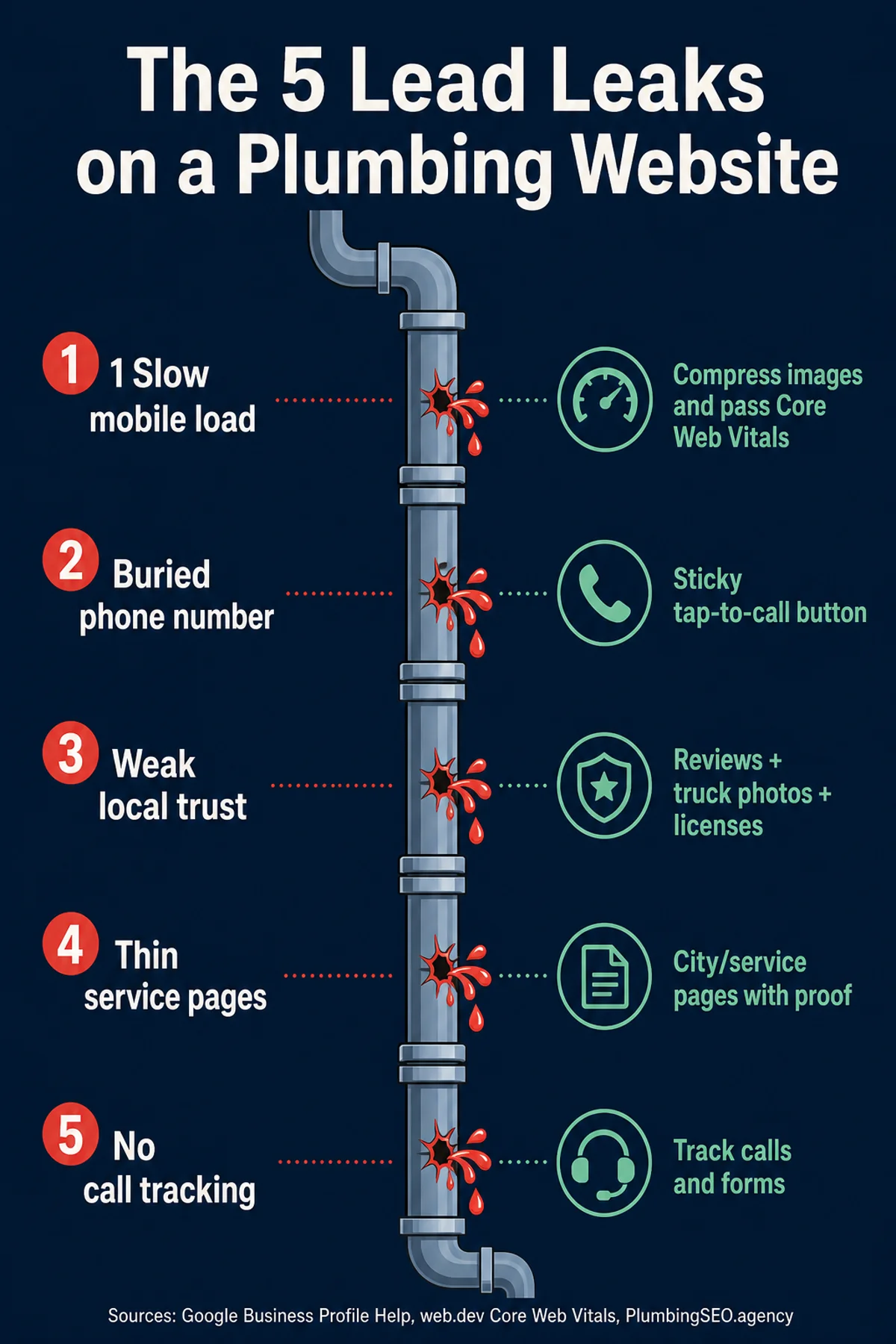
First, separate traffic problems from conversion problems
Before you rebuild anything, ask a plain question: are enough local people finding the site in the first place?
If impressions and clicks are low, the website may have a visibility problem. That points to local SEO, Google Business Profile work, service pages, internal links, and content that matches the jobs you want. If traffic is steady but calls are weak, the issue is probably conversion. That points to trust, calls to action, page speed, photos, offers, and the booking path.
Both problems can exist at the same time. But they need different fixes. Pouring ad spend into a page that cannot convert is like sending more water into a cracked pipe. You might see movement, but not where you wanted it.
| What you see | Likely leak | Fix first |
|---|---|---|
| Few local clicks and weak Maps visibility | Search visibility | Google Business Profile, service pages, local proof, technical cleanup |
| Traffic comes in but calls stay flat | Conversion path | Mobile speed, tap-to-call, trust signals, shorter forms |
| Calls come in but many are wrong fit | Message and targeting | Clear service areas, job types, emergency cues, pricing expectations |
| Nobody knows which work created booked jobs | Measurement | Call tracking, form tracking, CRM notes, source reporting |
How to find the lead leak before you redesign the site
Start with the evidence you already have. Open Search Console, call tracking, form submissions, Google Business Profile actions, and your booked-job notes for the same date range. You are looking for the first point where healthy activity turns into weak outcomes.
If local impressions are missing, the fix is upstream: local SEO, service-area relevance, technical indexability, and stronger links from supporting content. If impressions and clicks are present but calls are not, the fix is on the page: the offer, proof, phone path, speed, and trust sequence.
This is also where the homepage matters. The homepage should keep the core plumbing SEO promise simple: more calls and booked jobs from Search and Maps. Supporting blog posts like this one should move problem-aware readers toward that hub without creating duplicate service pages or confusing the main ranking target.
The 5 common reasons plumbing websites fail to generate leads
1. The mobile page is too slow for an emergency search
Most plumbing searches are not calm research projects. A homeowner may be on a phone, outside, half distracted, and trying to stop a problem before it gets worse. If the page drags, jumps around, or makes the call button hard to use, they do not wait around to admire the logo.
Google's Core Web Vitals focus on loading speed, responsiveness, and visual stability because those issues affect real users. Think with Google has also reported that longer mobile load times raise abandonment risk. In plumber language: if the site feels slow, the customer is already looking for the next name.
Fix the heavy stuff first. Compress oversized images. Remove scripts you do not need. Keep the above-the-fold area clean. Make the phone button load with the page, not after a pile of effects.
2. The phone number is visible, but not easy to use
A phone number in the header is not the same thing as an easy call path. On mobile, the number should be tappable, persistent, and obvious. If the visitor has to pinch, scroll, open a menu, or decode a form, you are asking too much from somebody who may have water on the floor.
Every important service page should answer these fast: what do you fix, where do you go, when can I call, and how do I start? That is why strong plumbing website design is not decoration. It is dispatch support for the first few seconds of a lead.
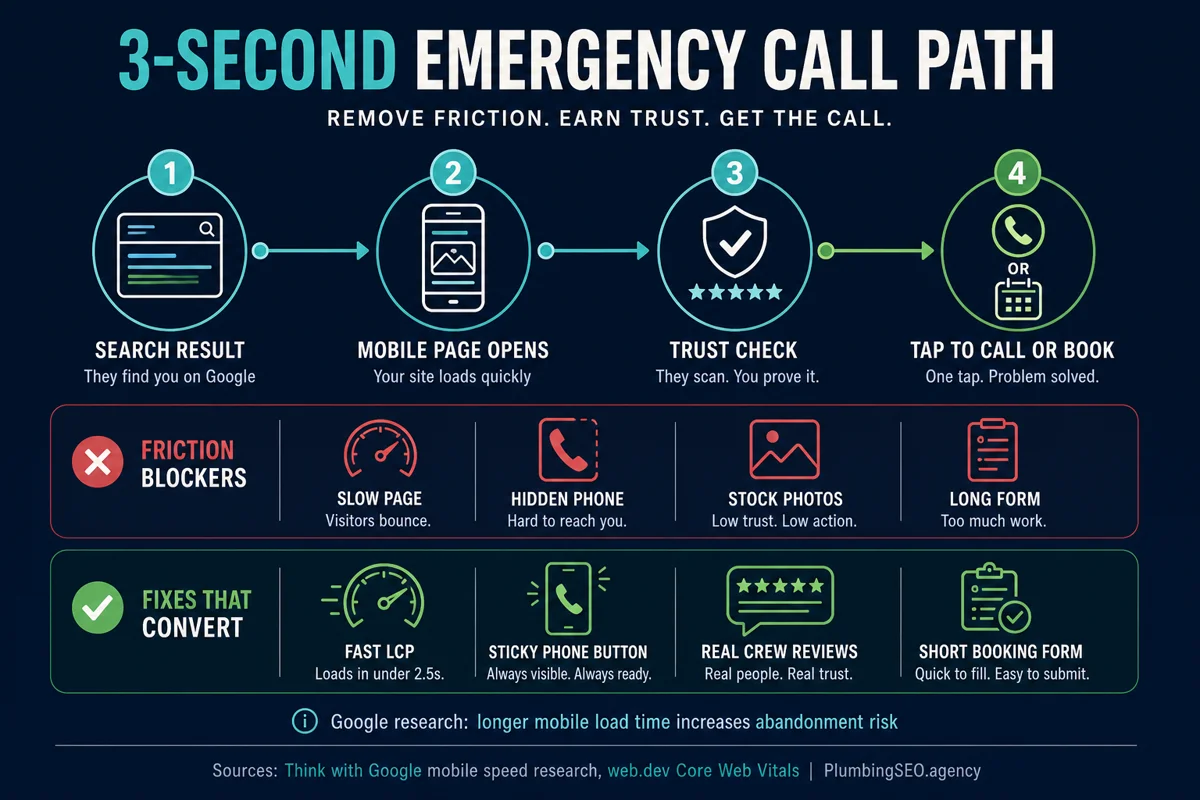
Call-first design beats pretty design on plumbing traffic
Pretty design helps only after the visitor understands what to do. On plumbing traffic, the first design test is whether a homeowner can choose the right action in a few seconds: call now, request an estimate, schedule non-emergency work, or check whether the company serves the address.
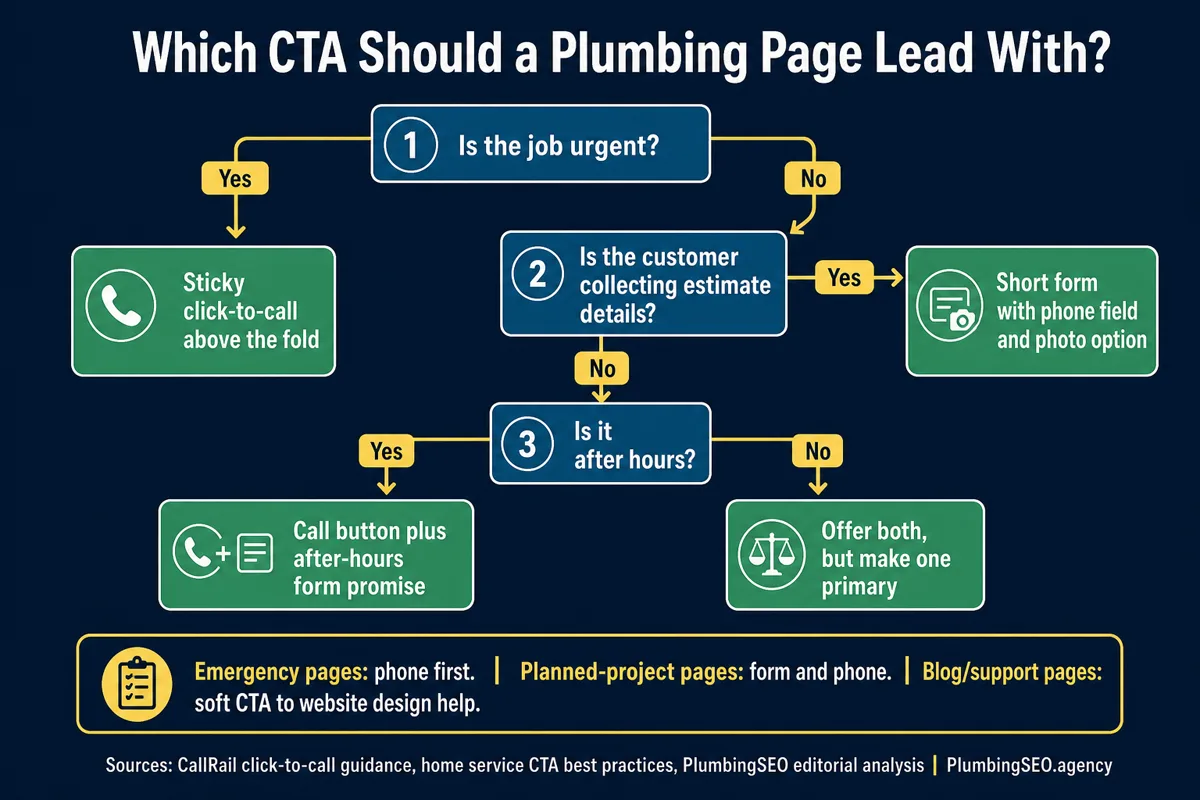
That does not mean every page needs a giant red button. It means the page should match urgency. Emergency plumbing pages need tap-to-call and fast reassurance. Replacement or remodeling pages can support a slightly longer form because the buyer has more time to compare proof, process, financing, and examples.
3. The site asks for trust before it proves trust
Homeowners are not only buying a repair. They are deciding who gets into the house, talks to their family, and touches expensive systems. A plumbing website that looks anonymous has to work twice as hard.
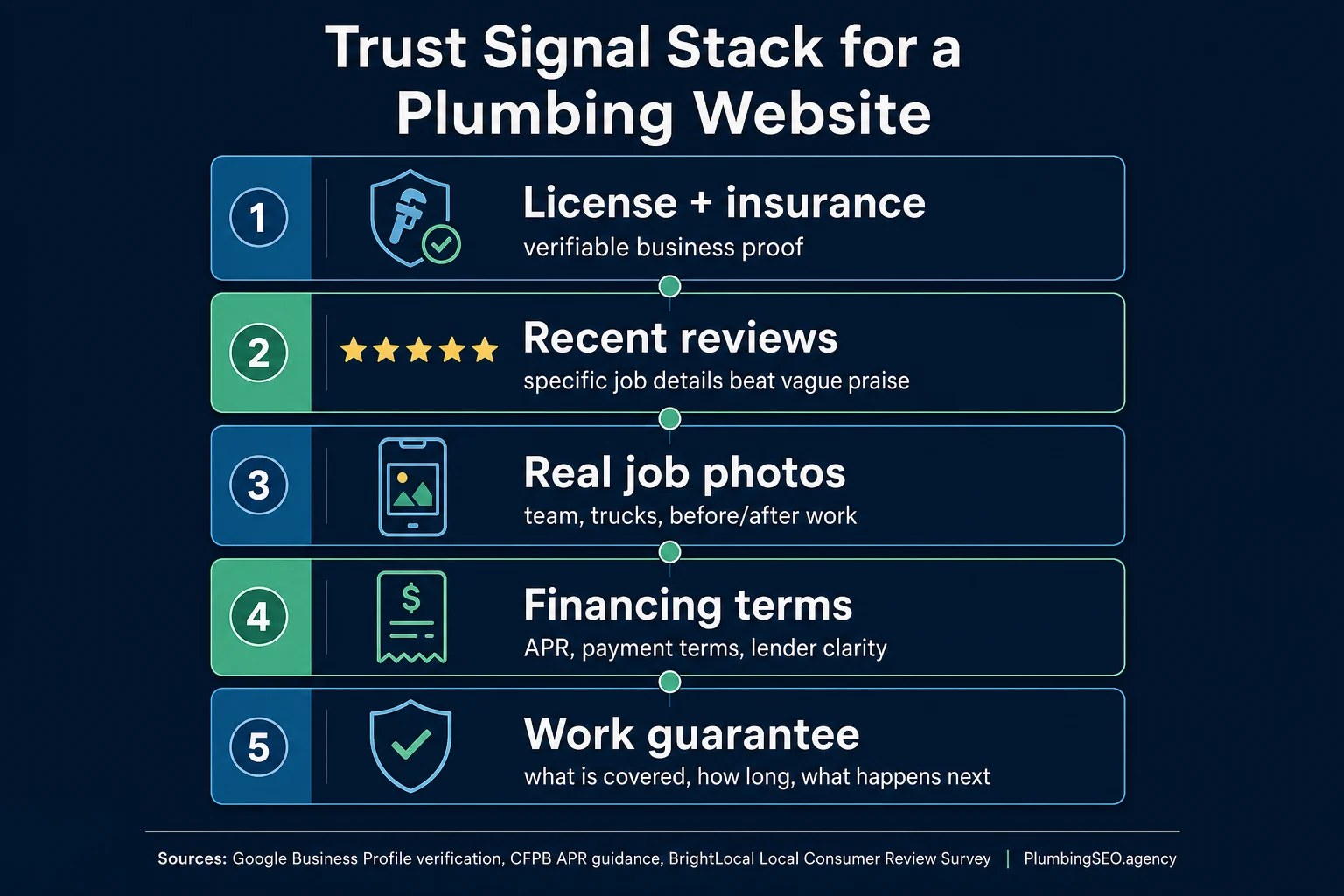
Use proof that feels local and real: branded truck photos, team photos, license details where appropriate, review snippets, service area names, before-and-after job photos, financing notes, warranties, and clear hours. Google's own Business Profile guidance emphasizes complete, accurate business information. Your website should back up the same reality.
Stock photos are not always evil, but they are not proof. If every image looks like it came from a catalog, the homeowner has to wonder what your actual crew, trucks, and work look like. Real beats polished when someone is choosing a local plumber.
Trust proof should sit beside the booking step
Many plumbing websites technically have proof, but they place it too far away from the decision. A reviews page, a badge in the footer, or a buried gallery may not help the visitor at the moment they are deciding whether to call.
Move proof beside the ask. Put review snippets near tap-to-call blocks, license and insurance cues near emergency offers, neighborhood proof near service-area copy, and job photos near service-specific pages. The visitor should not have to leave the page to decide whether you look real.
4. The service pages are too thin to sell the job
A lot of plumbing websites have one services page with a long list: drain cleaning, water heaters, leak repair, sewer repair, repipes, sump pumps, gas lines, and everything else. That tells Google very little. It tells the customer even less.
A good service page should match the specific job. Water heater repair needs different proof than sewer line replacement. Emergency leak repair needs different urgency than a bathroom remodel. If your best jobs are buried in one generic paragraph, you are making Google and the customer guess. Neither one is paid to figure it out for you.
Write service pages like dispatch notes for a real call. Include symptoms, service area fit, what happens next, photos, FAQs, and the best call option. Then use articles and related resources to point visitors toward the right page at the right time.
5. There is no clean tracking from visitor to booked job
Traffic reports can make a bad website look busy. Call tracking and booked-job tracking show whether the work actually moved the company. If you cannot tell which page, query, ad, profile, or form produced the call, you are guessing with the checkbook open.
For a small shop, start simple. Track calls from the website. Track form fills. Note whether the call booked, what service it became, and whether the job was worth doing again. If you use a CRM, connect the source to the job outcome. This is where a plumbing lead CRM becomes more than office software. It helps you see which work fills the board and which work just makes reports look nice.
Good website lead
- Calls from a town you serve
- Needs a service you want
- Understands the next step
- Can be tied back to a page or channel
Bad website lead
- Outside the route
- DIY shopper or price-only caller
- Confused by the page
- Shows up in reports as mystery traffic
Connect SEO work to calls and booked jobs
Search rankings are useful only when they create the right customer action. A plumbing company can rank for a broad topic, earn clicks, and still miss revenue if the page does not route the visitor to a call path, service page, or audit step.
That is why content, homepage messaging, service pages, and tracking should work as one system. Blog posts explain the problem. The homepage reinforces the main offer. Service pages prove the specific job. Tracking shows whether the lead became a booked job.
If one piece is missing, the website can look successful in reports while the schedule stays thin. Tie every major page to a next step and every next step to a source you can review.
The order I would fix a quiet plumbing website
Do not start with the prettiest thing. Start with the leak closest to the call. If a homeowner cannot call easily, fix that before rewriting every blog. If the phone button works but nobody trusts the page, fix proof. If proof is strong but local clicks are weak, fix visibility.
Step 1: Make the first screen earn the call
The first screen on mobile should make four things clear: you are a plumber, you serve this area, you can be contacted now, and you are trustworthy enough to invite inside. If the hero section is a vague slogan with no phone path, rewrite it.
Step 2: Put real proof near every ask
Do not put all reviews on one testimonial page and hope people find them. Put proof near calls to action. Put service-specific proof near service-specific offers. If you want water heater calls, show water heater proof. If you want emergency work, show emergency readiness.
Step 3: Build pages around services and towns, not just company pride
Your About page can tell the story of the company. Service pages need to help a customer decide. That means job type, symptoms, locations, schedule, proof, and the next step. If you need a quick pattern, use this plumbing website homepage checklist to tighten the main page, then apply the same thinking to the money pages.
Step 4: Add tracking before you judge the work
A lot of owners quit too early because they are looking at the wrong numbers. Traffic can dip while lead quality improves. Calls can rise while booked jobs stay flat because the wrong services are being pushed. Track the whole path before calling the website a failure.
If the site already gets traffic but is not getting calls, read the deeper guide on why a plumber website is not getting calls. If the biggest problem is the phone experience, compare against the mobile plumbing website test.
Use internal links to move visitors to the right fix
A lead-focused plumbing site should not leave helpful articles as dead ends. If a reader is worried about a quiet website, route them to the next practical page: the homepage for the full plumbing SEO offer, the website-design service for call-path and conversion fixes, the process page for how Search and Maps work together, or the audit page when they want a diagnosis.
Internal links also help search engines understand which pages are the money pages and which posts support them. Keep the anchors natural. A blog can mention how plumbing SEO turns Search and Maps visibility into calls without pretending to be a service page itself.
A 30-minute owner audit you can run this week
You do not need a 70-page report to spot the obvious leaks. Sit with your phone and test the site like a homeowner who has never heard of you.
- Search your main service and town. Do you show up in organic results, Maps, both, or neither?
- Open the website on mobile data. Does the first screen load cleanly, or does it feel heavy?
- Try to call with one thumb. If you hesitate, a customer will too.
- Look for local proof. Can you see real trucks, real reviews, real service areas, and real credentials?
- Pick one service page. Does it answer the job-specific questions, or does it read like every other plumber in town?
- Check tracking. Can you tell which calls came from the website and which became booked jobs?
If you want this checked without guessing, run a free plumbing SEO audit. The useful version is not a vanity score. It should tell you what is leaking, what to fix first, and whether the website problem is traffic, trust, conversion, or tracking.
Fast fixes that do not require a full rebuild
Some plumbing websites need a rebuild, but many only need a tighter lead path. Add a sticky mobile call button. Rewrite the first screen around the service area and emergency action. Put three real review snippets near the main call to action. Add job-specific proof to the top service pages. Shorten forms. Compress large images. Add call tracking before and after the change.
Then watch the right numbers for two to four weeks: calls, form submissions, booked jobs, job type, service area, and page source. If those improve, keep refining. If they do not, the issue is probably deeper in visibility, offer fit, or page structure.
What a lead-generating plumbing website looks like
A working plumbing website does not need to be fancy. It needs to be clear, fast, trusted, local, and easy to act on. It should tell the customer, "Yes, we handle that. Yes, we serve your area. Yes, we look legitimate. Here is how to call." Fancy can come later. The leak gets fixed first.
For a plumbing owner, that matters because every missed call can become somebody else's booked job. The goal is not more website activity. The goal is more of the right calls, from the right towns, for the right work, with enough tracking to know what paid off.
Want your website checked for lead leaks?
We will review the call path, mobile speed, service pages, local proof, internal links, and tracking setup so you know what to fix first.
Run My Free SEO Leak CheckFrequently Asked Questions
The most common reasons are weak local visibility, slow mobile loading, buried phone buttons, thin service pages, weak trust signals, and no tracking from visitor to booked job. Start by separating traffic problems from conversion problems.
Not always. If the site structure is sound, you may only need to fix the first mobile screen, call buttons, proof, service pages, speed, and tracking. Rebuild only when the current site blocks those fixes.
The first screen should show what you do, where you serve, how to call or book, and why the homeowner can trust you. Reviews, service area cues, emergency availability, and a tap-to-call button matter more than a clever slogan.
Yes, for important services. Drain cleaning, water heaters, sewer repair, leak repair, and repiping each need different proof, questions, urgency, and search intent. A single generic services page usually leaves too much money on the table.
If local impressions and clicks are low, fix visibility first. If traffic is steady but calls are weak, fix conversion: page speed, trust, phone placement, forms, and offers. If calls are low quality, fix messaging and tracking.
Make the mobile call path obvious. Add a sticky tap-to-call button, remove friction from the first screen, show real local proof, and make emergency service pages easy to reach. Then track whether those calls become booked jobs.
No. Emergency and repair pages should make calling easy, but replacement, remodel, commercial, and financing pages may also need short forms or estimate requests. Match the action to the visitor's urgency.
Refresh when rankings, clicks, calls, or booked jobs show a clear leak, or when services, service areas, photos, reviews, or tracking have changed. Avoid changing a stable ranking page just because the copy feels old.
Fix the leaks before buying more traffic.
If your plumbing website looks busy but the phone is quiet, we can check the call path, service pages, local proof, and tracking setup.
See Plumbing Website Design