
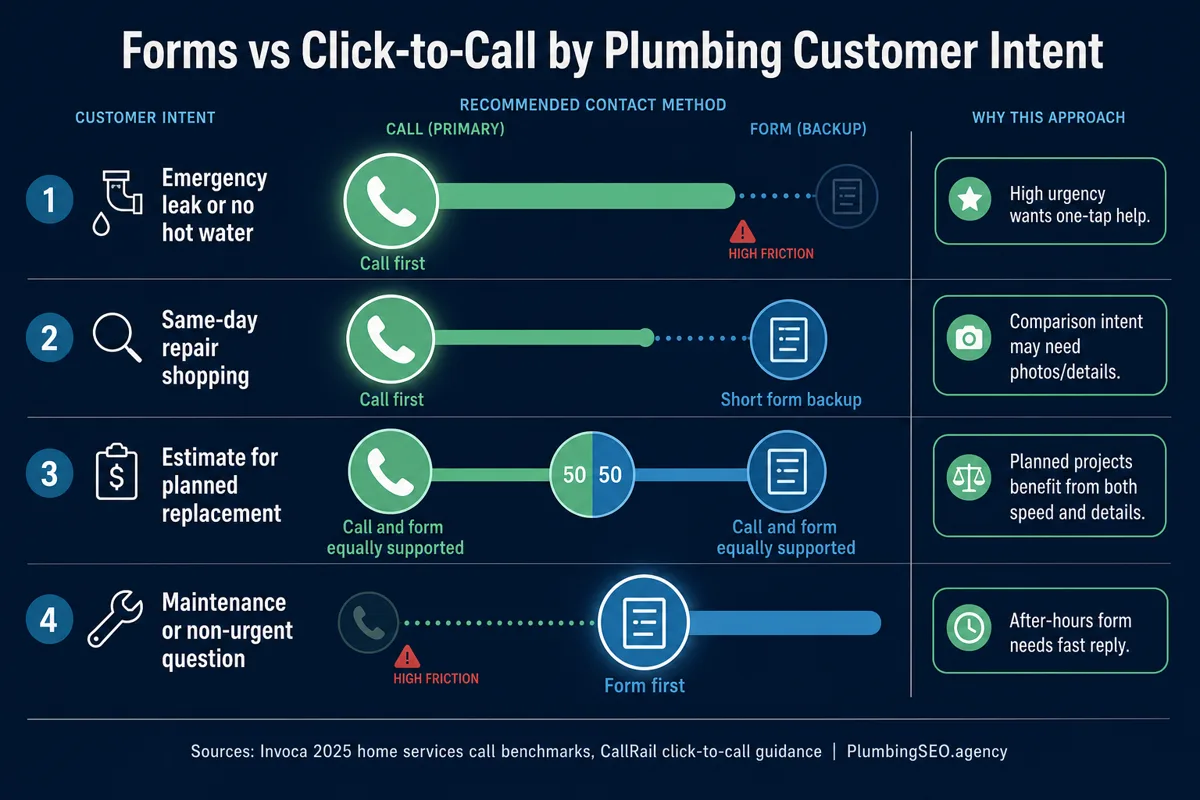
- Emergency plumbing pages should lead with click-to-call. If a homeowner has water on the floor, a hidden phone number is a leak in your website.
- Estimate and planned-project pages should offer both. Use a short form for details, but keep a phone path visible for people ready to book.
- The best CTA depends on intent, not agency taste. Track answered calls, qualified calls, forms, response time, and booked jobs separately.
If your plumbing website gets visitors but the phone still feels too quiet, the problem may not be traffic. It may be the next step you are asking people to take.
A homeowner with a burst supply line does not want to fill out a seven-field form and wait for somebody to "review the request." They want a real person. A homeowner planning a water heater replacement may want to send model photos, compare options, and avoid a sales call until they know the basics. Same website, different intent, different best CTA.
So the answer is not "forms are better" or "calls are better." For plumbing websites, click-to-call usually wins urgent intent. Forms win when the customer needs to explain details, send photos, or contact you after hours. The site should not make them pick the wrong tool for the job.
Why call intent usually beats form intent on urgent plumbing searches
Plumbing is not like selling a download or booking a haircut. Many visitors are searching with pressure on them. They have a clogged main line before guests arrive, a leaking water heater, or a tenant calling again because the first repair did not hold.
That pressure changes behavior. Supply House Times reported on Invoca's 2025 call benchmark analysis, which found that 37% of phone leads converted during the call, with home services benchmarks reaching 46%. The same report said 35% of calls from digital marketing are qualified leads.
Those numbers do not mean every call is good. Anybody who has bought ads knows some calls are wrong numbers, tire kickers, or folks outside the service area. But a real urgent plumbing caller is often much closer to the truck roll than a casual form submitter.
The practical takeaway is simple. On emergency plumber, drain cleaning, sewer backup, leak repair, and no-hot-water pages, make the call button obvious before anything else. If that feels too aggressive, remember what the visitor is dealing with. Nobody with water under the cabinet is admiring your typography.
Where forms still beat calls
Forms are not the enemy. Bad forms are the enemy.
A short form can beat a call when the visitor is not ready for a live conversation. Think planned water heater replacement, repipe estimates, remodel plumbing, commercial maintenance, or a landlord who needs to send the tenant address and preferred access window. In those cases, a form lets the customer gather their thoughts and gives your office better intake details.
Forms also help after hours. A small shop may not have 24-hour dispatch. A form that says "Tell us what happened and we will call when the office opens" is better than pretending every call will be answered at midnight.
Use click-to-call first when...
- The job is urgent or same-day.
- The page targets emergency, drain, sewer, leak, or water heater repair searches.
- The visitor is probably on mobile.
- Your office can answer quickly and qualify the call.
Use a form first when...
- The job needs photos, measurements, or planning details.
- The visitor may be comparing options before talking.
- The page supports maintenance, remodel, replacement, or commercial work.
- Your follow-up process is fast and owned by one person.
The real problem is not form versus phone. It is lead leakage.
A plumbing website can lose good leads in quiet ways. The phone number is tucked in the footer. The mobile header does not have a tap-to-call button. The form asks for a full address before the visitor trusts you. Calls ring six times, then roll to a mailbox nobody checks. Forms go to a general inbox that gets opened after lunch.
That is how a site can look fine and still fail. It is like a clean truck with bad brakes. Nice to look at, not something you want on the road.
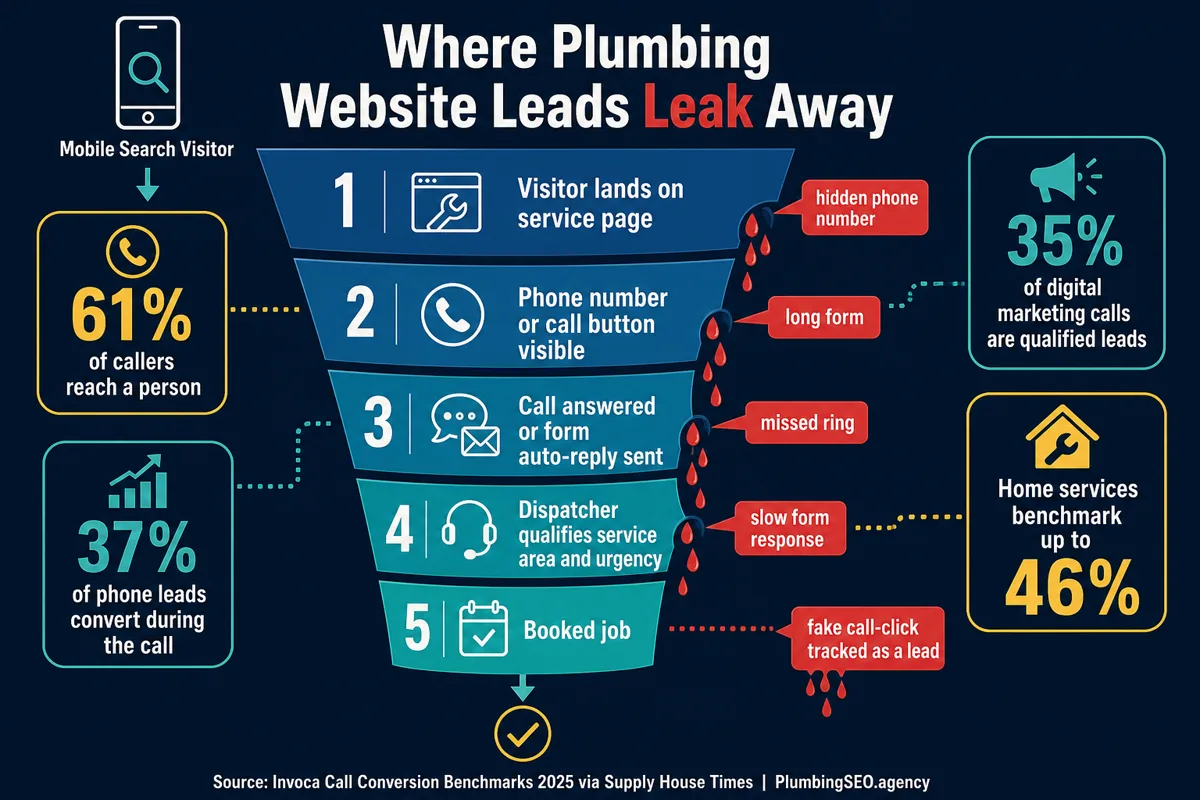
This is why call tracking matters. CallRail's click-to-call guidance explains how mobile call actions reduce friction and help businesses measure which campaigns drive phone conversations. That measurement matters, but only if you do not stop at the click.
A click on a phone number is not always a real call. A short call is not always a real lead. A form submission is not always a booked job. If you count all of them the same, your dashboard can look busy while the schedule stays thin.
Use this intent map for plumbing website CTAs
| Page or search intent | Primary CTA | Backup CTA | Why it works |
|---|---|---|---|
| Emergency plumber, leak repair, sewer backup | Sticky click-to-call | Short after-hours form | The customer needs speed and reassurance. |
| Drain cleaning, water heater repair, same-day service | Call button above the fold | Simple quote form | Many visitors are ready to schedule if the next step is clear. |
| Water heater replacement, repipe, remodel plumbing | Short estimate form | Visible phone number | The customer may need to share details before booking. |
| Commercial plumbing or maintenance plans | Form with business details | Office phone number | Decision makers often need a slower, documented intake path. |
| Blog posts and education pages | Soft service CTA | Free audit or contact link | The reader is learning first, so the CTA should fit the moment. |
If you are rebuilding the site, this is where a plumber-specific design process helps. A generic small business template may put the same form on every page. A stronger plumbing web design approach changes the CTA by service intent, job urgency, and how your office actually handles leads.
What the best plumbing websites do above the fold
The top screen of a plumbing page has one job: help the visitor understand that they are in the right place and show them the next step.
For urgent pages, that means the phone path should be impossible to miss. Use a tap-to-call button in the mobile header, a clear phone CTA in the hero, and a sticky mobile call bar if the layout supports it. The supporting form can sit lower on the page or open from a secondary button.
For planned-project pages, do the opposite. Lead with a short form that asks only what you need to start the conversation. Name, phone, service needed, address or ZIP, and an optional message are usually enough. If photos are useful, offer an upload field only when your team actually checks it.
Do not make every CTA fight for attention
If the hero has a phone button, a quote button, a chatbot, a financing badge, a coupon popup, and a newsletter signup, the visitor has to do the sorting. Pick the primary action for that page and let everything else support it.
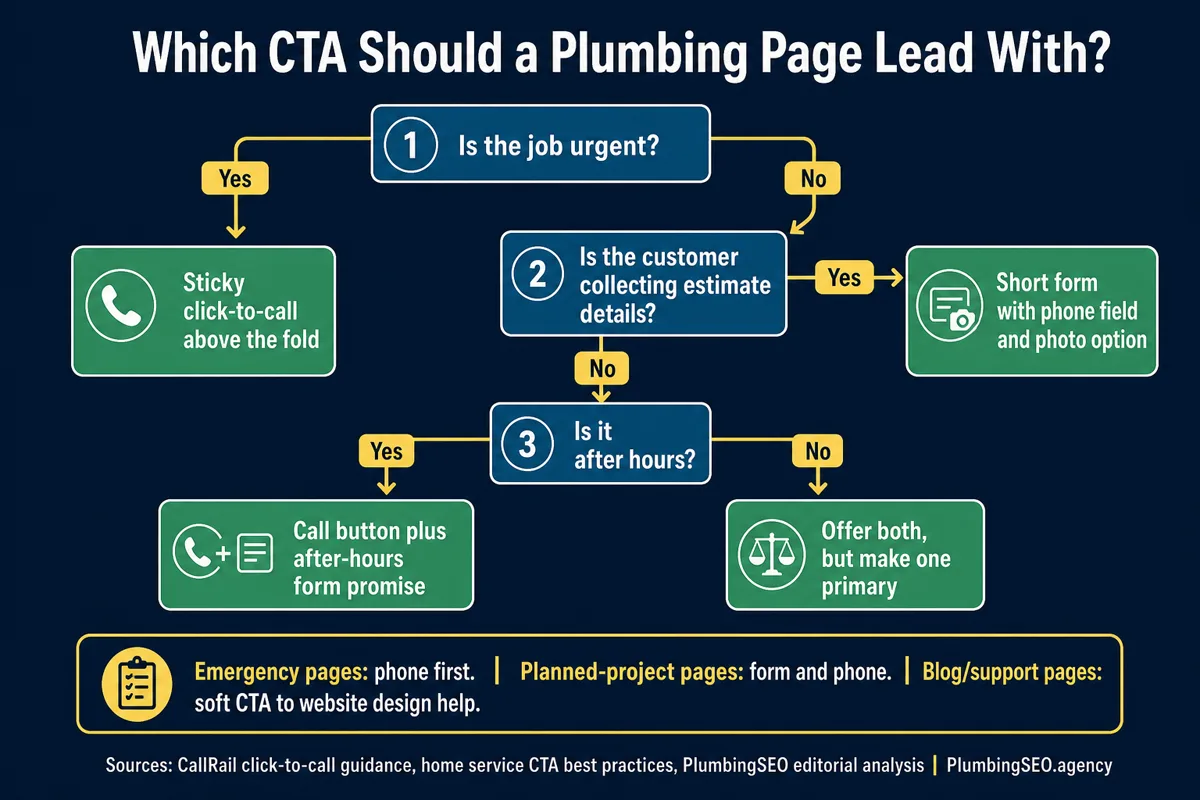
A simple decision tree for forms versus click-to-call
When you are unsure which CTA should lead, start with the job type. Urgency comes first. Then decide whether the customer needs to send details before a useful conversation can happen.
How to track the winner without fooling yourself
If you only track form submissions and phone clicks, you will make bad decisions. A campaign can generate a pile of call clicks with no real conversations. A form can generate fewer leads but better scheduled work. The phone tells part of the truth. The booked job tells the rest.
One PPC discussion from a plumbing campaign showed the danger clearly: the advertiser tracked website phone clicks and form submissions, but many low-quality clicks did not become real calls. The useful lesson is not that calls are bad. It is that call clicks, answered calls, qualified calls, and booked jobs must be separated.
For a small plumbing company, I would start with these five numbers every week: website calls, answered calls, qualified calls, form submissions, and booked jobs. If the call button is getting taps but the call log is thin, fix tracking. If forms are coming in but nobody follows up quickly, fix ownership. If both are happening and jobs are not booking, fix the script, service area filter, or offer.
What I would fix first on a plumbing website
First, make the mobile phone path visible on every money page. That includes the homepage, emergency service pages, drain cleaning pages, sewer pages, leak detection pages, and water heater pages. Pair that with trust signals near the CTA. License, reviews, service area, hours, financing, and real truck or team photos all help. If you need the checklist, read the plumbing website trust signals guide.
Second, shorten forms. If the form feels like paperwork, homeowners will put it off. Ask for the minimum needed to respond. Use optional fields for details. Put the privacy reassurance close to the button. Tell people when they should expect a call back.
Third, match page intent. An emergency plumbing landing page should not behave like a brochure. A planned replacement page should not force a nervous homeowner into a call before they can share the situation.
Fourth, check speed. A beautiful call button does not help if the page loads after the homeowner has already called somebody else. If mobile speed is weak, use the plumber website speed guide and fix the heavy stuff before you argue about button color.
Bottom line: phone first for urgency, forms for detail
For plumbing websites, click-to-call converts better when the visitor has urgent intent and your team can answer. Forms convert better when the visitor needs to share details, compare options, or contact you outside business hours.
The strongest plumbing websites do not choose one forever. They choose the primary action by page intent, then support it with the other path. That is how you stop making homeowners hunt for help and start turning more visits into real conversations.
Forms vs Click-to-Call FAQ
Want a plumbing website that sends the right lead to the right CTA?
We can review your service pages, forms, call buttons, trust signals, and tracking so urgent visitors can call and planned-project visitors can send the details your office needs.
Improve My Plumbing Website