
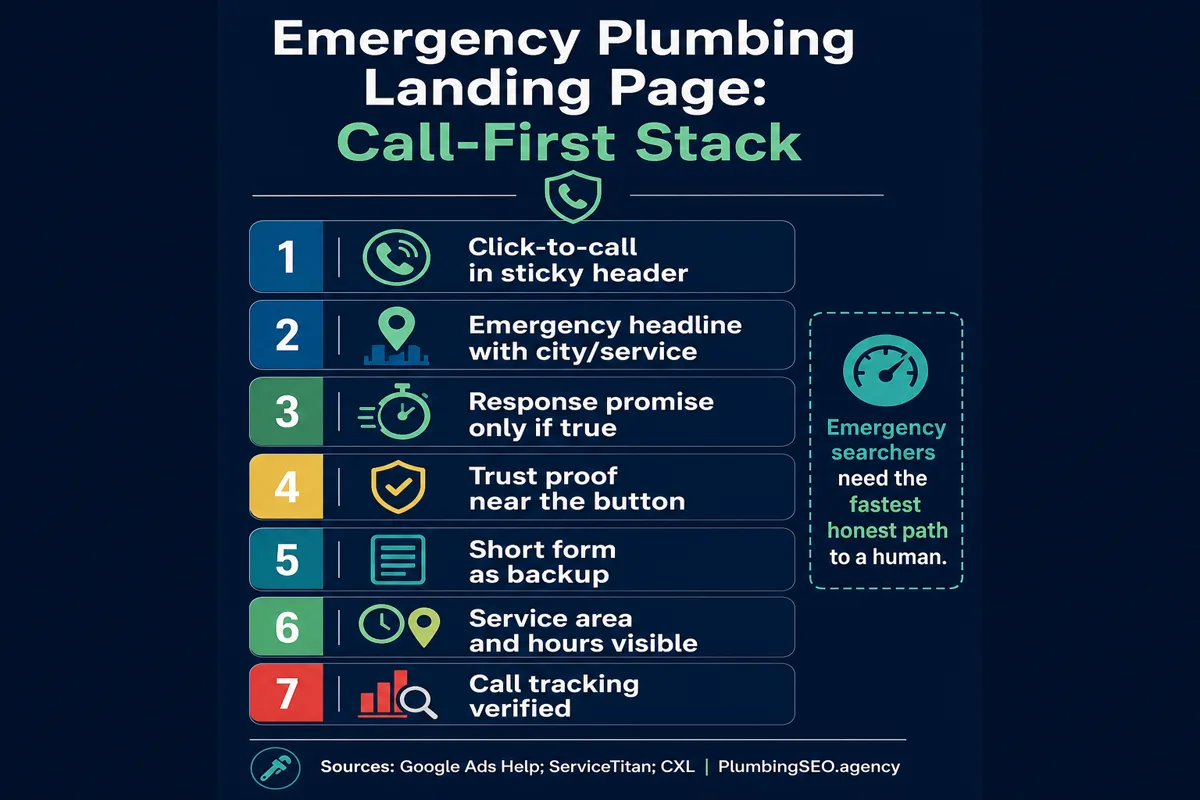
- Put the phone path first. On emergency plumbing pages, the mobile visitor should see a tap-to-call button, service area, and availability before anything that slows the decision.
- Do not promise 24/7 unless the shop can actually answer. A clear same-day or after-hours promise beats a loud claim that sends callers to voicemail.
- Track calls before you buy traffic. Google Ads phone conversion tracking and call-source notes keep paid clicks, SEO visits, and booked jobs tied together.
If a homeowner is searching for an emergency plumber on a phone, they are not shopping like it is a new faucet finish. Something is leaking, backing up, or flooding. They want a real person, a nearby truck, and a clear next step.
That is why an emergency plumbing landing page has to be call-first. Pretty design helps, but it cannot get in the way. The page has one main job: help the right customer call the right shop fast, then prove enough trust that they do not hit the back button and call the next company.
This checklist is for plumbing owners, managers, and marketers who are building a page for emergency searches. It supports a stronger plumbing web design system, but the same thinking applies whether the visit came from SEO, Google Ads, LSAs, or a referral.
Use this checklist to review page design, mobile calls, trust proof, and tracking. If your plumbing company wants an agency to audit search visibility, Maps alignment, emergency content, internal links, call tracking, and booked-job routing, see our emergency plumber SEO service. PlumbingSEO.agency provides marketing to plumbing businesses; we do not provide or dispatch emergency plumbing repairs.
Start with the caller, not the design
The mistake I see most often is building the page around the company instead of the emergency. The owner wants the logo big, the service list complete, and the page to feel impressive. The customer wants to know, "Can you help me, can you get here, and how do I reach you?"
That first screen should answer four things without making the visitor hunt:
| Above-the-fold question | What the page should show | Why it matters for calls |
|---|---|---|
| Do you handle this emergency? | Emergency plumber headline plus the main urgent services. | The visitor should not wonder if drain backups, leaks, or burst pipes count. |
| Can I reach you now? | Tap-to-call button and visible phone number. | Emergency visitors usually prefer a call over a long form. |
| Do you serve my area? | City, nearby service area, or response zone. | Local confidence beats a generic page that could belong anywhere. |
| Can I trust you? | Reviews, licensing, experience, or proof near the CTA. | Trust proof lowers hesitation before a high-stress call. |
Checklist 1: Make the call button impossible to miss
For emergency searches, the main CTA is usually a phone call. Forms still matter, especially for non-urgent work, but the call button should win the visual fight on mobile.
Use a sticky header or sticky footer CTA on mobile. The button text should be plain: "Call Now," "Call for Emergency Plumbing," or "Talk to a Plumber." Do not hide the phone number behind a vague "Contact Us" button. A panicked homeowner is not trying to solve a little mystery before the ceiling gets worse.
CXL's mobile landing page guidance calls out click-to-call and sticky navigation as mobile-specific features worth testing. For plumbing, I would not bury that in a test queue. If emergency calls matter, make click-to-call part of the page from the start.
Checklist 2: Match the searcher's emergency language
A good emergency page does not say only "quality plumbing solutions." It says the thing the customer is dealing with: burst pipe, sewer backup, overflowing toilet, leaking water heater, clogged drain, no hot water, or after-hours plumbing help.
The page title and H1 still need to be concise. Google's own title link guidance recommends descriptive, concise title text and warns against vague or stuffed titles. That is useful here. "Emergency Plumber in Dallas" is clearer than a clever slogan. "24/7 Emergency Plumbing Services, Best Cheap Fast Plumber Near Me" looks like someone spilled keywords into the drain.
Weak emergency headline
"Your Trusted Home Service Partner"
- Does not say plumber.
- Does not say emergency.
- Does not name the service area.
Call-first emergency headline
"Emergency Plumber in [City]. Call for Same-Day Help."
- Matches urgent intent.
- Shows local relevance.
- Points directly to the call.
Checklist 3: Promise only what dispatch can keep
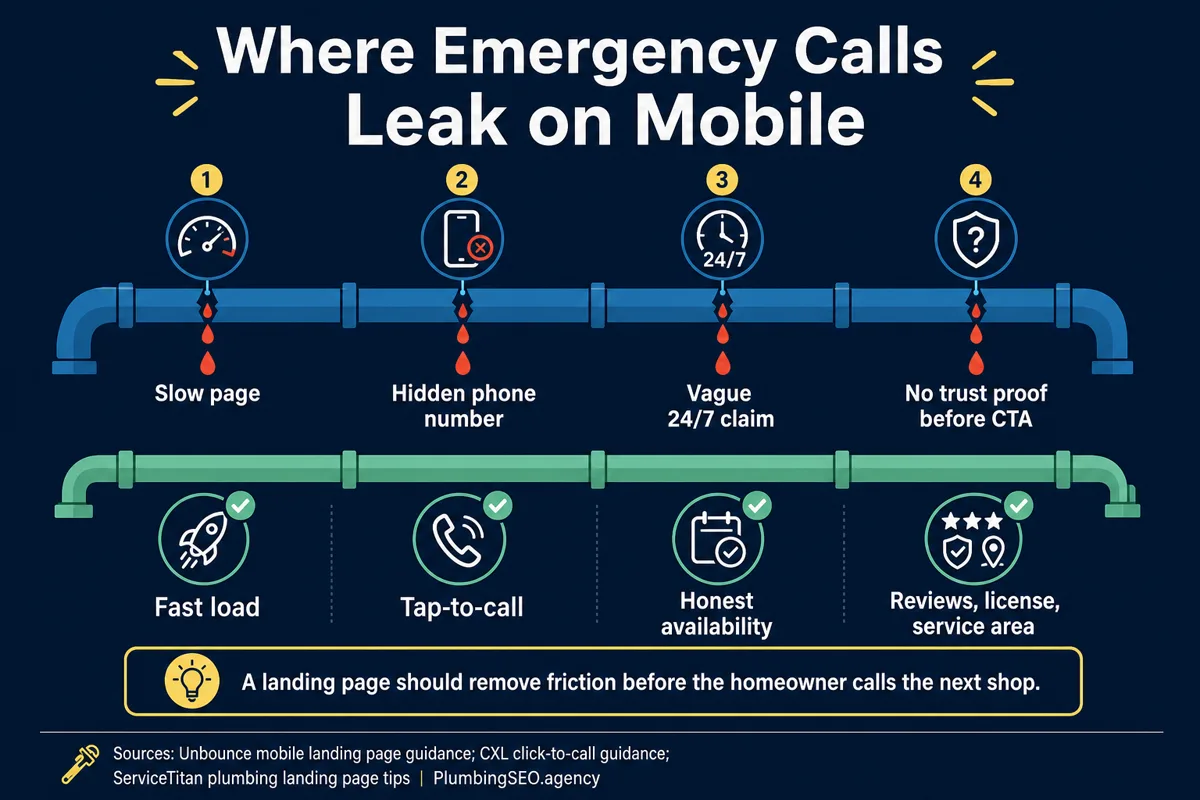
Emergency pages get dangerous when the marketing promise gets ahead of operations. If the page says 24/7 but calls roll to voicemail at 9 p.m., the page is not just weak. It is teaching people not to trust the company.
Community discussions around emergency trades show the same complaint again and again: people call companies advertising emergency service, then find nobody answers or nobody can come. That frustration is a warning for plumbers. If you can answer nights and weekends, say it clearly. If you cannot, say what you can do: same-day appointments, next available opening, after-hours voicemail monitored until a certain time, or emergency dispatch for existing customers.
Checklist 4: Put trust proof beside the decision
Trust proof works best near the call decision, not buried down the page. Put the most convincing proof close to the first CTA. That may include review count, star rating, years in business, license wording, insured wording, emergency experience, financing note, or a short promise about clean work and clear communication.
ServiceTitan's plumbing landing page guidance emphasizes headlines, trust-building elements, and clear conversion paths. For an emergency page, those elements should be tighter than a general service page because the customer is making a faster decision.
Do not make the top of the page look like a courtroom with every certification you have ever earned. Pick the proof that answers the caller's fear. Will you answer? Are you local? Have other homeowners trusted you? Will the tech be professional? Can I call without getting trapped in a sales maze?
Checklist 5: Keep forms short and secondary
A form is useful backup. It should not compete with the call button for emergency visits. If someone is standing next to a shutoff valve, a seven-field form feels like punishment.
For emergency pages, keep the form short: name, phone, ZIP or city, problem type, and optional notes. If the visitor chooses the form instead of the call, the thank-you message should set the response expectation. "We received it" is not enough. Tell them whether to call for urgent help, when the office responds, and what to do if water is actively running.
Checklist 6: Track calls before traffic turns on
Here is where a lot of plumbing shops lose the truth. The phone rings, but nobody knows whether it came from SEO, paid search, a Maps listing, a referral, or an old magnet on a refrigerator.
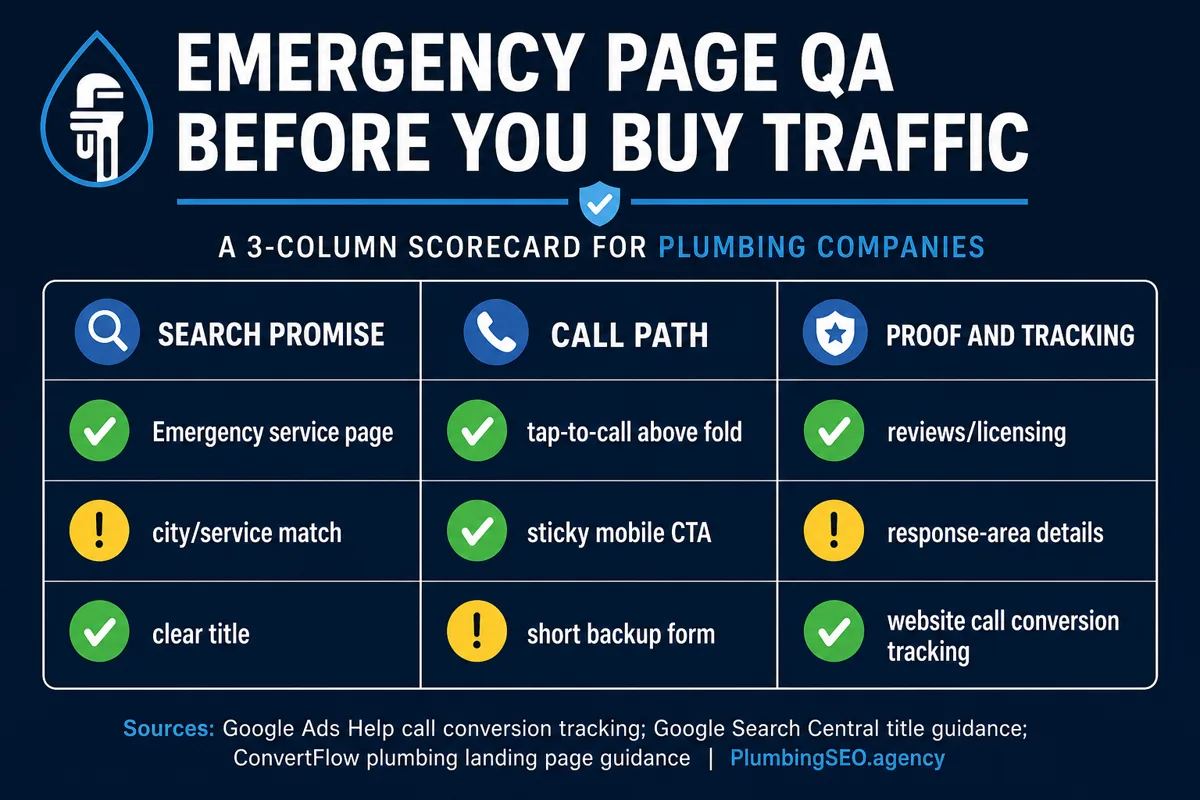
At minimum, set up website call conversion tracking before sending paid traffic. Google Ads Help explains website call conversion tracking and how calls can be counted as conversions after a minimum call length. That matters because a two-second wrong number is not the same as a booked emergency job.
For SEO traffic, use analytics events, call tracking, CRM notes, or call-source questions. The exact setup can vary, but the owner needs one answer at the end of the month: which page created real calls that turned into real jobs?
Checklist 7: Build the page for the job type, not every service
An emergency plumbing page should not try to be the whole website. It can mention related services, but the path should stay narrow. Emergency pages work best when they focus on the urgent job and move the visitor toward contact.
If you also run paid traffic, this page should line up with the ad group. Our guide to plumbing PPC landing pages above the fold goes deeper on paid-search page structure. For organic support, connect the page to your broader plumbing website homepage checklist so the main site carries the same call-first logic.
Checklist 8: Make the page fast enough for a bad moment
Emergency visitors are often on mobile, sometimes in a basement, garage, rental unit, or driveway. They may be on weak service. A page with heavy scripts, oversized images, and slow layout shifts is not just a technical issue. It is a missed call.
Compress images, limit third-party scripts, keep the first screen simple, and test the page on a real phone. A desktop screenshot does not tell you whether the call button is thumb-friendly when somebody is trying to stop water.
Final pass: the owner-side QA
Before publishing, hand the phone to someone who does not work on the website and ask them to complete three tasks:
- Find the phone number in five seconds.
- Tell whether the company serves their area.
- Explain what will happen after they call or submit the form.
If they hesitate, fix the page. Do not explain the design to them. Customers do not get a tour guide. They get a small screen, a plumbing problem, and three competitors one tap away.
The way I see it, an emergency plumbing landing page is not a brochure. It is dispatch support. It should help the right customer reach you quickly, help your team understand the call source, and keep the trucks moving toward jobs that are worth taking.
Emergency Plumbing Landing Page FAQ
Show an emergency-specific headline, tap-to-call button, visible phone number, service area, availability promise, and one strong trust signal. The visitor should know what you do, where you do it, and how to call before scrolling.
Use both, but make the phone call the primary mobile CTA. A short form is useful backup for less urgent visitors, but emergency searchers usually want the fastest path to a real person.
No. Say only what dispatch can actually support. If you offer same-day help, limited after-hours service, or next-morning priority, state that clearly. An honest promise protects trust and reduces angry calls.
Set up phone conversion tracking for paid traffic, track form submissions, and connect call-source notes to your CRM or dispatch process. The goal is not just counting calls. It is knowing which calls became real jobs.
Only when the service has clear urgent demand and a distinct call path. Burst pipes, sewer backups, drain clogs, water heater failures, and no-hot-water searches may deserve focused pages. Thin duplicate pages for every variation can hurt quality.
Link naturally to your plumbing web design page, PPC landing page guidance, homepage checklist, and any service pages that genuinely help the reader. Avoid stuffing links. Two or three useful links beat a pile of awkward anchors.
Want the full emergency-search path checked before you buy traffic?
Our emergency plumber SEO service reviews the mobile first screen, Maps and organic routing, call tracking, trust proof, service-area signals, and the handoff from click to booked job.
See Emergency Plumber SEO ServicesPlumbing-only. Practical notes, not a jargon report.