
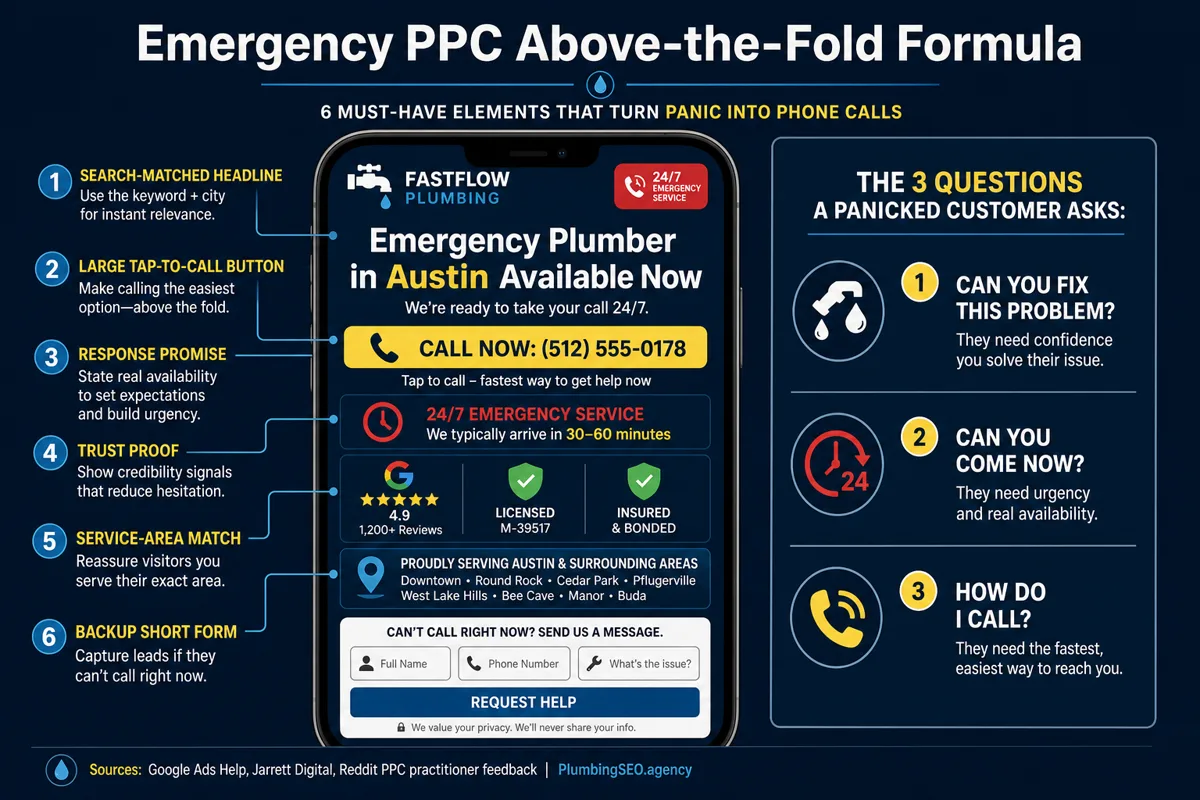
- For emergency PPC clicks, the top screen must answer three questions fast: can you fix this, can you come now, and how do I call?
- Put the phone number, service match, real availability, local proof, and one backup form above the fold. Do not make a flooded homeowner hunt through your full website.
- Track calls, forms, booked jobs, and completed revenue. A pretty landing page is only useful if it tells you which clicks became jobs on the board.
If a homeowner clicks your ad for an emergency plumber, they are not casually browsing. They may have water on the floor, a backed-up toilet, a cold shower, or a customer restroom out of order. That person is not reading your company history. They are asking one thing: can I trust this plumber enough to call right now?
That is why the first screen of a plumbing PPC landing page matters so much. You already paid for the click. If the page opens with a generic headline, a buried phone number, or five different menu choices, the call leaks away before your dispatcher ever gets a chance.
The practical rule is simple: above the fold should sell the call, not the whole company. The deeper page can explain services, reviews, FAQs, financing, and process. The top of the page has one job. Help the right emergency customer call you faster.
The above-the-fold job: calm panic and make calling easy
Most plumbing owners do not lose emergency PPC leads because they forgot to mention plumbing. They lose them because the visitor cannot instantly tell if this page matches their problem, their town, and their urgency.
Google's own landing page guidance says effective landing pages are key to getting conversions from ad traffic, and that mobile speed matters. Google also gives advertisers a landing pages report to spot pages that need better mobile experience. You can read that directly in Google Ads Help.
For a plumber, that guidance turns into a very concrete checklist. The page needs a headline that mirrors the ad, a phone number that cannot be missed, proof that you are local and legitimate, and a short backup path for people who cannot talk at that second.
Start with the search problem, not your company slogan
A homeowner who searched "emergency plumber near me" does not need to see "Quality Plumbing Solutions" as the first line. That may be true, but it does not carry the call. A better headline says what they need and where you serve.
Use a formula like this:
- Emergency Plumber in [City] Available Now
- Burst Pipe Repair in [City], Call for Same-Day Help
- Water Heater Repair Today, Local Licensed Plumbers
- Drain Backup Help in [City], Call a Plumber Now
That kind of headline does not sound clever. Good. Emergency PPC is not the place for clever. It is the place for clear. If your ad says emergency drain cleaning and the page says full-service plumbing company, you just made the customer do extra thinking while water is still moving.
This is also where your Google Ads for plumbers setup and landing page need to work together. Separate ad groups for emergency plumbing, drain cleaning, water heater repair, and other high-intent services deserve pages that repeat the same service promise. One generic page for every paid click makes the campaign harder to judge and harder to improve.
Make the phone number the hero, not a tiny header item
For emergency plumbing traffic, the phone is not decoration. It is the conversion path. Put a large click-to-call button in the hero. Repeat the number in plain text. On mobile, use a sticky call bar so the visitor does not have to scroll back up after checking proof.
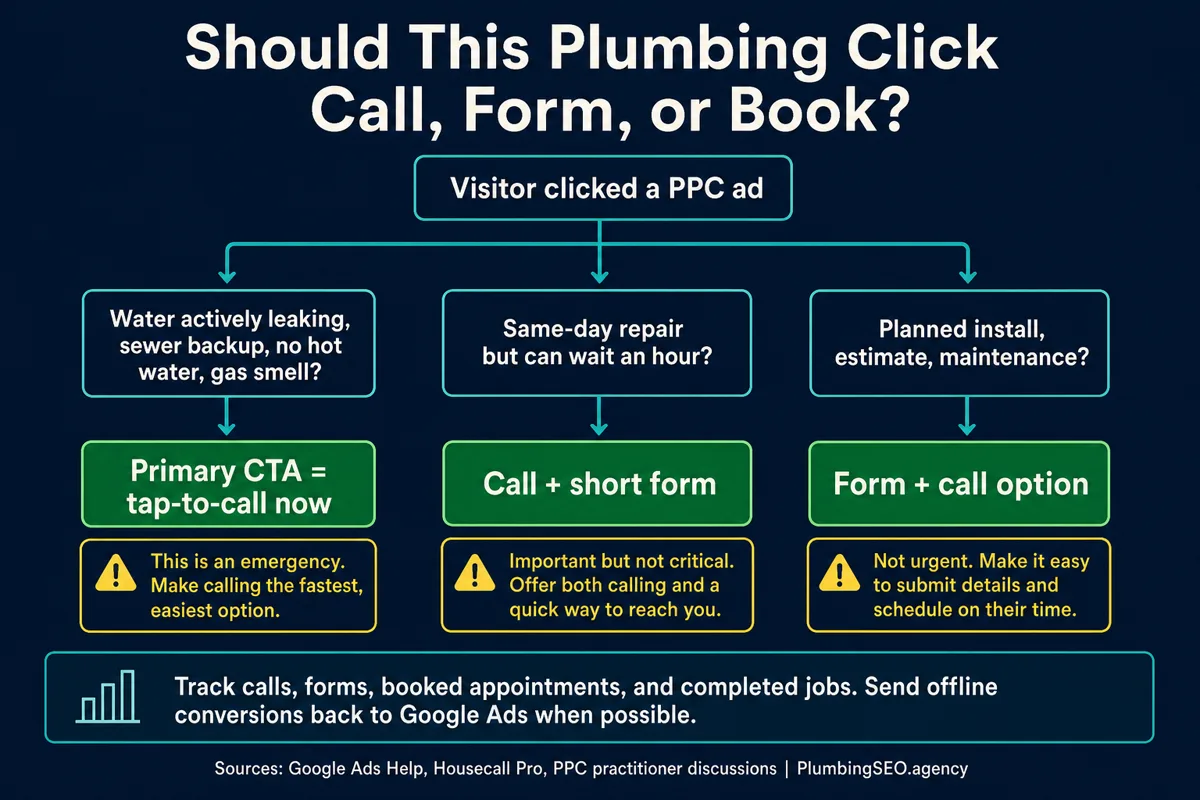
Forms still matter, but they should not replace the phone for urgent traffic. A form is useful when the homeowner is at work, the office manager is in a meeting, or the request is same-day but not critical. For a burst pipe or sewer backup, the fastest path should be a call.
| Above-the-fold element | Emergency page version | Why it earns calls |
|---|---|---|
| Headline | Specific service plus city or response promise | Confirms the click matched the problem |
| Phone CTA | Large tap-to-call button, visible without scrolling | Removes friction for panicked mobile users |
| Availability | Real hours, same-day window, or 24/7 only if true | Sets expectations and avoids wasted calls |
| Trust proof | Google rating, license, insured, local years, warranty | Gives the visitor permission to call now |
| Backup form | Name, phone, issue, service area | Captures non-callers without stealing focus from the phone |
Do not send high-cost emergency clicks to the homepage
Your homepage has a different job. It explains your company, services, location, process, reputation, and brand. That is useful for organic search, referrals, and shoppers. It is a poor fit for someone who clicked a paid ad because the toilet is overflowing.
A dedicated plumbing PPC landing page strips the page down to one promise, one service, one location pattern, and one primary action. It can still look professional. It should still include proof. But it should not invite the visitor to browse every part of your website before calling.
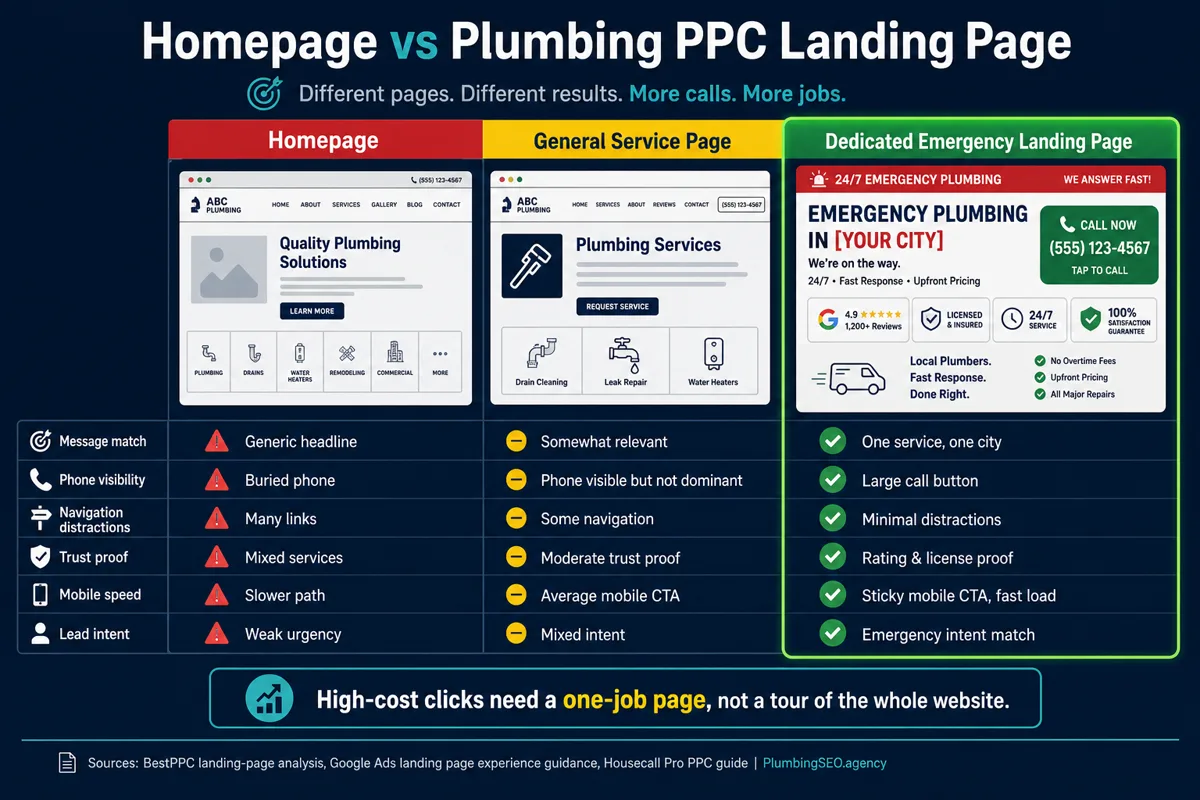
Housecall Pro's plumbing PPC guide makes the same owner-side point: PPC works best for high-intent searches like emergency plumber near me, and landing pages should be fast, mobile-friendly, and matched to the ad. Their guide also points to tracking and budget shifting as core parts of the campaign, not afterthoughts. That matches what we see in real plumbing accounts. The page, the phone, and the reporting have to be built together.
Put proof high, but keep it believable
Trust proof above the fold should be short and verifiable. A review rating, review count, license badge, insured badge, or years in business can help the customer stop hesitating. A wall of testimonials at the top usually does the opposite. Nobody wants to read a novel while the shutoff valve is hiding behind a shelf full of paint cans.
Good proof for the hero area includes:
- Google rating and review count, if strong and current.
- Licensed and insured wording, if accurate in your market.
- Service-area language that names the city or neighborhood.
- A response-time promise you can actually keep.
- A simple warranty or satisfaction promise, if your company uses one.
Do not fake urgency or invent proof. If you do not answer phones 24/7, do not say 24/7. Say "same-day appointments" or "after-hours emergency line" only when that is operationally true. Bad PPC does not just waste ad spend. It creates angry calls your team has to clean up.
Match the CTA to the job type
Not every paid plumbing click has the same urgency. Emergency sewer backup traffic should be pushed hard toward a call. A water heater estimate or repipe inquiry may need a form, financing note, or appointment request. If you treat all of them the same, you either under-sell urgent calls or over-pressure planned jobs.
Keep the first form short enough for a wet-handed customer
If you put a form in the hero, keep it short. Name, phone, issue, and maybe ZIP code is enough for the first step. Long forms feel tidy in a boardroom and terrible on a phone. Ask for the details after you have the lead.
One public PPC discussion about a plumbing landing page had a useful field note: several practitioners recommended testing a short form plus call combo, not online booking alone, especially when the visitor may need to talk to someone first. Another commenter pointed out that a time-frame guarantee or offer can be the final push when the visitor has already clicked this far. That is practical advice. It is also easy to test.
Good hero form
- First name
- Phone number
- Service issue dropdown
- Optional ZIP code
- Promise to call back fast
Lead-killing form
- Full address before trust is built
- Ten required fields
- Calendar booking as the only option
- No phone number nearby
- No response expectation
Track the whole path, not just the click
A landing page can look great and still lose money if tracking stops at form fills. Plumbing PPC should track calls, qualified calls, forms, booked appointments, completed jobs, and revenue where possible. Otherwise you may optimize toward cheap leads that never turn into work.
This is where plumber cost per lead can fool you. A $75 lead is not better than a $150 lead if the cheaper lead is outside the service area, looking for DIY help, or never books. The phone tells the truth, but only if you listen to it and feed the right conversion data back into the account.
If Local Services Ads are also part of your paid mix, compare this page against your Google LSA for plumbers setup. LSAs, search ads, and SEO all send different kinds of leads. The best plumbing companies do not let those channels fight each other. They use each one for the job it does best.
A practical above-the-fold checklist
Before you spend another week sending paid clicks to a page, open it on a phone and ask these questions:
- Does the headline match the service and city from the ad?
- Can a customer tap to call without scrolling?
- Does the page say when you can respond?
- Is there one strong trust signal above the fold?
- Is the form short enough to complete in under a minute?
- Does the page load quickly on mobile?
- Can you tell which calls became booked jobs?
For a bigger budget decision, read SEO vs Google Ads for plumbers. For this page, keep the focus tighter. If the customer clicked because they need a plumber now, show them the phone, prove you can help, and get the truck rolling.
FAQs About Plumbing PPC Landing Pages
Put a search-matched headline, large tap-to-call button, real availability or response promise, local trust proof, service-area wording, and a short backup form above the fold. Emergency visitors should not have to scroll to understand how to call.
Usually no for emergency or service-specific campaigns. A dedicated landing page matches the ad, removes distractions, and makes the phone the clear next step. Your homepage is better for general brand research and organic visitors.
For true emergencies, the call button should be the primary CTA. A short form can sit nearby as a backup for people who cannot call right away, but it should not make urgent customers work harder to reach you.
Start with separate pages for the highest-intent service groups, such as emergency plumbing, drain cleaning, water heater repair, and sewer backups. Add more pages when search terms, ad copy, and call quality show a clear difference in customer intent.
Track clicks, calls, qualified calls, forms, booked appointments, completed jobs, and revenue when possible. Cost per lead alone can be misleading if cheap leads do not turn into profitable jobs.
Need the paid clicks to turn into booked calls?
We build plumber-specific Google Ads and landing-page systems around real phone calls, service areas, and jobs on the board. Start with the paid search page built for plumbing companies.
See Google Ads Help for Plumbers