
- Use Google Business Profile posts to share timely updates, offers, events, and service information with local customers—not as a guaranteed ranking tactic.
- A clear, recent smartphone photo from an actual job can make the update more specific and credible than a generic stock image.
- Use the 40/30/20/10 mix as a starting framework, then adjust it using your own profile interactions, calls, website clicks, and booked jobs.
Why Are You Overthinking Your GBP Posts?
If you're spending an hour designing the "perfect" graphic on Canva to post to your plumbing company's Google Business Profile, you are doing it wrong.
We see this constantly. Plumbers know they should be posting to their GBP (formerly Google My Business), but they get paralyzed by the execution. They worry the photo isn't professional enough, they don't know what to write, and eventually, they stop posting altogether.
Meanwhile, another plumbing company may be using a short dispatcher workflow to keep customers informed about recent work, seasonal offers, and service availability.
The practical goal is not polish or a ranking formula. It is a locally relevant framework your team can execute in under 10 minutes and evaluate against real customer actions. Here is how to build that system.
Choose a Sustainable Posting Cadence, Not a Ranking Formula
Do GBP posts directly improve your Google Maps rankings? Google's local-ranking guidance focuses on relevance, distance, and prominence and does not promise a ranking boost for posting frequency.
Posts can still be useful customer communication. They let you present current offers, completed work, service details, and a relevant call to action. Treat calls, website clicks, profile interactions, and booked jobs as outcomes to measure in your own market—not as proof of an algorithmic ranking signal.
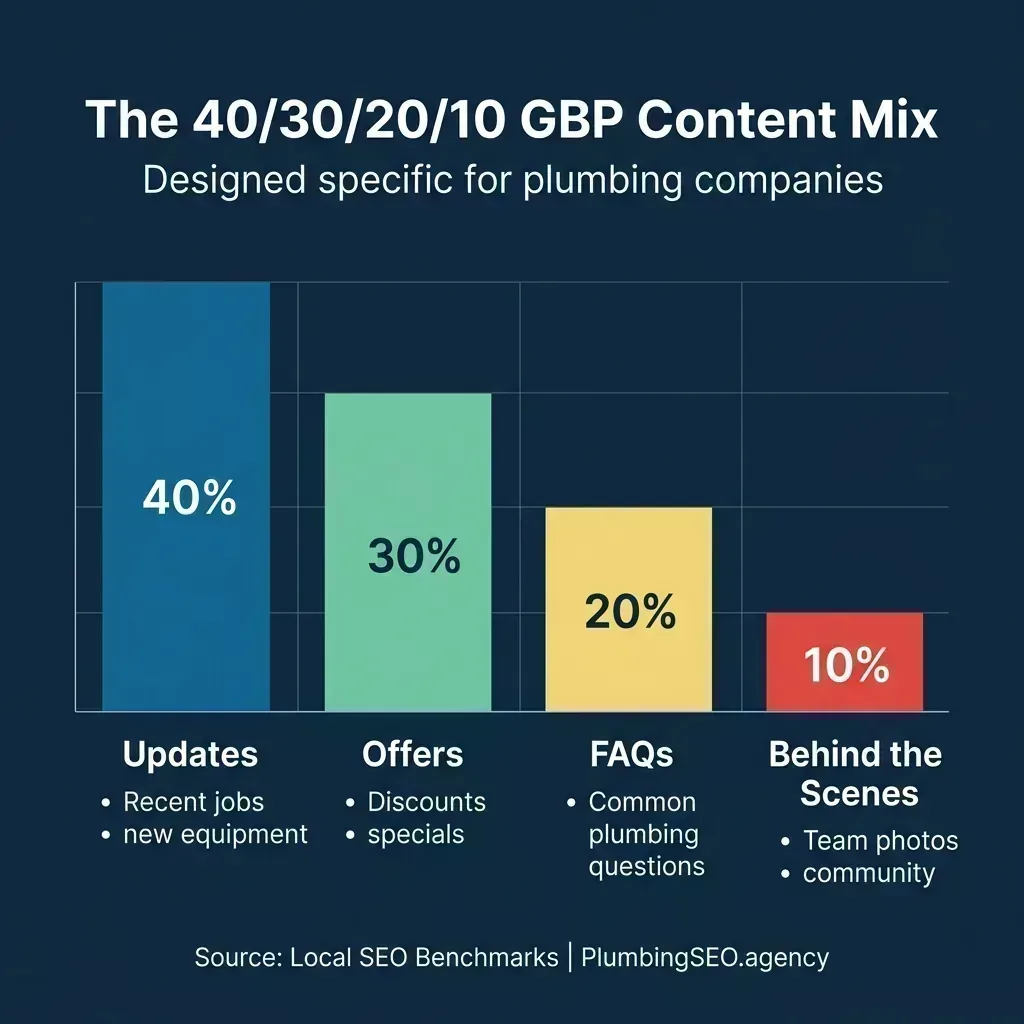
Use a varied content mix as a planning aid, not a fixed formula or performance promise.
There is no universal post frequency or call-lift benchmark that applies to every plumbing company. Choose a cadence your team can sustain, label links where possible, and compare profile interactions, calls, website clicks, and booked jobs over a meaningful test period.
Keep the test honest: note the date, post type, destination URL, offer, and resulting customer actions. That record can tell you which topics deserve repetition without turning correlation into a ranking claim.
The Anatomy of a Practical GBP Post
A practical Google post can use four elements: a relevant visual, a clear opening, concise service context, and an appropriate call to action. Put the useful information first and preview the post before publishing.
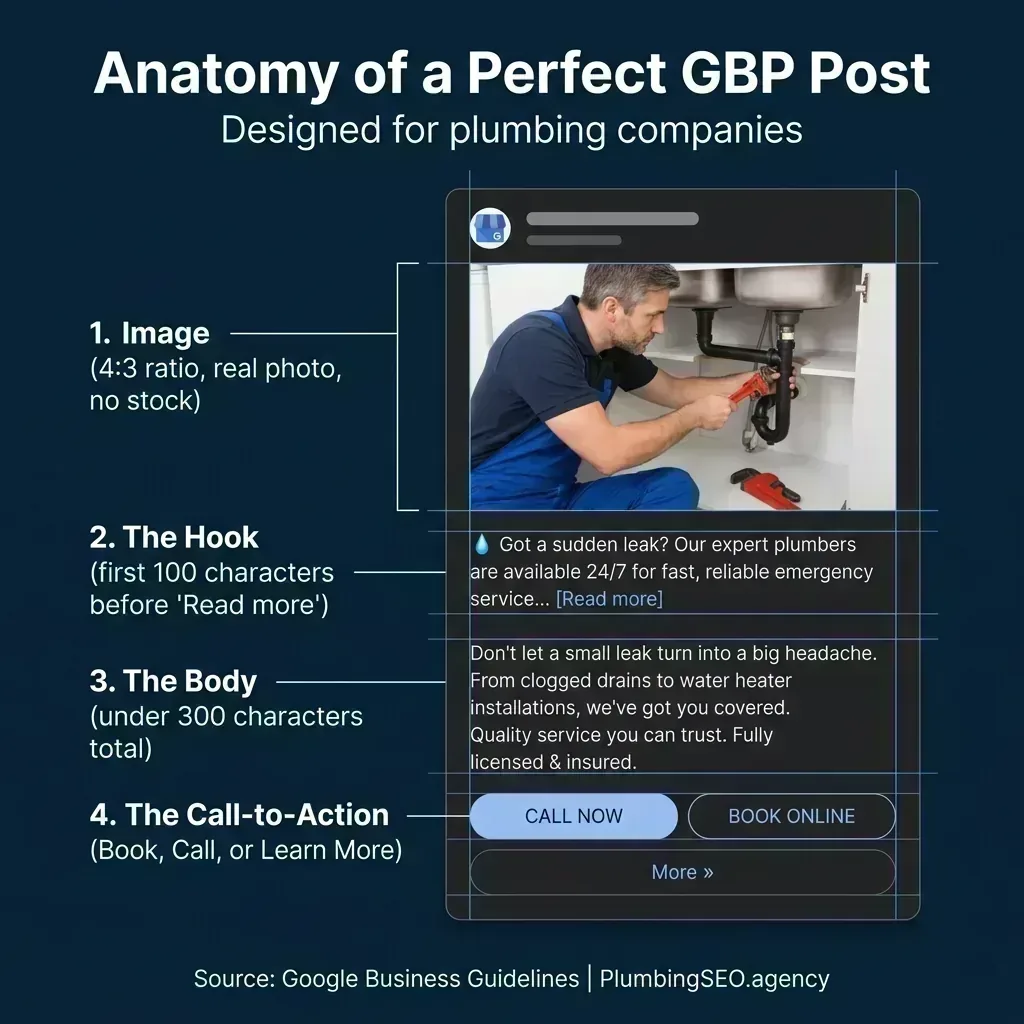
Lead with the service, location context, or offer so the update is useful at a glance.
Here is how the four elements break down:
1. The Image (No Stock)
When a photo helps explain the update, use a clear image of the actual team, equipment, or completed work and confirm you have permission to publish it. Preview the crop before posting. Avoid generic stock photos that do not represent the business or service.
2. The Hook (First 100 Chars)
Front-load the service, customer benefit, or offer so the post remains useful when only its opening is visible. Do not bury important terms or eligibility details at the end.
3. The Body Text
Keep this brief and punchy. Include relevant keywords naturally, but do not keyword stuff. Writing "best plumber in Austin affordable plumber near me" does not help your rankings; it just makes you look spammy. State what you did, where you did it, or what the offer is.
4. The Call-to-Action
Choose a call-to-action button when it gives the customer a useful next step. Use "Call now" for urgent service availability, "Book" for scheduling, or "Learn more" when linking to a specific plumbing service page. Track resulting calls, website clicks, and booked jobs instead of assuming a fixed lift.
What to Post: The 40/30/20/10 Ratio
The most common mistake plumbing owners make is treating their GBP like an advertising billboard, only posting coupons and discounts. If every post is a hard sell, users will tune out. You need variety.
If you need a starting point, try this 40/30/20/10 planning mix. It is an editorial framework—not a universal performance benchmark—and should be adjusted using your own customer-response data:
Rotate through these four post types, then keep the categories that produce useful customer actions.
40% Updates (Recent Jobs)
Finished a whole-house repipe? Post a picture of the clean copper lines. Cleared a main line? Show the roots you removed. Mention the neighborhood or city only when it is accurate and useful context for customers.
30% Offers (Specials)
Use the specific "Offer" post type when the promotion has clear terms, start and end dates, and genuine availability. A seasonal water-heater-flush discount is one example; make sure the destination page repeats the same terms.
20% FAQs (Knowledge)
Take the questions your dispatchers hear every day and turn them into posts. "How long does a tankless water heater last?" or "Why does my toilet keep running?" Answer the question directly in the post and link to your website for more details.
10% Behind the Scenes
Show the human side of your company. With permission, post a photo of a new apprentice, the fleet ready for Monday, or the team volunteering locally. These updates can give customers useful context before they visit your plumbing website.
5 GBP Posting Issues to Check
If your posts are inaccurate, difficult to scan, or hard to act on, check these five common issues:
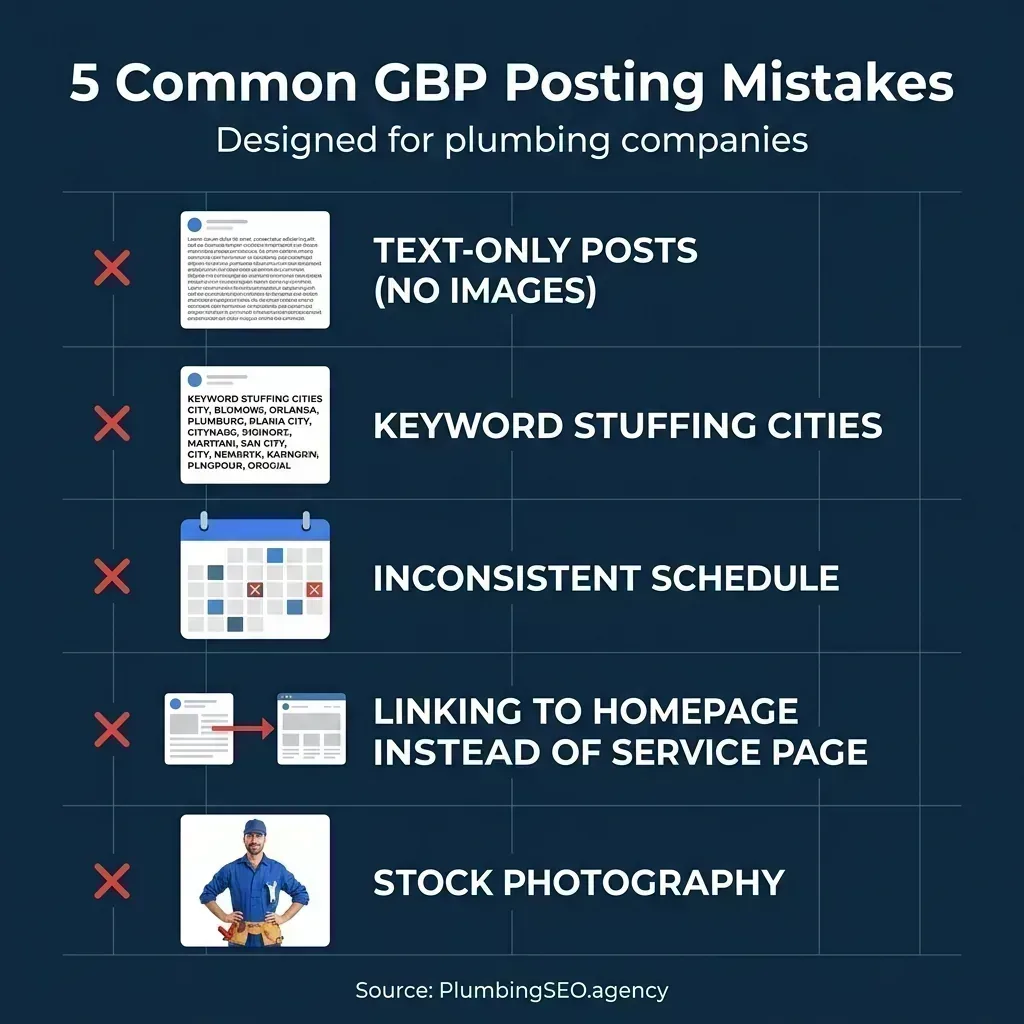
Check each post for accurate information, a useful visual, and a relevant next step.
- Unhelpful Visuals: Add a real, permission-safe photo when it helps explain the job, service, or offer; do not add an image only to satisfy a formula.
- Keyword Stuffing: Repeating city names and keywords makes the post hard to read and may conflict with Google's content policies. Write for customers, not an imagined algorithm.
- Unsustainable Scheduling: A burst of posts followed by months of silence makes measurement difficult. Pick a cadence the team can maintain and review.
- Linking to Your Homepage: If your post is about a drain cleaning special, the "Learn more" button should link directly to your drain cleaning page. Make it easy for the user to convert.
- Using Stock Photography: Generic plumbing photos may not represent your team or work. Use accurate, permission-safe photos from actual job sites when available.
A Repeatable 10-Minute Workflow for Dispatchers
You can delegate this workflow to a dispatcher or office manager. Reserve one short block at a frequency the team can sustain, then increase or reduce it only after reviewing the resulting customer actions.
Minute 1-3: Grab a Photo
Have your technicians text one photo per day to the office. The dispatcher picks the best one from yesterday. A new water heater installation, a clean work truck, or a cleared drain line. No editing needed.
Minute 4-7: Write the Hook & Body
Start with a strong hook mentioning the service and city: "Another tankless water heater installed in Dallas today!" Follow it with 2 short sentences about the benefits: "Endless hot water and lower energy bills. If your old tank is leaking, give us a call."
Minute 8-9: Add the CTA & Link
Select the "Learn more" button and paste the link to your specific service page. (e.g., your water heater replacement page, not your homepage).
Minute 10: Publish
Preview the post, confirm the offer and link, then publish. Record the post type and resulting interactions so the next update is informed by your own data.
Frequently Asked Questions
There is no universal word count that guarantees better results. Keep the post concise enough to scan, lead with the service or offer, include any important terms, and preview how it appears before publishing.
Some third-party social media management tools support scheduling for Google Business Profile. Check the tool's current capabilities and Google's policies, then review scheduled posts for accurate offers, links, and availability before they publish.
Google does not promise a local-ranking lift from GBP posts. Its local-ranking guidance focuses on relevance, distance, and prominence. Use posts to share useful, timely information with customers, then measure profile interactions and booked jobs in your own market.
Want Your GBP Managed for You?
We handle everything from weekly GBP posts to review management and Map Pack optimization for plumbing companies.
Get Your Free SEO Audit