
- Canonical tags are hints, not orders. For real redirects, use redirects. For duplicate URLs, use one clean canonical and keep the signals consistent.
- Plumbing sites usually get in trouble with tracking parameters, copied city pages, old test URLs, and canonicals that point to pages Google cannot index.
- Every important service page should self-canonical, appear cleanly in the sitemap, and be checked in Search Console before you trust the report.
If your plumbing website has ten versions of the same page, Google has to pick one. Sometimes it picks the page you wanted. Sometimes it picks an old URL with a tracking code, a copied service-area page, or a version your agency forgot existed.
That is not just a technical SEO problem. It is a phone problem. If your drain cleaning page is the page that should rank but Google keeps showing a weaker duplicate, the right customer may never find the page built to convert them.
If you came here searching for a canonical tags plumbing website fix, the practical goal is simple: choose the URL that should earn trust and make every technical signal support it.
A canonical tag is one of the tools that helps you tell search engines, "this is the main version." It belongs in the <head> of a page and usually looks like this:
<link rel="canonical" href="https://plumbingseo.agency/services/drain-cleaning">Simple line of code. Big responsibility. Used correctly, it keeps duplicate URLs from muddying up indexing and reporting. Used lazily, it can hide a service page that should be getting calls.
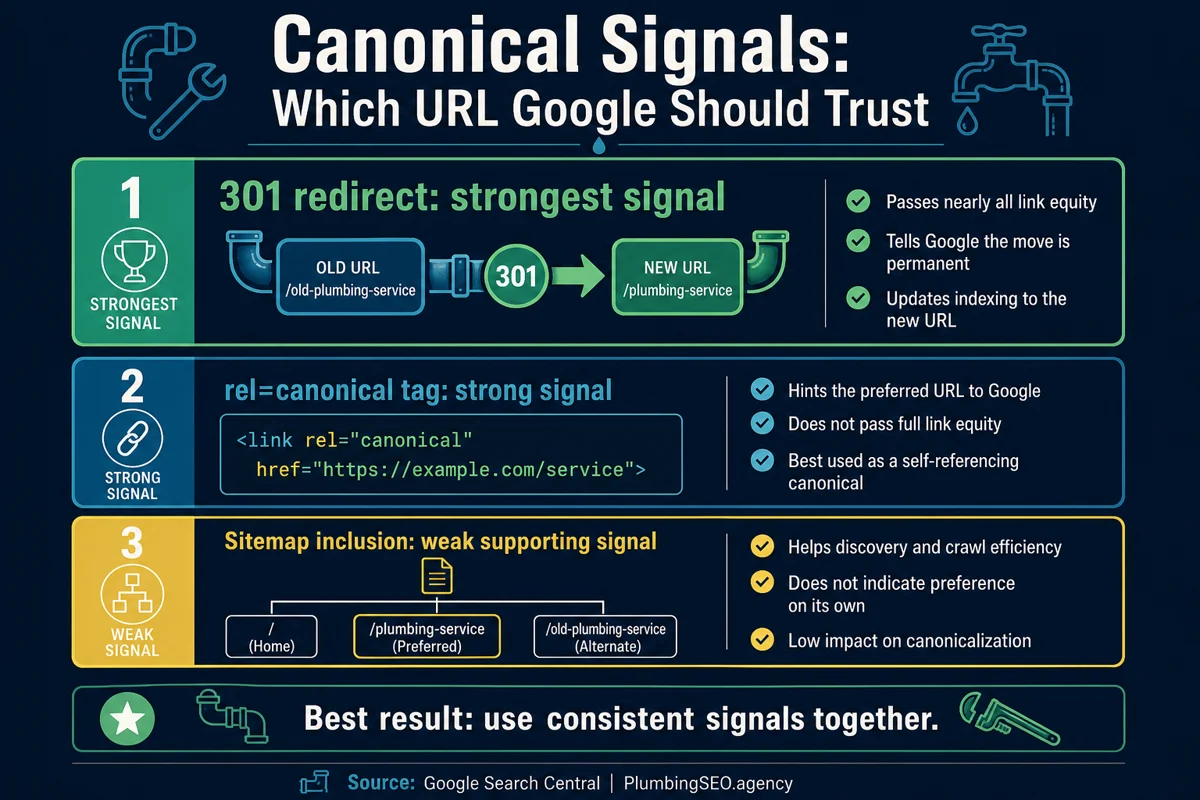
What a canonical tag does on a plumbing website
Google explains that canonicalization is the process of choosing the representative URL from a set of duplicate pages. In plain English, if two URLs show the same or very similar content, Google tries to decide which one should be treated as the main page.
You can suggest that preferred page with a canonical tag. Google calls rel=canonical a strong signal, but not a guarantee. That matters. If the page, internal links, sitemap, redirects, and content all disagree with each other, Google may ignore your hint and choose something else.
Here is the owner-side version. A canonical tag is not a magic drain snake. It will not clean up a messy site by itself. It tells Google which URL you prefer, but the rest of the website still has to back that choice up.
| Situation | Good canonical use | Bad canonical use |
|---|---|---|
| Tracking URLs | Campaign versions point back to the clean service page | Tracking URLs get indexed and reported like separate pages |
| HTTP, HTTPS, slash, and non-slash copies | One clean version is canonical and supported by redirects | Different signals split across multiple page versions |
| Printer, booking, or filtered pages | Alternate utility pages point to the main customer page | Utility pages compete with the money page |
| City or service pages | Unique pages self-canonical because they deserve to rank | Real local pages are canonicalized away to one generic page |
The last row is where plumbing websites get hurt. If your Riverside drain cleaning page has real local proof, jobs, reviews, service details, and a call path, it should normally self-canonical. Do not tell Google to ignore it unless it is truly a duplicate.
Where plumbing websites create duplicate URLs without noticing
Most owners do not wake up and decide to create duplicate pages. It happens during redesigns, ad tracking, WordPress plugin changes, location-page rollouts, and old agency handoffs. Nobody sees the leak until Search Console starts showing confusing indexing messages.
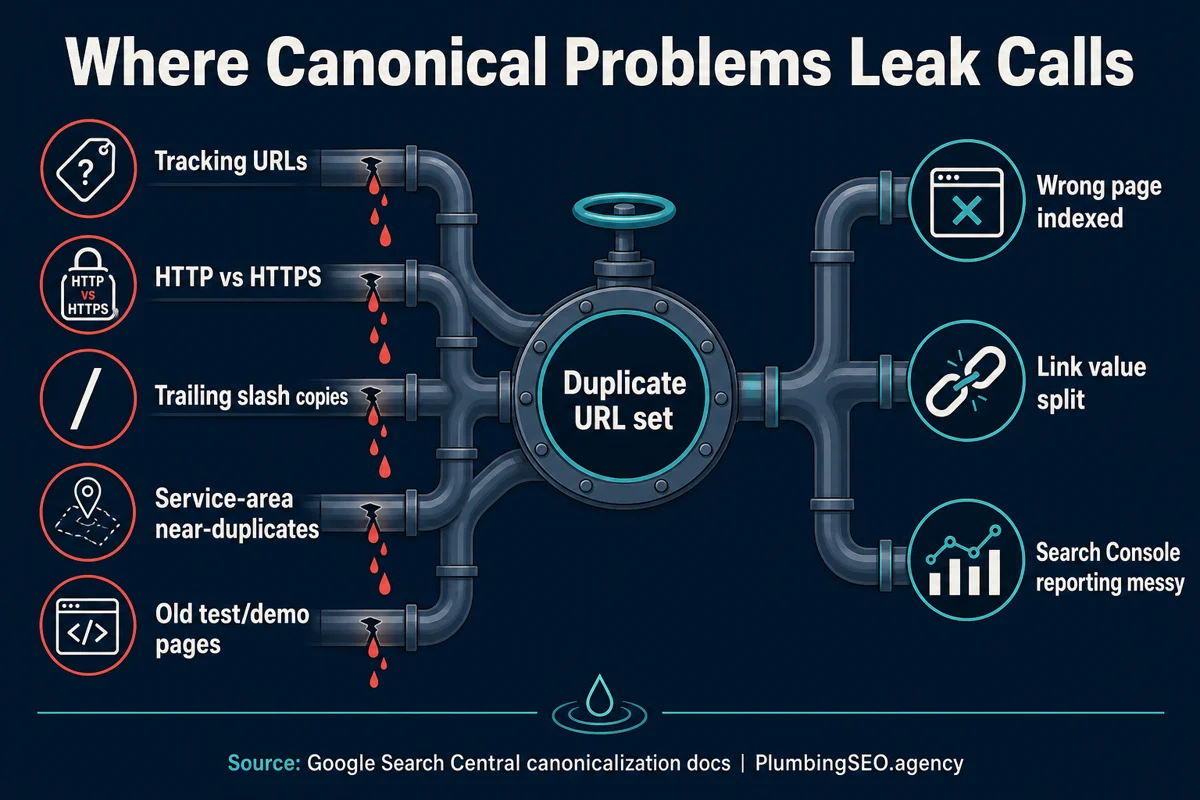
1. Call tracking and ad tracking parameters
Google has long warned that tracking IDs and other URL parameters can cause the same content to be accessible through many URLs. A plumber might share a service page from an ad campaign, email campaign, GBP post, or text message. The customer sees the same page. Google sees different URLs.
Keep the clean service page as the canonical. Use tracking in a way that your analytics understands, but do not let those campaign URLs become the version Google indexes.
2. HTTP, HTTPS, www, non-www, and trailing slash versions
These are boring issues until they split signals. Then they are expensive. A plumbing site may have http://, https://, www, non-www, slash, and no-slash versions floating around. The fix is not only a canonical tag. Use redirects and internal links so everyone points to the same clean URL.
3. City pages that are only city-name swaps
There is nothing wrong with city pages when they serve real locations and help real customers. The problem is publishing twenty pages where only the city name changes. That is thin. It does not help dispatch. It does not help the homeowner. It does not give Google a strong reason to show one page over another.
For city pages that matter, add unique proof: local job photos, neighborhood notes, reviews from that area, nearby service details, and clear call routing. If the page deserves calls from that city, it should look like someone at the company actually knows that city.
4. Old staging, demo, and builder pages
This one shows up after redesigns. A test page, duplicate homepage, old template, or demo service page gets left crawlable. If it looks close enough to the real page, Google has to sort it out. Canonicals can help, but the cleaner fix may be noindex, a redirect, or removal depending on the page.
Canonicalize when
- The pages are duplicate or very similar.
- The alternate page still needs to exist for users.
- The canonical target is live, indexable, and the preferred result.
Do something else when
- The old URL should permanently move. Use a redirect.
- The page should not be searchable at all. Consider noindex.
- The page targets a real service or city. Improve it instead.
The canonical mistakes that block indexing
Google's own rel=canonical guidance calls out several mistakes that show up in real audits. The big ones are simple enough for a plumbing owner to understand, even if someone else handles the code.
| Mistake | Why it hurts | What to check |
|---|---|---|
| Canonical points to a missing page | Google gets sent to a dead end instead of the page you want indexed | Canonical target returns 200 and loads the right content |
| Canonical target is noindex | You ask Google to prefer a page that also says not to index it | Robots meta and headers allow indexing |
| More than one canonical | Conflicting hints can cause Google to ignore the canonical signal | Only one canonical link appears in the page head |
| Canonical to a barely related page | Google may not see the pages as close duplicates | Most of the duplicate page content is present on the canonical page |
| Sitemap lists the wrong version | Your sitemap says one thing while the page says another | Sitemap URLs match the clean canonical URLs |
A practical canonical tag checklist before publishing
Before you publish a new service page, city page, blog post, or redesigned page, run a quick canonical check. It takes less time than driving back across town because someone forgot a fitting.
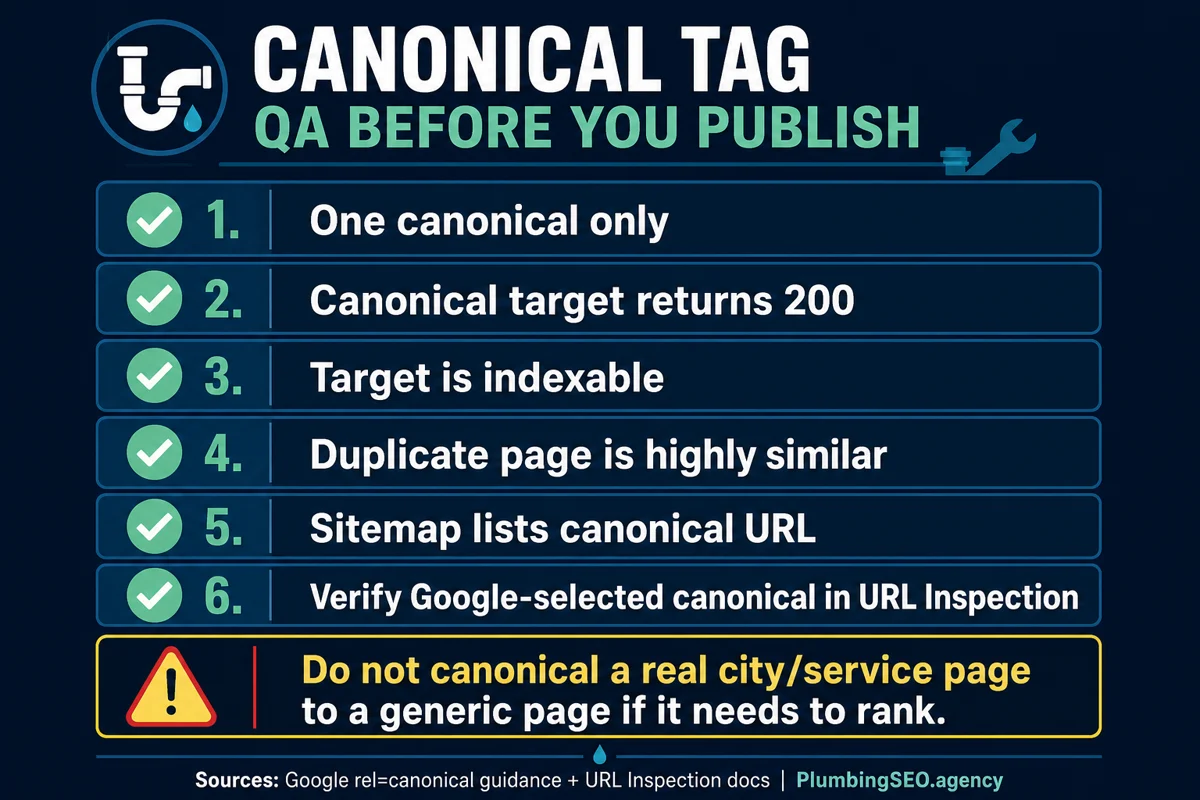
Step 1: Decide whether the page should rank
If it is a real service page, location page, or helpful blog post, it probably should self-canonical. That means the canonical URL points to itself. This is normal. It tells Google, "this is the main version of this page."
If it is a true duplicate, filtered view, tracking URL, print version, or alternate technical URL, point the canonical to the clean customer-facing version.
Step 2: Make internal links match the canonical
Do not link to one URL in the menu, another in the sitemap, another from blog posts, and another in the canonical tag. That is how a small site starts acting like a messy parts bin. Pick the clean URL and use it everywhere.
For example, if the audit service page is the support target, use one clean internal link like this: plumbing website SEO audit service. Do not mix it with tracked versions in normal site navigation.
Step 3: Check Search Console after Google crawls it
Google says the URL Inspection tool can show the Google-selected canonical. That is the number I care about in a real audit. Your page can say one thing in the code while Google chooses another URL after crawling the site.
If the user-declared canonical and Google-selected canonical do not match, do not panic. Check the obvious causes first: duplicate content, inconsistent internal links, sitemap mismatch, redirects, noindex tags, and thin service-area copy.
How this affects calls and tracking
Canonical mistakes make reports lie. If calls came from the drain cleaning page but Search Console is splitting impressions across clean URLs, tracking URLs, old URLs, and slash variants, you do not know which page is really pulling its weight.
That leads to bad decisions. You pause the wrong campaign. You rewrite the wrong page. You think a service page is weak when the problem is that Google is looking at a duplicate. The report may look busy, but the phone tells the truth.
The right setup is simple: clean canonical URLs, clean call tracking, clean internal links, and a crawl after every major site change. If you are not sure whether your site is sending mixed signals, a technical crawl and Search Console check should be part of your plumbing website indexing checklist.
My practical rule for plumbers
Use canonical tags to clean up duplicates. Do not use them to avoid making weak pages useful.
If a page has a real job, make it strong and self-canonical. If it is a duplicate that only exists because of tracking, sorting, old templates, or technical variants, canonical it to the clean page or fix it with a redirect. If you are not sure, inspect it before publishing.
That is how canonical tags help a plumbing company. Not by making the site look clever, but by making sure the right page gets indexed, the right report gets trusted, and the right customer finds the page built to book the job.
For deeper cleanup, pair this with a review of duplicate content on plumbing websites and internal linking for plumbing websites. The canonical tag is one piece. The whole site has to point the same way.
FAQ: Canonical Tags for Plumbing Websites
A canonical tag is a line of code that tells search engines which URL is the preferred version when the same or very similar page can be reached through more than one URL.
Yes, important service pages should usually have a self-referencing canonical tag. The tag should point to the clean version of that same page, not to a generic page, if the service page is meant to rank.
It can cause Google to treat the page as an alternate version and index the canonical target instead. If the page should never be indexed, use the right noindex or removal approach instead of relying only on a canonical tag.
Google may choose a different canonical when the site sends mixed signals. Common causes include duplicate copy, inconsistent internal links, sitemap mismatch, redirects, noindex tags, or a canonical target that does not look like the best version.
Only if they are true duplicates and not meant to rank. A useful city page with local proof, service details, and a real call path should usually self-canonical and be improved instead of hidden.
Use the URL Inspection tool for the page. Compare the user-declared canonical with the Google-selected canonical, then investigate any mismatch with a crawl, source-code check, sitemap check, and internal-link review.
Make sure Google is indexing the right plumbing pages
If tracking URLs, old templates, or copied service pages are confusing your reports, start with a plumbing-specific audit. We will show which pages should self-canonical, which should redirect, and which need better content before they can earn calls.
Audit My Plumbing Website