
- The new Plumbing SEO Page Builder Google Docs add-on gives plumbers a structured first draft in minutes, not hours.
- It helps your pages cover core local SEO and conversion elements: title, meta description, H1, service-area copy, trust signals, CTA, FAQ, and internal-link reminders.
- It does not replace strategy or editing. Use it as a drafting engine, then layer in real service proof, location detail, and unique jobsite context.
We just published our new Google Docs add-on: Plumbing SEO Page Builder.
You can install it from the Google Workspace Marketplace here: Plumbing SEO Page Builder listing.
Why we built this: most plumbing companies do not struggle with effort — they struggle with consistency. One page has a clear service-area section and strong CTA. The next page misses both. One draft has trust signals and internal links. The next one forgets them entirely. Over time, that inconsistency hurts both rankings and booked calls.
This add-on fixes the drafting bottleneck by giving your team a repeatable structure inside the tool they already use: Google Docs.
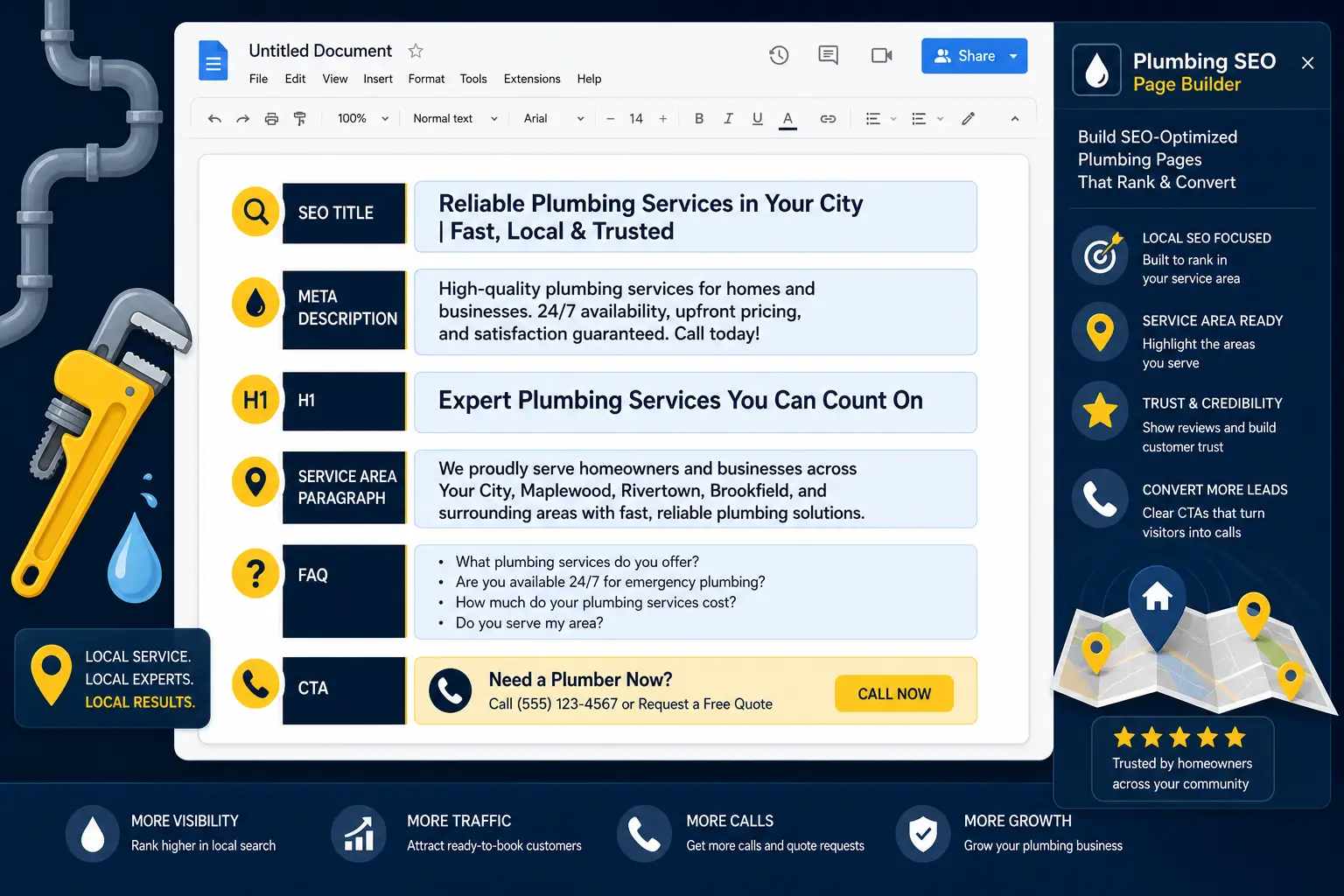
Plumbing SEO Page Builder turns blank-page drafting into a structured local SEO workflow inside Google Docs.
What the Add-On Actually Generates
Based on the Marketplace overview, the add-on helps you create a first-pass service-page draft with:
- SEO title idea and meta description draft
- H1 and opening paragraph
- Common problems + what-to-expect sections
- Local service-area copy
- Trust/proof language and phone CTA
- FAQ section and internal-link suggestions
- Google Business Profile reminder and image reminders
- Schema handoff note for implementation
That list matters because it maps to the exact places plumbing pages usually leak performance: weak local relevance, missing trust proof, and poor conversion intent.
Why This Matters for Local Plumbing SEO
Google's SEO guidance is clear: useful, organized, unique, people-first content performs better over time. See Google's official SEO Starter Guide.
For local visibility, Google Business Profile guidance also emphasizes complete, accurate business information and relevance. See Tips to improve your local ranking on Google.
In practice, service pages still need to echo those signals. If your GBP is complete but your service pages are vague, you leave money on the table. If your pages are strong but your GBP is thin, same problem. The add-on is designed to help teams keep website drafts aligned with local-intent fundamentals from day one.
How to Use It in a Real Plumbing Content Workflow
Use the add-on as your draft engine, then run a short quality pass before publishing:
| Step | What to do | Why it matters |
|---|---|---|
| 1) Generate draft | Use Plumbing SEO Page Builder to create the base structure. | Eliminates blank-page delay and keeps sections consistent. |
| 2) Localize deeply | Add real neighborhoods, service constraints, and response-time details. | Improves relevance and homeowner trust. |
| 3) Add proof | Insert real review snippets, job outcomes, guarantees, and licensing context. | Strengthens prominence and conversion confidence. |
| 4) Link intelligently | Connect to supporting pages (GBP, service process, pricing, audits). | Improves crawl paths and keeps users moving forward. |
| 5) Final SEO pass | Check title, meta, H1 alignment and FAQ usefulness before publish. | Avoids avoidable on-page misses. |
If you want a checklist to run after drafting, use our complete SEO checklist for plumbing and HVAC businesses.
What This Add-On Is Best For
- Owner-operators who need pages shipped quickly without forgetting core SEO blocks.
- In-house teams that want every writer to follow one drafting structure.
- Agencies serving home services that need cleaner first drafts before editorial polish.
Think of it as a quality floor, not a quality ceiling. It gets your first draft 70% of the way there, then your team adds local proof, expertise, and brand voice.
What It Does Not Replace (Important)
No add-on can replace field expertise, customer insight, and original proof. You still need to:
- Write for your real service footprint and actual dispatch reality
- Show true differentiators (response windows, guarantees, technician quality)
- Publish unique pages instead of cloning city text
- Keep GBP and on-site messaging aligned
If you're working on GBP positioning right now, pair this workflow with our guide on setting up and optimizing your Google Business Profile for plumbers.
Install Link + Next Step
You can install the add-on here:
Plumbing SEO Page Builder — Google Workspace Marketplace
Then create one service page draft, run your editorial pass, and compare it with your current process. If your drafts become faster, clearer, and more conversion-ready, keep it in your standard operating workflow.
Frequently Asked Questions
Want Better Service Pages Without Starting From Scratch?
Install Plumbing SEO Page Builder in Google Docs, then request a free review of your first draft. We’ll show you exactly what to keep, what to cut, and what to improve for rankings and calls.
Run My Free SEO Leak Check