
- Maps spam can steal real emergency calls, especially when a fake listing uses a keyword-stuffed name, false address, or rerouted phone number.
- Do not guess or retaliate. Save URLs, screenshots, business evidence, and policy notes before you report anything.
- Use simple Maps edits for obvious fixes and Google’s Business Redressal Complaint Form for misleading or fraudulent business activity.
If a fake plumbing company shows above you on Google Maps, it is not just an SEO annoyance. It can take the call from the homeowner with water on the floor, the no-heat water heater customer, or the property manager who needs a real crew today.
That is why Google Maps spam matters for plumbing companies. A fake competitor can look close to the searcher, stuff keywords into the business name, route calls through a lead seller, or use an address that nobody could actually dispatch from. The customer thinks they found a local plumber. A real shop loses the call. The bad listing keeps collecting jobs until somebody documents it properly.
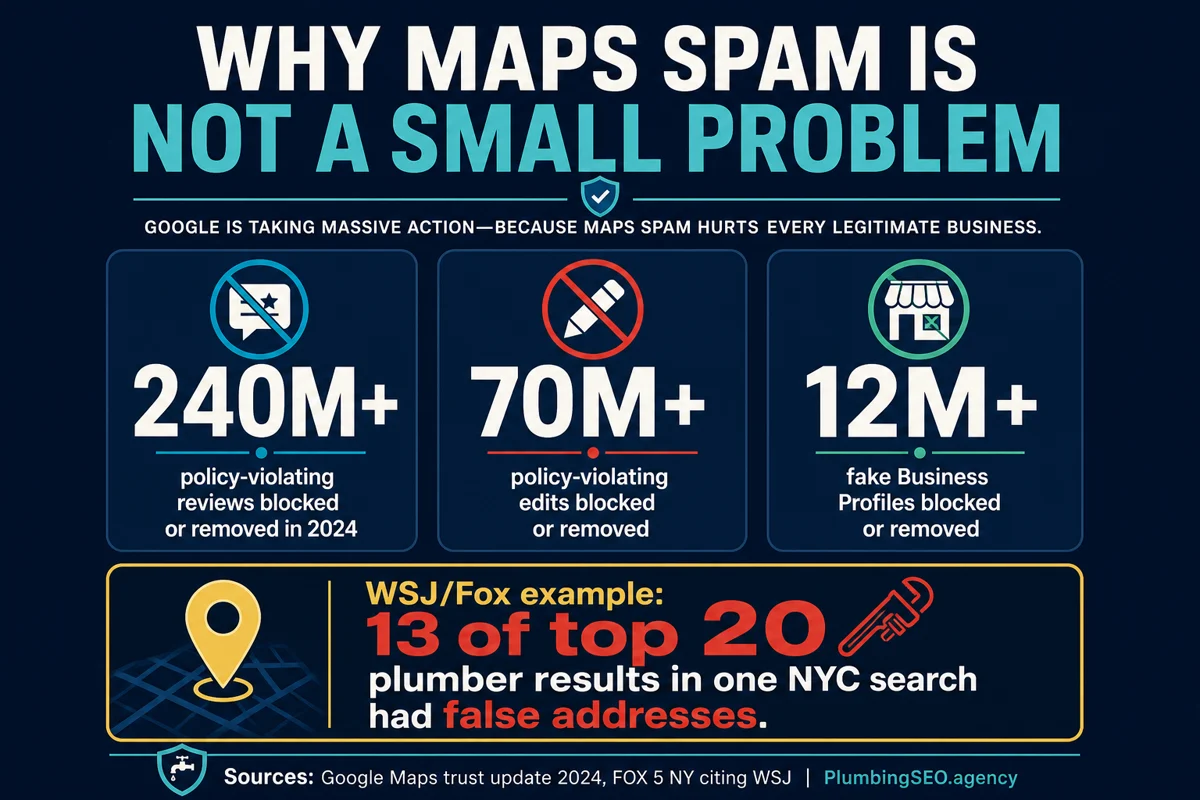
Google says it blocked or removed more than 240 million policy-violating reviews, more than 70 million policy-violating edits, and more than 12 million fake Business Profiles in 2024. That is the size of the mess. For plumbers, the problem is sharper because emergency and service-area searches are already crowded. One old report cited by FOX 5 NY from the Wall Street Journal found that 13 of the top 20 plumber results in one New York City search had false addresses.
The good news is that you can fight it without acting like the spammer. The trick is to treat it like a service call: inspect first, document clearly, use the right tool, then follow up. Do not swing a wrench at the wall and call it diagnosis.
What Counts as Google Maps Spam for Plumbers?
For a plumbing owner, Maps spam usually means a listing is using false or misleading business information to win local visibility it did not earn. Some cases are obvious. Others need a little checking before you accuse anybody.
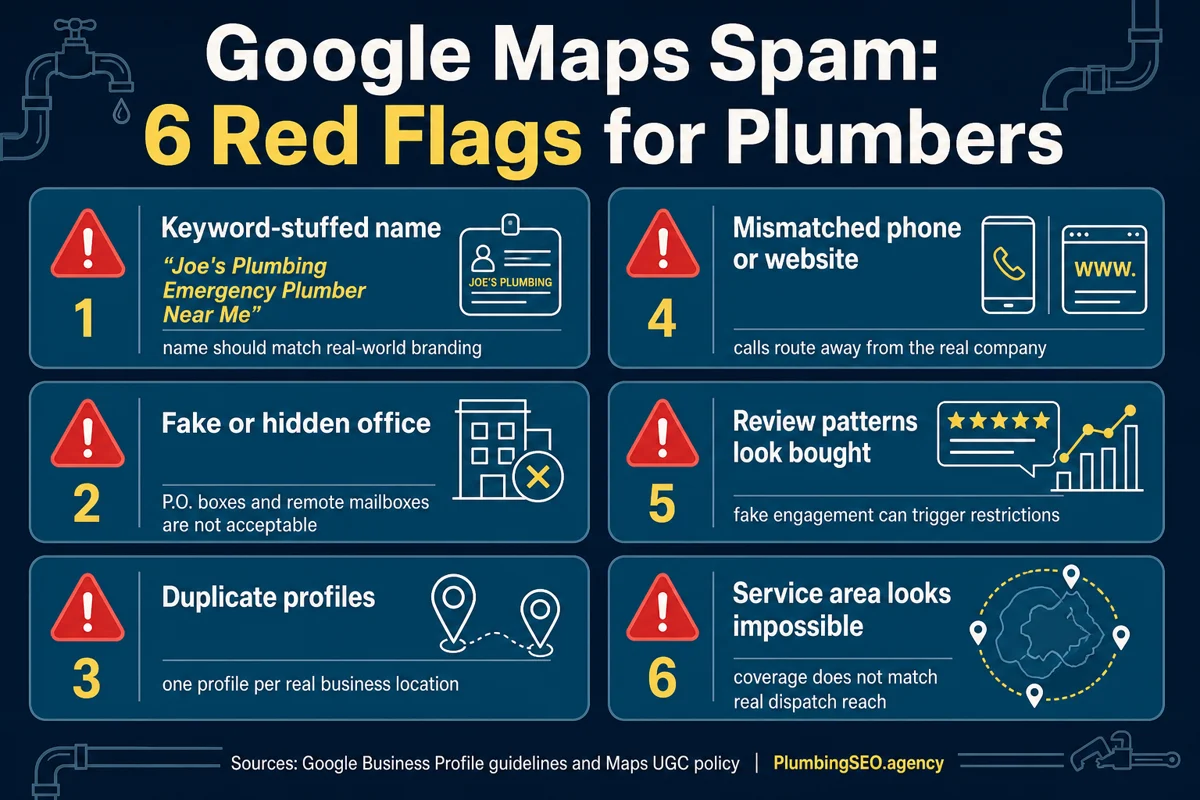
Google’s Business Profile guidelines say a business should use a precise, accurate address or service area, represent the real-world business name, choose appropriate categories, and generally have one profile per business. Google’s Maps content policy also says fake and misleading content is not allowed.
| Spam pattern | What it looks like in plumbing | Why it hurts calls |
|---|---|---|
| Keyword-stuffed name | "Smith Plumbing Emergency Plumber Near Me 24/7" when the real brand is "Smith Plumbing" | The listing gets extra relevance it should not have. |
| False location | A profile uses a mailbox, virtual office, empty lot, or unrelated house. | It can appear closer to customers than a real dispatch point. |
| Lead-gen masquerading as local shop | The phone number routes to a call center or broker, not a local plumbing company. | Real local plumbers get pushed below a middleman. |
| Duplicate profiles | Several listings use the same business, phone, or website to cover more map pins. | The spammer gets more chances to catch the same search. |
| Review manipulation | Review bursts, copied language, irrelevant reviewer history, or paid review patterns. | Customers trust a rating that may not reflect real plumbing work. |
Do not report a competitor because they outrank you. Report only what you can support with evidence. A strong local SEO for plumbers plan protects your own profile and gives Google clean information to evaluate.
How to Spot a Fake Competitor Without Guessing
Start with the listing itself. Search from the same city, save the exact query, and open the profile. Look at the business name, phone number, website, address status, review history, categories, photos, and service area. Then compare that profile to what exists in the real world.
Here is the practical test I like: if a customer called that listing at 9:00 PM with a burst supply line, who would actually show up? If the answer is unclear, you need more evidence before you report. If the answer is obviously "nobody from that listed business," you may have a real case.
Fast Field Check
- Name: Does it match the website, license, trucks, invoices, signs, and other real-world branding?
- Address: Is it an actual staffed plumbing location, or a mailbox, coworking office, private home, storage unit, or empty lot?
- Phone: Does the number match the business website and citations, or does it route to a call seller?
- Website: Does it identify a real company, owner, location, service area, and license details where required?
- Reviews: Do reviews mention real jobs, techs, neighborhoods, and timing, or do they look thin and repetitive?
- Photos: Are there real trucks, jobs, team shots, equipment, or only stock images and generic logos?
If you find spam, keep your own profile clean at the same time. Do not stuff keywords into your name just because somebody else does. Do not create extra map pins for cities where you do not have a real location. If you need help with the legitimate side of Maps visibility, read our guide to Google Maps SEO for plumbers.
Document the Evidence Before You Report
A weak report says, "This business is fake." A strong report says, "This listing uses a business name that does not match the real-world name, uses a mailbox address, routes to a different company, and here are the URLs and screenshots." Google is much more likely to act when the evidence is specific.
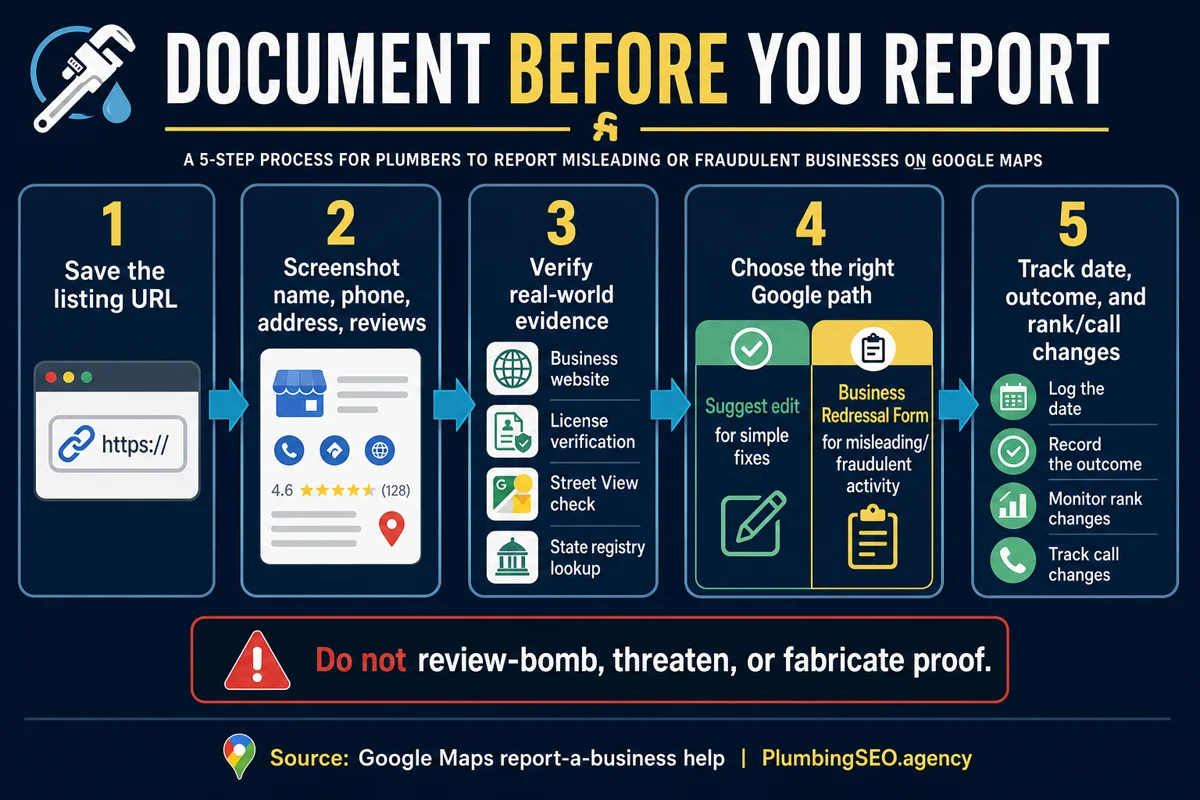
Save the exact URLs
Copy the Google Maps profile link, website link, and any duplicate profiles you suspect are connected.
Take dated screenshots
Capture the business name, address, phone, reviews, categories, photos, and map pin.
Check public records
Look for state license records, business registrations, address matches, and real company details.
Use Street View carefully
Street View can show mailboxes or unrelated buildings, but it can be outdated. Treat it as one clue, not the whole case.
Keep this in a simple spreadsheet or folder. Columns like listing URL, suspected issue, evidence URL, screenshot file, date reported, and outcome are enough. You do not need a 40-tab investigation board. You are running a plumbing company, not launching a detective agency.
Use the Right Google Reporting Path
Google gives different paths for different issues. Use the lightest tool that fits the problem.
| Situation | Best first action | What to include |
|---|---|---|
| Wrong hours, wrong category, typo, closed location | Suggest an edit in Google Maps | Exact correction and source if available. |
| Misleading name, fake address, duplicate network, fraudulent phone or website | Business Redressal Complaint Form | Profile URLs, evidence links, screenshots, and a short policy-based explanation. |
| Fake reviews on your own profile | Report the review from your Business Profile | Why the review violates policy, not just why it is unfair. |
| Account access, hijacking, or owner-profile problem | Google Business Profile support path | Ownership proof and account details. |
Google’s own report-a-business help page says the Business Redressal Complaint Form is the path for misleading business names, phone numbers, or URLs that suggest fraudulent activity. That is the form to use when the issue is bigger than a simple edit.
What Not to Do When You Find Spam
This is where a lot of owners get in trouble. They find a fake listing, get angry, and start firing off reports, leaving reviews, or telling employees to flag everything. Do not do that.
Keep Your Hands Clean
- Do not leave fake negative reviews on a competitor.
- Do not ask employees or friends to mass-report listings without evidence.
- Do not fabricate screenshots, phone-call notes, or license claims.
- Do not keyword-stuff your own Google Business Profile name to "even the score."
- Do not threaten the competitor. Report the facts and move on.
The goal is not revenge. The goal is to remove false competition so real customers can find real plumbers. If you cross the line, you can create reputation risk for your own shop. Google also restricts profiles that violate fake engagement policies, including review restrictions and warnings in some cases.
Interactive Spam Triage Scorecard
Use this quick scorecard before you spend time on a report. It is not legal advice, and it is not a guarantee Google will act. It just helps you decide whether the case is worth documenting.
How Spam Fighting Fits a Real Local SEO Plan
Spam reporting can help, but it is not the whole plan. If your own website is thin, your service pages are weak, your photos are stale, and your category strategy is wrong, removing one fake listing will not fix the whole board.
Use spam fighting as one part of a clean Maps system:
- Keep your primary and secondary categories tight. This guide on Google Business Profile categories for plumbers explains how to avoid muddy signals.
- Upload real job photos, team photos, truck photos, and location proof. Our GBP photos for plumbers guide covers what earns trust.
- Build strong service pages for the jobs you actually want, not generic pages for every city you can spell.
- Track calls from Maps separately from organic website calls so you know what changed.
- Review rankings by city and service, not just one "plumber near me" search from your office.
The way I see it, spam fighting is like clearing junk out of a drain line. It helps flow, but the rest of the system still has to be built right. If the pipe is cracked, you still have work to do.
When to Get Help
If you see one obvious fake listing, you can probably document and report it yourself. If you see a network of duplicate listings across multiple cities, fake review attacks, lead-gen profiles, or repeated reversals after edits, it is time to slow down and organize the work.
A plumber-specific local SEO process should audit the search results, separate real competitors from fake competitors, protect your own Google Business Profile, and connect the work to calls. That is exactly why our local SEO service for plumbers includes Maps checks, service-area strategy, profile cleanup, and reporting that owners can understand.
If you want a second set of eyes, start with a free plumbing SEO audit. We will look for visibility leaks, Maps issues, and the kind of problems that keep good shops below bad listings.
Google Maps Spam for Plumbers: FAQs
It is misleading or false Google Maps business information that gives a plumbing listing an unfair local ranking advantage. Common examples include keyword-stuffed names, fake addresses, duplicate profiles, rerouted phone numbers, and fake reviews.
No. Only report listings when you have specific evidence that the profile violates Google policies. Outranking you is not spam by itself.
Save the profile URL, screenshots, business name, address, phone number, website, reviews, category, and any supporting evidence such as license records, state registrations, Street View screenshots, or proof that the address is not a real staffed location.
Use it for misleading or fraudulent Google Maps activity, such as fake business names, false addresses, fraudulent phone numbers, duplicate networks, or lead-gen listings pretending to be local plumbing companies.
It can help if spam listings are crowding the local pack, but it is not a replacement for a clean Google Business Profile, strong local pages, reviews, photos, and call tracking. Treat it as one part of local SEO.
Factual reporting is normal. Risk comes from fake reviews, mass flagging without evidence, threats, fabricated proof, or copying the same spam tactics on your own profile. Keep the work documented and policy-based.
Want a Clean Maps Plan Before You Fight Spam?
Get a plumber-specific local SEO audit that checks your Google Business Profile, service areas, website signals, competitor spam, and call-tracking leaks.
Run My Free SEO Leak Check