
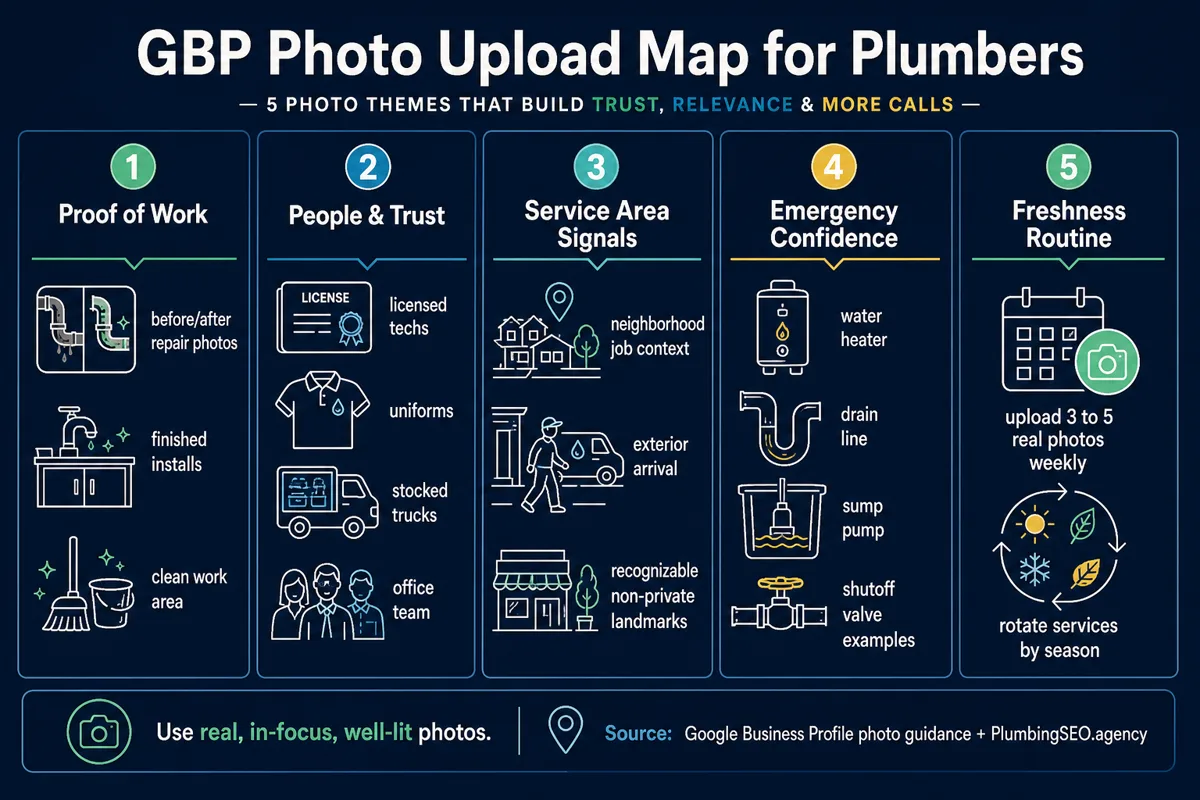
- Upload photos that prove the job is real: clean before and after work, uniformed techs, stocked trucks, and finished installs.
- Your cover, logo, team, truck, and service photos should help a homeowner trust you fast enough to call from Maps.
- Make photos part of the weekly closeout routine. Three to five real job photos beat a once-a-year dump of stock-looking images.
If your phone is quiet but your competitors keep showing up in the Google Map Pack, look at the photos before you blame the whole marketing plan. A homeowner with water on the floor is not reading your life story. They are looking at your rating, your distance, your hours, and the pictures that prove you are a real plumbing company.
Good Google Business Profile photos do not magically rank a weak business by themselves. But they can help a nervous customer decide whether to tap your listing, call your office, or move on to the next plumber with better proof. In my opinion, photos are one of the simplest trust fixes a plumbing company can make because they connect the search result to the real crew, real trucks, and real work behind the name.
Google's own business-specific photo guidance says photos should be in focus, well lit, and represent reality. That last part matters. Plumbing is local, messy, urgent, and trust-heavy. Stock photos of shiny pipes do not tell a homeowner you can handle their slab leak on a Tuesday afternoon.
Start with the photos that answer a customer's real question
Most homeowners are not asking, "Does this plumbing company have a perfectly curated brand mood board?" They are asking, "Can I trust these people inside my house, and can they fix my problem?"
That is the filter I would use for every Google Business Profile photo. If the image does not help a customer trust you, understand what you do, or recognize that you serve their area, leave it out.
1. Real work photos
Show finished water heater installs, drain cleaning setups, repipes, fixture replacements, sump pump work, leak repairs, sewer equipment, and clean work areas after the job is complete. If you do before and after photos, make sure the after photo is the hero. Nobody wants to hire the company that only shows the mess.
2. Team photos
Upload clear photos of technicians in uniform, dispatch or office staff, and the owner if that fits your brand. A plumbing call often means letting a stranger into the home. A real face makes the listing feel less risky.
3. Truck and equipment photos
Show wrapped trucks, stocked vans, hydro jetting equipment, drain cameras, water heater gear, or other tools that prove you are prepared. This is not about showing off toys. It tells the customer you can actually handle the job you say you handle.
4. Location and service-area photos
If you have a shop, showroom, or office customers can visit, add exterior and interior photos. If you are a service-area business, use job-context photos that show real work in the communities you serve without exposing private addresses or customer details. Pair that with a strong local SEO for plumbers plan so the photos support the right Maps visibility instead of sitting by themselves.
5. Logo and cover photo
Your logo helps customers recognize the brand. Your cover photo should show the business at its best: a clean truck, a real tech, a completed job, or a professional team shot. Google may not always show the exact cover photo you choose, but you still want to upload a strong one.
How photos help turn Maps visibility into calls
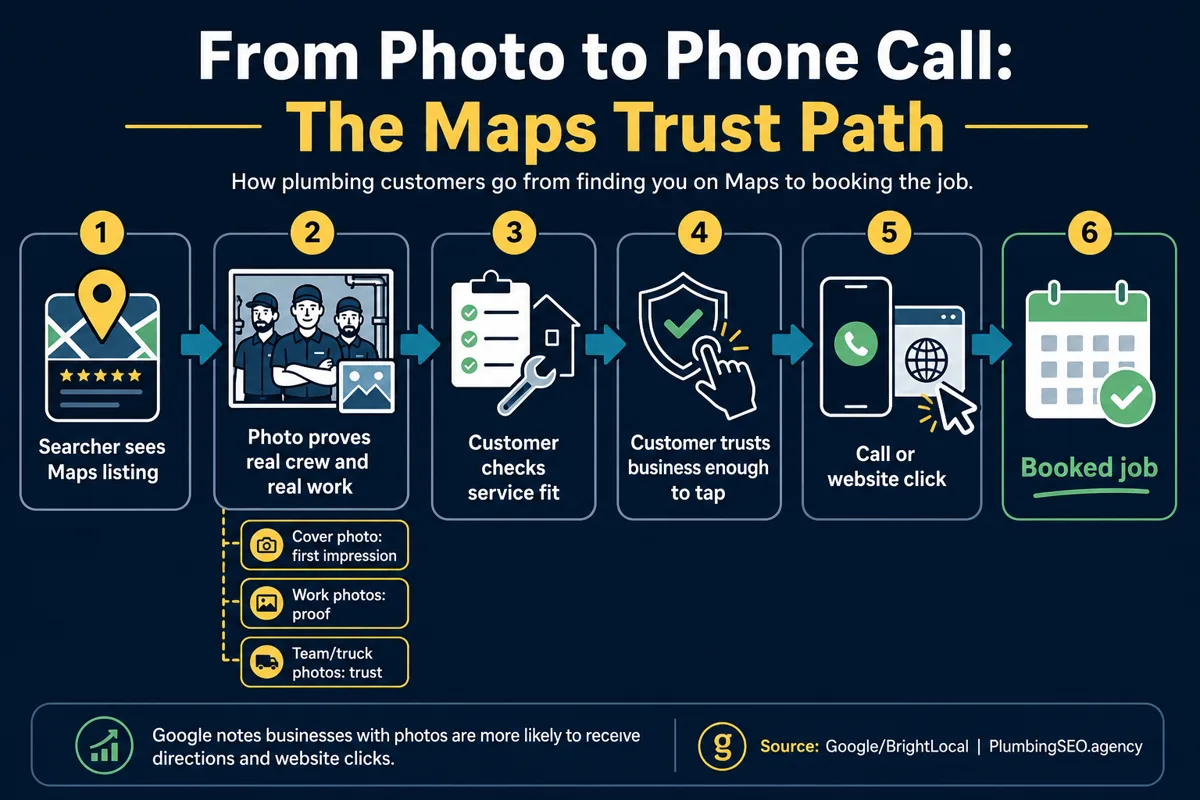
Ranking is only half the fight. A listing can show up and still leak calls if it looks empty, stale, or untrustworthy. Photos help close the gap between being seen and being chosen.
BrightLocal's GBP photo guide quotes Google's position that businesses with photos are more likely to receive direction requests and website clicks than businesses without them. For a plumber, that engagement is not vanity. It is a customer taking the next step while the problem is still urgent.
Match photos to the calls you actually want
If your company wants more tankless water heater installs, show real tankless installs. If you want more drain calls, show drain equipment, cleanouts, cameras, and cleared lines. If you want higher-ticket sewer work, show the crew and equipment that make that work possible.
This is where a lot of plumbing companies miss. They upload whatever is on the owner's phone and call it done. That might keep the profile active, but it does not steer the listing toward better jobs. The photo set should quietly tell Google and customers what kind of plumbing work you do best.
Use a simple weekly upload rhythm
Do not wait six months and dump 80 photos at once. Make it part of job closeout. At the end of the week, pick three to five usable photos from completed work and upload them. Rotate by service type so the profile does not look like you only install water heaters or only unclog drains.
| Photo type | Best use | What to avoid |
|---|---|---|
| Before and after | Show clean results, fixture upgrades, water heater installs, and solved problems. | Graphic damage, unsafe jobsite shots, or customer belongings in frame. |
| Team and truck | Build trust before the customer lets a tech into the home. | Dirty uniforms, unmarked vehicles, or photos that look like a random subcontractor. |
| Equipment | Prove you can handle drain, sewer, leak detection, or emergency work. | Closeups so tight the customer cannot tell what service it supports. |
| Shop or office | Help customers recognize a real local business if you have a public location. | Home addresses, private yards, or anything that violates service-area privacy. |
| Seasonal work | Support sump pump, frozen pipe, water heater, sewer, or holiday shutoff demand. | Uploading only one season of work all year long. |
What not to upload
Bad photos can hurt trust faster than no photos. A blurry crawlspace shot, a customer address in the background, or a stock photo of a smiling model holding a wrench can make the listing feel fake. The goal is not to look huge. The goal is to look real, capable, and safe to call.
Google's photo and video policies also matter. Avoid misleading images, heavy filters, unrelated photos, excessive text overlays, and anything that does not represent the real business. If a picture needs a paragraph of explanation, it is probably not a good Maps photo.
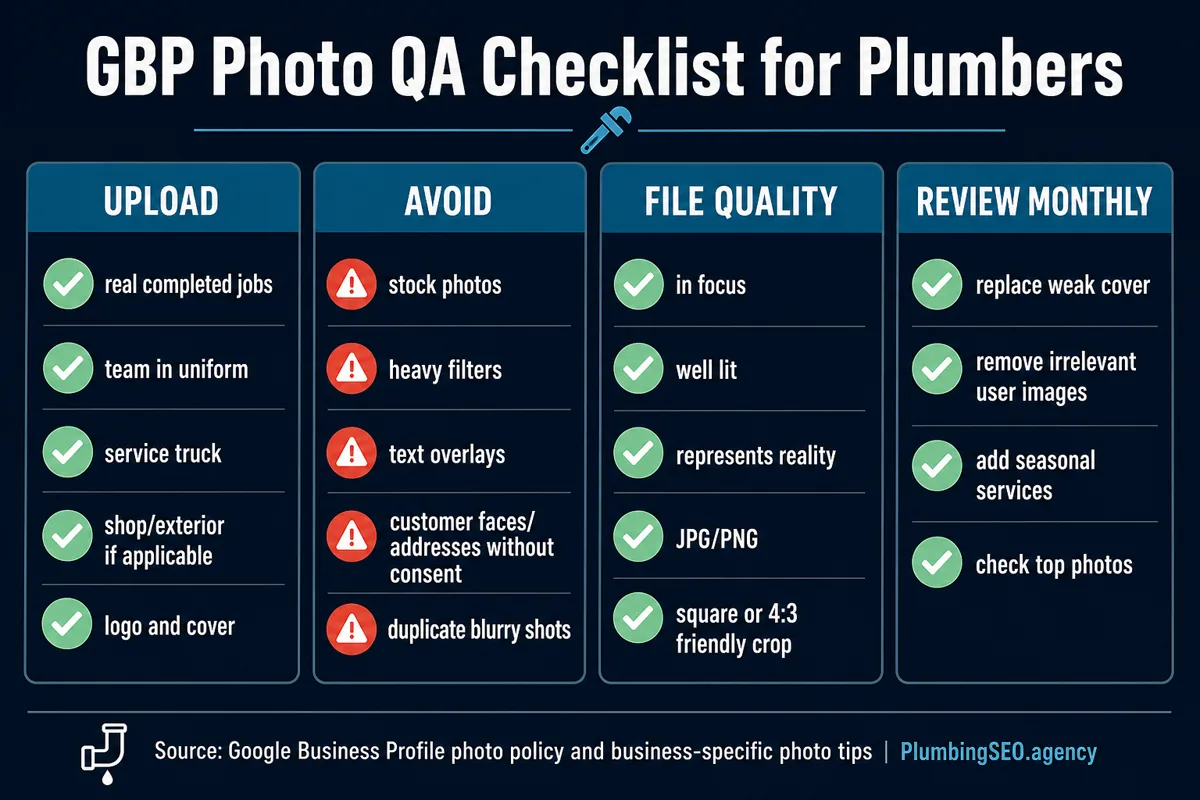
Photo sizes and file basics
For most plumbing companies, the practical rule is simple: use clear JPG or PNG files, crop them cleanly, and make sure the subject is obvious on a phone screen. Semrush's photo size guide recommends square or 4:3-friendly business photos and notes that poor sizing can lead to blurry or cropped images.
Do not let file specs turn into another excuse to delay. A good, honest photo of your tech next to a completed install is better than a perfect graphic nobody believes. Take the photo in decent light, keep the camera steady, remove personal information from the frame, and upload the best version.
Build the upload plan by service line
A strong photo library should cover the jobs that keep the trucks moving. If your best margin is water heaters, drain cleaning, repipes, slab leaks, or sewer repair, give each service its own proof. The listing should not feel like a random photo album. It should feel like a field guide to the work you want more of.
- Emergency plumbing: show shutoff valves, urgent repair setups, stocked trucks, and clean resolved work.
- Water heaters: show standard tanks, tankless units, code-safe installs, and clean mechanical areas.
- Drain and sewer: show cable machines, jetters, cameras, cleanouts, and finished job areas.
- Fixture work: show faucets, toilets, disposals, showers, and small jobs finished neatly.
- Commercial plumbing: show uniformed crews, vans, equipment, and job types that fit commercial buyers.
If this sounds like a lot, start with the next 10 jobs. Ask the tech or office manager for one clean photo per job. Review them on Friday. Upload the best three to five. Repeat. Good local SEO is not one heroic afternoon. It is a set of boring habits that keep paying rent.
How this fits with the rest of Google Maps SEO
Photos will not fix wrong categories, weak reviews, bad service areas, inconsistent business information, or a thin website. They support those signals. If your category strategy is messy, start with our guide to Google Business Profile categories for plumbers. If you are trying to rank across towns without showing a storefront, read the service area SEO plan for plumbing companies.
The way I see it, GBP photos are the proof layer. Your service pages explain what you do. Your reviews show whether people trust you. Your photos prove there is a real company behind the listing. When those pieces work together, Maps traffic has a better chance of turning into jobs on the board.
Frequently Asked Questions
Upload real photos of completed plumbing work, team members in uniform, wrapped trucks, equipment, shop or office photos if applicable, a clean logo, and a strong cover photo. The best photos answer whether the company is real, trustworthy, and able to handle the customer's problem.
A practical rhythm is three to five usable photos per week from completed jobs. If that is too much, start with a monthly review and upload the best recent work by service type.
Photos are not a magic ranking button, but they support engagement and trust. They can help more searchers click, call, request directions, or visit your website after they see your Maps listing.
Use real business photos instead. Stock photos can make the listing feel generic or misleading, and Google's guidance favors photos that represent reality. Show your own crew, trucks, equipment, and finished work.
Only show customer homes or job locations with permission, and avoid addresses, license plates, family photos, children, valuables, or anything private. When in doubt, crop tighter around the plumbing work.
A good cover photo is a clean, well-lit image that represents the business quickly: a wrapped truck, uniformed tech, team photo, or completed plumbing job. Google may choose a different image to display, so keep the whole photo library strong.
Want your Maps listing to earn more calls?
We will review your Google Business Profile, photos, categories, service areas, reviews, and local landing pages so you can see where calls are leaking.
Run My Free SEO Leak Check