
- Real job photos help plumbing SEO because they prove the work is yours, show service relevance, and make a visitor more comfortable calling.
- Shoot before, during, and after photos from the same angle. Then use them on service pages, Google Business Profile, reviews, and supporting blog content.
- Avoid generic stock images, over-edited collages, house numbers, faces without consent, unsafe work, and photos that do not match the service page.
Most plumbing websites have the same picture problem. A smiling stock-photo plumber holds a wrench, points at nothing, and somehow every company in town looks like they hired the same guy.
That does not help a homeowner decide who to call when the water heater is leaking or the kitchen ceiling has a stain spreading across it. Real before-and-after plumbing photos do something stock images cannot do. They show proof. They show care. They show that your crew has solved this exact kind of problem before.
Used the right way, job photos support SEO because they make your website and Google Business Profile more useful. They also help your plumbing web design feel local, specific, and trustworthy instead of generic.
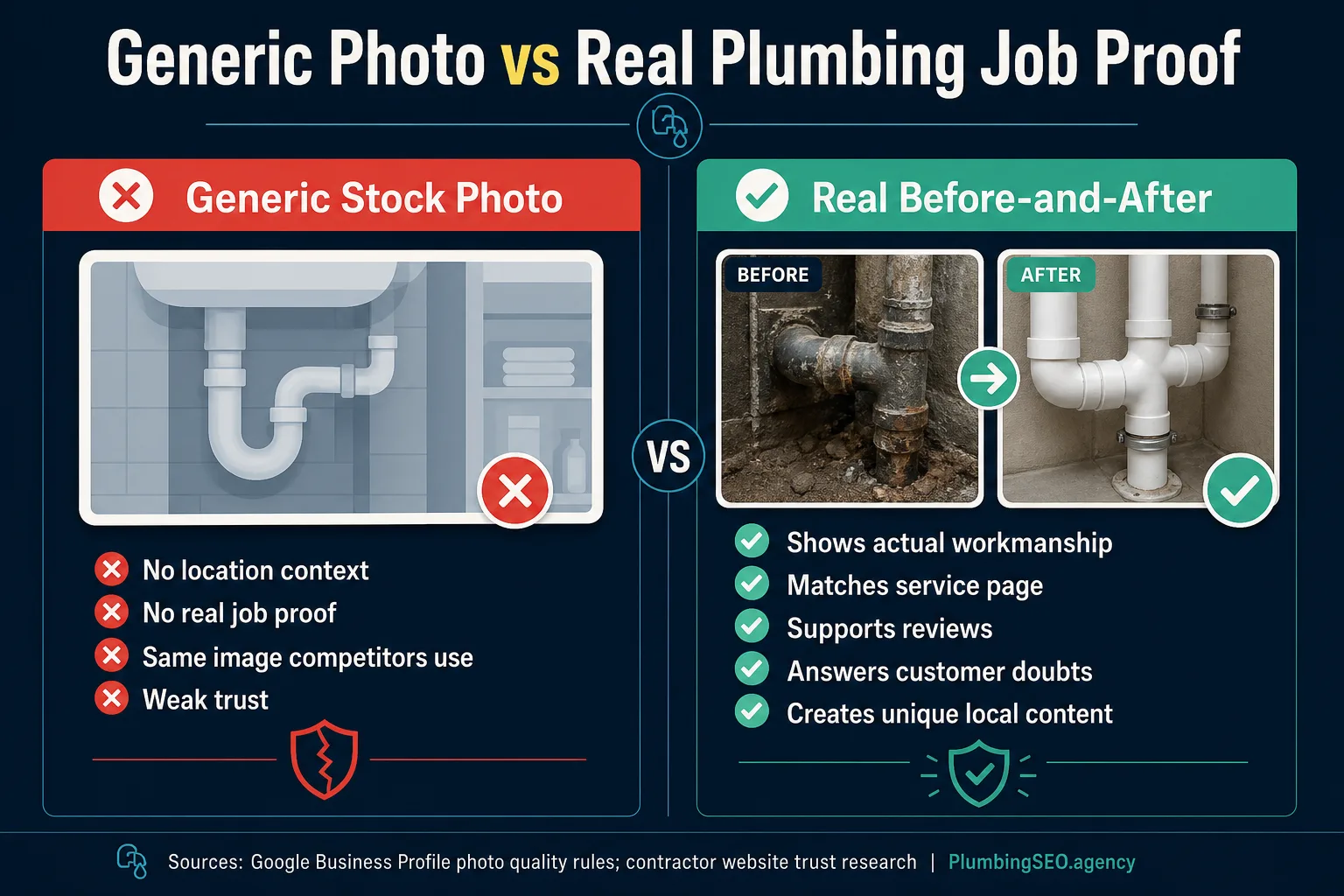
Why before-and-after photos help plumbing SEO
Search engines do not book plumbing jobs. People do. SEO gets you in front of them, but the page still has to earn the call.
Before-and-after photos help with that handoff. They make a service page feel less like a brochure and more like evidence. A drain cleaning page with one real line-clearing photo, a clean after shot, and a short explanation has more substance than a page stuffed with the phrase "best drain cleaning" ten times. Nobody calls because a keyword showed up again. They call because they believe you can handle the job.
Google's own Business Profile photo guidelines also point toward the same standard: use JPG or PNG files, keep them well lit and in focus, avoid heavy filters, and represent reality. That is a good rule for the website too.
The photos customers actually need to see
A plumbing owner does not need a full photo studio. You need a repeatable habit your techs can follow without slowing down the route.
The best set is simple: one wide before shot, one close-up of the problem, one during-work shot if it is safe and clean, one finished after shot from the same angle, and one context shot that helps the viewer understand the job type. For a water heater replacement, that might be the old unit, code-safe installation details, the finished unit, and a clean surrounding area. For drain work, it might be the access point, roots or blockage evidence, equipment on site, and the restored area.
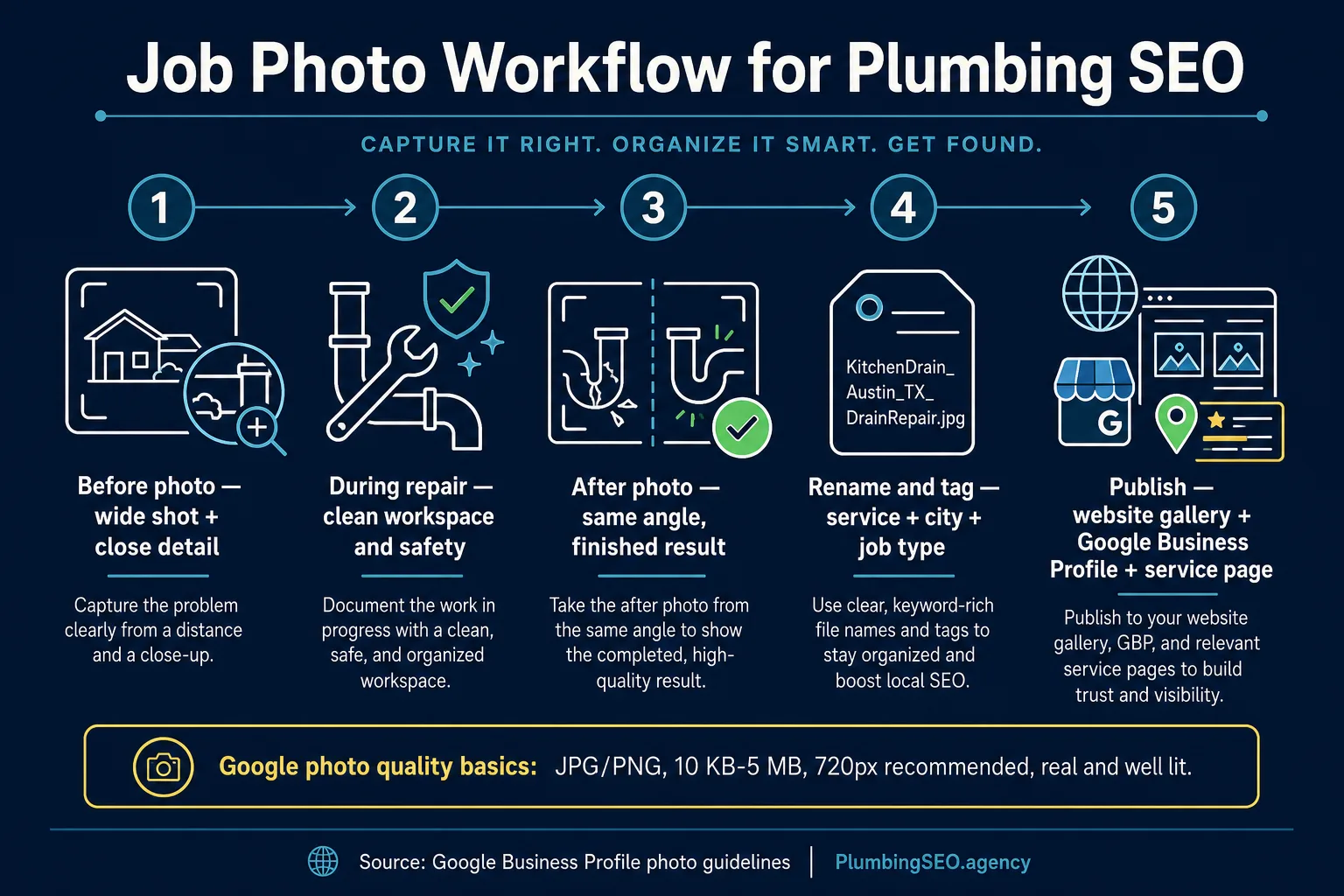
Use the same angle, not just any angle
Before-and-after photos only work when the viewer can tell what changed. If the before photo is a tight shot of a corroded valve and the after photo is a wide shot of the whole mechanical room, the customer has to work too hard.
Tell the crew to take the after photo from roughly the same position as the before photo. It does not need to be fancy. It needs to be clear. Same wall, same pipe, same fixture, same orientation. A little consistency does more for trust than a polished stock image ever will.
| Photo type | What to capture | Where it helps most |
|---|---|---|
| Before wide shot | Room, fixture, access point, or visible problem area | Blog explanations, service pages, review follow-up |
| Before close-up | Leak, corrosion, bad install, clog evidence, damaged part | Problem education and credibility |
| During work | Clean workspace, safe setup, tool or process context | Trust signals and technician professionalism |
| After same angle | Finished repair or installation from the before-photo position | Portfolio, Google Business Profile, service-page proof |
| Context shot | Van, equipment, service area context, no private details | Local relevance and brand recognition |
Do not make the customer wonder if the photo is real
One homeowner discussion about contractor portfolio photos shows the risk clearly. A customer noticed that some website images appeared to come from other contractors and treated it as a major trust problem. The concern was not whether the photos looked nice. The concern was whether the contractor was honest about the work. That is the danger of using borrowed or overly generic images.
If a photo is stock, use it only as a background or design element. Do not present it as your workmanship. If it is your work, say so in plain language. A caption like "Tankless water heater replacement in Plano, finished by our licensed crew" is better than "premium plumbing solution." One sounds like a real job. The other sounds like a brochure that got lost in the truck.
Website design examples from companies like Simpro and contractor profile guidance from CompanyCam both come back to the same point: people look for signs of credibility before they call. Photos, reviews, service areas, team proof, and recent activity all work together.
Where the photo set should live
A good job photo set should not die in a technician's phone. Use it in four places.
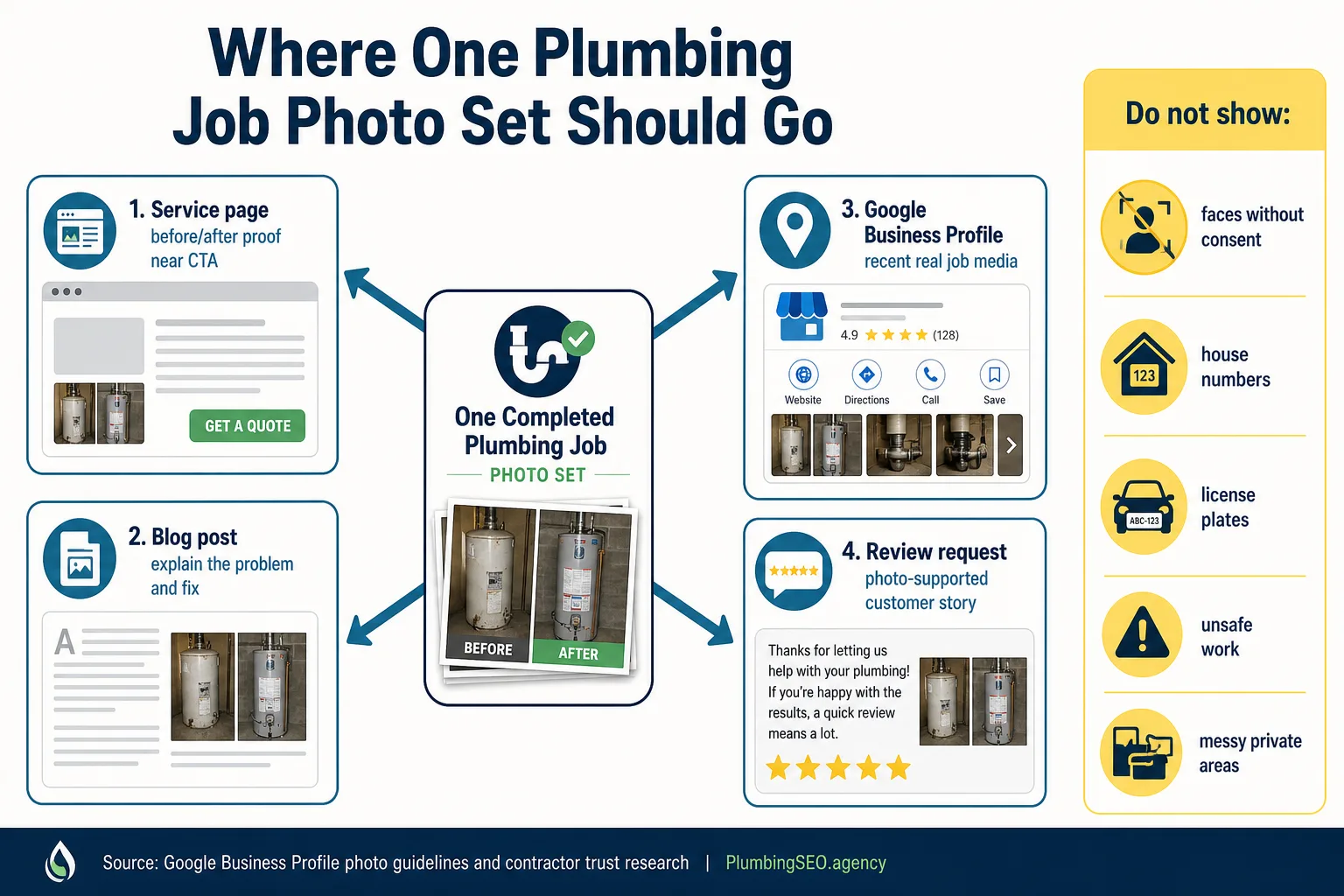
Put it on the service page
Add the before-and-after near the section where you explain that service. A water heater page should show water heater work. A sewer page should show sewer work. Match the proof to the customer's problem.
Use it in a blog post
Turn one job into a short educational example. Explain what failed, how the crew diagnosed it, what was fixed, and what warning signs a homeowner should notice next time.
Post it to Google Business Profile
Recent photos show the business is active. Keep them real, in focus, and lightly edited. Heavy filters and fake-looking collages work against the point.
Attach it to review outreach
After the job, send the customer a simple thank-you message. The photo reminds them what was fixed and makes the review request feel tied to real work, not a canned blast.
Write captions and alt text like a plumber, not a keyword machine
Image SEO is not about stuffing the same phrase into every file name and alt tag. It is about helping search engines and customers understand the image.
Use a file name like tankless-water-heater-install-austin-before-after.webp. Use alt text like "Before-and-after photo of a tankless water heater installation in Austin." That is clear. It gives service context. It gives location context when appropriate. It does not sound like a robot fell into a parts bin.
Captions can do a little more selling. Keep them factual: "Old leaking tank removed and new tankless unit installed with a cleaner wall layout." If you want more guidance on broader website proof, read the plumbing website trust signals guide.
What not to show
Good photos build trust. Careless photos can create problems. Do not publish faces without consent, house numbers, license plates, personal belongings, private family spaces, invoices, permits with identifying information, unsafe work, or anything that makes the homeowner feel exposed.
Also avoid showing work that looks unfinished unless the caption makes the stage clear. A half-open wall or messy access area can be useful in a "during repair" explanation. It should not look like the finished result.
A simple weekly system
Here is the system I would use if I owned a small plumbing shop and wanted job photos to help SEO without creating office chaos.
- Create one shared folder by month.
- Ask techs for three photos per good job: before, after, and context.
- Have the office rename photos once a week by service, city, and job type.
- Pick two strong sets for website or blog use.
- Pick three to five recent photos for Google Business Profile.
- Save customer permission notes when needed.
Do that for ninety days and you will have something most competitors do not have: real, local, service-specific proof. That supports SEO, but more importantly, it supports the phone call.
Want job photos to work harder on your website?
If your plumbing website still leans on stock photos, we can help turn real job proof into service pages, trust sections, and blog content that supports calls.
Run My Free SEO Leak CheckFAQs about plumbing job photos and SEO
They help indirectly by making service pages more useful, more trustworthy, and more specific. They also give you original media for Google Business Profile, blog posts, captions, and local service proof.
Stock photos can work as minor design support, but they should not be presented as portfolio proof. Real job photos, team photos, truck photos, and finished-work photos build more trust.
Use short descriptive file names with the service and location when accurate, such as tankless-water-heater-install-austin.webp or sewer-line-repair-dallas-before-after.webp. Do not stuff every keyword into every file.
Yes, if the photo follows Google guidelines and does not expose private information. Avoid house numbers, license plates, faces without consent, messy private areas, and anything that could identify or embarrass the customer.
A simple three-photo minimum works well: before, after, and context. For bigger jobs, add close-ups and a during-work photo if it is safe, clean, and useful.
Use them on matching service pages, project examples, trust sections, relevant blog posts, and sometimes near calls to action. The key is matching the photo to the page topic, not dumping every photo into one generic gallery.