
- Lead tracking is the only way to connect ad spend to actual revenue. If you are not tracing invoices back to clicks, you are throwing marketing money away.
- Dynamic Number Insertion (DNI) protects your Maps rankings while tracking website calls. Google's search crawlers see your real office line, but human visitors see tracking numbers.
- Stop paying for raw leads and start measuring booked jobs. Improving your team's booking rate drops your cost per job without spending a dollar more on Google.
The Vanity Metric Trap: Why Clicks and Leads Don't Pay the Bills
Every digital marketing agency report looks like a home run. You get monthly PDFs filled with green arrows pointing up, showcasing high click-through rates, thousands of impressions, and a high volume of raw leads. But when you look at your dispatch board, the screen is mostly empty. Techs are sitting in their trucks waiting for dispatch, and the company bank account is not showing the growth those reports promised.
This is the vanity metric trap. In the plumbing industry, a lead is not money. A lead is just the phone ringing. It could be a solicitor trying to sell you parts, a homeowner located two counties outside your service area, a caller looking for a service you do not offer, or a price shopper looking for a fifty dollar fix. If your marketing provider bills you based on lead volume alone, they are playing a different game than you are. You need booked jobs. You need trucks on the road and signed invoices. To get there, you must trace the line from the first click to the final paid ticket.
What Lead Tracking Actually Means for a Plumbing Shop
Lead tracking is the process of identifying exactly which marketing channel, keyword, or campaign made the phone ring or prompted a form submission. For a plumbing business, calls are the lifeblood. Between 75% and 80% of emergency repair jobs start with a direct phone call. The remaining 20% to 25% come through web forms, live chat widgets, or online booking schedulers like ServiceTitan or Housecall Pro.
True tracking tells you exactly which marketing key opened which door. When a homeowner searches for "emergency water heater replacement" on Google, clicks on your local search ad, visits your website, and calls your office, lead tracking connects that specific search history to the call recording and the resulting job card. This level of detail is what helps you decide where to double down and where to stop wasting marketing budget.
Protecting Your Local SEO: The Dynamic Number Insertion Rule
Many plumbing owners are hesitant to set up call tracking because they have heard it can ruin their Google Maps SEO. Google relies on NAP consistency, which stands for Name, Address, and Phone number. If Google scans the web and finds ten different phone numbers associated with your business name, it loses trust in your location data and drops your ranking in the local Map Pack.
The solution is Dynamic Number Insertion, or DNI. This is a small piece of code placed on your website. When a human visitor arrives from a search engine or a paid ad, the code swaps out your main office line for a unique tracking number. But when Google search crawlers index your site, the code displays your hardcoded office number. This ensures your NAP consistency remains intact while still letting you capture deep tracking data for human callers.
For your Google Business Profile (GBP), you do not use DNI. Instead, you set your tracking number as the primary phone number on the listing, and your hardcoded office number as the secondary number. Google uses the secondary number to verify your local citation, while you get to track every single call that comes from customers clicking your Google Map listing.
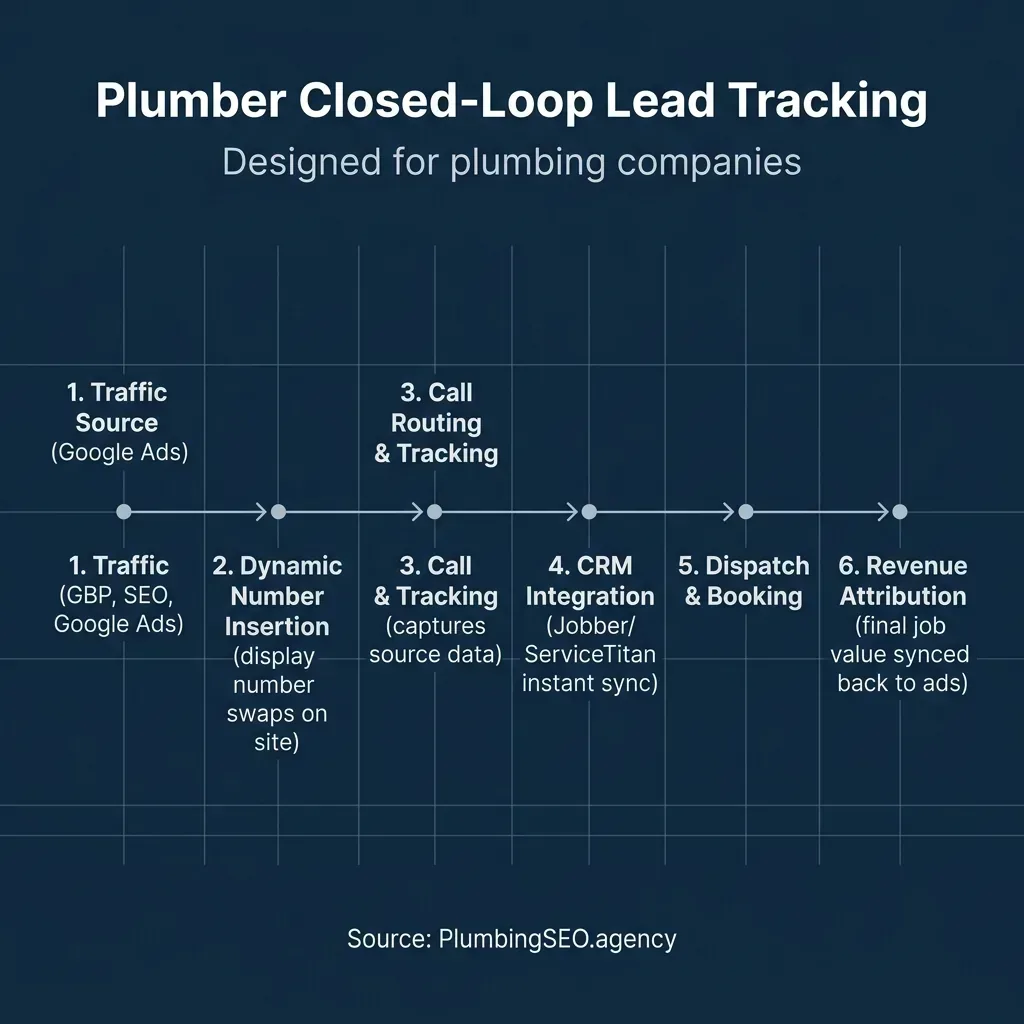
Source: PlumbingSEO.agency | Closed-loop tracking routes lead source data directly into your dispatch board.
How to Track Every Channel: SEO, GBP, LSAs, and Google Ads
To get a complete picture of your marketing performance, you must set up tracking across all the ways a customer can find you. Here is how you tackle each major channel:
- Google Business Profile & Maps: Set up a static tracking number. Use this tracking line as your primary phone number on your Google Business Profile. Place your hardcoded local shop number in the secondary slot. This ensures Google's crawlers can verify your local listing while allowing your call tracking system to capture and record every call from the Map Pack.
- Google Organic SEO: Use a dynamic tracking pool. When users click an organic Google result and land on your website, DNI swaps your main number for one from your organic pool. This tracks which search terms are leading to calls. You can learn more about reading organic search metrics in our plain-English guide to Google Search Console.
- Google Paid Ads (PPC): Set up a separate dynamic pool configured to capture UTM tracking parameters. When someone clicks a paid search ad, the URL contains tags like
utm_campaignandutm_adgroup. DNI reads these tags, associates them with the caller, and tells you exactly which campaign or ad group caused the phone to ring. - Google Local Services Ads (LSA): LSAs use Google Guaranteed routing numbers. Google records these calls and displays basic lead data in your LSA dashboard. However, you must manually log these leads or use native CRM integrations to reconcile them with actual customer invoices in your dispatch software.
- Website Forms and Webchats: Phone calls are not the only way customers contact you. When a user submits an estimate request form or uses a webchat widget like Podium, your website should capture their initial referral source (such as Google Ads or organic search) and append it to the notification email or CRM contact record.
The Power of Closed-Loop CRM Integration
A list of phone calls and web forms in a marketing dashboard is better than nothing, but it does not tell you if you actually made money. If you get fifty calls from an ad campaign but none of them turn into a booked job, that campaign is a failure. To find the truth, you must set up closed-loop tracking by connecting your call tracking system to your dispatch CRM, such as Jobber, Housecall Pro, or ServiceTitan.
When a lead comes in, the call tracking platform uses webhooks or native integrations to automatically create a new customer record or append lead source details to an existing contact. The dispatcher books the job, the technician completes the work, and the invoice is paid. Your CRM then sends the job status and final invoice value back to your tracking dashboard. This closes the loop, showing you exactly how many dollars of revenue were generated by each marketing source. We discuss the complete communication system in our guide to building a plumbing lead-capture communication stack.
The Math: Cost Per Lead vs. Cost Per Booked Job
Many plumbing owners focus entirely on Cost Per Lead, or CPL. While CPL is useful for tracking ad efficiency, it is a vanity metric if your team is not booking the jobs. In the plumbing trades, the metric that determines whether your business grows is Cost Per Booked Job, or CPBJ. This is calculated by dividing your total marketing spend by the number of jobs actually scheduled on your dispatch board.
Let us look at the math. Suppose you spend three thousand dollars a month on Google Ads and generate twenty-five leads. Your CPL is one hundred and twenty dollars. If your team only answers the phone half the time and struggles to handle price shoppers, you might only book 40% of those leads. That means you get ten booked jobs, resulting in a Cost Per Booked Job of three hundred dollars.
Now, if you implement missed-call text-back and train your dispatchers to increase your booking rate to 80%, those same twenty-five leads turn into twenty booked jobs. Without spending a single extra dollar on Google Ads, your Cost Per Booked Job drops to one hundred and fifty dollars, saving you one hundred and fifty dollars per job. You can test your own marketing numbers using the interactive widget in our plumbing marketing ROI calculator guide.
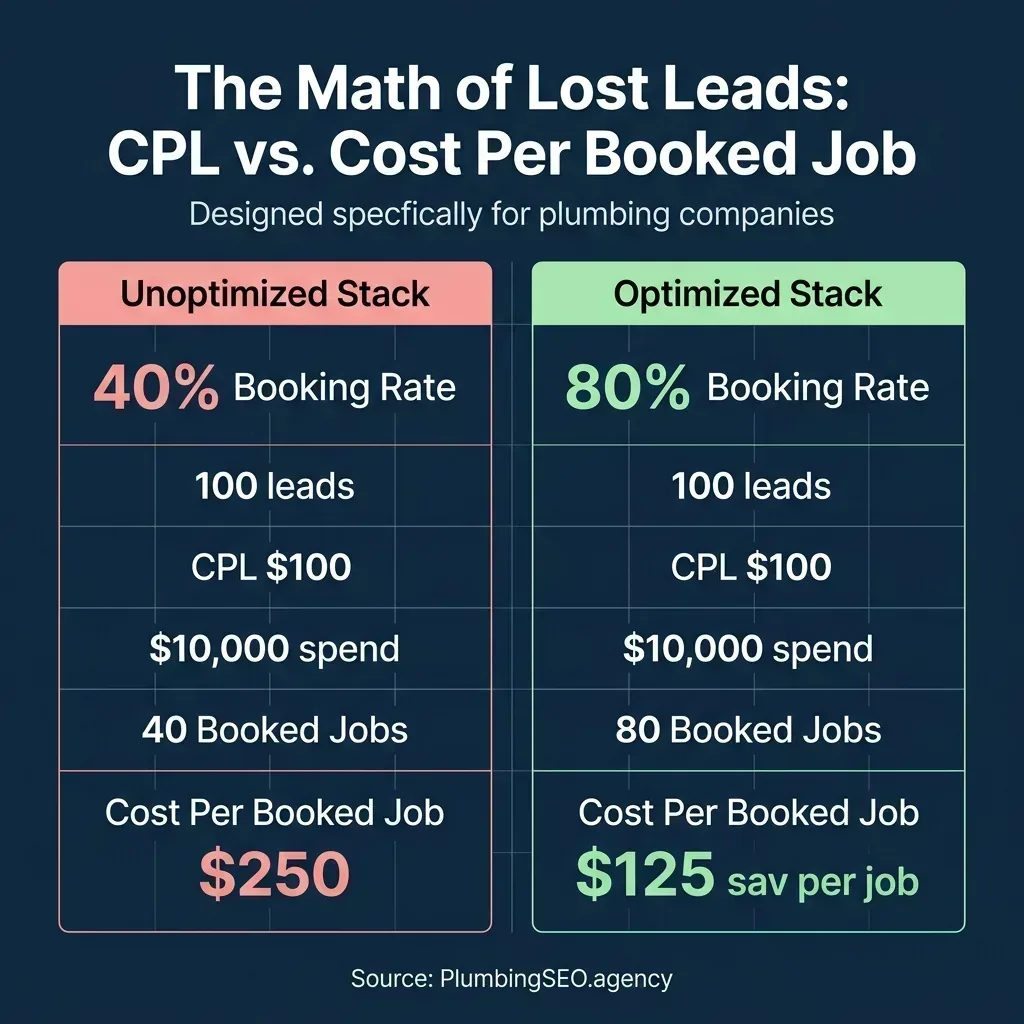
Source: PlumbingSEO.agency | Booking leaks double your Cost Per Booked Job (CPBJ) even if CPL stays the same.
| Metric | Unoptimized Shop (40% Booking) | Optimized Shop (80% Booking) |
|---|---|---|
| Monthly Google Ads Spend | $3,000 | $3,000 |
| Total Inbound Leads | 25 Leads | 25 Leads |
| Cost Per Lead (CPL) | $120 | $120 |
| Booked Jobs | 10 Jobs | 20 Jobs |
| Cost Per Booked Job (CPBJ) | $300 | $150 (50% Savings) |
Lead Status Definitions: Filtering the Noise
To keep your tracking data clean, your dispatchers must categorize every inbound call. If you treat every ring as a lead, your data will be useless. Here are the five key lead status definitions every plumber should use:
- Qualified Lead: A new contact requesting a service you offer within your active service area. This is a real sales opportunity.
- Existing Client: A call from an existing customer asking about an active job, booking maintenance, or requesting a callback. These should be tracked separately from new business acquisition.
- Out of Area / Non-Service: Callers looking for work outside your geographic range or requesting a trade you do not handle (like commercial fire sprinklers if you only do residential service).
- Solicitation / Spam: Sales reps, robo-calls, or wrong numbers. These must be marked as unqualified and filtered out of your marketing metrics.
- Price Shoppers: Callers asking "how much for a drain clean" who hang up as soon as they hear your dispatch fee. While technically leads, tracking their booking rate helps you assess lead quality.
In modern tracking platforms, marking a call as "unqualified" stops that data from being sent back to Google Ads. This is critical because Google's algorithm uses machine learning to find more people like your callers. If you feed Google data from solicitors and out-of-area callers, it will optimize your ads to bring in more junk. Pushing clean, qualified booking data back to Google is the secret to lowering your CPL over time.
The Plumber's Lead Tracking Stack by Company Size
You do not need an enterprise software setup if you only run three trucks. Conversely, a twenty-truck shop will quickly outgrow a basic setup. Here is how to build your lead tracking stack based on the size of your operation:
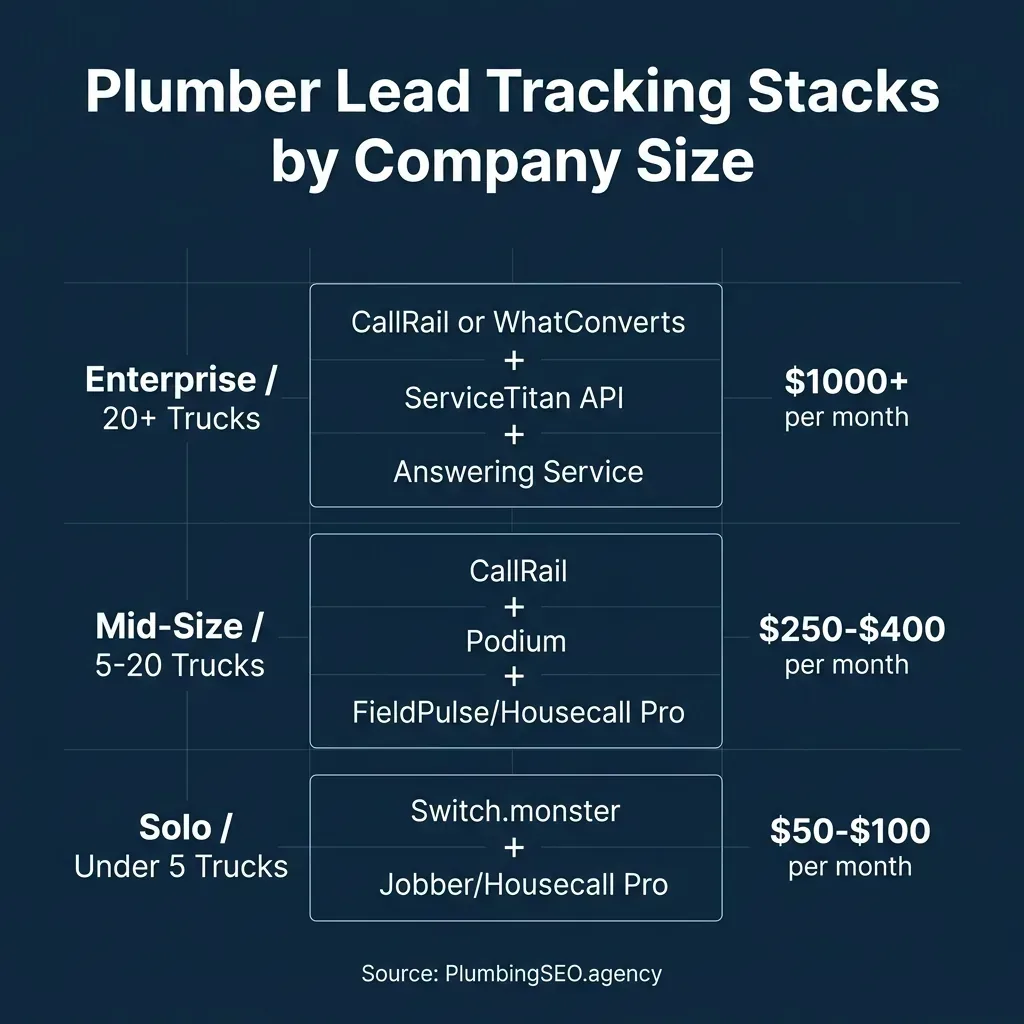
Source: PlumbingSEO.agency | Matching software capability to your dispatch volume keeps overhead low.
Solo / Small Shops (1 to 4 Trucks)
If you are in the truck or have one dispatcher, focus on keeping software costs low while capturing basic source data. You do not need expensive corporate software. We suggest using a budget-friendly call tracking platform like Switch.monster, which integrates directly with Twilio. You get dynamic number insertion and basic call recording for wholesale carrier rates. Pair this with a standard dispatch CRM like Jobber or Housecall Pro to log customer details. Total tracking cost is usually under one hundred dollars a month. You can read more about budget-friendly setups in our Switch.monster vs CallRail call tracking comparison.
Mid-Size Shops (5 to 19 Trucks)
As you scale, you need automation to catch missed opportunities. Set up a tracking tool like CallRail or WhatConverts to manage your organic, paid, and Google Business Profile pools. Add a webchat-to-text tool like Podium to your website so customers who prefer texting can start a conversation. Sync these tools with FieldPulse, Housecall Pro, or Jobber using native integrations. Total tracking cost ranges from two hundred and fifty to four hundred dollars a month. Before choosing, check out our in-depth comparisons: Switch.monster vs CallRail and Switch.monster vs WhatConverts.
Enterprise Shops (20+ Trucks)
Large operations require complete, automated closed-loop reporting. Use CallRail or WhatConverts and set up a native API integration with ServiceTitan. This connection matches every click to the exact technician invoice automatically, with no manual logging required by your office team. Combine this with a 24/7 live answering service and an advanced call routing tool like CallTrackingMetrics to manage complex dispatch queues. Total tracking cost starts at one thousand dollars a month.
Frequently Asked Questions
No, as long as you use Dynamic Number Insertion (DNI) on your website. DNI swaps the phone number for human visitors who click from ads or search results, but shows your hardcoded office number to Google's search crawlers. This maintains your NAP (Name, Address, Phone) consistency for SEO while providing complete call tracking data.
For shops with 1 to 4 trucks, a budget-friendly platform like Switch.monster is ideal. It connects directly to your own Twilio account, meaning you pay wholesale carrier rates (about one dollar a month per number and less than a cent per minute) instead of paying high monthly SaaS markups. For larger shops, CallRail or WhatConverts offer deeper native integrations with CRM tools like ServiceTitan.
To track Google Maps calls, you set your static tracking number as the primary phone number on your Google Business Profile (GBP), and your main office line as the secondary number. Google will still verify your secondary number for citation integrity, but all consumer clicks will route through the tracking number, giving you accurate data in your dashboard.
Cost Per Lead only tracks how much you spent to make the phone ring. If your team fails to answer the phone or cannot schedule the job, you still pay for that lead. Cost Per Booked Job tracks the actual revenue opportunity on your schedule. Improving your booking rate drops your cost per job without spending more money on marketing.
Yes. Most call tracking platforms can integrate with major plumbing CRMs either natively or through webhooks and Zapier. When a call comes in, the software automatically creates a contact record or logs the lead source on the dispatch board. This lets you view the actual invoice value generated by each marketing campaign.
Stop Guessing Where Your Plumbing Leads Come From
Let us audit your website, citation setup, and tracking infrastructure to find where you are losing booked jobs. Run a free plumbing SEO and lead flow check in 60 seconds.
Run My Free SEO Leak Check