
- Keep primary ownership in a company-controlled Google account. Do not hand the keys to an agency, employee, or personal Gmail you might lose.
- For most SEO agencies and office staff, Manager access is enough to edit services, photos, posts, reviews, and profile details without letting them remove users or delete the profile.
- Before any agency handoff, audit current users, cancel strange pending invites, invite the new team correctly, then remove old access when the work is done.
Your Google Business Profile is not just another login. For a plumbing company, it is tied to Maps visibility, review replies, emergency calls, service-area trust, photos, posts, and the phone number customers click when the water heater quits.
That is why access matters. A bad handoff can leave an old agency in control, a former employee still able to edit hours, or the owner locked out while calls are leaking away. Nobody wants to figure that out on a Friday afternoon while two trucks are already behind.
Google says Business Profile owners can invite owners and managers, and that each user should use their own Google Account instead of sharing a password. Google also explains that owners have full control, while managers can do most daily profile work but cannot add or remove users or remove the profile. You can read the primary Google guidance here: manage your Business Profile owners and managers.
My practical rule: the plumbing company keeps the keys
In my opinion, a plumbing business should treat its Google Business Profile like a company truck title, not like a shared shop calendar. Vendors can drive the work forward, but the owner should not sign away control just because someone needs to update service areas or reply to reviews.
If you are working with an SEO company, web designer, office manager, dispatcher, or marketing consultant, give them the lowest access that still lets them do the job. For most outside help, that means Manager access first.
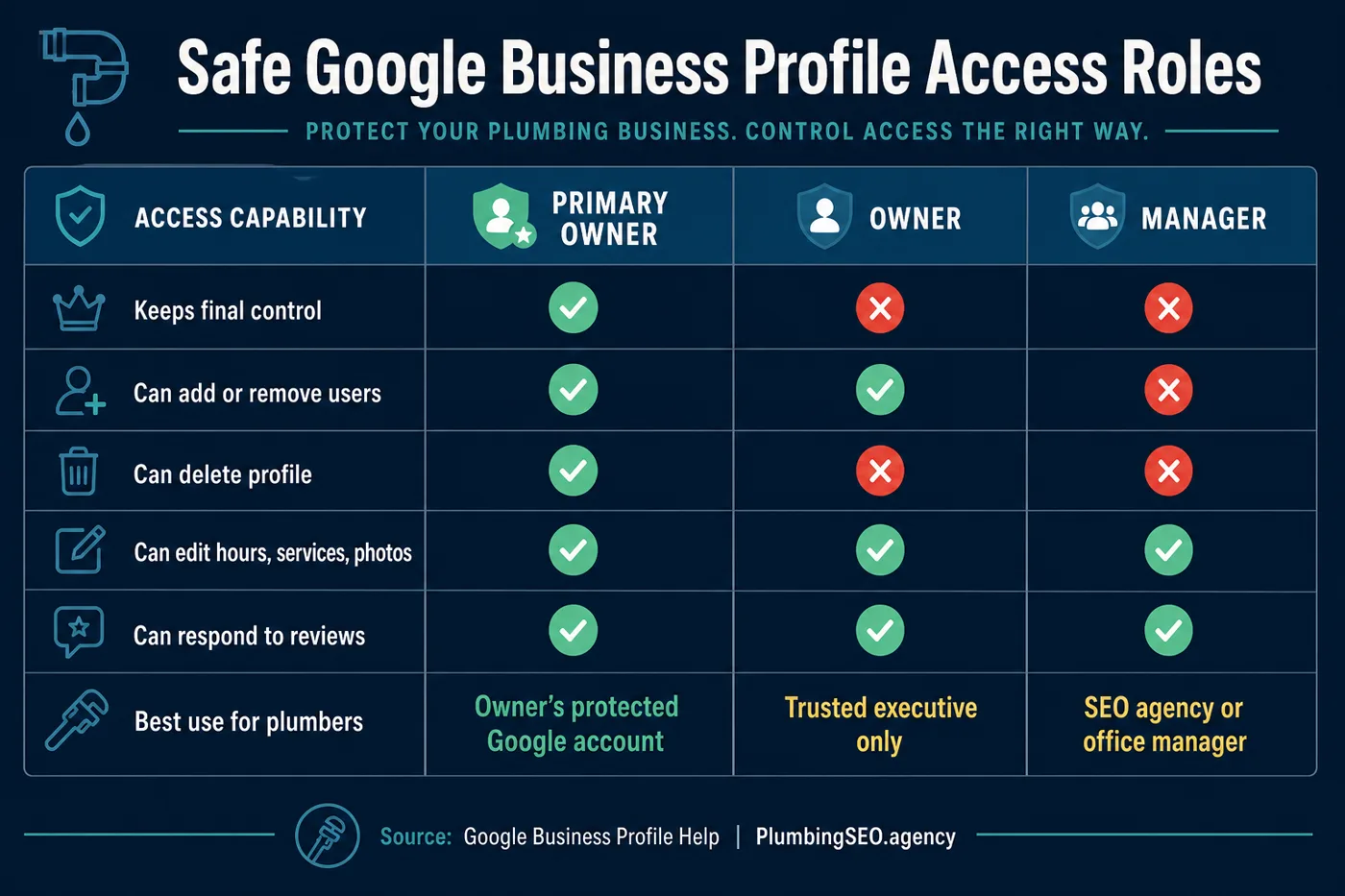
What each GBP role means in plain English
| Role | Best plumbing-company use | What to watch |
|---|---|---|
| Primary Owner | The company-controlled account the owner can recover, ideally not one employee's personal Gmail. | Only one profile user can be primary owner. Protect this account like payroll access. |
| Owner | A trusted business partner or senior operator who truly needs admin control. | Owners can add or remove users. Do not hand this out because someone asked nicely. |
| Manager | SEO agency, office manager, marketing assistant, or internal team member handling posts, photos, services, and review replies. | Managers can do daily profile work, but they cannot add or remove users or remove the profile. |
The difference matters because local SEO depends on consistent profile details, real photos, service categories, review response habits, and clean Maps trust signals. If you are also tightening your local search foundation, pair this access cleanup with our advanced local SEO guide for plumbers.
How to add an agency or team member safely
Here is the owner-safe way to add help without sharing your password. The names in Google's dashboard can change a little over time, but the pattern is the same.
- Sign in from the company-controlled owner account. Do not ask the agency to log in as you.
- Open your Business Profile settings. In Google Search or Maps, find the profile controls and choose People and access.
- Check the existing user list first. Look for old agencies, former employees, unknown emails, and pending invites.
- Invite the new person by email. Use their work email or Google account, not a shared password.
- Choose Manager unless ownership is truly needed. For most profile updates, review replies, posts, services, photos, and daily SEO work, Manager is enough.
- Confirm the invite was accepted. Google notes accepted users can start right away, and you can see pending invites on the People and access page.
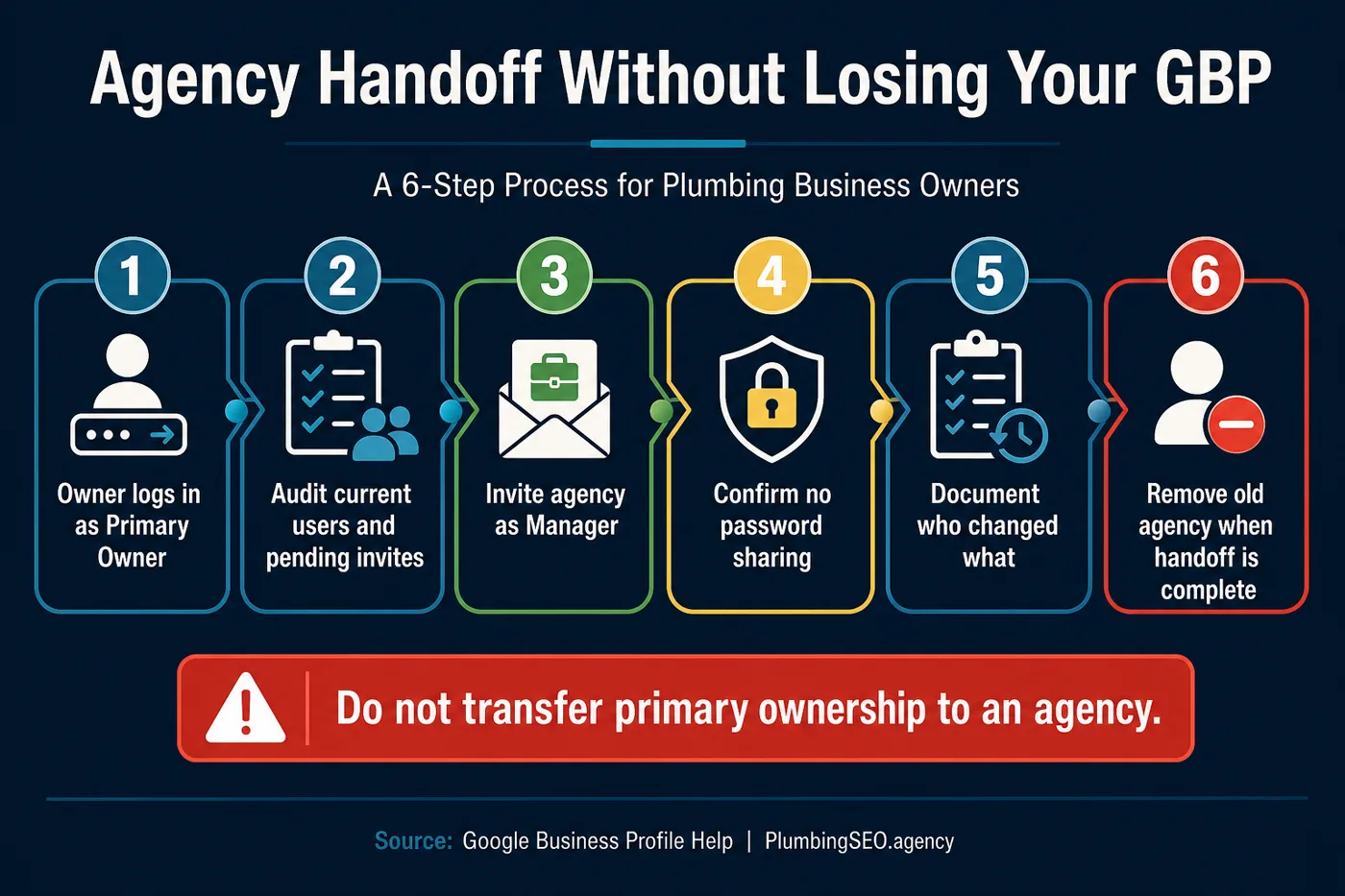
The agency handoff checklist I would use
If you are switching SEO companies, selling the business, moving from a freelancer to an internal office manager, or cleaning up old vendor access, slow down and do the handoff in order. Fast is good. Locked out is not good.
| Before you invite the new team | During the handoff | After the handoff |
|---|---|---|
| Confirm the primary owner is a company account you can recover. | Invite the new agency as Manager first. | Remove the old agency, former employees, and unused users. |
| Screenshot or document current users and pending invites. | Tell the agency which changes require owner approval, like core hours, phone number, website URL, or service-area changes. | Check the profile after major edits so calls still route to the right number and customers still see the right service area. |
| Cancel invites you do not recognize. | Keep password sharing off the table. | Put a quarterly access audit on the calendar. |
This is not just security housekeeping. If the wrong person changes your website link, marks you closed, removes services, or edits your service area, the phone can get quiet. That is an expensive way to learn a simple lesson.
Common access mistakes that hurt plumbing companies
1. Sharing the owner's password
Password sharing feels faster, but it creates a mess. You cannot tell who made changes, you may expose other Google services, and you have to reset everything when the relationship ends. Give each person their own access instead.
2. Making every agency an Owner
Some agencies ask for Owner access because it makes their work easier. Easier for them is not always safer for you. If they only need to update profile content, publish posts, add photos, answer reviews, and fix service details, Manager access usually covers the work.
3. Leaving old vendors in the profile
Old access is like leaving a key under the mat at a rental house you no longer own. Maybe nothing bad happens. Maybe someone changes something by mistake. Either way, remove access when the contract ends.
4. Using a personal Gmail that nobody can recover
If the primary owner is tied to a retired employee, old bookkeeper, or forgotten Gmail, the business can be stuck when it needs to update critical details. Use an account the company can recover and monitor.
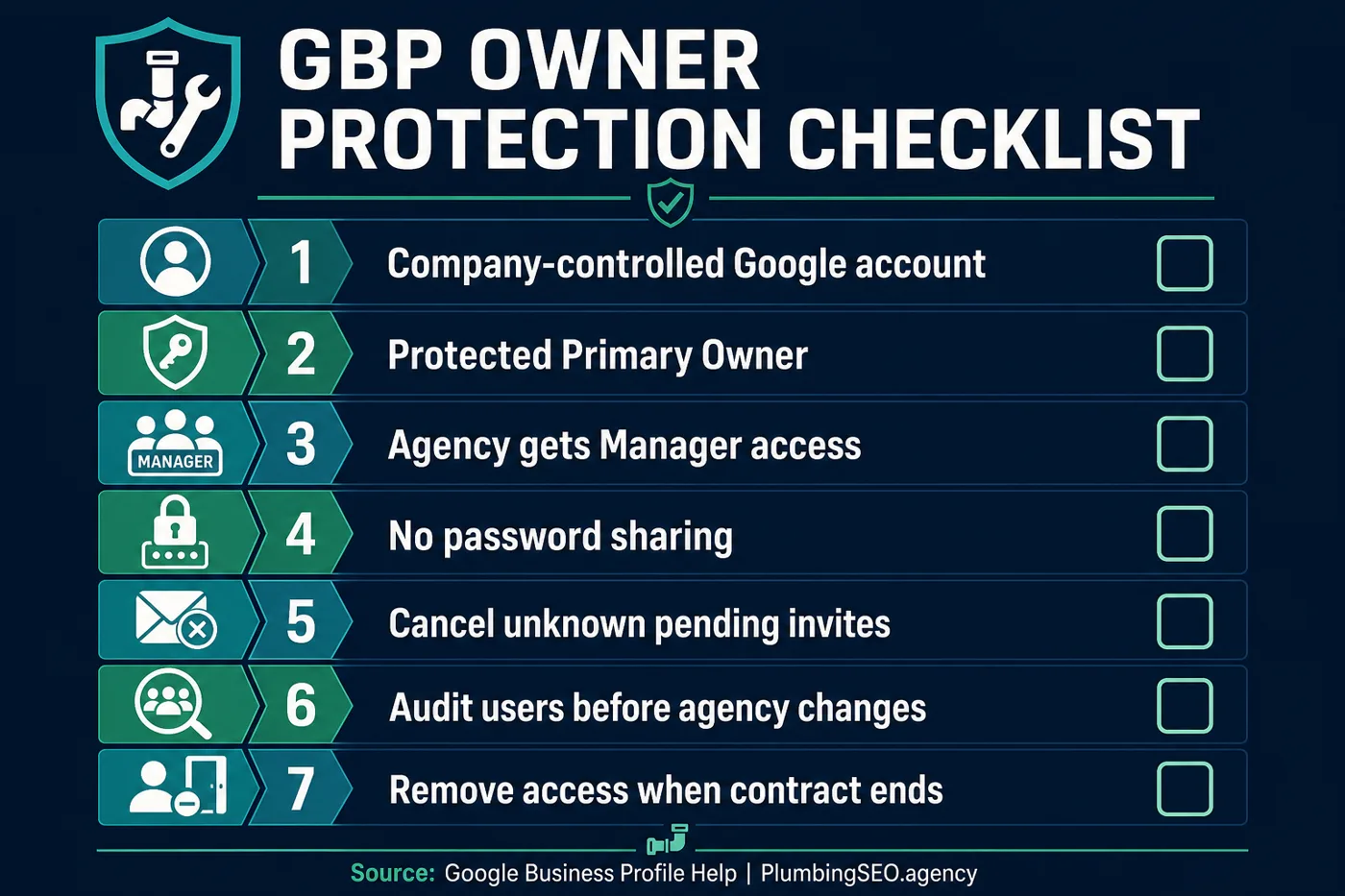
When should a plumber give Owner access?
Give Owner access only when the person has a true business reason to manage other users or help protect the profile at an ownership level. That might be a co-owner, senior operations manager, or trusted internal leader. It should not be the default for every marketing vendor.
Google notes that new owners and managers may have a 7-day waiting period before they can manage certain profile features, including removing other owners or transferring primary ownership. That is another reason to plan handoffs before an urgent deadline.
How this ties back to local SEO results
Access control will not magically rank your plumbing company by itself. But it keeps the foundation clean. The right people can update services, photos, posts, hours, and review replies. The wrong people cannot lock you out or quietly break the profile. If you want the full growth plan around GBP, service pages, reviews, and call tracking, see our plumber SEO homepage.
The practical next step is simple. Open People and access today. Check every user. Remove anyone who should not be there. Then write down who controls the primary owner account. That small job can protect a lot of calls.
Frequently Asked Questions
Manager access is usually the right starting point. It lets an agency handle most day-to-day profile work while keeping user control with the plumbing company owner.
No. Each person should use their own Google Account. Sharing the owner's password creates security, tracking, and offboarding problems.
Yes. Google says managers can handle many daily operations, including profile edits, posts, photos, reviews, and Q&A. They cannot add or remove users or remove the profile.
The Primary Owner should be a company-controlled Google account that the business can recover and monitor. Avoid using an agency account, a former employee account, or a personal email nobody else can access.
Audit current users, cancel unknown pending invites, invite the new agency as Manager, confirm the work is underway, then remove the old agency once the handoff is complete.
Not always. Google notes that new profile owners and managers may need to wait 7 days before using some features, including transferring primary ownership.
Not Sure Who Still Has Access?
We can review your Google Business Profile, service-area signals, local SEO setup, and call path so you know what is helping the phone ring and what needs cleanup.
Run My Free SEO Leak Check