
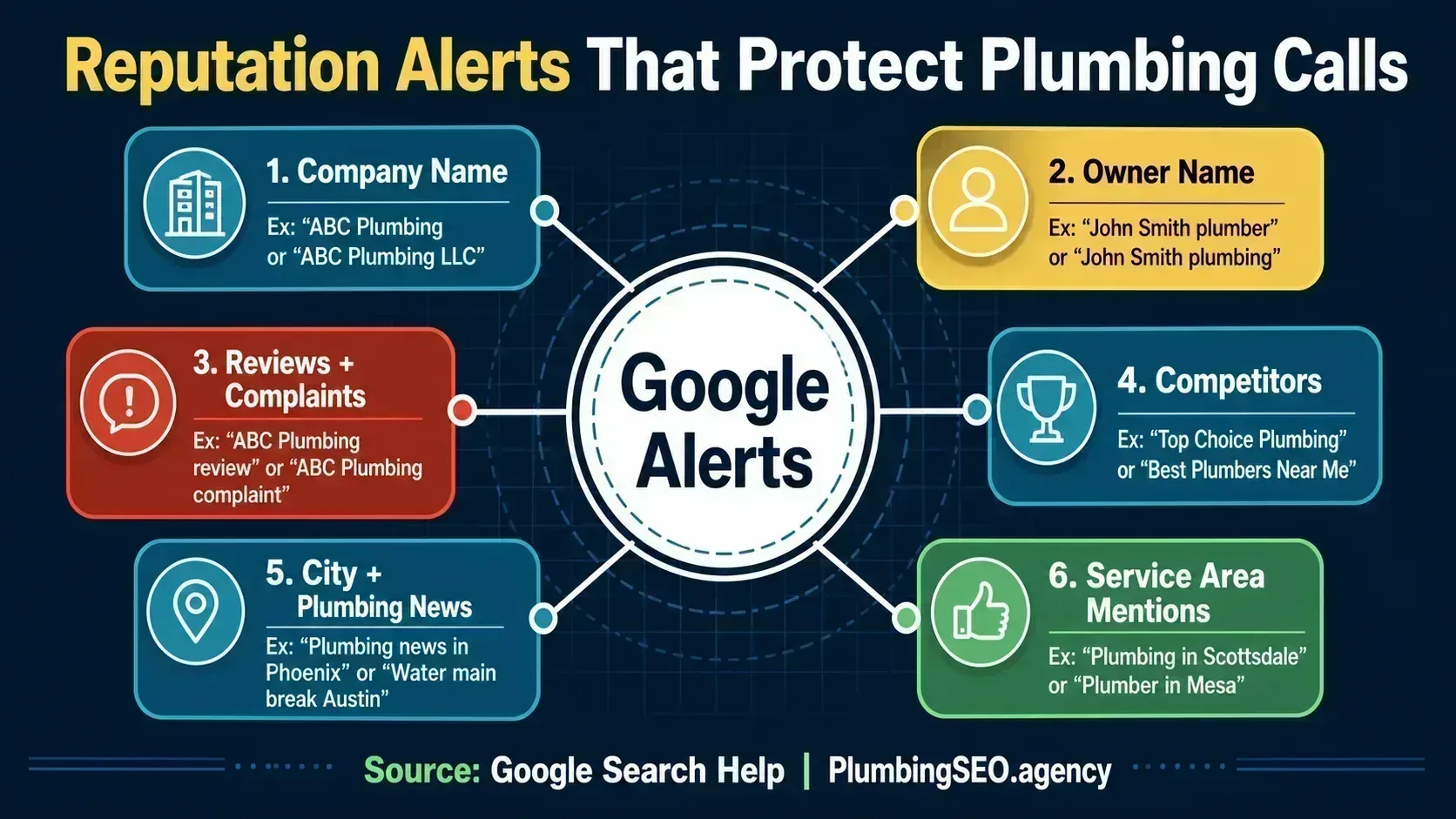
- Set up alerts for your company name, owner name, review terms, competitors, and service-area mentions. One alert is not enough.
- Google Alerts is free and useful, but it does not replace Google Business Profile review notifications, Facebook group checks, or a weekly reputation sweep.
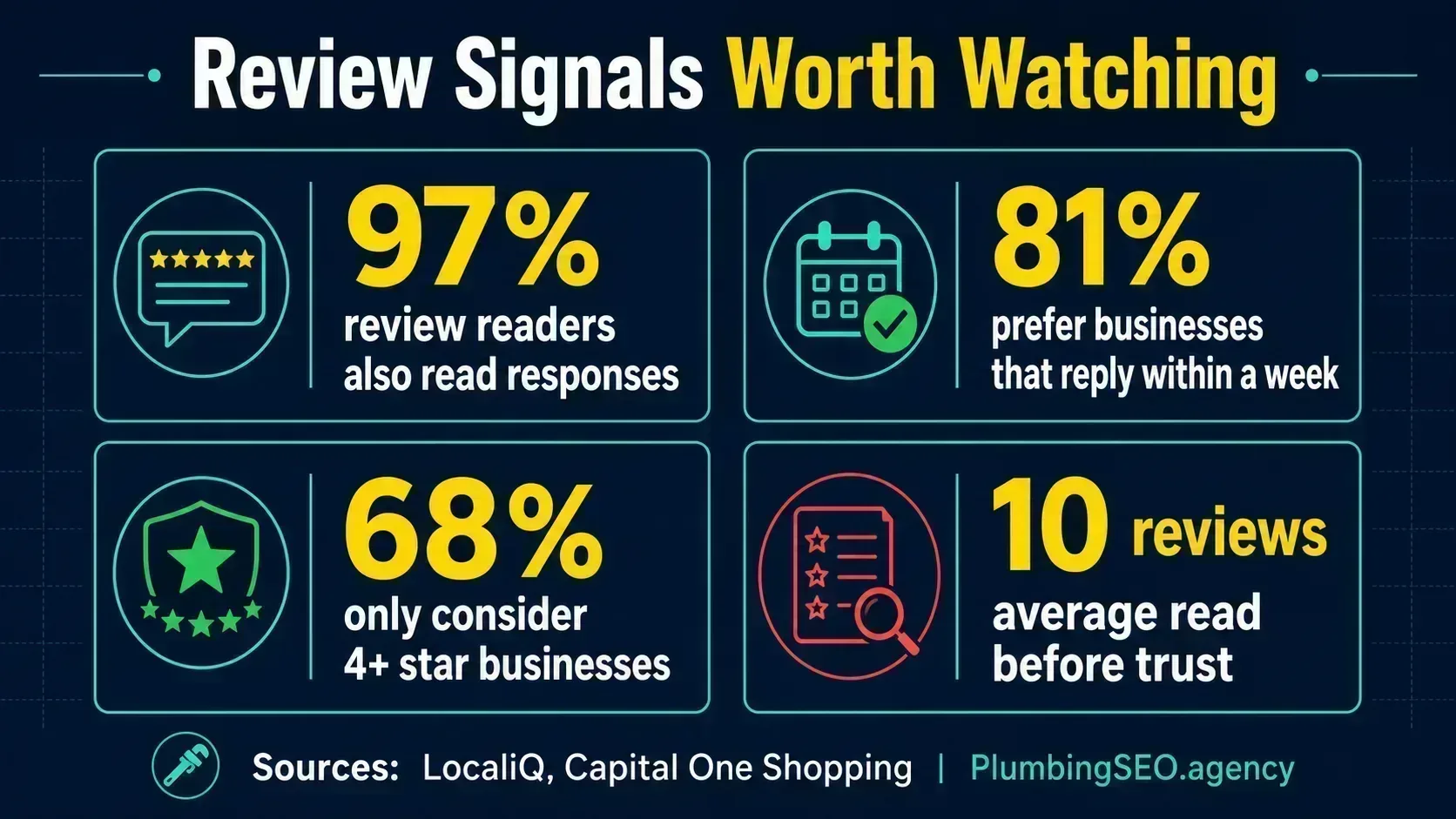
- The money is in speed. Review readers study your responses, and customers are more likely to choose businesses that reply quickly and professionally.
The problem: your reputation can leak before the phone slows down
A plumbing company can do good work all week and still lose the next call because of one bad mention nobody saw. A customer vents on a local website. A competitor gets written up in the city paper. Somebody spells your company name wrong in a complaint. By the time you find it, the post has already been sitting there like an open cleanout.
That is where Google Alerts helps. It is a free early warning system that emails you when Google finds new results for search terms you choose. In my opinion, Many plumbing companies should consider have it set up, even if you already use review software. It is not fancy. It is not the whole dashboard. But it catches enough web mentions to be worth the five minutes.
The goal is not to stare at alerts all day. The goal is to catch reputation problems while they are still small, answer the ones that need answering, and keep the trucks moving instead of wondering why calls got quiet.
What Google Alerts actually does
Google's own help page says you can get emails when new search results show up for a topic, including mentions of your name, products, or other subjects you follow. The setup is simple: go to Google Alerts, type the topic, open Show options, choose the frequency and sources, then create the alert.
For a plumbing owner, the useful part is not the button. The useful part is choosing the right search terms. If you only track your exact company name, you will miss complaints that use a nickname, reviews that mention the owner, or local articles that say "a plumber in [city]" instead of your brand.
| Alert type | Example search | Why it matters |
|---|---|---|
| Exact company name | "ABC Plumbing" | Catches direct mentions, articles, directory pages, and unlinked brand mentions. |
| Company variations | "ABC Plumbing LLC" OR "ABC Plumbers" | Covers the way customers and local sites actually write your name. |
| Review and complaint terms | "ABC Plumbing" review OR complaint | Finds reputation problems outside your normal review inbox. |
| Owner or manager name | "John Smith" plumber | Protects the personal name tied to bids, permits, interviews, and local trust. |
| Competitor mentions | "Top Choice Plumbing" "water heater" | Shows where competitors are earning attention, links, and local trust. |
| Local service-area news | "water main break" "Mesa" | Helps you spot timely content ideas and public problems your team can explain. |
Step-by-step: set up your first Google Alert
Start with your company name. Do not try to build the perfect alert stack on the first pass. Get the basic one live, then add the others.
- Go to google.com/alerts while logged into the Google account you want receiving the emails.
- Type your exact company name in quotes, like "ABC Plumbing".
- Click Show options.
- Set How often to At most once a day for normal brand alerts. Use As-it-happens only for urgent terms like complaints or owner-name issues.
- Set Sources to Automatic unless you have a specific reason to limit it.
- Set your region to the country where you work.
- Choose Only the best results for noisy terms, or All results for exact company names with fewer mentions.
- Click Create Alert.
Once that is done, repeat the process for the other alerts in this guide. Google also lets you edit or delete alerts later, so you are not marrying the thing. You can tune it after it starts sending emails.
The six alerts I would set up for a plumbing company
The way I see it, a plumbing reputation setup should watch three things: what people say about you, what Google shows about you, and what your local market is talking about. That gives you enough coverage without turning your inbox into a parts bin after a Friday rush.
1. Brand alerts
Use your legal name, common name, abbreviations, and misspellings. If your trucks say one thing and your invoices say another, track both.
2. Owner and key staff alerts
Track the owner, general manager, and public-facing brand names. A lot of local trust attaches to people, not just the logo.
3. Complaint alerts
Pair your brand with words like complaint, scam, lawsuit, overcharged, bad service, and review. These are not fun, but neither is finding them six weeks late.
4. Review-site alerts
Track your brand with Yelp, BBB, Angi, HomeAdvisor, Nextdoor, Reddit, and Facebook. Google Alerts may not catch everything there, but it can catch pages Google indexes.
5. Competitor alerts
Watch your top three local competitors. If they get a local news mention, sponsor a school, or earn a supplier link, you will see opportunities you can use honestly.
6. Service-area alerts
Track local plumbing problems, water issues, permit changes, storm damage, freeze warnings, and city infrastructure news in the areas you serve.
Use search operators so your alerts do not get messy
Google Alerts can use many of the same search operators you use in Google Search. HubSpot's setup guide points out two that matter most for business monitoring: quotation marks for exact phrases and the minus sign to exclude junk results.
| Operator | Use it for | Plumbing example |
|---|---|---|
| Quotes | Exact company names | "Reliable Rooter Plumbing" |
| OR | Name variations | "ABC Plumbing" OR "ABC Plumbers" |
| Minus sign | Exclude wrong matches | "Smith Plumbing" -Australia |
| Site search | Specific platforms | site:reddit.com "ABC Plumbing" |
| City pairing | Local chatter | "water heater leak" "Plano" |
Keep each alert simple. If one alert tries to watch your company, every competitor, every city, and every complaint term, it will become useless. Good monitoring is like good dispatch. Smaller, cleaner queues beat one overloaded board.
Why fast reputation monitoring matters
This is not busywork. Reputation is one of the last things a homeowner checks before calling. LocaliQ's 2026 review data says 97% of people reading reviews also read business responses. Capital One Shopping's 2026 review research reports that 80% of consumers are likely to choose a business that replies to all reviews, and 81% believe businesses should respond within one week.
For a plumbing company, that means your response speed is part of your sales process. The customer who reads a bad review is also reading how you handled it. If you answer calmly, explain next steps, and invite the customer offline, you look organized. If the review sits unanswered, the silence does the selling for your competitor.
The best use of Google Alerts is to create a habit around the signal. If an alert finds a complaint, check the job record before replying. If it finds a positive mention, thank the customer or save it for social proof. If it finds a competitor getting press, ask what they did that earned attention and whether your company has a better local story to tell.
Do not confuse Google Alerts with review notifications
Here is the problem most guides skip: Google Alerts is not the same as Google Business Profile notifications. Google Alerts watches new search results. Your Business Profile notifications tell you about customer activity on your profile, including new reviews and customer photos, according to Google Business Profile Help.
You need both. Google Alerts can catch web mentions outside your profile. GBP notifications catch customer actions inside your profile. For reputation work, turning on one and ignoring the other is like checking the water heater but not the shutoff.
What Google Alerts will miss
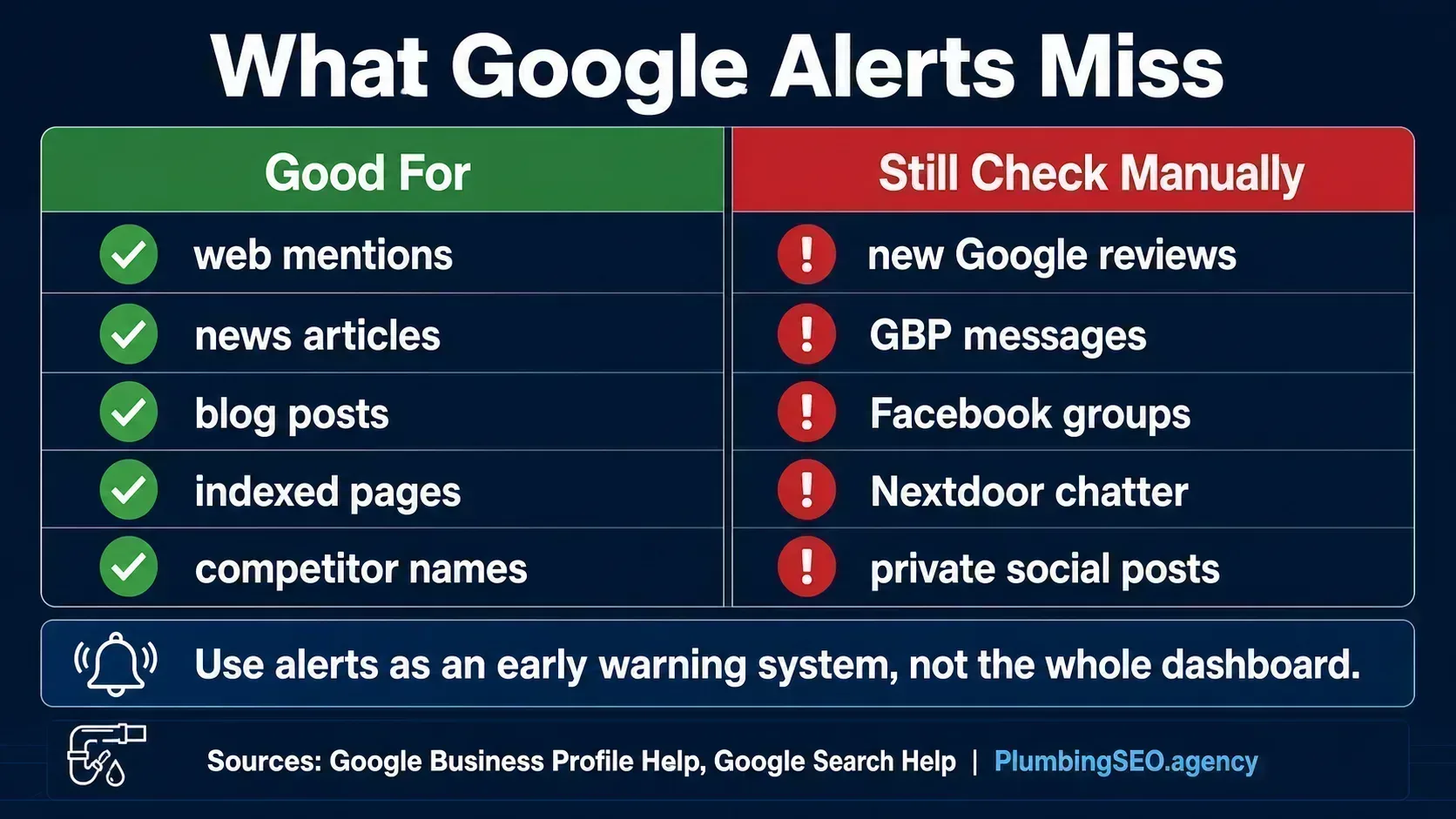
Google Alerts is useful, but it is not magic. It usually will not catch private Facebook group posts, most Nextdoor conversations, every social mention, or every new review as quickly as a native platform notification. It also depends on what Google indexes. If Google does not crawl or surface the content, your alert may never fire.
That is why I would build a simple weekly sweep around it:
- Check Google Business Profile reviews and Q&A.
- Check Yelp, Facebook, BBB, Angi, and any local directories that matter in your market.
- Search your company name in Google from an incognito window.
- Search your company name plus complaint, review, scam, owner name, and city.
- Skim local Facebook or Nextdoor groups if your service area uses them heavily.
- Log repeated complaints so you can fix the operation, not just the online response.
If you are already collecting reviews, connect this habit to your Google review system. Alerts tell you what people are saying. Review collection helps make sure your best customers are speaking too.
How to respond when an alert finds a problem
An alert is only useful if the office knows what to do with it. Do not let every alert become a fire drill. Use a simple triage system.
| Alert type | Who handles it | First move |
|---|---|---|
| Positive mention | Office manager or owner | Thank them, save the link, and consider using it as proof on your site or GBP post. |
| Bad review or complaint | Owner or service manager | Pull the job notes, call the customer if appropriate, then respond calmly. |
| Wrong business information | Admin or marketing lead | Update the listing and check your NAP consistency across key directories. |
| Fake review suspicion | Owner | Document evidence, avoid public accusations, and report through Google's review tools. |
| Competitor press or backlink | Owner or marketing lead | Study why it happened and look for a legitimate local story of your own. |
If the alert is tied to a bad review, use a calm response framework. Acknowledge the concern, keep it short, offer a direct contact path, and move the conversation offline. We have a full set of negative Google review response templates if you need wording that does not sound like it came from a legal department with a head cold.
Be careful with fake reviews and incentives
Reputation monitoring also helps you stay out of bad habits. In 2024, the FTC announced a final rule banning fake reviews and testimonials, including buying positive or negative reviews. The FTC's business guidance also says the rule went into effect on October 21, 2024, and covers deceptive review and testimonial conduct.
For plumbers, the practical rule is simple: do not buy reviews, do not ask only happy customers for reviews, do not pressure customers to change truthful reviews, and do not have employees or family write reviews without clear disclosure. If your alerts show a suspicious review attack, document it and report it. Do not start throwing accusations in public unless you like making a bad situation look worse.
A 15-minute weekly reputation routine
This is the routine I would put on the office calendar every Monday morning. It is short enough to actually happen.
- Open the last seven days of Google Alerts emails.
- Flag anything negative, inaccurate, or worth turning into a testimonial.
- Check Google Business Profile reviews, Q&A, messages, and photo notifications.
- Search your company name in Google and skim page one.
- Log repeated themes: late arrivals, pricing confusion, cleanup, dispatch communication, callbacks, or specific service areas.
- Assign one operational fix if the same complaint appears twice.
That last step is where the money is. Reputation monitoring should not just make you better at replying. It should make the company better at preventing the same complaint from showing up again.
When should you use a paid reputation tool instead?
Google Alerts is enough for a smaller shop that gets occasional mentions and has one person watching the inbox. Once you have multiple locations, a high review volume, several office users, or a lot of social chatter, a paid tool can save time.
Use paid software when you need centralized review inboxes, SMS review requests, team assignments, response templates, sentiment reports, or multi-location reporting. Keep Google Alerts anyway. It is free, and it catches different things than review software.
DIY is enough when...
You have one location, a manageable review volume, and someone in the office who can check alerts and profiles every week.
Software helps when...
You are missing reviews, managing multiple profiles, responding from different inboxes, or losing track of customer issues.
The bottom line
Google Alerts will not run your reputation for you. It will not answer bad reviews, fix a rough dispatch process, or make customers trust a half-empty profile. But it will help you see more of what is being said about your plumbing company before it quietly costs calls.
Set up the alerts. Turn on GBP notifications. Check the main review sites once a week. Then use what you find to improve the business, not just polish the online version of it. That is how reputation work turns into booked jobs instead of another marketing chore.
Frequently Asked Questions
Yes. Google Alerts is free. You need a Google account, then you can create alerts for your company name, owner name, competitors, review terms, and local plumbing topics.
Not reliably. Use Google Business Profile notifications for new reviews and customer activity. Use Google Alerts for web mentions, articles, indexed pages, complaint pages, and competitor monitoring.
Start with your exact company name in quotes, your common name variations, your owner name plus plumber, your company name plus review or complaint, and your top three competitors.
Use once a day for most company and competitor alerts. Use as-it-happens for high-risk alerts like your company name plus complaint, scam, lawsuit, or fake review terms.
Only if the content is public and indexed by Google. Private social posts and many local group conversations will not trigger alerts, so you still need manual checks or a social listening tool.
Yes. Competitor alerts can show press mentions, sponsorships, reviews, complaints, backlinks, and local content ideas. Use the information to improve your own marketing honestly, not to copy or attack.
Want to Know What Your Plumbing Reputation Is Costing You?
We check your Google profile, reviews, local visibility, citations, and website trust signals so you can see where calls are leaking before the slow weeks show it.
Run My Free SEO Leak Check